
Introduction
The VGR V-956 Professional Trimmer is designed for efficient, precise, and smooth cutting. It features high-quality stainless steel blades suitable for various hair types. This manual provides essential information for the safe and effective use of your trimmer, including setup, operation, and maintenance instructions.
What's in the Box
Upon opening your VGR V-956 Professional Trimmer package, please ensure all the following items are present:
- 1 x VGR V-956 Trimmer
- 1 x Type-C USB Charging Cable
- 3 x Guide Combs (1mm, 2mm, 3mm)
- 1 x Blade Protection Cap
- 1 x Cleaning Brush
- 1 x Lubricating Oil Bottle
- 1 x User Manual Book
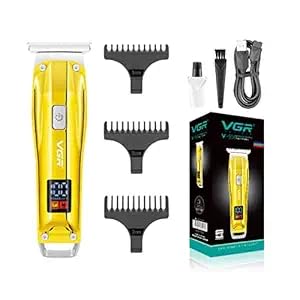
Video: Unboxing and overview of the VGR V-956 Professional Trimmer and its included accessories.
Product Features
Blade Design
- Precise & Sharp Blades: Self-sharpening stainless-steel blades ensure a smooth cutting and trimming experience without snagging or pulling.
- Skin-Friendly: R-angle processing on the blades helps protect the skin during use.
- Zero Cutting Blades: Designed for close and precise trimming.

Controls and Display
- On/Off Button & Turbo Mode: Features a single button for power control and activating the turbo function for increased speed.
- Digital LED Display: Clearly shows battery power percentage, turbo indicator, and charging status.
Power and Charging
- Long Operation Time: The powerful 500 mAh Lithium-ion battery provides up to 100 minutes of cordless operation on a full charge.
- Quick Charging: Fully charges in approximately 2 hours.
- Cordless/Corded Use: Can be used wirelessly or while connected to the power cord for continuous operation.
- USB Type-C Charging: Convenient charging via power banks, adapters (5V=1A), or computers.

Versatility and Length Settings
- Multiple Cutting Lengths: Equipped with 3 attachment combs (1mm, 2mm, 3mm) for various hair lengths.
- Trimming Range: Offers a trimming range from 0mm (without comb) to 3mm (with combs).
- Multipurpose Use: Suitable for styling hair, beard, and body hair.

Setup Instructions
- Unpack: Carefully remove all components from the packaging. Retain the packaging for future storage or transport.
- Initial Charge: Before first use, fully charge the trimmer for approximately 2 hours using the provided Type-C USB charging cable. The LED display will indicate the charging status and battery percentage.
- Attach Guide Comb (Optional): Select the desired guide comb (1mm, 2mm, or 3mm) and securely attach it to the trimmer head. Ensure it clicks into place. For a 0mm trim, do not attach any comb.
Operating Instructions
- Power On/Off: Press the On/Off button once to turn on the trimmer. Press it again to turn it off.
- Activate Turbo Mode: While the trimmer is on, press the On/Off button a second time to activate the Turbo Mode for increased cutting speed. The LED display will show the turbo indicator. Press again to return to normal speed.
- Trimming: Hold the trimmer against the skin at the desired angle. Move the trimmer slowly and steadily against the direction of hair growth for an even trim.
- Changing Lengths: To change the cutting length, turn off the trimmer, remove the current guide comb, and attach a different size.

Maintenance
Regular maintenance ensures the longevity and optimal performance of your trimmer.
- Cleaning the Blades: After each use, turn off the trimmer and remove any attached guide comb. Use the provided cleaning brush to remove loose hairs from the blades and the trimmer head.
- Oiling the Blades: Apply a small drop of the lubricating oil (provided) to the blades after every few uses or when you notice reduced cutting performance. Turn the trimmer on for a few seconds to distribute the oil evenly. Wipe off any excess oil.
- Storage: Store the trimmer in a dry place, away from direct sunlight and moisture. Use the blade protection cap to prevent damage to the blades when not in use.
Specifications
| Feature | Detail |
|---|---|
| Model Number | V-956 |
| Brand | VGR |
| Power Source | Corded Electric & Battery Powered |
| Battery Type | Lithium Ion (500 mAh) |
| Runtime | Up to 100 minutes |
| Charging Time | Approx. 2 hours |
| Blade Material | Stainless Steel |
| Trimming Range | 0mm to 3mm |
| Guide Combs | 1mm, 2mm, 3mm |
| Product Dimensions | 14 x 4 x 4 cm |
| Item Weight | 121 g |
| Special Features | Turbo Function, Digital LED Display, USB Type-C Charging |
Warranty and Support
The VGR V-956 Professional Trimmer comes with a 12-month quality warranty from the date of purchase.
For any product-related inquiries, support, or warranty claims, please contact VGR customer care:
- Email: customercare@vgrofficial.in
- Phone: 9667796740
- Website: www.vgrofficial.in
Customer service hours are from 10:00 AM to 6:00 PM, Monday to Saturday.


