
Introduction
Thank you for purchasing the Andoer D2 Handheld RGB LED Video Light Wand. This manual provides detailed instructions for the safe and effective use of your new light wand. Please read this manual thoroughly before operation and retain it for future reference.
Safety Information
- Do not expose the device to water or high humidity.
- Avoid direct eye exposure to the light source.
- Do not disassemble or modify the device. Repairs should only be performed by authorized personnel.
- Keep out of reach of children.
- Use only the provided or certified charging cable.
- Do not operate in environments with flammable gases or liquids.
Package Contents
Please check the package contents upon opening. If any items are missing or damaged, contact your retailer.
- Andoer D2 Handheld RGB LED Video Light Wand
- USB Type-C Charging Cable
- User Manual (this document)
Product Overview
Familiarize yourself with the components and controls of the Andoer D2 light wand.
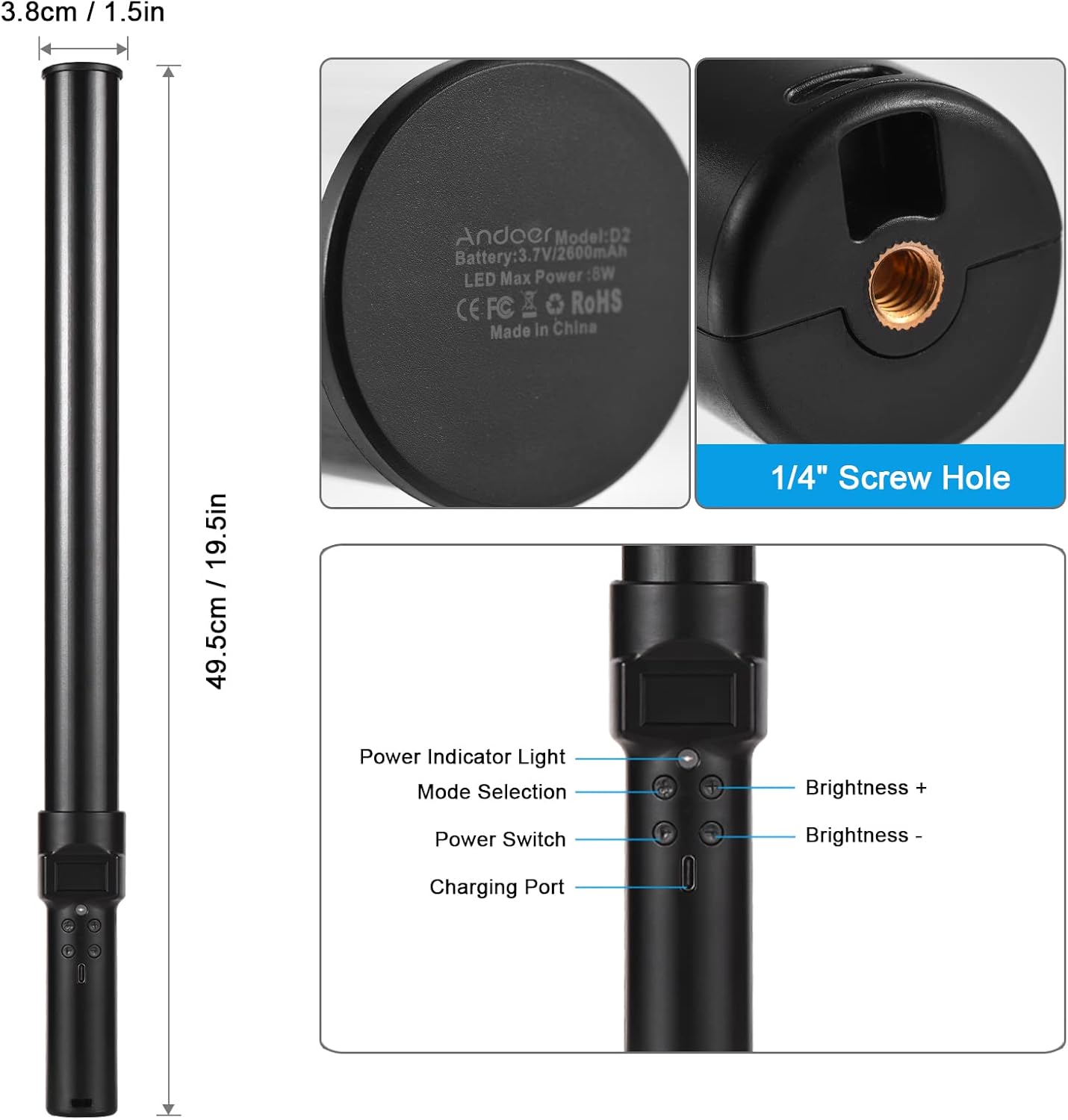
Image: Overview of the Andoer D2 light wand, showing its dimensions (approximately 49.5cm / 19.5in long and 3.8cm / 1.5in diameter) and control panel. The control panel includes a Power Indicator Light, Mode Selection button, Power Switch, Brightness + button, Brightness - button, and a Charging Port.
Control Panel Functions:
- Power Switch: Turns the light wand on or off.
- Mode Selection: Cycles through different lighting modes (e.g., CCT mode, RGB color effects).
- Brightness +: Increases the light brightness.
- Brightness -: Decreases the light brightness.
- Power Indicator Light: Shows the power status and charging status.
- Charging Port (Type-C): Used for charging the internal battery.
Setup
Initial Charge:
Before first use, fully charge the light wand. Connect the provided USB Type-C cable to the charging port on the device and the other end to a USB power adapter (not included) or a computer USB port. The power indicator light will show charging status.

Image: A close-up view of the Type-C charging port, indicating where to connect the charging cable.

Image: The Andoer D2 light wand shown alongside its USB Type-C charging cable, illustrating the charging setup.
Mounting Options:
The Andoer D2 light wand can be used handheld for flexible lighting or mounted for stable positioning. It features a standard 1/4-inch screw hole at the bottom.

Image: A detailed view of the 1/4-inch screw hole located at the base of the light wand, demonstrating how it can be attached to a light stand or tripod for stable use. Note that the light stand/tripod is sold separately.
- Handheld Use: Simply hold the light wand to direct light as needed.
- Tripod/Light Stand Mounting: Screw the 1/4-inch thread at the bottom of the light wand onto a compatible tripod or light stand. Ensure it is securely fastened before use.
Operating Instructions
Power On/Off:
Press and hold the Power Switch button to turn the light wand on or off.
Adjusting Brightness:
The light wand offers 12 levels of adjustable brightness. Use the Brightness + button to increase brightness and the Brightness - button to decrease it.

Image: Illustration of the 12 levels of adjustable brightness, demonstrating the range from dim to bright light output.
Adjusting Color Temperature (CCT Mode):
In CCT mode, you can adjust the color temperature between 2500K (warm light), 5500K (neutral/daylight), and 8500K (cold light). Press the Mode Selection button to cycle to CCT mode, then use the Brightness + and Brightness - buttons to adjust the color temperature.

Image: Visual representation of the adjustable color temperatures, ranging from warm (2500K) to neutral (5500K) to cool (8500K) light.
Activating Colorful Light Effects (RGB Mode):
The light wand features 7 colorful light effects: red, green, blue, orange, purple, light blue, and red & blue flash. Press the Mode Selection button to cycle through these RGB effects. Brightness can still be adjusted in these modes using the Brightness + and Brightness - buttons.
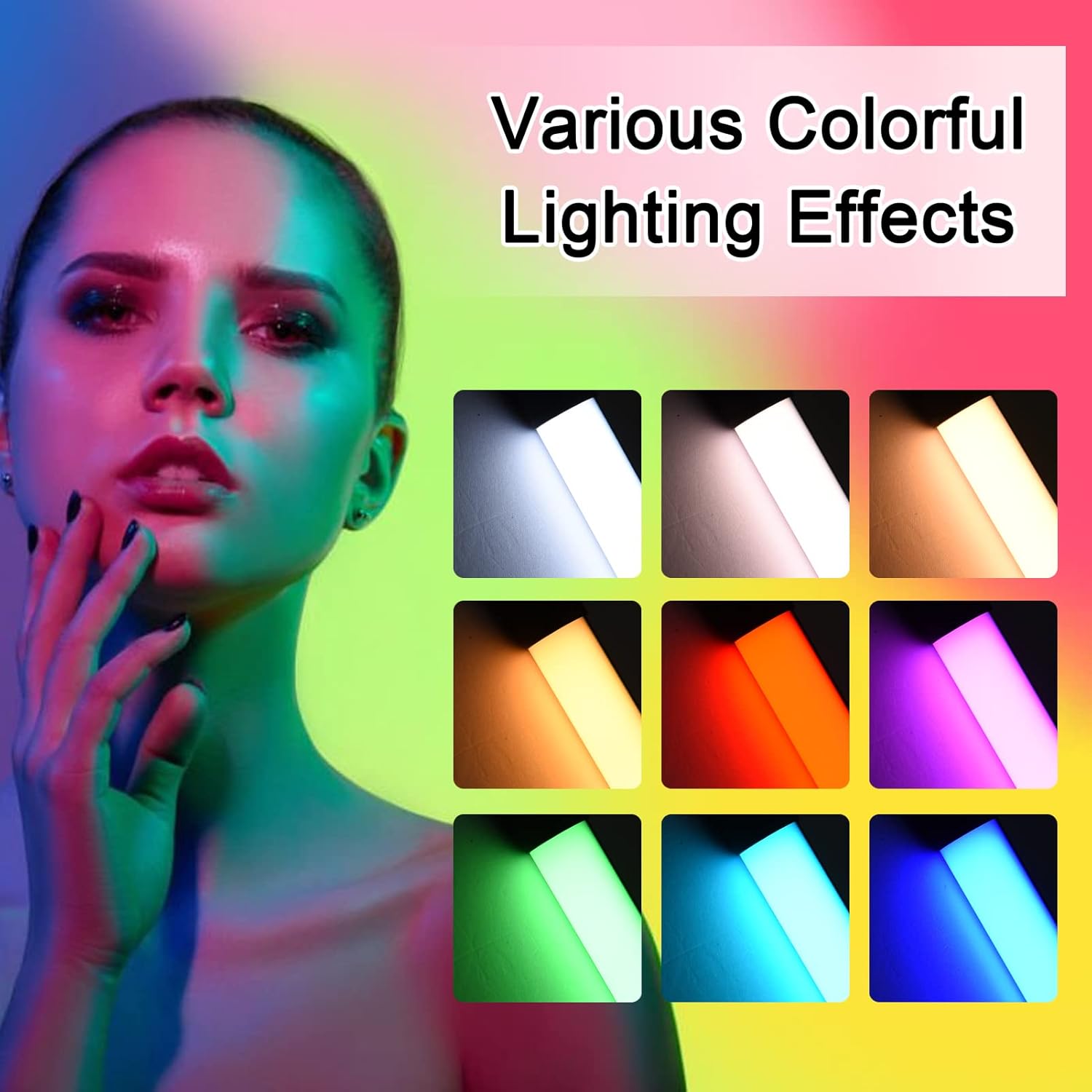
Image: A visual guide to the 7 colorful light effects available, showcasing the vibrant range of colors the light wand can produce.
Charging
The Andoer D2 light wand has a built-in 2600mAh rechargeable lithium battery. When the battery is low, the power indicator light will signal. To charge:
- Connect the small end of the USB Type-C charging cable to the charging port on the light wand.
- Connect the standard USB end of the cable to a USB power source (e.g., wall adapter, power bank, computer USB port).
- The power indicator light will illuminate or change color to indicate charging. It will change again or turn off when fully charged.
A full charge provides approximately 2.5 hours of continuous use at maximum brightness.
Maintenance
- Clean the light wand with a soft, dry cloth. Do not use abrasive cleaners or solvents.
- Store the device in a cool, dry place away from direct sunlight and extreme temperatures.
- If not used for extended periods, charge the battery every 3 months to maintain battery health.
Troubleshooting
| Problem | Possible Cause | Solution |
|---|---|---|
| Light does not turn on. | Battery is depleted. | Charge the light wand using the provided USB Type-C cable. |
| Light is dim or flickers. | Low battery. | Recharge the device. |
| Cannot change color or mode. | Incorrect button press or temporary software glitch. | Ensure you are pressing the Mode Selection button. Try turning the device off and on again. |
| Device not charging. | Faulty cable, power adapter, or charging port. | Try a different USB Type-C cable or power adapter. Ensure the cable is fully inserted. |
Specifications
| Feature | Detail |
|---|---|
| Model | D2 (SJI3033515989406YA) |
| Brand | Andoer |
| Color Temperature | 2500K / 5500K / 8500K (Adjustable) |
| Brightness Levels | 12 levels |
| Colorful Light Effects | 7 effects (Red, Green, Blue, Orange, Purple, Light Blue, Red & Blue Flash) |
| Battery Capacity | 2600mAh Lithium Battery |
| Charging Port | USB Type-C |
| Battery Life (Max Brightness) | Approx. 2.5 hours |
| Mounting | 1/4-inch screw hole |
| Dimensions | Approx. 49.5cm (19.5in) length, 3.8cm (1.5in) diameter |
Warranty and Support
Andoer products are designed and manufactured to the highest quality standards. For warranty information or technical support, please refer to the warranty card included with your purchase or visit the official Andoer website. Please retain your proof of purchase for warranty claims.
Andoer Official Website: Andoer Store on Amazon