
BODEGA QZW38
BODEGACOOLER 12 Volt Car Refrigerator User Manual
Model: QZW38
1. Introduction
This manual provides essential information for the safe and efficient operation of your BODEGACOOLER 12 Volt Car Refrigerator. Please read it thoroughly before use and retain it for future reference.

Image 1.1: The BODEGACOOLER 12 Volt Car Refrigerator, showcasing its design and the accompanying mobile application for remote control.
2. Safety Information
Always adhere to the following safety guidelines to prevent injury or damage to the appliance:
- Ensure the power supply matches the voltage requirements of the refrigerator (12/24V DC or 100-240V AC).
- Do not immerse the refrigerator in water or expose it to excessive moisture.
- Keep ventilation openings clear of obstructions.
- Do not use electrical appliances inside the food storage compartments unless they are of the type recommended by the manufacturer.
- Avoid touching cold surfaces with wet hands to prevent frostbite.
- Unplug the appliance before cleaning or maintenance.
3. Product Overview
3.1 Key Features
- Dual Zone Capacity: Independent temperature control for two compartments (33L large zone, 5L small zone, total 38L).
- Fast Cooling: Powerful compressor achieves 32℉ (0℃) quickly in MAX mode.
- WIFI APP Control: Remote temperature control and mode settings via mobile application.
- Low Noise Operation: Operates at approximately 40 dB.
- Anti-Shaking Design: Multi-functional non-slip base for stability, even at 30-degree inclination.
- User-Friendly Design: Built-in LED light, storage bag, detachable 2-way door, off-road wheels, and extendable handle.
- Battery Protection: Three levels (L/H/M) to prevent power supply overload.
- Versatile Power: Supports 12/24V DC and 100-240V AC.
3.2 Components
The BODEGACOOLER refrigerator includes the main unit, DC power cord, AC power cord, and a user manual. Some models may include a chopping board.

Image 3.1: Close-up of the control panel, showing temperature display, mode settings, and battery voltage indicator.

Image 3.2: Internal layout of the 40QT/38L refrigerator, illustrating the dual zone configuration and capacity for various beverages.
4. Setup
4.1 Unpacking and Placement
- Carefully remove the refrigerator from its packaging.
- Place the unit on a flat, stable surface, ensuring adequate ventilation around all sides.
- Allow the refrigerator to stand upright for at least 6 hours before connecting to power, especially if it was transported horizontally. This allows the refrigerant to settle.
4.2 Power Connection
The BODEGACOOLER supports both DC and AC power sources.
- DC Power (12V/24V): Connect the DC power cord to the refrigerator's DC input port and then to your vehicle's 12V/24V outlet (cigarette lighter socket).
- AC Power (100-240V): Connect the AC power cord to the refrigerator's AC input port and then to a standard wall outlet.
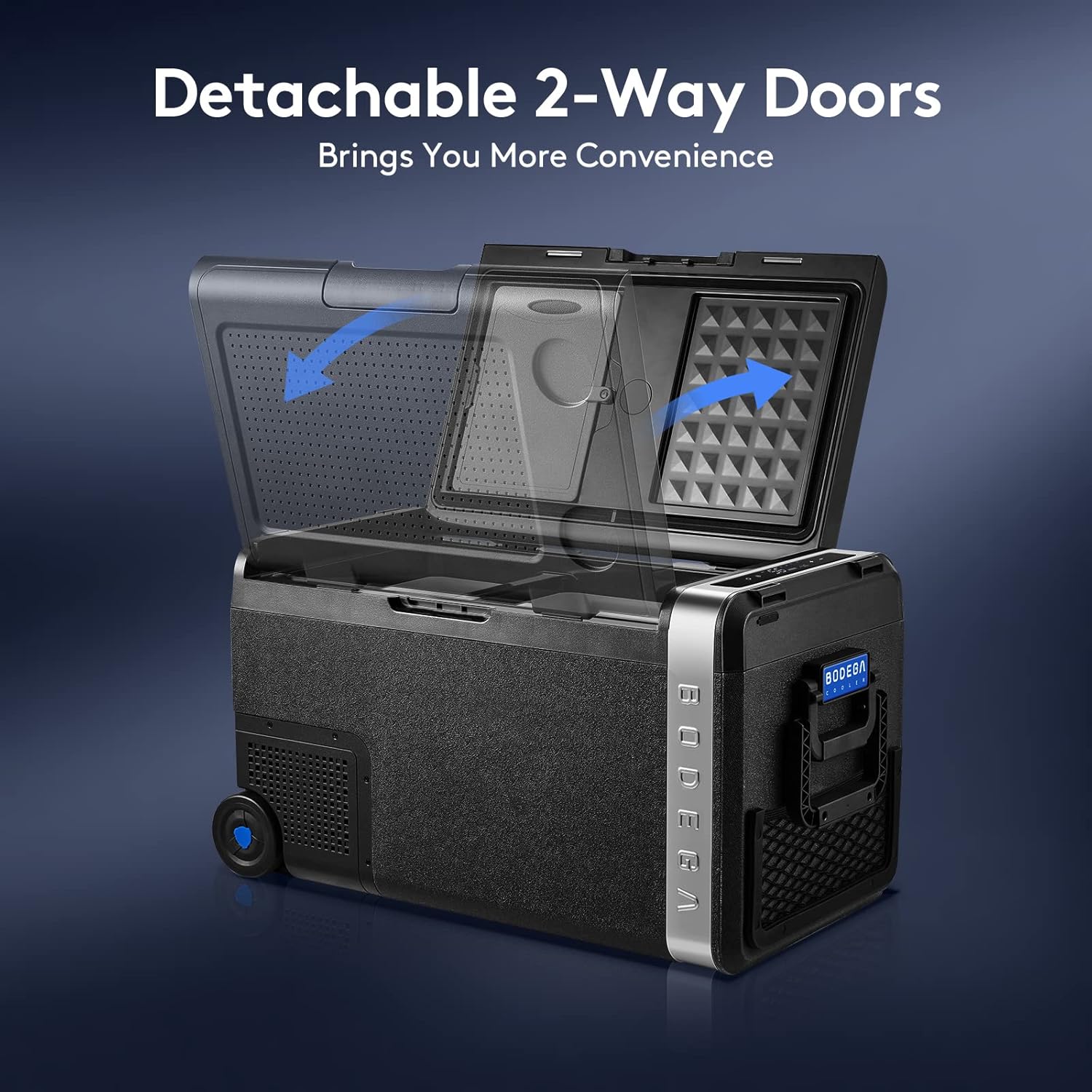
Image 4.1: Illustration of compatible power sources, including car (DC), home (AC), and solar panel/power station options.
5. Operating Instructions
5.1 Basic Operation
- Power On/Off: Press the power button on the control panel to turn the unit on or off.
- Temperature Adjustment: Use the '+' and '-' buttons to set the desired temperature for each zone. The display will show the current temperature.
- Cooling Mode: Press the 'SET' button to cycle between MAX (fast cooling) and ECO (energy-saving) modes.
- Battery Protection: Press and hold the 'SET' button to adjust the battery protection level (L/M/H) to prevent your vehicle battery from draining.
5.2 WIFI APP Control
The BODEGACOOLER can be controlled via a mobile application for added convenience.
- Download the official BODEGACOOLER app from your smartphone's app store (iOS/Android).
- Ensure your refrigerator is powered on and within range of your smartphone's Bluetooth/WIFI connection.
- Follow the in-app instructions to pair your device with the refrigerator.
- Once connected, you can monitor temperature, adjust settings, and switch modes remotely.

Image 5.1: The mobile application interface, demonstrating features like battery protection, fast cooling, temperature range, energy saving, anti-shock, and USB port status.
5.3 Detachable 2-Way Doors
The refrigerator features detachable doors that can be adjusted for opening direction, providing flexibility in various setups.

Image 5.2: Visual guide demonstrating how the detachable doors can be reconfigured to open from either side.
5.4 Internal Storage and Features
The interior is designed for optimal storage and convenience.
- LED Light: A built-in LED light illuminates the interior for easy access in low-light conditions.
- Storage Bag: Side storage bags provide space for small items or charging cables.
- Wheels and Handle: Equipped with off-road wheels and a solid extendable handle for easy portability.

Image 5.3: A view of the refrigerator's side, highlighting the integrated storage bag for accessories.
Video 5.1: An official product video titled "QZW Serires Car Freezer" by ONETREE HOME USA, demonstrating the internal capacity and features of the car refrigerator, including the ability to store various beverages.
6. Maintenance
6.1 Cleaning
- Always unplug the refrigerator before cleaning.
- Wipe the interior and exterior surfaces with a damp cloth and mild detergent.
- Do not use abrasive cleaners or sharp objects that could damage the surfaces.
- Ensure the unit is completely dry before plugging it back in.
6.2 Storage
- If storing for an extended period, ensure the unit is clean and dry.
- Leave the lid slightly ajar to prevent odors and mold growth.
- Store in a dry, well-ventilated area away from direct sunlight.
7. Troubleshooting
| Problem | Possible Cause | Solution |
|---|---|---|
| Refrigerator not cooling | No power, fan blocked, temperature set too high. | Check power connection, ensure ventilation, adjust temperature setting. |
| Unit making unusual noise | Unit not level, fan obstruction. | Place on a flat surface, clear fan area. |
| App connection issues | Bluetooth/WIFI off, app not updated, unit not powered. | Ensure Bluetooth/WIFI is on, update app, power on unit. |
8. Specifications
- Model: QZW38
- Capacity: 38 Liters (40 Quart)
- Dimensions: 13.39 x 25.98 x 14.96 inches
- Item Weight: 41.7 pounds
- Temperature Range: -4℉ to 68℉ (-20℃ to 20℃)
- Power Input: 12/24V DC, 100-240V AC
- Noise Level: Approximately 40 dB
- Compressor Life Span: 5 Years
9. Warranty & Support
BODEGACOOLER provides a 5-year life span warranty on the compressor and a 1-year warranty on all other parts.
For any questions or support regarding your car fridge freezer, please contact us via Amazon. We aim to respond within 24 hours.
For more information, visit the official BODEGA store: BODEGA Store on Amazon
Related documentsQZW38


Ask a question about this manual
Ask about setup, troubleshooting, compatibility, parts, safety, or missing instructions. Manuals+ will review the question and use this page’s manual context to help answer it.