
Important Safety Instructions
Please read and understand all safety instructions before using the Anker Powerhouse 760 Expansion Battery. Failure to follow these instructions may result in electric shock, fire, or serious injury.
- Do not disassemble, repair, or modify the unit.
- Do not place the unit near heat sources or in direct sunlight.
- Do not expose the unit to rain or moisture.
- Use only original or certified cables and accessories.
- Keep out of reach of children.
- Ensure proper ventilation during use and charging.
What's in the Box
Upon opening your Anker Powerhouse 760 Expansion Battery package, you should find the following items:
- Anker 760 Portable Power Station Expansion Battery (2048Wh)
- User Manual
- Battery-to-Host Cable
- 5-Year Warranty Card
Video: Unboxing the Anker PowerHouse 767. This video demonstrates the unboxing process and contents for the compatible PowerHouse 767, which shares similar packaging and accessories with the 760 Expansion Battery.
Product Overview
The Anker Powerhouse 760 Expansion Battery is designed to extend the capacity of your Anker PowerHouse 767, providing reliable and long-lasting power for various applications.
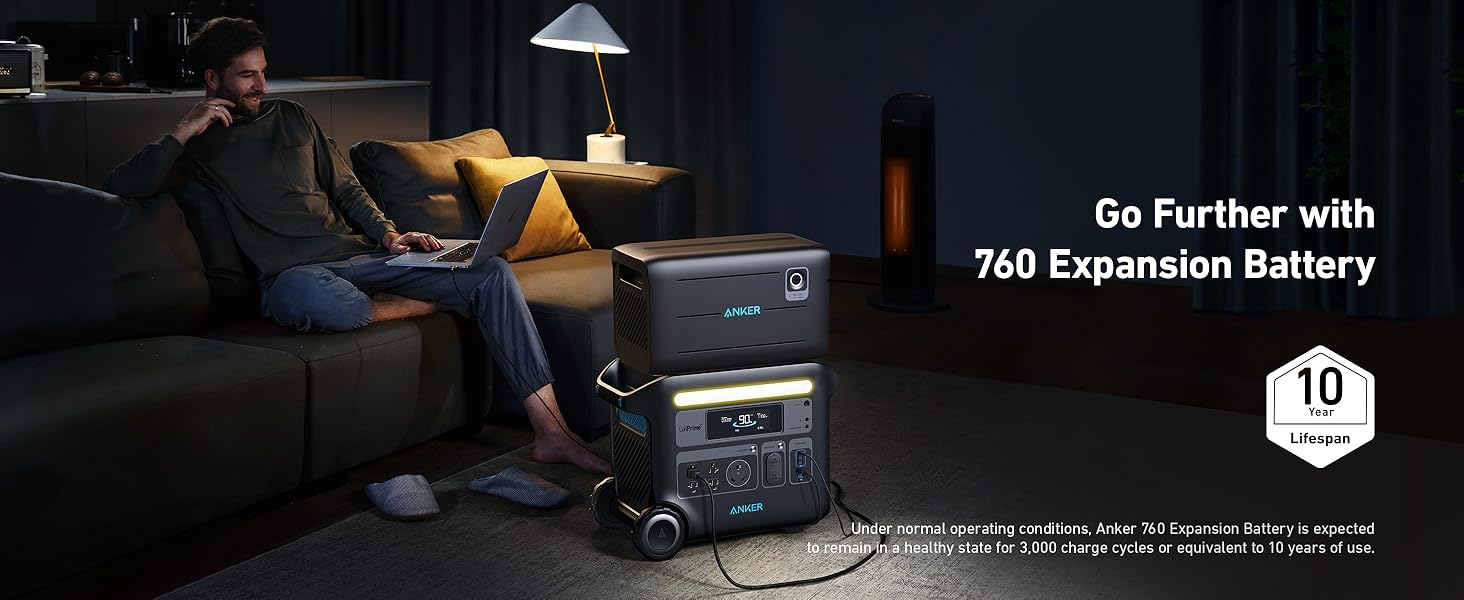
Image: Anker's InfiniPower Technology highlights LiFePO4 batteries, 50,000-hour component lifespan, industrial-grade design, and a smart battery management system for a 10-year lifespan and 5-year warranty.
Key Features:
- Long-Lasting Lifespan: Features InfiniPower™ technology with LiFePO4 batteries, ultra-durable electronic components, a smart temperature control system, and impact-resistant structural design for over a decade of use.
- Double the Power: Seamlessly integrates with the Anker PowerHouse 767 (2048Wh) to expand total battery capacity to 4096Wh.
- Extremely Durable and Safe: Boasts a drop-proof unibody design, 50,000-hour lifespan components, ventilation grille for heat dissipation, and a secure 3-point protective clasp to prevent leakage current.

Image: The Anker PowerHouse 767 shown with the 760 Expansion Battery stacked on top, illustrating how the capacity scales up to 4096Wh/2400W.
Setup
Connecting the Expansion Battery
- Place the Anker Powerhouse 760 Expansion Battery securely on top of the Anker PowerHouse 767.
- Connect the Expansion Battery to the PowerHouse 767 using the included battery-to-host cable. Ensure the connection is firm.
- Press and hold the power button on the Expansion Battery for 2 seconds until it beeps, indicating a successful connection. The Expansion Battery icon will appear on the PowerHouse 767 screen.
Video: How to use the Expansion Battery with Anker PowerHouse 767. This video guides you through the physical connection and activation of the expansion battery.
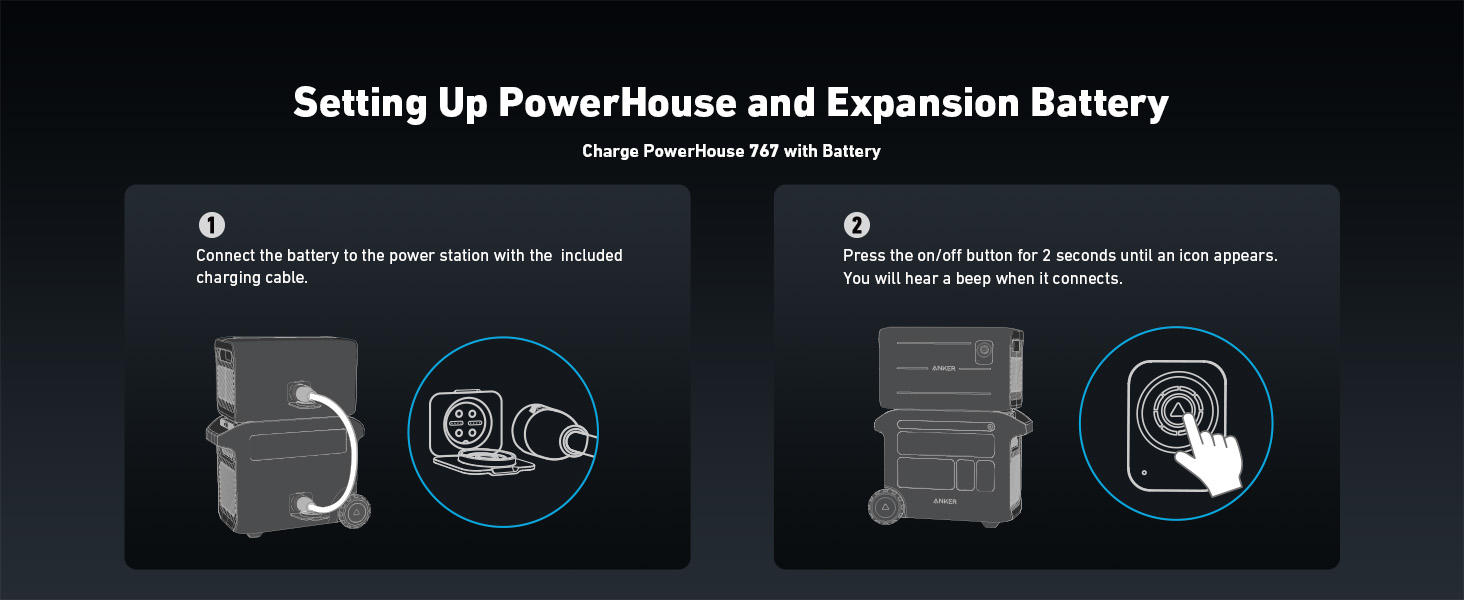
Image: A diagram illustrating the connection of the Anker 760 Expansion Battery to the PowerHouse 767 using the provided cable, and the power button activation.
Activating the Power Station
- Locate the included AC charging cord.
- Plug the PowerHouse 767 (with the Expansion Battery connected) into an AC wall outlet.
- The screen will light up automatically, indicating that the Power Station has been successfully activated.
- Recharge the Power Station to 100% before first use.
Video: How to Activate the Anker PowerHouse 767. This video demonstrates the initial activation process by plugging the unit into a wall outlet.
Operating
Charging Devices
The Anker Powerhouse 767, when paired with the 760 Expansion Battery, offers multiple output ports to power and charge your devices and appliances.
- AC Outlets: Provides up to 2400W AC output for household appliances.
- TT-30R AC Plug: Power your RV directly.
- Car Sockets: For 12V DC devices.
- DC Output (USB-C & USB-A): Charge multiple devices with 3 USB-C and 2 USB-A ports.
Video: How to Use Anker PowerHouse 767. This video demonstrates connecting various devices to the PowerHouse 767's output ports.
Power Saving Mode
To prevent wasted energy, turn ON Power Saving Mode. The output will automatically turn off once the connected device is fully charged.
Using the Anker App
The Anker App allows you to monitor and control your PowerHouse 767 and connected 760 Expansion Battery remotely.
- Download the Anker App from the Apple App Store or Google Play Store.
- Press and hold the Bluetooth button on the PowerHouse 767 until the light begins to flash.
- Open the Anker App, locate, and connect to the PowerHouse 767.
Video: How to use the Anker App with the Anker PowerHouse 767. This video demonstrates downloading the app, pairing the device via Bluetooth, and monitoring its status.
Charging the Expansion Battery
Via AC Wall Outlet
The Expansion Battery charges automatically once the main PowerHouse 767 unit is fully charged when both are connected to an AC wall outlet.
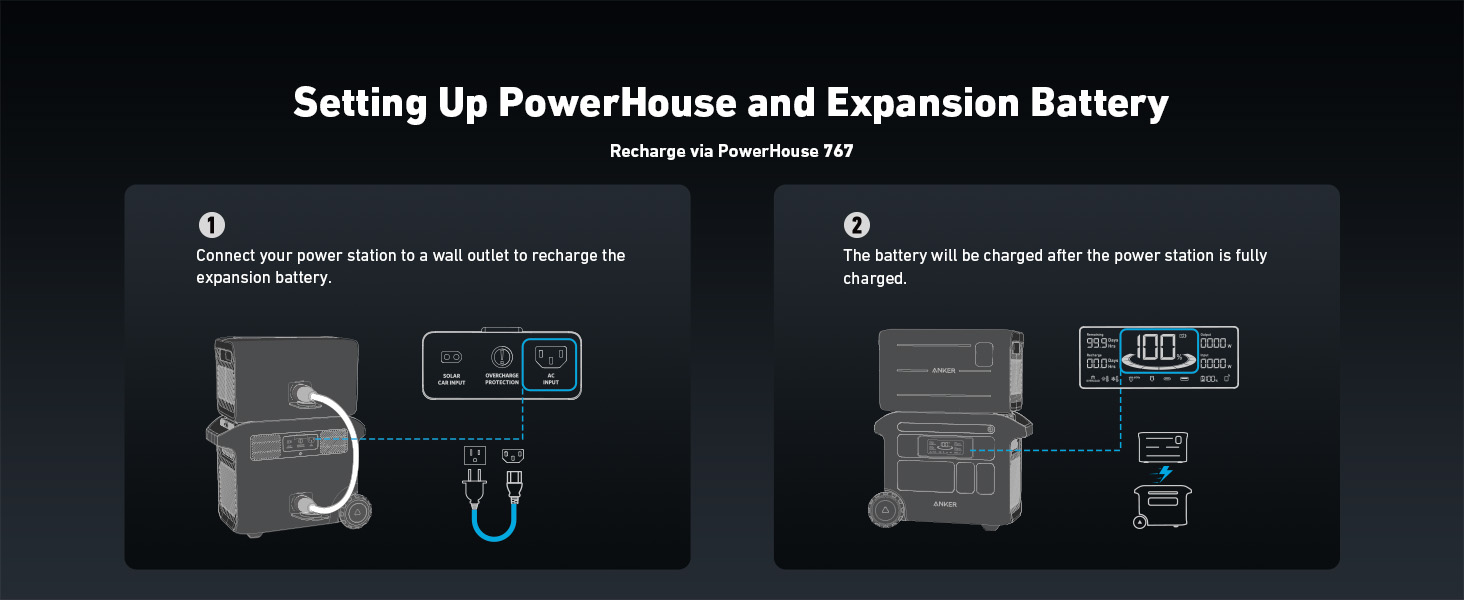
Image: A diagram illustrating how the PowerHouse 767 and connected Expansion Battery are recharged via an AC wall outlet, with the expansion battery charging after the main unit.
Via Solar Panel
You can recharge the PowerHouse 767 and its connected Expansion Battery using compatible solar panels for sustainable power generation.
- Set up the solar panel with the front of the panel facing the sun.
- Connect the solar panel to the PowerHouse 767 with the included cable.
- Multiple solar panels can be connected for up to 1000W of input.
Video: How to recharge the Anker PowerHouse 767 with the Anker 531 Solar Panel. This video demonstrates setting up and connecting a solar panel to the PowerHouse 767.
Maintenance
Storage
- Unplug all devices and cords from the PowerHouse 767 and Expansion Battery.
- Turn off all outputs to prevent the battery from draining.
- Store the unit in a cool, dry area.
Video: How to store the Anker PowerHouse 767. This video provides guidance on preparing the power station for storage.
Regular Checks
- Check the battery capacity each week.
- If the battery level is below 30%, recharge the power station to 100%.
- Fully charge the power station once every 3 months to maintain battery health.
Troubleshooting
If you encounter any issues with your Anker Powerhouse 760 Expansion Battery, please refer to the following common solutions or contact customer support.
- Battery Not Charging: Ensure all cables are securely connected and the power source is active. Check the PowerHouse 767's display for error messages.
- No Output from Ports: Verify that the specific output ports are turned on. Some ports may have individual power buttons.
- Device Not Recognized: Try connecting the device to a different port or restarting the PowerHouse 767. Ensure the device's power requirements do not exceed the station's output limits.
- Unusual Noise/Smell: Immediately turn off the unit and disconnect all devices. Contact customer support for assistance.
Specifications
| Feature | Value |
|---|---|
| Manufacturer | Anker |
| Part Number | A1780 |
| Item Weight | 45.6 pounds |
| Product Dimensions | 17.44 x 9.37 x 10.55 inches |
| Color | Black |
| Style | Anker SOLIX BP2000 |
| Material | Plastic |
| Power Source | Battery Powered, Solar Powered |
| Voltage | 5 Volts |
| Wattage | 2048 Watt-hours |
| Battery Cell Type | Lithium Polymer |
| Battery Capacity | 640000 Milliamp Hours |
| Connector Type | Proprietary |
| Compatible Devices | Anker PowerHouse 767 |
Warranty and Support
The Anker 760 Portable Power Station Expansion Battery comes with a superior 5-year full-device warranty, ensuring a worry-free experience. This warranty covers defects in materials and workmanship under normal use.
For technical support, troubleshooting assistance, or warranty claims, please contact Anker customer service through their official website or the contact information provided in your product packaging. You can also visit the Anker Store on Amazon for more information and resources.


