
1. Introduction
The XINDUM CO12 Carbon Monoxide Detector is a vital safety device designed to continuously monitor carbon monoxide (CO) levels in your home or office. Equipped with a high-precision electrochemical sensor, this detector provides real-time CO concentration readings on its LCD screen and alerts you with an 85 dB alarm in the event of dangerous levels. It features a sealed 10-year lithium battery for long-term, maintenance-free operation and complies with the EN 50291 standard for carbon monoxide alarms.
This manual provides essential information for the proper installation, operation, and maintenance of your CO detector. Please read it thoroughly before using the device.
2. Important Safety Information
Carbon monoxide (CO) is a highly toxic gas that is colorless, odorless, and tasteless, making it impossible to detect with human senses. Exposure to CO can lead to serious health issues, including brain damage and death. This detector is designed to provide an early warning of CO presence, but it is not a substitute for proper maintenance of fuel-burning appliances, regular inspection of ventilation systems, or adequate ventilation.
- Never ignore the alarm. If the alarm sounds, immediately move to fresh air and call emergency services.
- Do not paint the detector. Paint can block the sensor openings and interfere with the detector's ability to sense CO.
- Test the detector regularly as instructed in this manual.
- Ensure the detector is installed in appropriate locations as specified.
- This device is for indoor use only.
3. Product Features
- High-Precision Electrochemical Sensor: Provides accurate and reliable CO detection.
- 10-Year Sealed Lithium Battery: Offers long-lasting power without the need for battery replacement.
- LCD Digital Display: Shows real-time carbon monoxide concentration in parts per million (PPM).
- Loud 85 dB Alarm: Alerts occupants to dangerous CO levels.
- Test/Mute Button: Allows for easy testing of the alarm and silencing during non-emergency situations.
- LED Indicators: Visual cues for Alarm (Red), Fault/Low Battery (Yellow), and Power (Green).
- Low Battery Warning: Audible and visual alerts when the battery is low.
- End-of-Life Warning: Indicates when the device needs to be replaced after its 10-year lifespan.
- Flexible Installation: Can be placed on a desk or mounted on a wall.
- EN 50291 Standard Compliant: Certified for safety and performance.
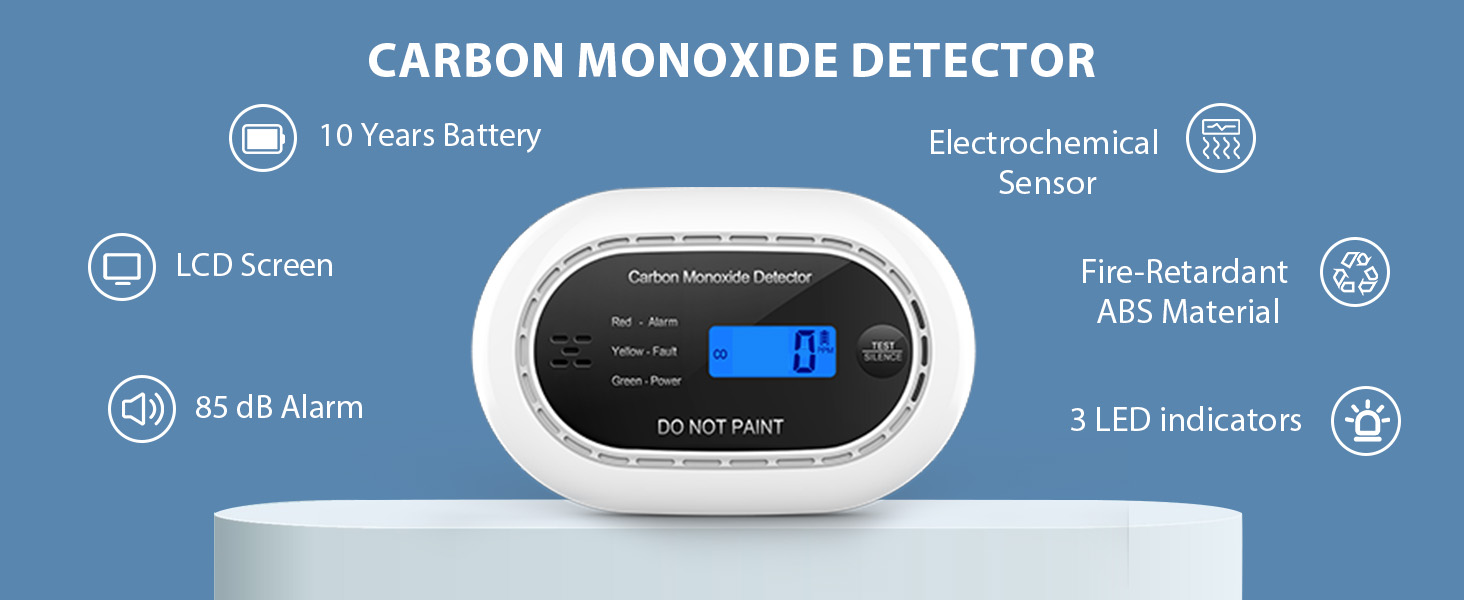
Image: Key features of the XINDUM CO12 Carbon Monoxide Detector, including its 10-year battery, electrochemical sensor, LCD screen, 85 dB alarm, and LED indicators.
4. Package Contents
Upon opening the package, please ensure all items are present and undamaged:
- XINDUM CO12 Carbon Monoxide Detector
- Mounting Kit (screws and wall plugs, or double-sided adhesive tape)
- User Manual
5. Setup and Installation
5.1 Activating the Detector
The detector is powered by a sealed 10-year lithium battery. To activate the device:
- Locate the ON/OFF switch on the back of the detector.
- Slide the switch to the "ON" position. The detector will perform a self-test, and the LCD screen will illuminate.

Image: Illustration of the ON/OFF switch located on the back of the CO detector for activation.
5.2 Choosing an Installation Location
For optimal performance and safety, consider the following when choosing a location:
- Install at least one detector on each level of your home, especially near sleeping areas and in rooms with fuel-burning appliances.
- For bedrooms, place the detector inside or just outside the sleeping area.
- In rooms with fuel-burning appliances, install the detector between 1 to 3 meters (3 to 10 feet) horizontally from the appliance.
- Mount the detector on a wall at a height above any doors or windows, but below the ceiling.
- Avoid placing the detector in dead air spaces, such as at the peak of a vaulted ceiling or in recessed areas.
- Do not install near vents, fans, or areas with high airflow that could dilute CO concentrations.
- Keep away from direct sunlight, extreme temperatures, and high humidity.

Image: Recommended placement locations for the CO detector, including bedrooms, hallways, living rooms, and stairwells, highlighting the alarm's effectiveness.
5.3 Mounting the Detector
The CO12 detector offers flexible installation options:
- Desk Placement: The detector can stand freely on any flat surface. Ensure it is stable and not easily knocked over.
- Wall Mounting with Adhesive: For a drill-free installation, use the provided double-sided adhesive tape. Clean the wall surface thoroughly, apply the tape to the back of the detector, and firmly press the detector onto the desired wall location.
- Wall Mounting with Screws: For a more secure installation, use the provided screws and wall plugs.
- Mark the positions for the two mounting holes on the wall.
- Drill two holes at the marked positions.
- Insert the wall plugs into the drilled holes.
- Screw the mounting bracket (if separate) or the detector directly onto the wall using the screws.
- Attach the detector to the mounting bracket, ensuring it is securely fastened. The detector can be easily removed from the bracket for maintenance or replacement.
6. Operating Instructions
6.1 Normal Operation
During normal operation, the green LED indicator will flash periodically (e.g., every 30 seconds) to confirm the unit is functioning correctly. The LCD screen will typically display "0 PPM" if no carbon monoxide is detected, or the current CO concentration if present.

Image: The LCD display of the CO detector showing a CO concentration of 30 PPM and a battery level indicator.
6.2 Alarm Conditions and Indications
The detector will activate its alarm based on specific CO concentration levels and exposure times, as per EN 50291 standards:
- 50 PPM: Alarm within 60-90 minutes.
- 100 PPM: Alarm within 10-40 minutes.
- 300 PPM: Alarm within 1-3 minutes.
When an alarm condition is met:
- The red LED indicator will flash rapidly.
- The audible alarm will sound loudly (85 dB).
- The LCD screen will display the detected CO concentration.

Image: Real-time carbon monoxide monitoring on the detector's LCD, showing a high CO level and corresponding alarm thresholds.
6.3 LED Indicators
The detector features three LED indicators:
- Red LED: Indicates an alarm condition (CO detected).
- Yellow LED: Indicates a fault or low battery condition.
- Green LED: Indicates normal power and operation.

Image: Visual representation of the Red (Alarm), Yellow (Fault/Low Battery), and Green (Power) LED indicators on the CO detector.
6.4 Test/Mute Function
Press the "TEST/SILENCE" button to:
- Test the Alarm: In normal operation, pressing the button will initiate a self-test, sounding the alarm and flashing the red LED to confirm functionality.
- Silence the Alarm: During an alarm, pressing the button will temporarily silence the audible alarm for a short period (e.g., 5-10 minutes) if the CO level is not critically high. The red LED will continue to flash, and the LCD will show the CO level. If CO levels remain high or increase, the alarm will reactivate.
7. Maintenance
7.1 Regular Testing
It is crucial to test your CO detector regularly to ensure it is functioning correctly. Test the detector at least once a month by pressing the "TEST/SILENCE" button. The alarm should sound, and the red LED should flash.
7.2 Cleaning
Dust and debris can accumulate on the detector and interfere with its operation. Clean the detector at least once every three months:
- Gently wipe the exterior of the detector with a soft, damp cloth.
- Do not use cleaning sprays, solvents, or abrasive cleaners.
- Do not paint the detector.
7.3 Battery Information
The XINDUM CO12 detector is equipped with a sealed 10-year lithium battery (1600 mAh). This battery is designed to last the entire lifespan of the detector and is not replaceable. Do not attempt to open the unit or replace the battery.
7.4 End-of-Life Warning
After approximately 10 years of operation, the detector will reach its end-of-life. When this occurs, the detector will emit two short beeps every 30 seconds, and the yellow LED indicator will flash twice. This indicates that the unit needs to be replaced immediately. Dispose of the old unit according to local electronic waste regulations.
8. Troubleshooting
| Problem | Indication | Possible Cause | Solution |
|---|---|---|---|
| Alarm sounds continuously | Red LED flashes, 85 dB alarm, LCD shows CO level | High CO concentration detected | Immediately move to fresh air. Call emergency services. Do not re-enter the premises until cleared by professionals. |
| Yellow LED flashes, 1 beep every 60 seconds | Low battery warning | Battery is nearing end of life | The battery is sealed and not replaceable. The unit is nearing its end of life. Prepare to replace the detector soon. |
| Yellow LED flashes twice, 2 beeps every 30 seconds | End-of-life warning | Detector has reached its 10-year lifespan | Replace the detector immediately. Dispose of the old unit responsibly. |
| No display, no LED, no sound | Unit appears dead | Unit not activated or completely depleted battery | Ensure the ON/OFF switch is in the "ON" position. If still unresponsive, the unit may be faulty or past its lifespan. Replace the detector. |
| False alarms | Alarm sounds without CO presence | Interference from other gases (e.g., strong cleaning agents, aerosols), improper placement, dust accumulation | Ventilate the area. Relocate the detector away from sources of interference. Clean the detector as per maintenance instructions. If false alarms persist, contact support. |
9. Specifications
| Feature | Detail |
|---|---|
| Model Number | CO12 |
| Sensor Type | Electrochemical |
| Power Source | 10-Year Sealed Lithium Battery (1600 mAh, 3V) |
| Alarm Loudness | 85 dB at 1 meter (3.3 feet) |
| Operating Humidity | Up to 95% RH (non-condensing) |
| Material | ABS |
| Dimensions (L x W x H) | Approximately 12.4 x 8.6 x 3.7 cm (4.9 x 3.4 x 1.5 inches) |
| Weight | Approximately 102 grams (3.6 ounces) |
| Standard Compliance | EN 50291 |
10. Warranty and Support
For warranty information, please refer to the documentation provided at the time of purchase or contact your retailer. If you encounter any issues or have questions not covered in this manual, please contact the retailer or manufacturer's customer support for assistance.
