
Introduction
Welcome to the user manual for your new VERTU iVERTU-81 5G smartphone. This guide provides essential information to help you set up, operate, maintain, and troubleshoot your device. Please read this manual thoroughly to ensure optimal performance and longevity of your smartphone.
What's in the Box
Upon unboxing your VERTU iVERTU-81, please verify that all components are present:
- VERTU iVERTU-81 5G Smartphone
- Power Adapter
- USB-C Cable (not explicitly listed but implied for charging)
- SIM Ejector Tool (not explicitly listed but implied for SIM tray)
- Quick Start Guide (not explicitly listed but implied)
If any items are missing or damaged, please contact customer support.
Setup
1. Inserting SIM Cards
The VERTU iVERTU-81 supports dual Nano SIM cards for 5G dual card dual standby functionality.
- Locate the SIM card tray on the side of your phone.
- Insert the SIM ejector tool into the small hole next to the tray and push gently until the tray pops out.
- Place your Nano SIM cards into the designated slots on the tray, ensuring the gold contacts face down.
- Carefully reinsert the SIM tray into the phone until it clicks into place.
2. Initial Power On and Setup
- Press and hold the power button until the VERTU logo appears.
- Follow the on-screen prompts to select your language, connect to a Wi-Fi network, and set up your Google account.
- Configure security settings such as fingerprint, face unlock, or a PIN/pattern.
3. Charging the Battery
Before first use, it is recommended to fully charge your device. Use the provided power adapter and USB-C cable.
- Connect the USB-C cable to the charging port at the bottom of the phone.
- Connect the other end of the cable to the power adapter, then plug the adapter into a wall outlet.
- The phone supports 55W fast charging. A full charge can be achieved rapidly.

Image: The VERTU iVERTU-81 smartphone connected to a charger, displaying a '55W Fast Charge' notification on its screen, indicating rapid battery replenishment.
Operating Your Device
Display and Navigation
The iVERTU-81 features a 6.67-inch OLED FHD+ display with a 120Hz high refresh rate, providing a clear and immersive viewing experience. The display is designed to adapt to blue light, caring for your eyes.
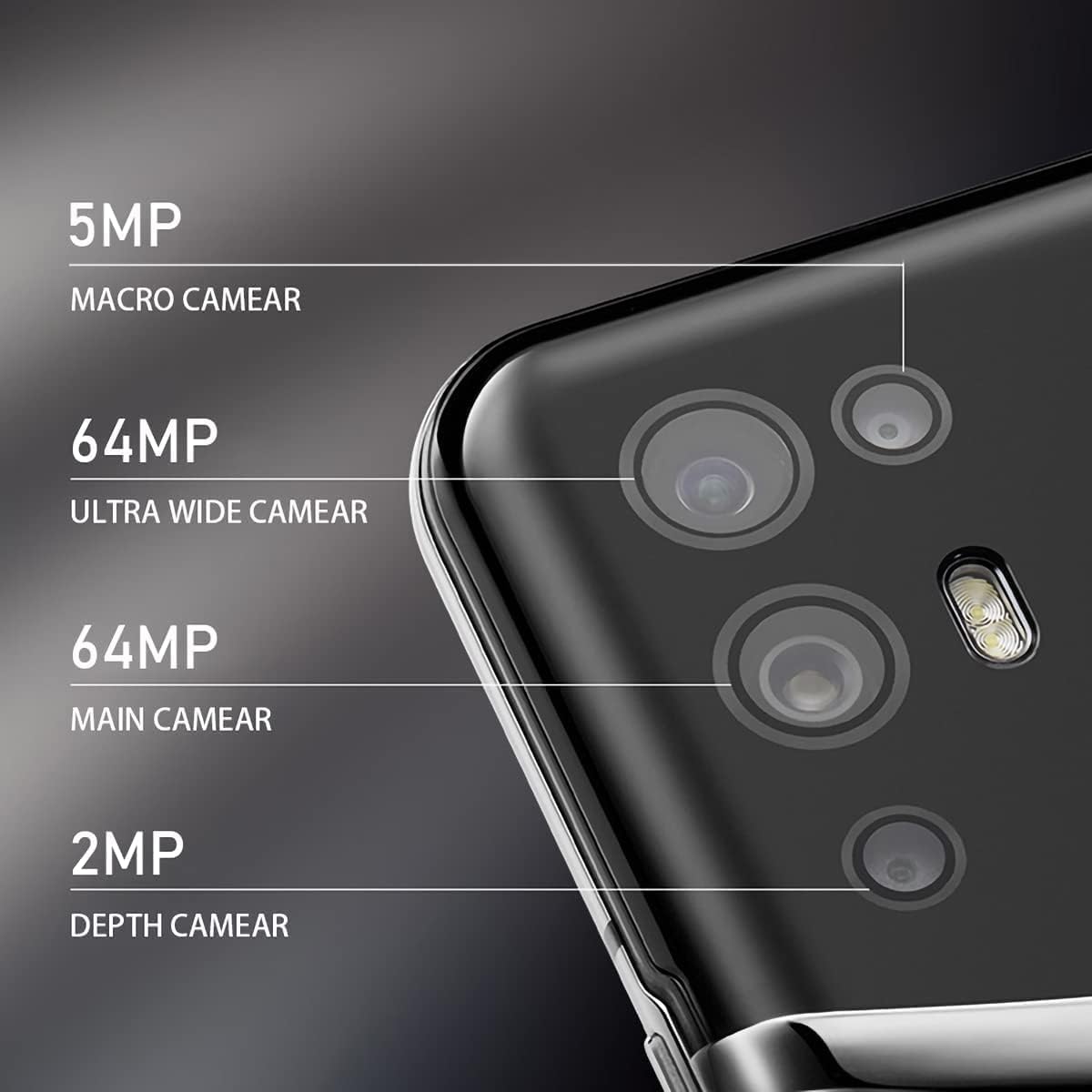
Image: The VERTU iVERTU-81 smartphone showcasing its 6.67-inch OLED display with vibrant colors, featuring a dancer and text highlighting '6.67" OLED Display' and '90hZ' (likely indicating refresh rate).
Performance
Powered by a Snapdragon 888 octa-core chip and 12GB RAM, the iVERTU-81 delivers powerful performance for a smooth gaming and multitasking experience.

Image: Two hands holding the VERTU iVERTU-81 smartphone, which displays a graphically intensive game, illustrating the device's 'Powerful Performance'.
Audio Quality
Experience master sound quality with 3D audio technology and HiFi sound. The device also features exclusive ringtones compiled by the London Symphony Orchestra.

Image: The VERTU iVERTU-81 smartphone displaying an image of an orchestra, accompanied by text highlighting 'Master Sound Quality', '3D audio technology', 'HiFi sound quality', and 'London Symphony Orchestra compiled exclusive ringtones'.
Camera Features
The iVERTU-81 is equipped with a professional photography configuration, allowing you to capture high-quality images and videos.
Rear Camera System
- 64MP Main Camera: For high-resolution photos.
- 64MP Ultra Wide Angle Camera: For expansive landscape and group shots.
- 5MP Macro Camera: For detailed close-up photography.
- 2MP Depth Camera: For enhanced portrait mode with bokeh effects.
Front Camera
- 16MP Front Camera: For clear selfies and video calls.
Video Recording
Support for 4K 60FPS high-definition video shooting with two-way anti-shake technology ensures smooth and stable video capture. Intelligent focus assists in sharp and clear recordings.

Image: A detailed view of the VERTU iVERTU-81's rear camera module, labeling its four lenses: 5MP Macro, 64MP Ultra Wide, 64MP Main, and 2MP Depth cameras.

Image: The VERTU iVERTU-81 smartphone displaying its camera interface, capturing a snowboarder in action, with text emphasizing 'Professional Photography' and support for '4K 60FPS HD video shooting, two-way anti-shake, intelligent focus'.
Maintenance
To ensure the longevity and optimal performance of your VERTU iVERTU-81 smartphone, follow these maintenance guidelines:
- Cleaning: Use a soft, lint-free cloth to clean the screen and body of the phone. Avoid abrasive materials or harsh chemicals.
- Software Updates: Regularly check for and install system updates to ensure your device has the latest security patches and features.
- Battery Care: Avoid extreme temperatures. Do not fully discharge the battery frequently. Use only the provided or certified charging accessories.
- Storage Management: Periodically clear unnecessary files and apps to maintain optimal performance. The phone comes with 512GB ROM.
- Protection: Consider using a protective case and screen protector to guard against physical damage.
Troubleshooting
If you encounter issues with your VERTU iVERTU-81, refer to the following common troubleshooting steps:
Device Not Turning On
- Ensure the battery is charged. Connect the phone to the charger for at least 15 minutes before attempting to power on again.
- Press and hold the power button for 10-15 seconds to force a restart.
Poor Network Signal
- Check if your SIM card is properly inserted.
- Move to an area with better network coverage.
- Restart your phone.
- Verify that your mobile data or 5G settings are correctly configured.
Apps Crashing or Freezing
- Close the problematic app and reopen it.
- Clear the app's cache and data in the phone's settings.
- Ensure the app is updated to its latest version.
- Restart your phone.
Battery Draining Quickly
- Reduce screen brightness and set a shorter screen timeout.
- Disable unused features like Wi-Fi, Bluetooth, GPS, or 5G when not needed.
- Identify and close power-intensive apps running in the background.
- Check for system updates, as they often include battery optimizations.

Image: The VERTU iVERTU-81 smartphone connected to a charger, displaying '4200mAh Long Battery Life' and '55W fast charge' text, emphasizing its battery capacity and quick charging capability.
Communication Encryption
The device features communication encryption for double protection of your data and privacy.

Image: A visual representation of a safe door, overlaid with various security-related terms such as 'encryption', 'firewalls', 'privacy', and 'information security', illustrating the concept of 'Communication Encryption Double Protection'.
Specifications
| Feature | Specification |
|---|---|
| Model Name | iVERTU-81 |
| Operating System | Android |
| Processor | Snapdragon 888 (Octa-core) |
| RAM | 12 GB |
| Memory Storage Capacity | 512 GB |
| Screen Size | 6.67 Inches |
| Display Type | OLED |
| Resolution | 2400 x 1080 |
| Refresh Rate | 120 Hz |
| Rear Camera | 64MP Main + 64MP Ultra Wide + 5MP Macro + 2MP Depth |
| Front Camera | 16MP |
| Battery Capacity | 4200 Milliamp Hours |
| Charging | 55W Fast Charge |
| Wireless Carrier | Unlocked |
| Cellular Technology | 5G |
| Connectivity Technologies | Wi-Fi, GPS |
| Color | Calf Leather-Brown |
Warranty and Support
For warranty information and customer support, please refer to the warranty card included with your product or visit the official VERTU website. Keep your proof of purchase for warranty claims.
For technical assistance or service inquiries, please contact VERTU customer service through the channels provided on their official website.


