
1. Introduction
This manual provides essential information for the installation, operation, and maintenance of your Power Stop Front Z36-2407 Carbon-Fiber Ceramic Brake Pads. Designed for trucks and SUVs that tow or haul heavy loads, these brake pads offer enhanced stopping power and durability. Please read these instructions thoroughly before proceeding with installation or use to ensure optimal performance and safety.
2. Product Overview
The Power Stop Z36 Truck and Tow brake pads are engineered for vehicles requiring superior braking performance under demanding conditions. Key features include:
- Carbon-Fiber Ceramic Formula: Provides increased stopping power and resistance to fade, crucial for heavy-duty applications.
- Premium Stainless-Steel Shims: Designed for better heat dissipation and virtually noise-free braking.
- Low-Dust Formulation: Helps keep wheels cleaner compared to traditional brake pads.
- Complete Hardware Kit: Includes all necessary stainless-steel hardware for a straightforward installation.

Figure 2.1: Power Stop Z36 Truck and Tow Carbon-Fiber Ceramic Brake Pads with packaging.

Figure 2.2: Contents of the Power Stop Z36 brake pad kit, including pads, shims, and installation hardware.
3. Setup and Installation
Important Safety Notice: Brake system components are critical for vehicle safety. Incorrect installation can lead to serious injury or death. If you are not experienced with automotive brake system repair, it is highly recommended to have these brake pads installed by a qualified professional mechanic.
3.1. Before You Begin
- Ensure your vehicle is safely supported on jack stands on a level surface.
- Gather all necessary tools, including a jack, jack stands, lug wrench, caliper compression tool, brake cleaner, and torque wrench.
- Verify that the brake pads are the correct fit for your vehicle model (refer to vehicle compatibility list).
3.2. Installation Steps (General Guidelines)
- Remove the wheel.
- Carefully remove the brake caliper mounting bolts and lift the caliper off the rotor. Do not let the caliper hang by the brake hose. Support it with a wire or bungee cord.
- Remove the old brake pads and any old hardware.
- Clean the caliper bracket and rotor surface thoroughly with brake cleaner.
- Install the new stainless-steel hardware provided in the kit onto the caliper bracket.
- Apply a thin layer of brake lubricant to the back of the new brake pads (where they contact the caliper piston and caliper bracket) and to the caliper slide pins. Avoid getting lubricant on the friction material.
- Install the new Power Stop Z36 brake pads into the caliper bracket.
- Use a caliper compression tool to retract the caliper pistons.
- Reinstall the caliper over the new pads and rotor, ensuring proper alignment.
- Tighten the caliper mounting bolts to the manufacturer's specified torque.
- Repeat for all wheels.
- Before driving, pump the brake pedal several times until it feels firm. Check the brake fluid level and top off if necessary.

Figure 3.1: Hands installing new brake pads into a vehicle's caliper assembly.
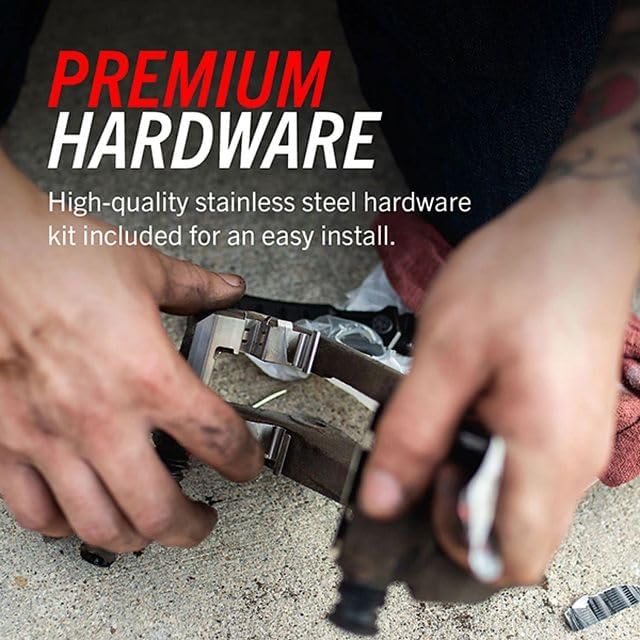
Figure 3.2: Close-up view of hands installing premium stainless steel hardware during brake pad replacement.
4. Operating and Break-in Procedure
4.1. Break-in (Bedding) Procedure
Proper break-in of new brake pads is crucial for optimal performance and longevity. Follow these steps:
- Perform 5-6 moderate stops from 40 mph down to 10 mph. Allow for a brief cooling period between stops.
- Perform 2-3 hard stops from 50 mph down to 10 mph.
- Drive for several miles without heavy braking to allow the brakes to cool completely.
During the break-in period, avoid sudden, aggressive braking or prolonged braking (e.g., riding the brakes down a long hill). You may notice some smoke or a distinct smell; this is normal during the bedding process.
4.2. General Operation
These Z36 Truck and Tow brake pads are designed for vehicles that frequently tow, haul heavy loads, or operate in mountainous terrain. They provide enhanced stopping power under these conditions. Always maintain a safe following distance and adjust your driving style to account for vehicle load and road conditions.

Figure 4.1: A truck towing a boat, demonstrating the intended heavy-duty use for Z36 Truck and Tow brake pads.
5. Maintenance
Regular inspection and maintenance of your brake system are vital for safety and performance.
- Periodic Inspection: Inspect brake pads, rotors, calipers, and brake fluid levels at least every 12,000 miles or annually, whichever comes first.
- Pad Wear: Replace brake pads when the friction material wears down to the minimum thickness specified by the vehicle manufacturer, or when the wear indicators become audible.
- Rotor Condition: Check rotors for excessive wear, scoring, or warping. Replace or resurface rotors as needed.
- Brake Fluid: Ensure brake fluid is at the proper level and is clean. Consult your vehicle's owner's manual for recommended brake fluid type and replacement intervals.
- Caliper Function: Ensure calipers are moving freely and not sticking.

Figure 5.1: A truck driving, emphasizing the importance of reliable braking for vehicle operation.
6. Troubleshooting
This section addresses common issues that may arise with brake pads. If you experience persistent problems, consult a qualified mechanic.
| Symptom | Possible Cause | Solution |
|---|---|---|
| Squealing/Grinding Noise | Improper break-in, worn pads (wear indicator), foreign object, caliper issues. | Re-perform break-in, inspect pads for wear, check for debris, inspect calipers. |
| Reduced Braking Performance | Brake fade (overheating), improper break-in, contaminated pads, air in brake lines. | Allow brakes to cool, re-perform break-in, inspect for fluid leaks, bleed brake lines. |
| Vibration During Braking | Warped rotors, uneven pad wear, loose wheel bearings. | Inspect and replace/resurface rotors, check pad wear, inspect wheel bearings. |
| Excessive Brake Dust | Normal for some pad types, but Z36 is low-dust. Could indicate rotor wear. | Clean wheels regularly. If excessive, inspect rotors for wear. |

Figure 6.1: A white truck driving, demonstrating the low-dust characteristics of the Z36 Carbon-Fiber Ceramic brake pads.
7. Specifications
| Attribute | Detail |
|---|---|
| Model Number | Z36-2407 |
| Brand | Power Stop |
| Pad Material | Carbon-Fiber Ceramic |
| Position | Front |
| Item Weight | 7.1 pounds |
| Product Dimensions | 11.4 x 4.1 x 3.9 inches |
| Included Components | Set of Brake Pads, Hardware |
| Compatibility | 2022 CHEVROLET TAHOE PPV; SSV (Police Model), 2021 CHEVROLET TAHOE PPV; SSV (Police Model), and other compatible Cadillac Escalade, Silverado, Suburban, Tahoe, Yukon, Yukon XL models. |

Figure 7.1: Detail of the Carbon-Fiber Ceramic brake pad material.

Figure 7.2: Brake pad featuring a premium stainless steel shim for heat dissipation and noise reduction.
8. Warranty and Support
Power Stop products are manufactured to high standards. For specific warranty information, please refer to the documentation included with your purchase or visit the official Power Stop website. For technical support or inquiries, please contact Power Stop customer service directly.
Manufacturer: Power Stop
Website: www.powerstop.com (Example link, actual link may vary)
