
1. Introduction
This manual provides comprehensive instructions for the installation, operation, and maintenance of your Durablow SH4001D Dual WiFi Gas Fireplace Valve and Blower Remote Control. This smart home device allows you to control your gas fireplace and its blower fan via a smartphone application, voice commands, and programmable schedules. It supports both 2.4G and 5G WiFi networks for seamless integration into your smart home ecosystem.
2. Safety Information
- Gas Supply: If your house is unattended, do NOT use any remote functions. Always turn OFF the main gas supply to the fireplace when leaving your home for extended periods.
- Professional Installation: While designed for DIY upgrade, if you are unsure about any wiring or gas connections, consult a qualified professional.
- Temperature Limits: The WiFi controller box has an engineering plastic housing. Avoid exposing it to temperatures exceeding 130°F (54°C) to prevent damage.
- Power Outlet: Ensure a power outlet is available under or near your fireplace for the controller box and blower fan.
- FCC Compliance: This device complies with FCC regulations. Any changes or modifications not expressly approved by the manufacturer could void the user's authority to operate the equipment.
3. Package Contents
Verify that all items listed below are included in your package:
- WiFi Controller Box (SH4001D)
- USB Power Adapter + Cable for Controller Box
- 2-Way Power Splitter
- 3-Prong Power Cord for Blower
- User Manual
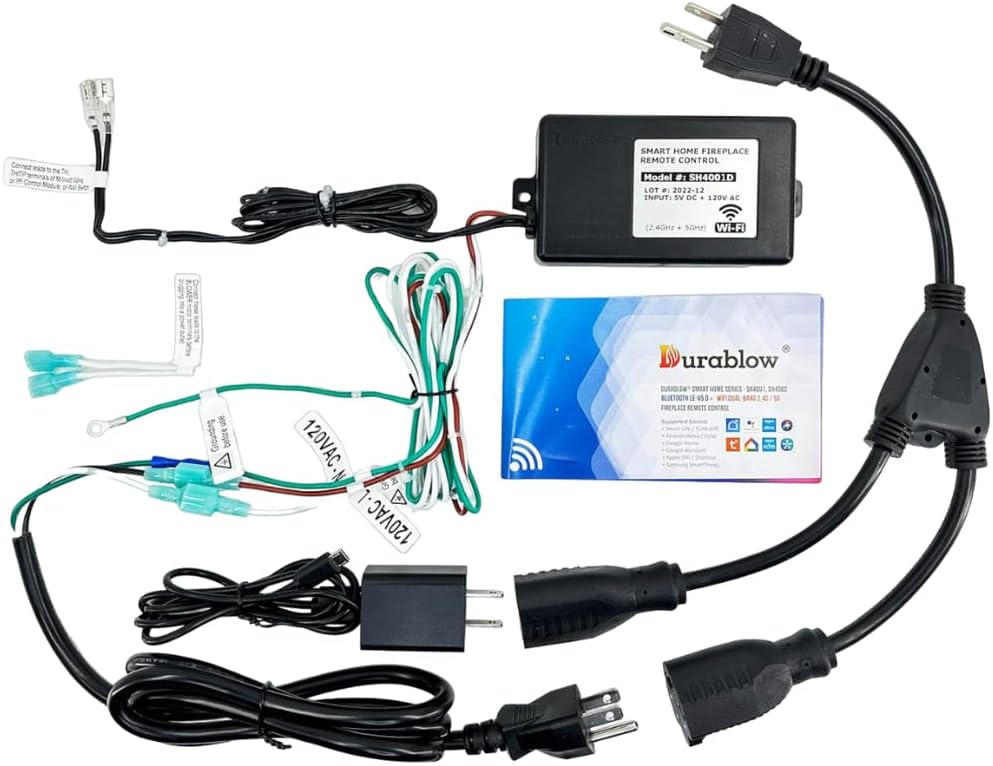
Image 3.1: All components included in the Durablow SH4001D package.
4. Setup and Installation
This section guides you through the physical installation and wiring of the Durablow SH4001D system.
4.1 Wiring Overview
The Durablow SH4001D connects to your fireplace's gas valve (millivolt or IPI control module) and a 120VAC blower fan. The system requires a 120VAC power source.

Image 4.1: Complete wiring diagram for the SH4001D. Note that the control module, valve, and fan are not included.
4.2 Connection Steps
- Power Source: Connect the USB power adapter to the WiFi controller box. Plug the USB power adapter into one socket of the 2-way power splitter.
- Blower Fan Connection: Connect the 3-prong power cord for the blower to the other socket of the 2-way power splitter. Plug your 120VAC blower fan into this 3-prong cord.
- Gas Valve/IPI Module Connection: The controller box provides an ON/OFF signal. Connect these wires to your fireplace's IPI control module, millivolt gas valve, or existing ON/OFF wall switch terminals. Refer to your fireplace's specific manual for terminal identification (e.g., TH/TP, TH).
- Grounding: Ensure proper grounding. The green wire from the controller box should be connected to a suitable ground point, such as the blower motor casing.

Image 4.2: Detailed wiring diagram for the SH4001D, illustrating connections for power, blower, and fireplace control.

Image 4.3: Example of grounding connection to a blower motor. Ensure proper grounding before use.
4.3 Compatibility Notes
The Durablow SH4001D is compatible with:
- Millivolt valves
- Dexen or SIT electronic IPI control modules
- Most fireplace blower fans (120VAC)
It is not compatible with locking solenoid gas valve systems.

Image 4.4: Example of an IPI control module.

Image 4.5: Components of a pilot assembly.

Image 4.6: Gas valve with TH/TP terminals (for reference, actual appearance may vary).
4.4 Wiring Diagrams for Different Systems
The following diagrams illustrate common wiring configurations:

Image 4.7: Millivolt Valve Wiring.

Image 4.8: Replacing existing switch/thermostat.

Image 4.9: IPI System with Blower Wiring.

Image 4.10: In Series Wiring.

Image 4.11: In Parallel Wiring.
5. App Installation and Pairing
The Durablow SH4001D operates with the free Smart-Life APP, available for both iOS and Android devices. No additional hub or gateway is required.
5.1 App Download
Search for "Smart-Life" in your device's app store and download the application.
5.2 Device Pairing
Follow the quick pairing modes detailed in the installation manual provided with your product to connect the controller box to the Smart-Life APP. Ensure your smartphone is connected to the same WiFi network (2.4G or 5G) that you intend to use for the controller.

Image 5.1: Key features of the Smart-Life APP integration.
6. Operating Instructions
Once paired, you can control your fireplace and blower using the Smart-Life APP or voice commands.
6.1 App Control
- ON/OFF Control: Use the main switch within the app to turn your fireplace ON or OFF.
- Blower Fan Speed: Adjust the blower fan speed directly from the app. Available settings include OFF, Low, Medium, and High.
- Programmable Schedule: Set 24/7 schedules for automatic ON/OFF control of your fireplace.
- Built-in Timer: Utilize the timer function for temporary operation.
- Family Sharing: Share control of the device with other family members through the app.

Image 6.1: Smart-Life App interface for fireplace control and blower fan speed adjustment.
6.2 Voice Control
The Durablow SH4001D is compatible with popular voice assistants via the Smart-Life APP, including Amazon Alexa, Google Home, SmartThings, and Siri. Once integrated, you can use voice commands such as "Alexa, turn on the fireplace" to operate your device.

Image 6.2: Example of voice control integration with a smart home assistant.
7. Maintenance
The Durablow SH4001D requires minimal maintenance. Keep the controller box clean and free from dust. Ensure it is not exposed to excessive heat, as its engineering plastic housing should not exceed 130°F (54°C).
8. Troubleshooting
If you encounter issues with your Durablow SH4001D, consider the following:
- No Power: Check all power connections, including the USB adapter, 2-way splitter, and wall outlet. Ensure the outlet has power.
- No WiFi Connection: Verify your WiFi network is active and broadcasting on 2.4G or 5G. Ensure the controller box is within range of your router. Re-attempt the pairing process as described in Section 5.2.
- Fireplace Not Responding: Confirm that the wiring to your gas valve or IPI module is correct and secure. Check your fireplace's pilot light and gas supply.
- Blower Not Operating: Ensure the blower fan is properly plugged into the 3-prong power cord and the fan itself is functional. Check the blower speed setting in the app.
- App Issues: Ensure your Smart-Life APP is updated to the latest version. Try restarting the app or your smartphone.
9. Specifications
| Feature | Specification |
|---|---|
| Model Name | SH4001D |
| Brand | Durablow |
| Control Method | App, Remote |
| WiFi Connectivity | Dual WiFi (2.4G+5G) |
| Voice Assistant Compatibility | Amazon Alexa, Google Home, SmartThings, Siri |
| Blower Fan Speed Settings | OFF, High, Medium, Low (4 levels) |
| Power Source | 120 Volts (AC) |
| Product Dimensions | 6"D x 4.5"W x 4"H |
| Item Weight | 1.31 pounds |
| Safety Certification | FCC Approved |
10. Warranty Information
The Durablow SH4001D comes with a 1-year limited warranty from the date of purchase. This warranty covers defects in materials and workmanship under normal use. Please retain your proof of purchase for warranty claims.
11. Support
For technical assistance, troubleshooting, or warranty inquiries, please contact Durablow customer support. Refer to the contact information provided on the product packaging or the official Durablow website.


