
SMALLRIG P108
SmallRig P108 RGB Video Light User Manual
Model: P108 | Brand: SMALLRIG
Introduction
The SmallRig P108 RGB Video Light is a portable and versatile LED camera light designed for various content creation needs, including YouTube, vlogging, and photography. It features 108 high-quality lamp beads, offering 360° full-color adjustment, a wide color temperature range, and multiple special effects. Its compact size and long battery life make it an ideal companion for on-the-go shooting.

Image: The SmallRig P108 RGB Video Light, highlighting its compact design and vibrant RGB capabilities.
What's in the Box
- RGB Video Light
- USB Type-C Charging Cable
- User Manual (this document)

Image: Contents of the SmallRig P108 RGB Video Light package.
Setup
1. Charging the Device
Before first use, fully charge the SmallRig P108 RGB Video Light. The device has a built-in 2500mAh lithium battery.
- Connect the included USB Type-C charging cable to the USB-C port on the light.
- Connect the other end of the cable to a compatible USB power adapter (not included).
- The indicator lights will show charging progress. Four white lights indicate 100% power when fully charged.
- A full charge provides approximately 130 minutes of usage at maximum power.

Image: Charging the SmallRig P108 RGB Video Light.
2. Mounting the Light
The P108 offers multiple mounting options for versatile use.
- Standard 1/4"-20 Screw: Use the integrated 1/4"-20 screw mount at the bottom to attach the light to tripods, camera cages, or other accessories.
- Cold Shoe Mounts: The light features a built-in standard cold shoe interface at the bottom for direct attachment to cameras or mobile phone expansion frames. Additionally, there are three cold shoe seats on the sides for splicing multiple lights together or expanding with other accessories like microphones.

Image: Various mounting options for the SmallRig P108 RGB Video Light.
Operating Instructions
1. Power On/Off
- To turn on the light, press and hold the power button (located on the top left) for 2-3 seconds.
- To turn off the light, press and hold the power button for 2-3 seconds again.
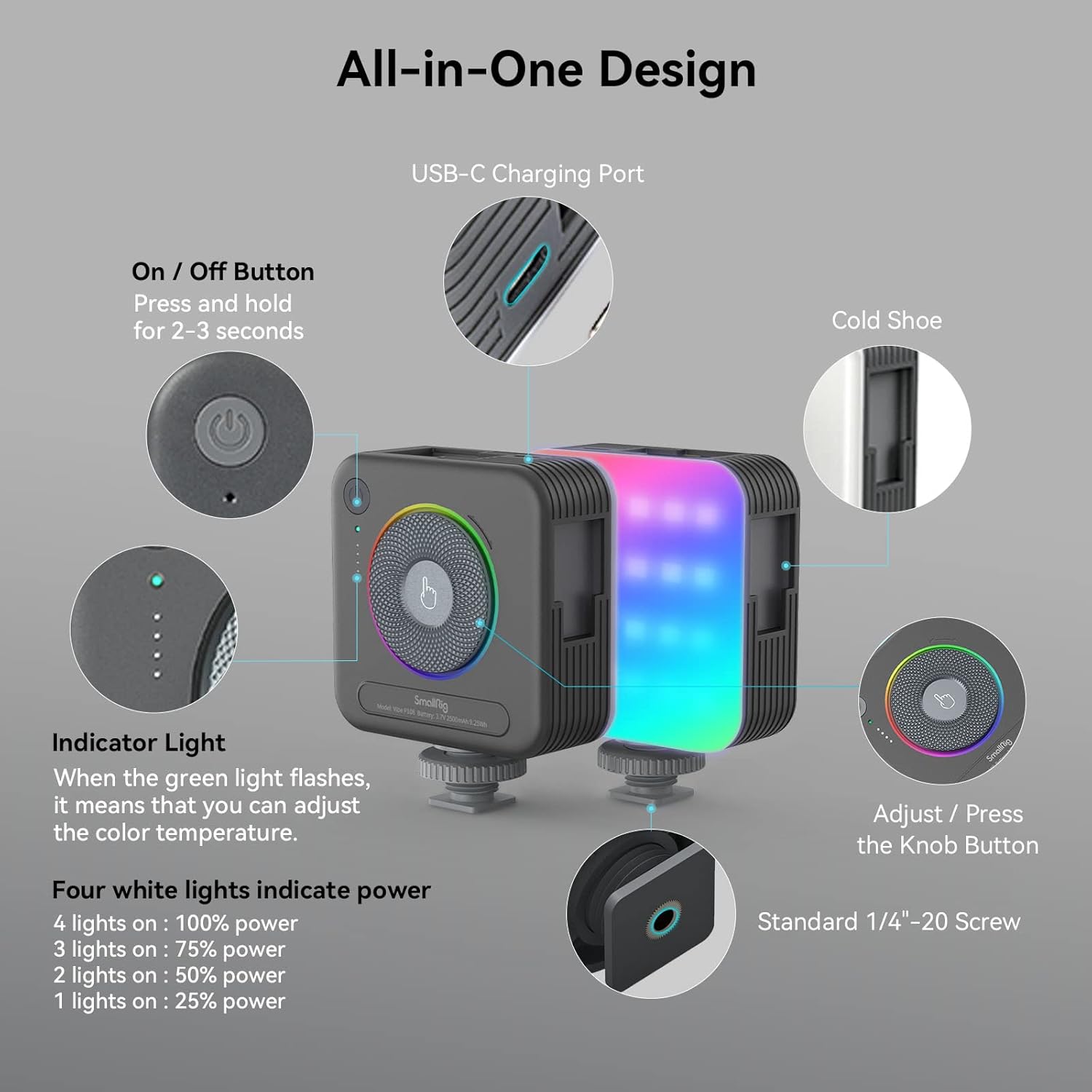
Image: Overview of the SmallRig P108 controls.
2. Adjusting Color Temperature (CCT Mode)
The P108 offers a color temperature range of 2700K (warm light) to 6500K (cold light).
- Ensure the light is in CCT mode (indicated by the green indicator light).
- Rotate the central knob clockwise to increase the color temperature (cooler light).
- Rotate the central knob counter-clockwise to decrease the color temperature (warmer light).

Image: Color temperature and full color range of the light.
3. Adjusting Brightness
Brightness can be adjusted from 0% to 100% in both CCT and RGB modes.
- In CCT mode, the four white indicator lights show the current power level: 1 light (25%), 2 lights (50%), 3 lights (75%), 4 lights (100%).
- To adjust brightness, rotate the central knob.
- Press the power button briefly to cycle through preset brightness levels (25%, 50%, 75%, 100%).

Image: One-handed control via the step-less knob.
4. Special Effects (FX) Modes
The P108 includes 12 FX light effect modes for various photography needs.
- To enter FX mode, press the central knob. Continue pressing to cycle through the 12 effects.
- Rotate the central knob to adjust the brightness or speed of the selected effect.
- Examples of FX modes include Police Car, Fire Truck, RGB Slow Gradient, Pulsing, Lightning, TV, Candlelight, Firework, Breathing, Disco, Paparazzi, and Faulty Bulb.
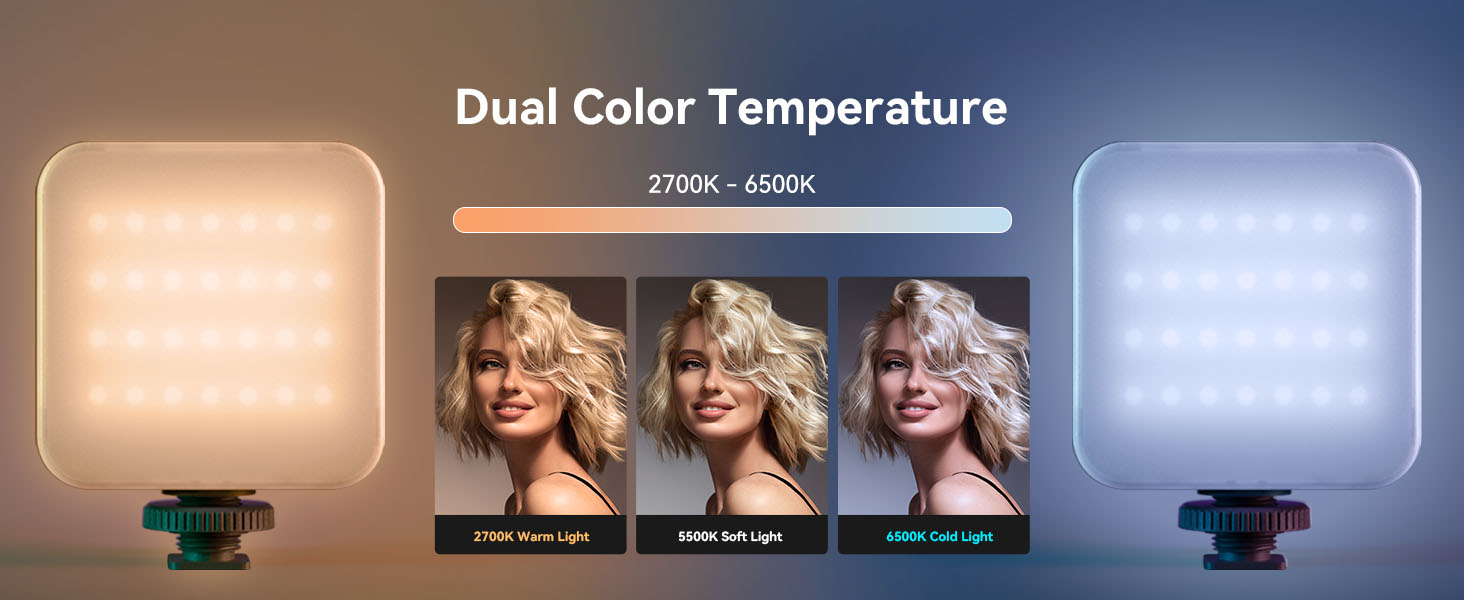
Image: Visual representation of various FX modes.
5. RGB Mode
The light features a 360° full-color design, allowing adjustment of hue and saturation.
- To enter RGB mode, press the central knob until the RGB indicator light is active.
- Rotate the central knob to cycle through 360° of colors.
- Press the power button briefly to adjust the brightness within the selected color.
Official Product Video: How to Use
Video: A detailed guide on how to use the SmallRig P108 RGB Video Light, covering its features and modes.
Maintenance
- Cleaning: Use a soft, dry cloth to clean the surface of the light. Do not use harsh chemicals or abrasive materials.
- Storage: Store the device in a cool, dry place away from direct sunlight and extreme temperatures.
- Battery Care: To prolong battery life, avoid fully discharging the battery frequently. Charge the device regularly, even if not in use, to maintain battery health.
- Handling: Handle the light with care to prevent drops or impacts, which could damage internal components.
Troubleshooting
| Problem | Possible Cause | Solution |
|---|---|---|
| Light does not turn on. | Low battery; Power button not pressed long enough. | Charge the device fully. Press and hold the power button for 2-3 seconds. |
| Light output is dim or inconsistent. | Low battery; Incorrect brightness setting. | Recharge the light. Adjust brightness using the central knob or power button. |
| Cannot change modes or colors. | Incorrect button press; Device malfunction. | Ensure you are pressing the central knob to cycle modes. If issue persists, contact support. |
| Device not charging. | Faulty cable or adapter; USB-C port issue. | Try a different USB-C cable and power adapter. Ensure the cable is fully inserted. |
Specifications
| Feature | Detail |
|---|---|
| Product Dimensions | 2.83 x 3.5 x 1.24 inches |
| Item Weight | 5.9 ounces |
| Light Beads | 108 (28 RGB, 40+40 cold/warm) |
| CRI | ≥ 95 |
| Color Temperature Range | 2700K - 6500K |
| Color Modes | 360° Full Color (RGB) |
| FX Light Effects | 12 modes (e.g., Police Car, Fire Truck, Lightning, TV) |
| Battery Capacity | 2500mAh Lithium Battery |
| Battery Life (Max Power) | 130 minutes |
| Charging Port | USB Type-C |
| Mounting Options | Standard 1/4"-20 Screw, 3 Cold Shoe Mounts |
Warranty and Support
SmallRig products are designed for durability and performance. For warranty information, technical support, or service inquiries, please refer to the official SmallRig website or contact their customer service directly. Keep your purchase receipt for warranty claims.
Online Resources:
Related documentsP108


Ask a question about this manual
Ask about setup, troubleshooting, compatibility, parts, safety, or missing instructions. Manuals+ will review the question and use this page’s manual context to help answer it.