
Joby Wavo PLUS
Joby Wavo PLUS On-Camera Vlogging Microphone Instruction Manual
Model: Wavo PLUS (JB01734-BWW)
Product Overview
The Joby Wavo PLUS is a high-quality, super cardioid on-camera microphone designed to enhance audio recording for compact cameras, smartphones, and computers. It features live audio monitoring, an auto-power mode, a switchable high-pass filter, and an LED battery level indicator for optimal performance and ease of use.

Image: The Joby Wavo PLUS microphone with its foam windshield attached, showcasing its compact design.
What's in the Box
Your Joby Wavo PLUS package includes the following items:
- 1 x Wavo PLUS On-Camera Mic
- 1 x TRS to TRS coiled cable (for cameras)
- 1 x TRRS to TRRS coiled cable (for smartphones)
- 1 x USB-C to USB-A charging cable
- 1 x USB-C to USB-C charging/data cable
- 1 x Foam windshield
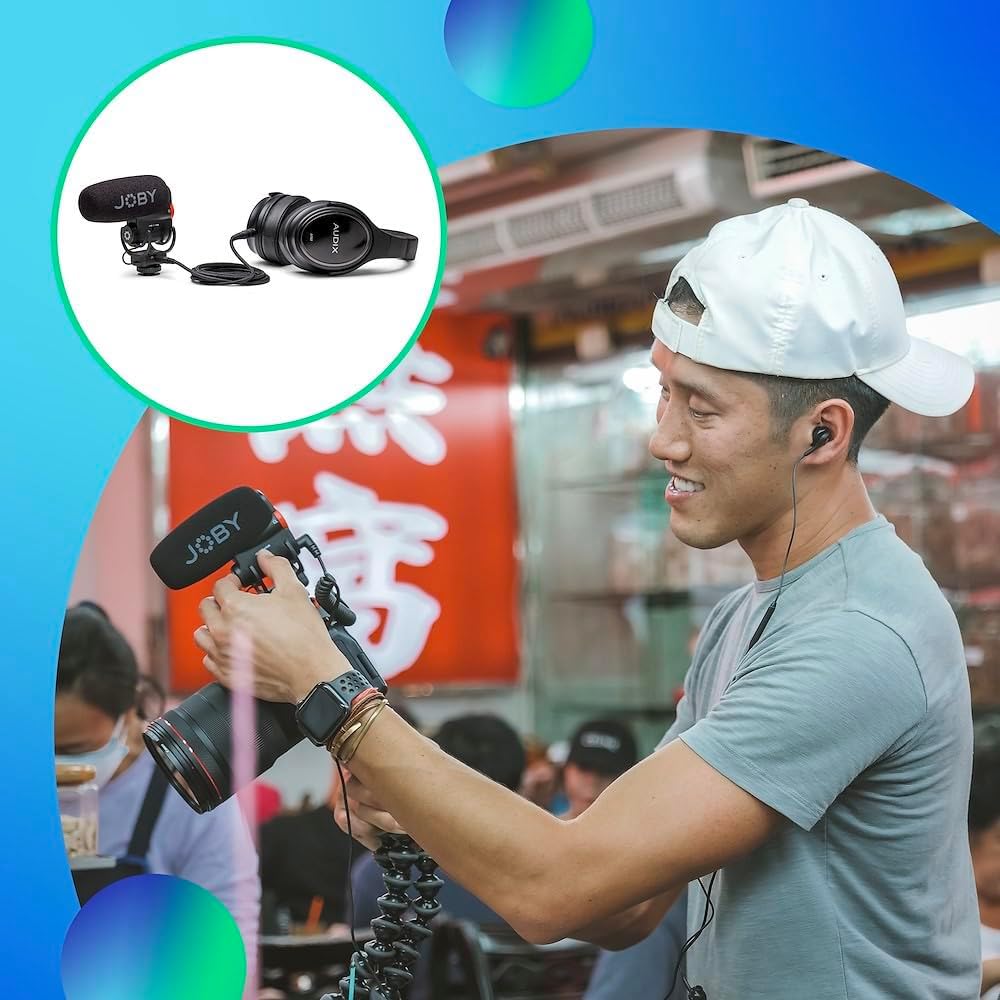
Image: All components included in the Joby Wavo PLUS package, laid out on a surface.
Setup
1. Charging the Microphone
Before initial use, fully charge the internal lithium-ion battery using the provided USB-C to USB-A or USB-C to USB-C cable. Connect the USB-C end to the microphone's USB-C port and the other end to a compatible USB power source. The LED indicator will show charging status.
2. Attaching the Foam Windshield
Gently slide the foam windshield over the microphone capsule until it is securely in place. This helps reduce wind noise and plosives during recording.
3. Mounting the Microphone
The Wavo PLUS features an integrated shock mount with a cold shoe adapter and a 1/4"-20 threaded mount for versatile attachment.
- On-Camera (Hot/Cold Shoe): Slide the microphone's cold shoe mount into your camera's hot shoe or a compatible cold shoe accessory. Tighten the locking wheel to secure it.
- Tripod/Boom Pole: The 1/4"-20 thread on the bottom allows direct attachment to tripods, boom poles, or other accessories.

Image: The Joby Wavo PLUS microphone securely mounted on top of a camera, ready for use.
4. Connecting to Your Device
- For Cameras (DSLR/Mirrorless): Use the provided TRS to TRS coiled cable. Plug one end into the microphone's 3.5mm output jack and the other end into your camera's microphone input.
- For Smartphones: Use the provided TRRS to TRRS coiled cable. Plug one end into the microphone's 3.5mm output jack and the other end into your smartphone's 3.5mm jack. (Note: Some newer smartphones may require a separate adapter, not included).
- For Computers: Use the provided USB-C to USB-C cable. Plug one end into the microphone's USB-C port and the other end into your computer's USB-C port for digital audio recording.
Operating Instructions
1. Powering On/Off (Auto-Power Mode)
The Wavo PLUS features an intelligent auto-power mode. When connected to a camera or smartphone via the 3.5mm cable, the microphone will automatically switch ON or OFF in sync with your device's power state. This conserves battery life and prevents accidental recording without audio.

Image: The Joby Wavo PLUS microphone highlighting its auto-power mode feature, which automatically turns the mic on/off with the camera.
2. Adjusting Gain Levels
Use the gain switch on the side of the microphone to adjust the input sensitivity:
- 0dB: Standard gain level for most recording situations.
- +15dB: Boosts the audio signal, useful for quiet environments or when the sound source is far away.
- -10dB: Attenuates the audio signal, ideal for loud environments to prevent distortion.
3. Live Audio Monitoring
Connect headphones to the 3.5mm headphone output jack on the microphone to monitor your audio in real-time. Use the adjustable volume wheel on the side to set your preferred monitoring level.
4. High-Pass Filter
Activate the switchable High-Pass Filter button to reduce low-frequency rumble noises, such as air conditioning, traffic, or handling noise. This helps achieve cleaner audio recordings.
5. Safe Track Recording
The microphone can record an additional "safe track" at -10dB. This secondary track acts as a backup, ensuring that if your main audio track distorts due to unexpected loud noises, you have a clean, usable alternative.

Image: The Joby Wavo PLUS microphone illustrating the safe track recording feature, which provides a backup audio track at a lower gain to prevent clipping.
6. LED Battery Level Indicator
A front multicolor LED signals the battery status, allowing you to easily monitor the microphone's power level during recording.

Image: The Joby Wavo PLUS microphone showing its front LED indicator displaying different battery levels (green for full, orange for medium, red for low).
Maintenance
- Cleaning: Use a soft, dry cloth to clean the microphone body. The foam windshield can be gently removed and cleaned if necessary.
- Storage: Store the microphone in a cool, dry place away from direct sunlight and extreme temperatures.
- Battery Care: For optimal battery longevity, avoid fully discharging the battery frequently. Recharge as needed.
Troubleshooting
- No Audio Recording:
- Ensure the microphone is properly connected to your device using the correct cable (TRS for cameras, TRRS for smartphones, USB-C for computers).
- Check if the microphone's battery is charged. The LED indicator should be green or purple.
- Verify your camera/smartphone/computer audio settings are configured to use an external microphone.
- Confirm the microphone is powered on (auto-power mode should handle this, but check the LED).
- Distorted Audio:
- Reduce the microphone's gain level using the gain switch (-10dB).
- Check your device's input audio levels and reduce them if they are too high.
- Ensure the foam windshield is properly installed to minimize plosives and wind noise.
- Low Audio Volume:
- Increase the microphone's gain level using the gain switch (+15dB).
- Check your device's input audio levels and increase them if they are too low.
- Ensure the microphone is positioned close enough to the sound source.
Specifications
| Brand | Joby |
| Model Name | Wavo PLUS |
| Item Model Number | JB01734-BWW |
| Microphone Form Factor | Shotgun |
| Polar Pattern | Unidirectional (Super Cardioid) |
| Audio Sensitivity | 10 Decibels |
| Signal-to-Noise Ratio | 75 dB |
| Dynamic Range | 110 dB |
| Power Source | Battery Powered (1 Lithium Ion battery included) |
| Battery Life | Up to 30 hours |
| Connectivity Technology | Auxiliary, USB |
| Compatible Devices | Camera, Personal Computer, Smartphone |
| Item Weight | 8.4 ounces |
| Product Dimensions | 19.69 x 19.69 x 11.02 inches |
| Material | Kunststoff (Plastic) |
Warranty & Support
For warranty information, technical support, or further assistance, please visit the official Joby website or contact their customer service. Product registration may be available for extended warranty benefits.
Official Joby Website: www.joby.com
Official Product Videos
JOBY Wavo PLUS Microphone demo
Video Description: A demonstration of the JOBY Wavo PLUS Microphone, showcasing its features and sound capabilities. This video is provided by The Gadgeteer (Seller).
JOBY Wavo Plus Microphone
Video Description: An overview of the JOBY Wavo Plus Microphone, highlighting its design and functionality. This video is provided by Casual Influencer (Seller).
Powers on when you turn camera on! Love that feature!
Video Description: A review emphasizing the auto-power feature of the JOBY Wavo Plus Microphone, which turns on automatically with the camera. This video is provided by Hai and Terrie (Seller).
Related documentsWavo PLUS


Ask a question about this manual
Ask about setup, troubleshooting, compatibility, parts, safety, or missing instructions. Manuals+ will review the question and use this page’s manual context to help answer it.