
SMC ISE35-N-25-LB
SMC ISE35-N-25-LB Digital Pressure Switch with Built-in Regulator User Manual
Model: ISE35-N-25-LB
1. Introduction
This manual provides essential information for the safe and correct installation, operation, and maintenance of the SMC ISE35-N-25-LB Digital Pressure Switch with Built-in Regulator. Please read this manual thoroughly before using the product to ensure optimal performance and prevent damage or injury.
The SMC ISE35-N-25-LB is a high-precision digital pressure switch designed for industrial applications, featuring an integrated regulator for stable pressure control. It is part of the ISE30/ISE30A series.
2. Safety Information
Always observe the following safety precautions to prevent accidents and ensure safe operation.
- Ensure all power is disconnected before installation or maintenance.
- Do not use the product outside its specified operating range.
- Only qualified personnel should perform installation and wiring.
- Verify proper wiring connections to prevent electrical shock or malfunction.
- Avoid dropping or subjecting the unit to strong impacts.
3. Product Overview
The SMC ISE35-N-25-LB is a compact digital pressure switch with a built-in regulator, offering precise pressure monitoring and control. Key features include:
- Digital display for clear pressure readings.
- Integrated pressure regulator for stable output.
- Compact design for space-saving installation.
- Easy-to-use interface for setting parameters.
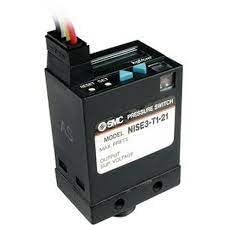
Figure 1: SMC ISE35-N-25-LB Digital Pressure Switch. This image shows the compact black unit with a digital display, control buttons, and wiring connections at the top.
4. Specifications
Refer to the following table for detailed technical specifications of the SMC ISE35-N-25-LB.
| Parameter | Value |
|---|---|
| Model | ISE35-N-25-LB |
| Type | Digital Pressure Switch with Built-in Regulator |
| Series | ISE30/ISE30A |
| Manufacturer | SMC |
| Item Weight | 3.07 Pounds |
| Unit Count | 1.0 Count |
5. Setup and Installation
5.1 Mounting
The unit should be mounted in a location free from excessive vibration, direct sunlight, and corrosive gases. Ensure adequate space for wiring and maintenance.
- Securely fasten the pressure switch using appropriate screws through the mounting holes.
- Ensure the display is easily visible for monitoring.
5.2 Pneumatic Connections
Connect the air supply and output lines according to standard pneumatic practices.
- Connect the main air supply to the inlet port of the built-in regulator.
- Connect the regulated output to the desired pneumatic circuit.
- Use appropriate sealing tape or sealant on threaded connections to prevent leaks.
5.3 Electrical Wiring
Perform electrical wiring according to the provided wiring diagram and local electrical codes. Incorrect wiring can lead to malfunction or damage.
- Power Supply: Connect the power supply wires to the designated terminals. Verify voltage requirements.
- Output Wiring: Connect the output signal wires to the control system or indicator.
- Ensure all connections are secure and insulated.
6. Operation
6.1 Initial Power-On
- After completing all connections, apply power to the unit.
- The digital display will illuminate, showing the current pressure reading.
6.2 Setting Pressure Thresholds
The ISE35-N-25-LB allows for setting high and low pressure thresholds for switching operations.
- Press the SET button to enter parameter setting mode.
- Use the UP and DOWN buttons to navigate through parameters (e.g., P1 for high threshold, P2 for low threshold).
- Press SET again to select a parameter, then use UP/DOWN to adjust the value.
- Press SET to confirm the value and move to the next parameter or exit.
6.3 Regulator Adjustment
The built-in regulator can be adjusted to achieve the desired output pressure.
- Locate the adjustment knob or screw on the regulator section.
- Turn the knob clockwise to increase pressure and counter-clockwise to decrease pressure.
- Monitor the digital display to set the precise regulated pressure.
7. Maintenance
Regular maintenance ensures the longevity and reliable operation of your pressure switch.
- Cleaning: Periodically clean the exterior of the unit with a soft, dry cloth. Do not use abrasive cleaners or solvents.
- Inspection: Regularly inspect pneumatic connections for leaks and electrical wiring for damage or loose connections.
- Filter Check: If an air filter is installed upstream, ensure it is clean and functioning correctly to prevent contaminants from entering the switch.
- Calibration: If accuracy drifts over time, professional recalibration may be required.
Warning: Always disconnect power and depressurize the system before performing any maintenance.
8. Troubleshooting
This section provides solutions to common issues encountered during the operation of the ISE35-N-25-LB.
| Problem | Possible Cause | Solution |
|---|---|---|
| No display/No power | No power supply; Incorrect wiring; Blown fuse | Check power connection; Verify wiring diagram; Replace fuse if necessary |
| Inaccurate pressure reading | Sensor clogged; Leak in pneumatic line; Unit needs calibration | Clean sensor port; Check for leaks and seal connections; Contact service for calibration |
| Switch not activating | Incorrect threshold settings; Output wiring error; Faulty switch | Review and adjust set points; Check output wiring; Contact support for replacement |
| Regulator not holding pressure | Internal leak; Damaged diaphragm; Incorrect adjustment | Check for external leaks; Contact service for repair; Re-adjust regulator |
9. Warranty and Support
For warranty information and technical support, please refer to the official SMC website or contact your local SMC distributor. Keep your purchase receipt for warranty claims.
Manufacturer: SMC
ASIN: B0BM32N25S
Date First Available: February 26, 2025
For further assistance, visit the SMC Global Website.
Related documentsISE35-N-25-LB


Ask a question about this manual
Ask about setup, troubleshooting, compatibility, parts, safety, or missing instructions. Manuals+ will review the question and use this page’s manual context to help answer it.