
1. Product Overview
The Baseus Bowie WM02 True Wireless Earphones are designed to provide a seamless audio experience with their compact design and advanced wireless technology. These earphones offer clear sound, comfortable fit, and intuitive touch controls for music playback and call management.

Image: Baseus Bowie WM02 True Wireless Earphones packaging box.
2. What's in the Box
Carefully unpack your Baseus Bowie WM02 True Wireless Earphones package. Ensure all items listed below are present and in good condition.
- Baseus Bowie WM02 True Wireless Earbuds (Left and Right)
- Charging Case
- USB-C Charging Cable
- Silicone Ear Tips (Multiple Sizes)
- User Manual (this document)
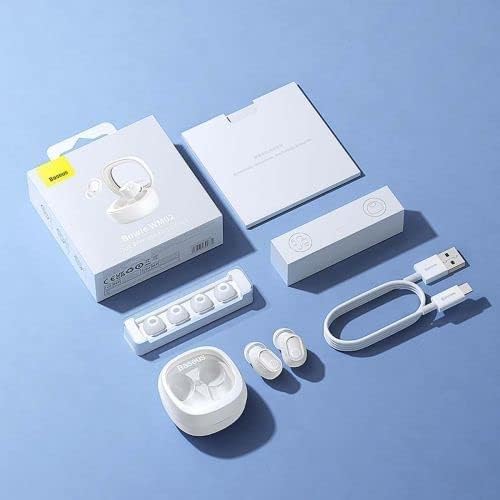
Image: Contents of the Baseus Bowie WM02 True Wireless Earphones package.
3. Setup
3.1 Charging the Earphones and Case
Before first use, fully charge the earphones and the charging case.
- Place the earbuds into the charging case. Ensure they are correctly seated in their respective slots.
- Connect the USB-C charging cable to the charging port on the case and the other end to a USB power adapter (not included) or a computer's USB port.
- The indicator light on the charging case will show charging status. Once fully charged, the light will indicate completion (refer to specific light behavior in the quick start guide if provided).
3.2 Bluetooth Pairing
Follow these steps to pair your earphones with a Bluetooth-enabled device.
- Open the charging case. The earbuds will automatically enter pairing mode, and the indicator light on the earbuds will flash.
- On your device (smartphone, tablet, etc.), enable Bluetooth.
- Search for Bluetooth devices and select "Baseus Bowie WM02" from the list.
- Once connected, the indicator lights on the earbuds will stop flashing, indicating successful pairing.

Image: Earbuds in open charging case, ready for pairing or use.
3.3 Wearing the Earbuds
For optimal sound quality and comfort, ensure a proper fit.
- Choose the ear tips that best fit your ear canal. Experiment with different sizes for the most secure and comfortable seal.
- Gently insert each earbud into your ear, twisting slightly until it feels snug and secure.
4. Operating Instructions
4.1 Power On/Off
- Power On: Open the charging case, and the earbuds will automatically power on.
- Power Off: Place the earbuds back into the charging case and close the lid. They will automatically power off and begin charging.
4.2 Touch Controls
The Baseus Bowie WM02 earphones feature intuitive touch controls on each earbud.
| Action | Left Earbud | Right Earbud |
|---|---|---|
| Play/Pause | Single tap | Single tap |
| Next Track | Triple tap | Triple tap |
| Previous Track | N/A | N/A |
| Answer/End Call | Single tap | Single tap |
| Reject Call | Press and hold (2s) | Press and hold (2s) |
| Activate Voice Assistant | Double tap | Double tap |
Note: Specific touch control functions may vary slightly. Refer to the quick start guide for any additional or alternative controls.
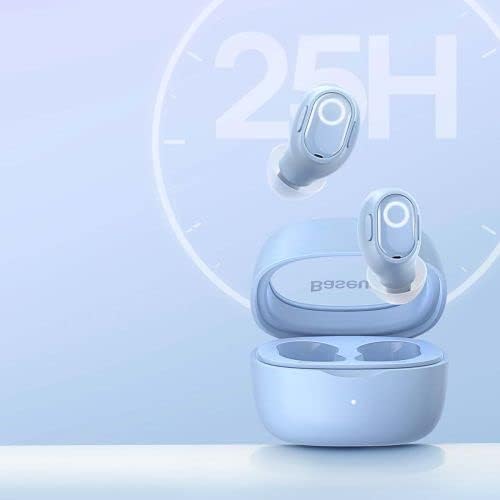
Image: Earbuds and case, illustrating long battery life.
5. Maintenance and Care
- Cleaning: Regularly clean the earbuds and charging case with a soft, dry, lint-free cloth. Do not use harsh chemicals or abrasive materials. Gently remove any earwax or debris from the ear tips and speaker mesh using a small, soft brush.
- Storage: When not in use, store the earphones in their charging case to protect them from dust and damage. Store in a cool, dry place away from direct sunlight and extreme temperatures.
- Battery Care: To prolong battery life, avoid fully discharging the earphones and case frequently. Charge them regularly, even if not in constant use.
- Water Resistance: These earphones are not waterproof. Avoid exposure to water, sweat, or high humidity.
6. Troubleshooting
If you encounter issues with your Baseus Bowie WM02 earphones, try the following solutions:
- No Sound:
- Ensure the earphones are charged.
- Check if the earphones are properly connected to your device.
- Adjust the volume on both your device and the earphones.
- Pairing Issues:
- Ensure Bluetooth is enabled on your device.
- Make sure the earphones are in pairing mode.
- Forget the device from your Bluetooth list and try pairing again.
- Ensure the earphones are not connected to another device.
- Earbuds Not Charging:
- Ensure the charging cable is securely connected.
- Check the power source.
- Clean the charging contacts on both the earbuds and the case.
- One Earbud Not Working:
- Place both earbuds back into the case, close the lid, wait a few seconds, then open it again.
- Try re-pairing the earphones with your device.
If the problem persists, contact customer support for further assistance.
7. Specifications
| Feature | Detail |
|---|---|
| Brand | Baseus |
| Model Number | NGTW180003 |
| Product Dimensions | 50 x 50 x 28 cm |
| Item Weight | 60 g |
| Color | Blue |
| Material Type | Default |
| Manufacturer | Baseus |
8. Safety Information
- Do not disassemble, repair, or modify the product. This may cause fire, electric shock, or complete damage to the product.
- Keep the product away from extreme temperatures, direct sunlight, and high humidity.
- Avoid dropping or subjecting the product to strong impacts.
- Keep out of reach of children and pets. Small parts may pose a choking hazard.
- Do not use the earphones at excessively high volumes for prolonged periods, as this may cause hearing damage.
- Be aware of your surroundings when using the earphones, especially in traffic or other potentially dangerous situations.
9. Warranty and Support
Baseus products are covered by a limited warranty. For detailed warranty terms and conditions, please refer to the warranty card included with your product or visit the official Baseus website. If you require technical support or have questions about your product, please contact Baseus customer service through their official channels.
For more information, visit the Baseus Store on Amazon.


