
1. Product Overview
The GTPLAYER GT901 Gaming Chair is designed for comfort and support during extended periods of sitting, whether for gaming or office work. It features an ergonomic design, high-quality PU leather, and multiple adjustment options to suit individual preferences.

Image: The GTPLAYER GT901 Gaming Chair integrated into a modern gaming environment.
Key Features:
- High-Quality PU Leather: Smooth, durable, breathable, and easy to clean synthetic leather for a premium feel.
- 170-Degree Reclining Function: Allows for significant recline, providing enhanced relaxation and stability.
- Ergonomic Design: Body-fitting cushion, adjustable headrest, and lumbar support to reduce strain on the back and neck.
- Reinforced Steel Frame: Provides robust support and durability, with a maximum load capacity of 136 kg (300 lbs).
- SGS Certified Gas Cylinder: Ensures safe and stepless height adjustment.
- Silent PU Casters: 360-degree rotating casters designed for smooth movement without scratching floors.
- Retractable Footrest: Integrated ottoman for additional comfort and relaxation.
2. Assembly Instructions
Assembly is required for this product. Please follow these detailed steps carefully to ensure correct and safe setup. It is recommended to have two people for assembly.
Components Checklist:
Before starting, verify that all parts are present and undamaged. Refer to the included parts diagram.
Step-by-Step Assembly:
- Attach the Casters to the Base: Insert the five silent PU casters into the holes on the star base. Ensure they are securely seated.
- Install the Gas Lift: Place the SGS certified gas lift cylinder into the center hole of the star base.
- Assemble the Seat Mechanism: Secure the seat mechanism to the underside of the seat cushion using the provided screws. Ensure the front of the mechanism faces the front of the seat.
- Attach Armrests: Fasten the armrests to the sides of the seat cushion using the designated screws.
- Connect Backrest to Seat: Align the backrest with the seat cushion and secure it using the screws.
- Mount Seat Assembly to Gas Lift: Carefully place the assembled seat onto the gas lift cylinder. The chair should now be able to rotate and adjust height.
- Install Headrest and Lumbar Support: Attach the headrest pillow and lumbar support cushion to the backrest using their elastic straps. Adjust their positions for optimal comfort.
- Install Retractable Footrest: Slide the footrest into its designated slot under the seat.

Image: Illustration of the SGS certified gas cylinder and silent PU casters, highlighting their safety and floor protection features.
3. Operating Instructions
Understand how to use the various adjustment features of your GTPLAYER GT901 chair for personalized comfort.
Height Adjustment:
- To raise the seat, lift the lever on the right side of the chair while taking your weight off the seat.
- To lower the seat, lift the lever while seated.
Reclining Function:
- Pull the lever on the left side of the chair upwards to unlock the backrest.
- Lean back to your desired angle (up to 170 degrees).
- Push the lever down to lock the backrest in position.
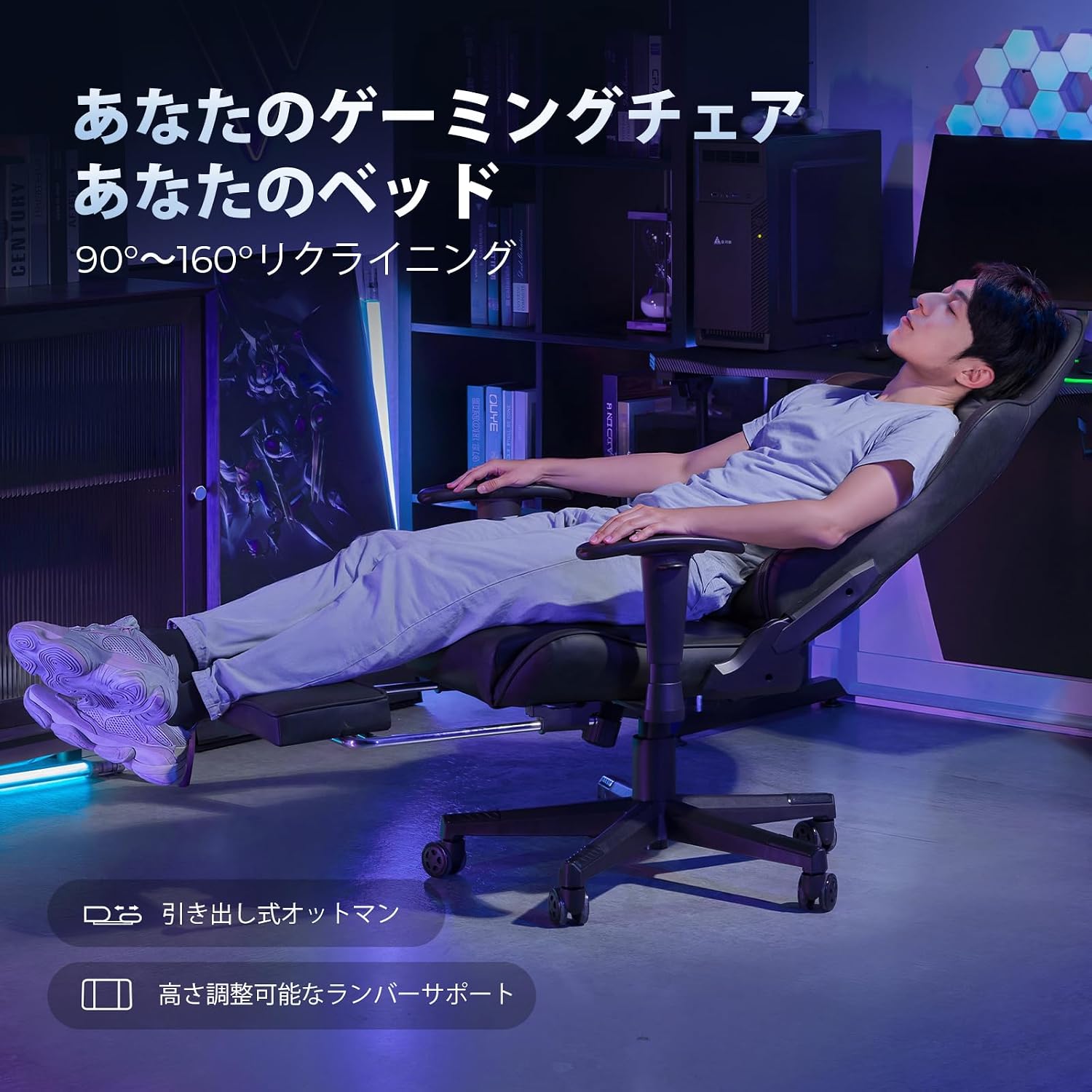
Image: The GTPLAYER GT901 Gaming Chair shown in a fully reclined position with the retractable ottoman extended, demonstrating its relaxation capabilities.
Armrest Adjustment:
- The armrests can be adjusted for height. Press the button on the side of the armrest and move it up or down to your preferred height. Release the button to lock.
Lumbar Support and Headrest:
- The lumbar support and headrest pillows are adjustable. Slide them up or down along the backrest straps to find the most comfortable position for your neck and lower back.

Image: A visual representation of the chair's ergonomic design, highlighting the 90-170 degree recline, 136kg load capacity, and 3D headrest for optimal support.
4. Maintenance
Proper maintenance ensures the longevity and appearance of your gaming chair.
Cleaning the PU Leather:
- Wipe the surface with a soft, damp cloth.
- For stubborn stains, use a mild soap solution and wipe immediately with a clean, damp cloth, then dry thoroughly.
- Avoid harsh chemicals, abrasive cleaners, or direct sunlight, as these can damage the PU leather.
Caster Maintenance:
- Periodically check the casters for hair, dust, or debris that may hinder smooth movement. Clean as necessary.
General Care:
- Regularly check all screws and bolts to ensure they are tight. Retighten if loose.
- Avoid standing on the chair or using it for purposes other than sitting.

Image: A detailed view of the chair's high-quality PU leather, emphasizing its smooth texture and durability.
5. Troubleshooting
If you encounter any issues with your GTPLAYER GT901 chair, refer to the following common problems and solutions.
Chair Does Not Adjust Height:
- Ensure the gas lift lever is fully engaged.
- Check if the gas lift cylinder is correctly installed and not damaged.
Backrest Does Not Recline or Lock:
- Verify that the recline lever is functioning correctly and not obstructed.
- Ensure all bolts connecting the backrest to the seat are securely tightened.
Chair Squeaks or Wobbles:
- Tighten all assembly bolts and screws.
- Ensure the casters are clean and properly inserted into the base.
Casters Not Rolling Smoothly:
- Remove any debris (hair, dust) from the caster wheels.
- Ensure casters are fully inserted into the base.
6. Specifications
| Feature | Detail |
|---|---|
| Brand | GTPLAYER |
| Model Number | GT901 |
| Color | Black-PU Leather |
| Material | Faux Leather (PU Leather), Memory Foam (Seat), Polycarbonate (Frame) |
| Product Dimensions (D x W x H) | 78 x 55 x 27 cm (30.7 x 21.7 x 10.6 inches) |
| Item Depth | 78 cm |
| Back Seat Interior Height | 84 cm |
| Item Weight | 18 kg (39.7 lbs) |
| Maximum Recommended Weight | 136 kg (300 lbs) |
| Reclining Stages | Stepless adjustment up to 170 degrees |
| Special Features | Adjustable, Reclining, Lumbar Support, Retractable Footrest |

Image: A diagram illustrating the various dimensions of the GTPLAYER GT901 Gaming Chair, including height, width, depth, and maximum load capacity.

Image: A table showing recommended user height (150-180cm) and weight (45-136kg) for the GTPLAYER GT901 chair, along with its static load capacity (1136kg) and impact load capacity (136kg).
7. Warranty and Support
GTPLAYER provides a comprehensive warranty and customer support for its products.
Warranty Information:
All GTPLAYER models come with a one-year product warranty. This warranty covers manufacturing defects and material flaws under normal use. Please retain your proof of purchase for warranty claims.
Customer Support:
For any inquiries, assistance with assembly, or troubleshooting, please contact our customer support team:
- Email: service.jp@gtracing.com (Replies within 24 hours, available year-round)
- Phone: 10:00-13:00, 14:00-18:00 (Japan time)
Note: Due to the spread of new coronavirus infections, phone support may be limited. We recommend contacting us via email or through the inquiry form on our official website for prompt assistance.


