
Introduction
This manual provides essential information for the Dell Latitude 9330 2-in-1 Multi-Touch Laptop. It covers initial setup, operational guidance, maintenance procedures, troubleshooting tips, and detailed product specifications. The Latitude 9330 is a versatile 13.3-inch device designed for flexible use, featuring a QHD+ touchscreen, a collaboration touchpad, and a fingerprint reader for enhanced security and productivity.
Setup
1. Unboxing and Initial Inspection
Carefully remove the laptop and its accessories from the packaging. Ensure all components are present:
- Dell Latitude 9330 2-in-1 Laptop
- Power Adapter (Charger)
- Battery (pre-installed)
Inspect the laptop for any physical damage before proceeding.

Image: Front view of the Dell Latitude 9330 2-in-1 Laptop, showcasing the display and keyboard.
2. Connecting to Power
Connect the power adapter to the laptop's USB-C Thunderbolt 4 port and then to a power outlet. The laptop is equipped with a 3-Cell, 50 WHr Lithium Ion Battery that supports Express Charge.
3. Initial Power On and Windows Setup
Press the power button, located on the palmrest with the fingerprint reader, to turn on the laptop. Follow the on-screen instructions to complete the Windows 11 Pro setup, including language selection, network connection, and user account creation.
Operating
1. Basic Controls
- Keyboard: The US English Single Pointing Backlit Keyboard provides standard input.
- Touchpad: The palmrest features a Collaboration Touchpad for navigation and gesture control.
- Touchscreen: The 13.3-inch QHD+ display supports multi-touch input.
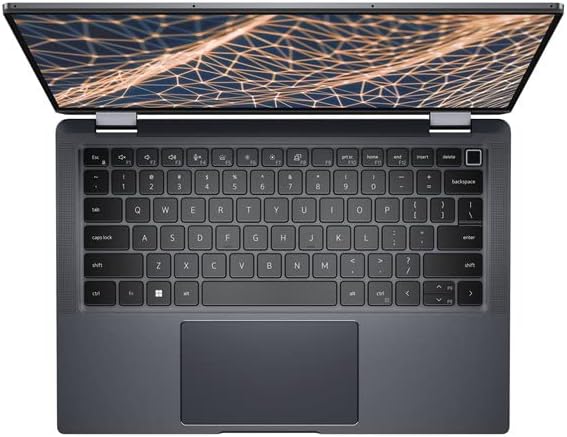
Image: Top-down view of the laptop's keyboard and collaboration touchpad.
2. 2-in-1 Modes
The Latitude 9330 can be used in multiple configurations:
- Laptop Mode: Standard clamshell configuration for typing and traditional use.
- Tent Mode: Fold the display back to stand the laptop like a tent, ideal for presentations or media viewing.
- Stand Mode: Position the keyboard face down with the screen angled upwards, suitable for touch interaction.
- Tablet Mode: Fold the display completely back against the base for a tablet-like experience.

Image: The Dell Latitude 9330 2-in-1 Laptop configured in tent mode, displaying content.
3. Security Features
- Fingerprint Reader: Integrated into the power button for secure login via Windows Hello.
- FHD IR Camera: Supports ExpressSign-In and Intelligent Privacy features. The camera includes a Safe Shutter for physical privacy.
4. Connectivity
- Wireless: Intel Wi-Fi 6E AX211 2x2 802.11ax 160MHz for high-speed internet access.
- Bluetooth: Bluetooth 5.2 for connecting wireless peripherals.
- Ports: Includes Thunderbolt 4 ports for high-speed data transfer, video output, and power delivery.
Maintenance
1. Battery Care
To maximize battery life, avoid extreme temperatures and allow the battery to discharge partially before recharging. The Express Charge feature allows for rapid charging when needed.
2. Cleaning
- Screen: Use a soft, lint-free cloth lightly dampened with water or a screen cleaner. Do not spray liquid directly onto the screen.
- Chassis and Keyboard: Use a soft, dry cloth. For stubborn dirt, a slightly damp cloth can be used. Avoid harsh chemicals.
3. Software Updates
Regularly check for and install operating system updates (Windows Update) and Dell driver updates to ensure optimal performance and security. These can typically be found in the Windows Settings or through the Dell SupportAssist application.
Troubleshooting
Common Issues and Solutions
- Laptop does not power on: Ensure the power adapter is securely connected and the outlet is functional. Try a different outlet. If the battery is completely drained, allow it to charge for at least 30 minutes before attempting to power on.
- Display issues (no image, flickering): Restart the laptop. If an external monitor is connected, try disconnecting it. Check display settings in Windows.
- Wi-Fi connectivity problems: Ensure Wi-Fi is enabled in Windows settings. Restart your router and modem. Update Wi-Fi drivers if necessary.
- Touchscreen unresponsive: Restart the laptop. Ensure there are no physical obstructions or dirt on the screen. Check for driver updates.
- Fingerprint reader not working: Ensure your finger is clean and dry. Re-register your fingerprint in Windows Hello settings.
For more detailed troubleshooting, refer to the Dell support website or contact Dell technical support.
Specifications
| Feature | Detail |
|---|---|
| Model Name | Latitude 9330 2-in-1 |
| Processor | Intel Core i7-1260U (12th Gen, 10 Core, Up to 4.70GHz) |
| RAM | 16GB LPDDR5 |
| Storage | 512GB M.2 NVMe SSD |
| Graphics | Intel Iris Xe Graphics (Integrated) |
| Display | 13.3 inch QHD+ (2560 x 1600) Anti-Reflective 500-nits ComfortView Plus Low Blue Light Touch Display |
| Operating System | Windows 11 Pro |
| Wireless Connectivity | Intel Wi-Fi 6E AX211 2x2 802.11ax 160MHz + Bluetooth 5.2 |
| Ports | Thunderbolt 4 (WLAN Capable), USB 2.0, USB 3.0, Audio Jack |
| Battery | 3-Cell, 50 WHr Lithium Ion (Express Charge Capable) |
| Camera | FHD IR Camera with Safe Shutter, ExpressSign-In, Intelligent Privacy, Temporal Noise Reduction |
| Weight | Approximately 2.95 pounds |
| Dimensions (LxWxH) | 11.6 x 8.2 x 0.56 inches |

Image: Left side view of the laptop, showing available ports.

Image: Right side view of the laptop, showing available ports.
Warranty and Support
The Dell Latitude 9330 2-in-1 Multi-Touch Laptop includes 3 Years Dell ProSupport (Expires 20 OCT. 2027). This service provides advanced support for hardware and software issues.
For technical assistance, warranty claims, or to access support resources, please visit the official Dell Support website or contact Dell customer service directly. You will typically need your service tag or express service code, which can be found on the bottom of your laptop or in the system information.


