
Introduction
The Veise RZ06 Smart Lock offers advanced security and convenient access for your home. This manual provides detailed instructions for installation, operation, and maintenance to ensure optimal performance and user experience. Please read thoroughly before proceeding with installation or use.
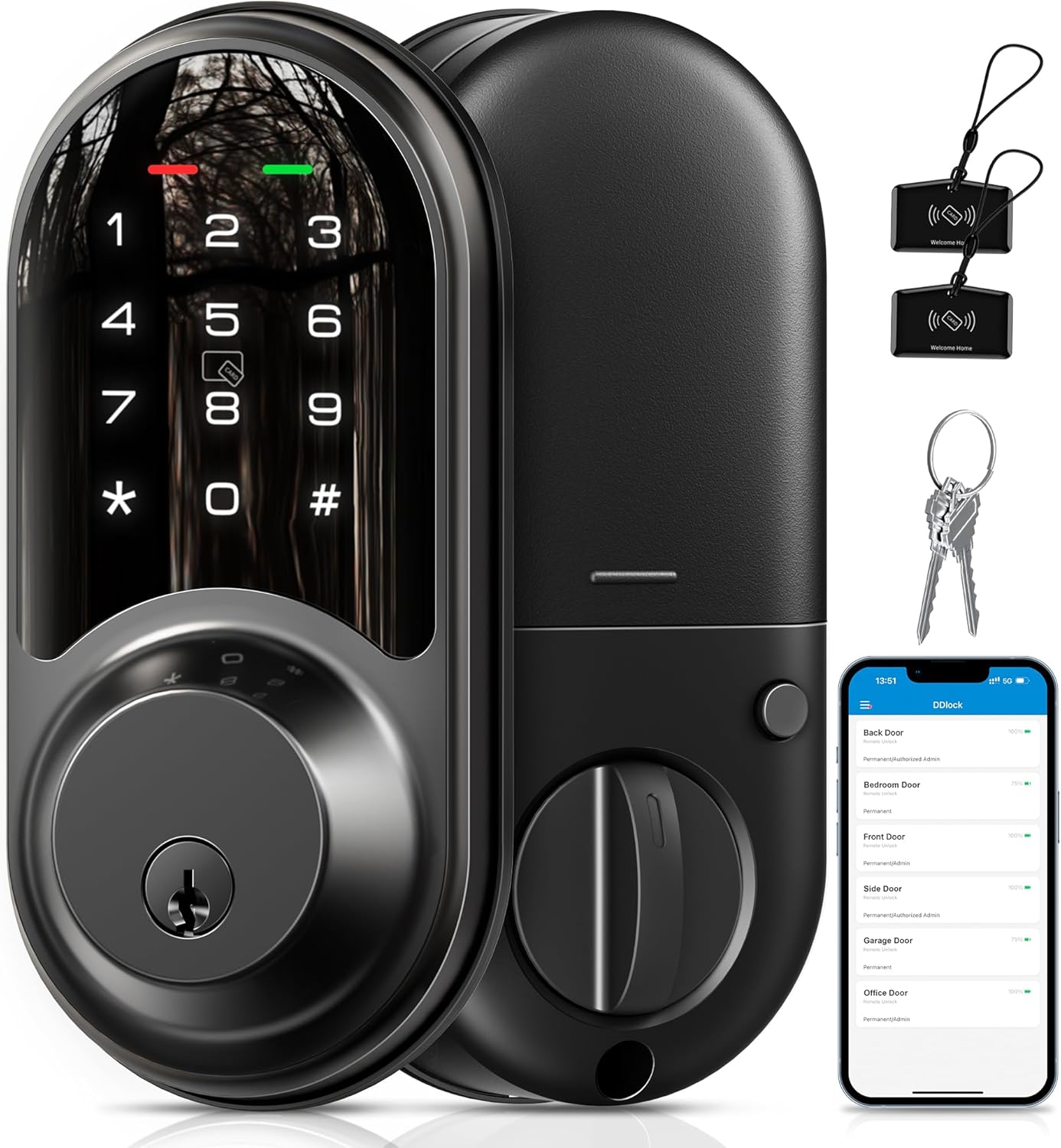
Image: Veise RZ06 Smart Lock components including the exterior keypad, interior thumb turn, physical keys, and key fobs.
Key Features
- 5-in-1 Access Methods: Unlock using the mobile app, key fobs (IC cards), touchscreen keypad, physical key, or interior thumb turn.
- App Control & eKeys: Manage access, set passwords, view access logs, and authorize eKeys for family, guests, or tenants via the dedicated mobile application.
- Multiple Passcode Options: Generate permanent, timed, one-time, and recurring passcodes for flexible access management.
- Remote Control Capability: With the optional Veise G2 Gateway (sold separately), enable remote access, real-time logging, and integration with smart home assistants like Alexa and Google Assistant.
- Automatic Locking: Configure the smart deadbolt to automatically lock after a set period (1-900 seconds) for enhanced security.
- One-Touch Locking: Conveniently lock the door by pressing the '#' button on the touchscreen keypad.
- Durable Construction: Made from aluminum and metal, designed for reliability and longevity.
Package Contents
Ensure all items are present before beginning installation:
- Smart Door Lock (Exterior Keypad and Interior Assembly)
- Mounting Plate
- Latch
- Strike Plate
- 2 Physical Keys
- 2 IC Cards (Key Fobs)
- Screws
- Installation Instruction Manual
- Programming Quick Set Up Guide
Installation Guide
The Veise RZ06 Smart Lock is designed for easy installation on most US standard left and right-handed doors. A screwdriver is typically the only tool required.
1. Prepare Your Door

Image: Door measurement guide for proper smart lock fit.
- Ensure your door meets the following specifications:
- Hole Diameter: 1-1/2" or 2-1/8" (38mm or 54mm)
- Backset: 2-3/8" or 2-3/4" (60mm or 70mm)
- Minimum Distance: 1-5/8" (40mm) between deadbolt and handle.
- Door Thickness: Typically 1-3/8" to 2" (35mm-50mm).
- Remove any existing deadbolt hardware.
2. Install the Latch and Strike Plate
- Insert the latch into the door edge and secure it with screws. Ensure the latch bolt faces the correct direction for your door swing.
- Install the strike plate on the door frame, aligning it with the latch bolt.
3. Install the Exterior Keypad Assembly
- Feed the cable through the hole in the door.
- Position the exterior keypad assembly on the outside of the door, ensuring the spindle passes through the latch mechanism.
4. Install the Interior Mounting Plate
- Attach the interior mounting plate to the door, securing it to the exterior assembly with screws. Make sure the cable is not pinched.
5. Install the Interior Assembly and Batteries
- Connect the cable from the exterior assembly to the interior assembly.
- Mount the interior assembly onto the mounting plate, securing it with screws.
- Insert 4 AA batteries (not included) into the battery compartment.
6. Handing the Lock (Left/Right Door)

Image: Visual guide for setting the lock direction for left or right-handed doors.
- Follow the instructions in the Programming Quick Set Up Guide to calibrate the lock for your door's handing (left or right). This is crucial for proper operation.
Operating Instructions
Unlocking Methods

Image: Overview of the 4-in-1 access methods for the smart lock.
1. Keypad Entry
- Touch the keypad to activate it.
- Enter your programmed passcode followed by the '#' key.
- The lock will unlock, indicated by a green light and an audible confirmation.
2. Key Fob (IC Card)
- Present the registered IC card (key fob) to the card reader area on the keypad.
- The lock will unlock, indicated by a green light and an audible confirmation.
3. Physical Key
- Insert the physical key into the keyhole.
- Turn the key to unlock the deadbolt.
4. Mobile App Control
- Open the DDLock app on your smartphone.
- Ensure Bluetooth is enabled and you are within range of the lock.
- Tap the unlock icon in the app to unlock the door.
Locking Methods
1. Automatic Locking

Image: The smart lock's automatic locking feature in action.
- If enabled in the app settings, the lock will automatically engage the deadbolt after a user-defined period (1-900 seconds) once the door is closed.
2. One-Touch Locking
- From the outside, simply press and hold the '#' key on the keypad for a few seconds.
- From the inside, turn the thumb turn to the locked position or press the small button on the interior assembly.
App Control (DDLock App)
The DDLock app provides comprehensive control and management over your Veise RZ06 Smart Lock.

Image: DDLock app main screen for managing your smart lock.
1. User Management
- Add or remove users, assigning them specific access rights and schedules.
2. Passcode Management
- Create and manage various types of passcodes:
- Permanent Passcodes: For regular users.
- Timed Passcodes: Active only during specified dates and times.
- One-Time Passcodes: Valid for a single use.
- Recurring Passcodes: Active on specific days of the week.
3. eKeys
- Grant eKeys to other users, allowing them to unlock the door via their own DDLock app.
4. Access Logs
- View a detailed history of who accessed the lock, when, and by what method.
5. Remote Control (Requires Veise G2 Wi-Fi Gateway)

Image: Features requiring the Veise G2 Wi-Fi Gateway for remote functionality.
- To enable remote access, real-time notifications, and voice control with Amazon Alexa or Google Assistant, the Veise G2 Wi-Fi Gateway (sold separately) is required.
- Once connected, you can lock/unlock your door from anywhere, receive instant alerts, and integrate with your smart home ecosystem.
Maintenance
Battery Replacement

Image: Low battery alert notification from the DDLock app.
- The lock requires 4 AA batteries. When the battery level is low (typically around 15%), the lock will provide an indicator light alert and send a notification via the DDLock app.
- To replace batteries, slide up the cover of the interior assembly, remove the old batteries, and insert new ones, ensuring correct polarity.
Troubleshooting
- Keypad not responding: Check battery levels. Replace batteries if low. Ensure the keypad is clean and dry.
- Lock not engaging/disengaging: Verify proper installation and alignment of the deadbolt. Check for any obstructions in the door frame. Perform handing calibration again if necessary.
- App connectivity issues: Ensure Bluetooth is enabled on your phone and you are within range. If using the G2 Gateway, verify its connection to Wi-Fi and the lock. Restart the app or your phone.
- Incorrect passcode alerts: Double-check the entered passcode. Ensure the passcode is still active (not expired or one-time used).
- Lock beeping randomly or malfunctioning keypad: This could indicate a hardware issue or severe environmental damage (e.g., prolonged direct sunlight exposure). Contact customer support for assistance.
Specifications
| Feature | Detail |
|---|---|
| Brand | Veise |
| Model Name | RZ06 |
| Lock Type | Deadbolt, Keypad |
| Access Methods | APP, IC Card, Passcode, Physical Key, Thumb Turn |
| Material | Aluminum, Metal |
| Color | Matte Black |
| Item Dimensions (L x W x H) | 6.3 x 2.96 x 1.15 inches |
| Item Weight | 2.6 Pounds |
| Power Source | Battery-Powered (4 AA batteries required, not included) |
| Connectivity Protocol | Bluetooth, Wi-Fi (Veise G2 Wi-Fi Gateway Required for remote access) |
| Controller Type | APP, IC Card, Passcode, Keys, Amazon Alexa, Google Assistant, Android, iOS |
| Special Features | App control & eKeys, Auto lock & one-click lock, Keyless entry, Remote control with Gateway, Anti-peeping password, Anti-cracking (lockout after 5 incorrect attempts) |
| Usage | Indoor/Outdoor doors, Front Door, Back Door, Side Door, Bedroom Door, Short-term Rental Room, Apartment |
Warranty and Support
Veise is committed to providing high-quality products and excellent customer service.
- Warranty: Veise offers at least a 2-year warranty on the RZ06 Smart Lock.
- Customer Support: Lifetime US-Based professional phone support is available Monday to Friday, 9 AM to 5 PM PST. Additionally, 24/7 after-sales email service is provided for your convenience.
For any questions, technical assistance, or warranty claims, please refer to the contact information provided in your product packaging or visit the official Veise website.


