
1. Introduction
The Formuler Z11 Pro Max is an advanced Android 11 streaming media player designed to deliver a high-quality entertainment experience. Featuring 4K resolution support, Wireless AX connectivity, and a Gigabit LAN port, this device provides robust performance for streaming various media content. This manual provides essential information for setting up, operating, and maintaining your Formuler Z11 Pro Max.
2. What's Included
Please verify that all items listed below are present in your package:
- Formuler Z11 Pro Max Unit
- HDMI Cable
- Power Cable
- Remote Control
- IR Remote Extension
- 7 Colours Wireless Keyboard (Extra Accessory)
- Magnetic Car Mount (Extra Accessory)

Figure 2.1: Formuler Z11 Pro Max packaging and included accessories, including the main unit, remote, cables, wireless keyboard, and car mount.
3. Product Overview
Familiarize yourself with the components and features of your Formuler Z11 Pro Max.
3.1 Device Features

Figure 3.1: The Formuler Z11 Pro Max device, showcasing its core features such as Android 11 operating system, 4GB DDR4 RAM, 32GB storage, 6th generation AX Wireless, Gigabit LAN, and 4K HDR10+ video support.
3.2 Ports and Connections

Figure 3.2: Rear view of the Formuler Z11 Pro Max, displaying the Gigabit LAN port, HDMI output, USB 2.0 port, Micro SD Card slot, IR Extension port, and Power Input (12V/1A).
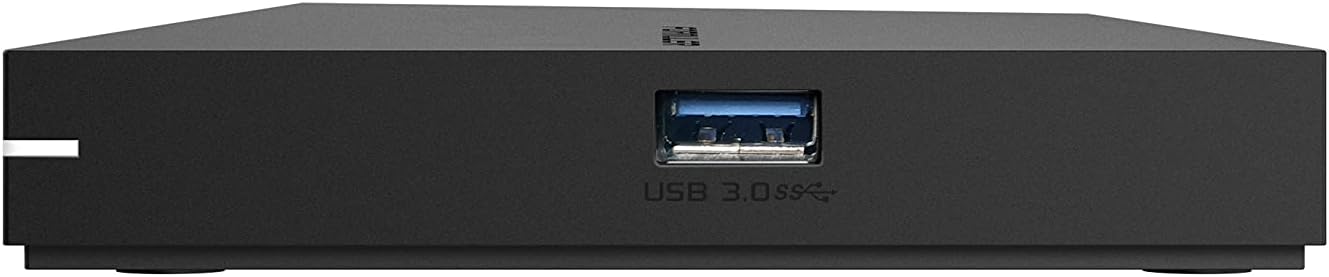
Figure 3.3: Side view of the Formuler Z11 Pro Max, showing the USB 3.0 port for high-speed data transfer.
3.3 Remote Control

Figure 3.4: Diagram of the Formuler IR1 Premium Learning IR Remote, illustrating the functions of each button for both STB and TV control, including power, volume, channel navigation, menu access, and learning mode.
3.4 Included Accessories

Figure 3.5: The included 7-color wireless mini keyboard with a USB receiver, offering enhanced navigation and typing capabilities for the streaming media player.

Figure 3.6: The included magnetic car mount, designed for securing compatible devices in a vehicle.
4. Setup Instructions
Follow these steps to set up your Formuler Z11 Pro Max.

Figure 4.1: Visual guide for the initial installation steps of the Formuler Z11 Pro Max.
- Connect to TV: Connect one end of the HDMI cable to the HDMI port on your Formuler Z11 Pro Max and the other end to an available HDMI input on your television.
- Connect Power: Plug the power cable into the 'Power Input' port on the Formuler Z11 Pro Max, then connect the other end to a power outlet.
- Power On TV and Select Input: Turn on your television and use its remote control to select the correct HDMI input source that corresponds to where you connected the Formuler Z11 Pro Max.
- Network Connection:
- Wired Network: For a wired connection, connect an Ethernet cable from your router or modem to the 'Gigabit LAN' port on the Formuler Z11 Pro Max.
- Wireless Network: For a wireless connection, the device will prompt you to select your Wi-Fi network and enter the password during the initial setup process.
- Initial Setup: Follow the on-screen instructions to complete the initial setup, which typically includes language selection, Google account login, and network configuration.
5. Operating Instructions
This section provides general guidance on operating your Formuler Z11 Pro Max.
5.1 Using the Remote Control
The included remote control allows you to navigate the user interface and control playback. Refer to Figure 3.4 for a detailed button layout and their functions. The remote also features a learning mode to control basic TV functions.
5.2 Navigating the Android TV Interface
The Formuler Z11 Pro Max runs on Android 11, providing a user-friendly interface. Use the directional pad and 'OK' button on your remote to navigate through menus, select applications, and confirm actions. The 'Back' button returns to the previous screen, and the 'Home' button takes you to the main Android TV home screen.
5.3 Installing Applications
You can download and install various applications from the Google Play Store directly on your device. Ensure you are logged in with a Google account to access the store.
5.4 Media Playback
The device supports 4K resolution and various media formats. You can play content from installed streaming apps, local storage (via USB or Micro SD card), or network shares.
6. Maintenance
Proper maintenance ensures the longevity and optimal performance of your device.
- Cleaning: Use a soft, dry cloth to clean the exterior of the device. Avoid using liquid cleaners or abrasive materials.
- Ventilation: Ensure the device is placed in a well-ventilated area to prevent overheating. Do not block the ventilation openings.
- Software Updates: Periodically check for and install software updates to ensure you have the latest features and security enhancements. These can usually be found in the device's settings menu.
- Power Cycle: If the device becomes unresponsive, disconnect the power cable, wait 10 seconds, and then reconnect it to perform a power cycle.
7. Troubleshooting
This section addresses common issues you might encounter.
7.1 No Power
- Ensure the power cable is securely connected to both the device and a working power outlet.
- Verify the power outlet is functional by plugging in another device.
7.2 No Picture/Signal on TV
- Check that the HDMI cable is firmly connected to both the Formuler Z11 Pro Max and your TV.
- Ensure your TV is set to the correct HDMI input source.
- Try a different HDMI cable or a different HDMI port on your TV.
7.3 Network Connection Issues
- Wired: Ensure the Ethernet cable is properly connected to the device and your router. Check your router's status.
- Wireless: Go to Settings > Network & Internet to verify your Wi-Fi connection. Ensure the Wi-Fi password is correct. Restart your router and the Formuler Z11 Pro Max.
7.4 Remote Control Not Responding
- Replace the batteries in the remote control.
- Ensure there are no obstructions between the remote and the device's IR receiver.
- If using the IR Extension cable, ensure it is properly connected and positioned.
8. Specifications
Detailed technical specifications for the Formuler Z11 Pro Max.
| Feature | Specification |
|---|---|
| Output Resolution | 4K (3840 x 2160) |
| RAM | 4GB DDR @2400MHz |
| Storage | 32GB eMMC |
| Operating System | Android 11 |
| Wireless Connectivity | AX 2x2 |
| Bluetooth | 5.0 |
| Ethernet | 1000M (Gigabit) |
| Dimensions (L x W x T) | 105mm x 105mm x 21mm (4.13 x 4.13 x 0.83 inches) |
| Weight | 1.83 pounds |
| Ports | 1x Power Input, 1x USB 3.0, 1x USB 2.0, 1x HDMI, 1x Gigabit LAN, 1x Micro SD Card, 1x IR Extension |
| Color | Black |
| Manufacturer | Formuler Z11 Pro Max |
9. Warranty and Support
For warranty information and technical support, please refer to the documentation provided with your purchase or visit the official Formuler website. Support resources typically include FAQs, troubleshooting guides, and contact information for customer service.


