1. Introduction
This manual provides detailed instructions for the SHANLING M3 Ultra Portable Hi-Res Bluetooth Audio Player. Please read this manual thoroughly before using the device to ensure proper operation and to maximize your listening experience.
2. Package Contents
Verify that all items listed below are included in your product package:
- SHANLING M3 Ultra Player
- Manual
- Warranty Card
- USB-C to USB-A Cable
- 2x Screen Protector (One already pre-applied)
- 2x Rear Glass Protector (One already pre-applied)

Image: Contents of the SHANLING M3 Ultra retail package.
3. Product Overview
3.1 Physical Features
The SHANLING M3 Ultra features a robust design with intuitive controls and essential connectivity ports.

Image: Front and back view of the SHANLING M3 Ultra player, showcasing its sleek design and screen.

Image: The SHANLING M3 Ultra with its 4.2-inch LCD touch screen displaying various application icons.
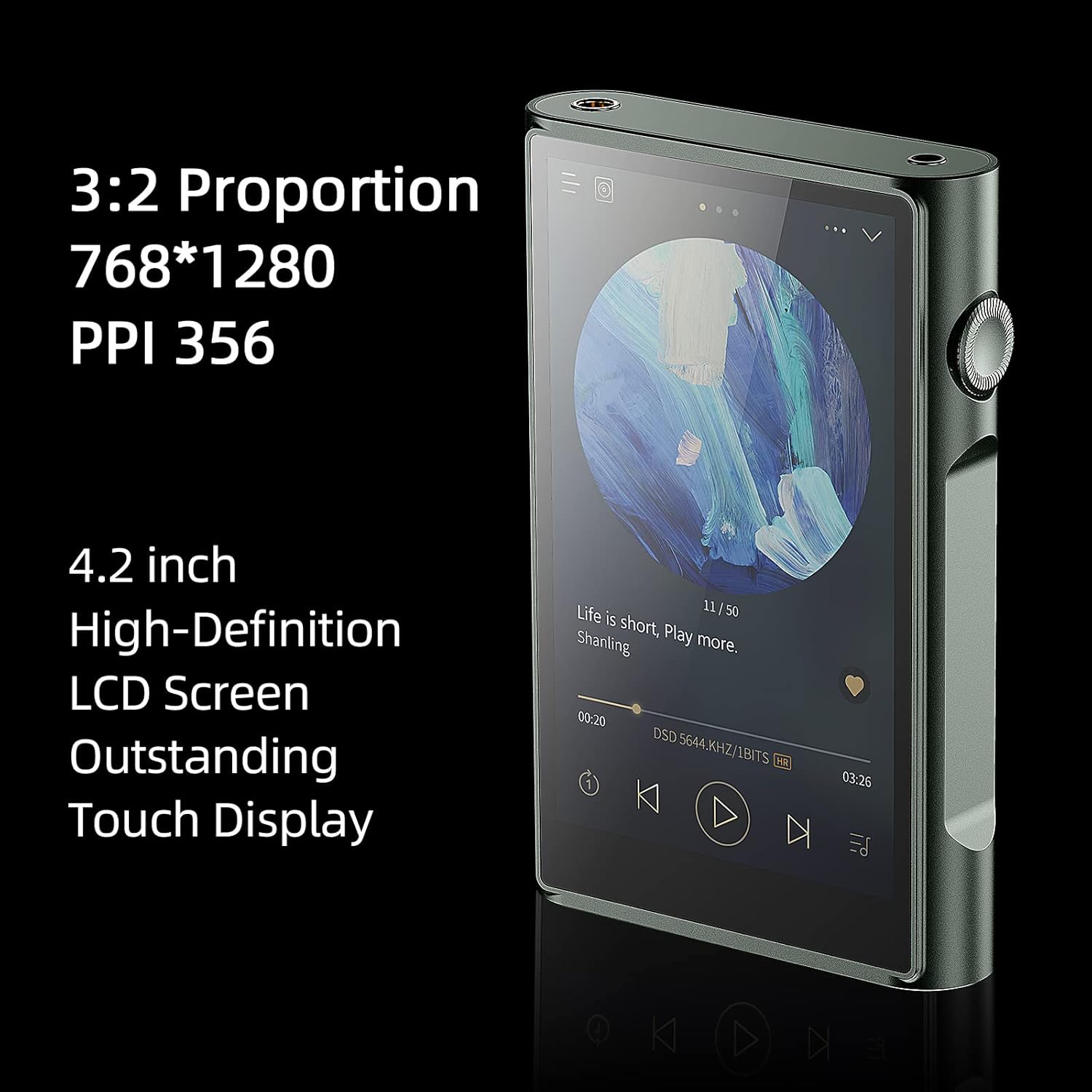
Image: A close-up of the M3 Ultra's 4.2-inch Sharp IPS high-definition display, highlighting its 3:2 proportion, 768*1280 resolution, and 356 PPI.
3.2 Ports and Buttons
The device features a combination of physical buttons and ports for comprehensive control and connectivity.
- Volume Wheel: Located on the side, also serves as the power button.
- Playback Control Buttons: Play/Pause, Next Track, Previous Track.
- 3.5mm Single-Ended Output: Standard headphone jack.
- 4.4mm Balanced Output: For balanced headphones, offering enhanced audio quality.
- USB-C Port: For charging, data transfer, and USB DAC functionality.
- MicroSD Card Slot: For expandable storage up to 2TB.

Image: Top view of the SHANLING M3 Ultra, showing the 3.5mm single-ended and 4.4mm balanced audio output jacks.
4. Setup
4.1 Powering On/Off
- To power on, press and hold the volume wheel until the screen illuminates.
- To power off, press and hold the volume wheel until the power-off options appear, then select 'Power Off'.
4.2 Initial Configuration
Upon first startup, follow the on-screen prompts to configure basic settings such as language, Wi-Fi connection, and time zone.
Video: This video demonstrates the process of switching languages on SHANLING Digital Audio Players, specifically for devices running on the Snapdragon 665 platform.
4.3 Expanding Storage with MicroSD Card
The M3 Ultra supports MicroSD cards up to 2TB for additional storage.
- Locate the MicroSD card slot on the side of the device.
- Gently insert the MicroSD card into the slot until it clicks into place.
- To remove, push the card inward until it springs out.
5. Operating Instructions
5.1 Navigation
The M3 Ultra features a 4.2-inch LCD touch screen for intuitive navigation. Swipe, tap, and pinch to interact with the user interface. The physical volume wheel also allows for menu scrolling and selection in certain contexts.
5.2 Music Playback
Utilize the pre-installed SHANLING Music app for local music playback. The app supports various audio formats and offers features like playlist creation, equalizer adjustments, and browsing by artist, album, or genre.

Image: The SHANLING M3 Ultra displaying the built-in Shanling Music APP, which supports DLNA, AirPlay, and NAS functions.
5.3 App Installation
Running on an open Android 10 system with AGLO technology, the M3 Ultra allows installation of various streaming and music applications. Access the Google Play Store or other app sources to download your preferred apps.
5.4 Connectivity
- Bluetooth 5.0: Supports high-quality codecs such as LDAC, LHDC, aptX HD, aptX, and SBC for both transmission and reception.
- Wi-Fi: Features 2.4G/5G dual-band Wi-Fi with MIMO technology for stable data transmission.
- DLNA, Airplay, NAS: Supports various network streaming protocols for versatile music access.
5.5 MQA Playback
The M3 Ultra supports MQA 16X full decoding, allowing you to experience Master Quality Authenticated audio files as intended by the artist.

Image: The SHANLING M3 Ultra screen showing MQA 16X support, indicating its capability for high-definition audio decoding.
6. Key Features
6.1 Processor and Operating System
The M3 Ultra is powered by an Octa-Core Snapdragon 665 processor, providing smooth performance for its Android 10 operating system. It comes with 3GB RAM and 32GB internal storage, expandable up to 2TB via MicroSD.

Image: An internal view highlighting the Qualcomm Snapdragon 665 CPU, 3GB RAM, 32GB ROM, and Android 10 operating system.
6.2 High-Performance DAC and Amplifier
Equipped with dual ES9219C DAC/AMP chips and two RT6863 independent amplifier chips, the M3 Ultra delivers high-fidelity audio. It incorporates 4x47μF Japanese ELNA high-quality silk film capacitors and polymer tantalum capacitors to reduce distortion and ensure sound purity. The device also features a self-developed FPGA with 45MHz/49MHz dual active crystal oscillators for stable and pure sound.

Image: Detailed view of the M3 Ultra's audio architecture, including dual ES9219C DAC/AMPs, dual RT6863 op-amps, ELNA premium silk film capacitors, and polymer tantalum capacitors.
6.3 Audio Outputs and Gain
The M3 Ultra offers both 3.5mm single-ended and 4.4mm balanced outputs. It provides two levels of gain, with output power reaching 140mW@32Ω for single-ended and 260mW@32Ω for balanced output, accommodating various headphone types.

Image: Visual representation of the M3 Ultra's 3.5mm single-ended and 4.4mm balanced output capabilities, including gain levels and battery life estimates.
6.4 Battery Life
The device is equipped with a 3500mAh battery, offering approximately 20.5 hours of playback via 3.5mm single-ended output, 14.5 hours via 4.4mm balanced output, and 45.5 hours via Bluetooth transmission. It supports QC3.0 18W fast charging.
Video: An official product video showcasing the SHANLING M3 Ultra High Resolution Digital Audio Player and its features.
7. Specifications
| Feature | Specification |
|---|---|
| Product Dimensions | 0.71 x 2.78 x 4.29 inches |
| Item Weight | 14 ounces |
| Manufacturer | SHANLING |
| Item Model Number | SHANLING M3 Ultra |
| Batteries | 1 Lithium Ion batteries required (included) |
| Model Name | M3 Ultra |
| Special Feature | 16X MQA, 2.4G/5G WiFi, 3GB+32GB+2TB Scalable, Dual ES9219C DAC, Hi-Res Audio |
| Connectivity Technology | Bluetooth, USB, Wi-Fi |
| Memory Storage Capacity | 3 GB (RAM) + 32 GB (ROM) + 2TB Scalable |
| Color | M3 Ultra Green |
| Screen Size | 4.2 Inches |
| Compatible Devices | Laptop, Headphone, Personal Computer |
| Media Type | Micro SD |
8. Maintenance
To ensure the longevity and optimal performance of your SHANLING M3 Ultra, follow these maintenance guidelines:
- Keep the device clean using a soft, dry cloth. Avoid abrasive materials or harsh chemicals.
- Protect the screen and body from scratches and impacts. Use the provided screen and rear glass protectors.
- Avoid exposing the device to extreme temperatures, humidity, or direct sunlight.
- Ensure all ports are free from dust and debris.
9. Troubleshooting
If you encounter issues with your M3 Ultra, try the following steps:
- Device not powering on: Ensure the battery is charged. Connect the device to a power source using the USB-C cable.
- No sound: Check headphone connections and volume levels. Ensure the correct output (3.5mm or 4.4mm) is selected if applicable.
- Connectivity issues (Bluetooth/Wi-Fi): Restart the device and try reconnecting. Ensure the device is within range of the network or Bluetooth accessory.
- App crashes or slow performance: Close background applications. Restart the device. Consider clearing the cache of problematic apps or performing a factory reset if issues persist (back up data first).
- MicroSD card not recognized: Ensure the card is inserted correctly. Try reinserting the card or testing with a different card.
10. Warranty and Support
SHANLING provides a 1-year maintenance service for its products. For any technical consultation or after-sales service, you can contact SHANLING customer support, who are available 24 hours a day. Products with quality problems will be replaced unconditionally within the warranty period.
For further assistance, please refer to the official SHANLING website or contact their customer service directly.


