Introduction
The AGPTEK T06S is a versatile WiFi MP3 player designed for music, video, and app usage. Featuring a 4-inch touch screen, Bluetooth connectivity, and a 5MP camera, it offers a comprehensive portable entertainment experience. This manual provides instructions for setting up, operating, maintaining, and troubleshooting your device.

Image: Front view of the AGPTEK T06S WiFi MP3 Player.
Package Contents
Ensure all items are present in the package:
- AGPTEK T06S MP3 Player
- USB-C Cable
- Earphones
- User Manual
- Silicone Case
- Screen Protector Film

Image: The AGPTEK T06S MP3 Player and its included accessories: USB-C cable, earphones, manual, silicone case, and screen protector film.
Setup
1. Charging the Device
Before first use, fully charge the AGPTEK T06S. Connect the provided USB-C cable to the device and a power source (e.g., computer USB port or USB wall adapter). A full charge typically takes approximately 2 hours.
2. Powering On/Off
- To power on: Press and hold the Power button until the screen lights up.
- To power off: Press and hold the Power button, then select "Power off" on the screen.
3. Initial Wi-Fi Connection
To access online features and apps, connect to a Wi-Fi network:
- Go to Settings.
- Select Network & Internet, then Wi-Fi.
- Turn Wi-Fi On.
- Select your desired network from the list and enter the password if prompted.
- Important: Ensure the device's date and time are correctly set before attempting to connect to Wi-Fi, as incorrect settings can prevent successful connection.

Image: The AGPTEK T06S display showing the Google Play Store interface with various app icons, indicating its Wi-Fi capabilities.
4. Bluetooth Pairing
To connect Bluetooth headphones or speakers:
- Go to Settings.
- Select Connected devices, then Bluetooth.
- Turn Bluetooth On.
- Ensure your Bluetooth accessory is in pairing mode.
- Select your accessory from the list of available devices to pair.
- Note: Avoid using Bluetooth near 2.4 GHz signal source devices (e.g., routers) to prevent signal interference.

Image: The AGPTEK T06S MP3 Player displaying music playback, with icons for Bluetooth earphones and speakers, illustrating its Bluetooth connectivity.
5. Expanding Storage
The device has 16GB of internal storage and supports Micro SD cards up to 128GB for additional storage. Insert a Micro SD card into the designated slot to expand your music and media library.
Operating Instructions
1. Navigation and Interface
The AGPTEK T06S features a 4-inch HD full touch screen (480x800 resolution) for easy navigation. Swipe, tap, and pinch gestures are used to interact with the Android 8.1 operating system.
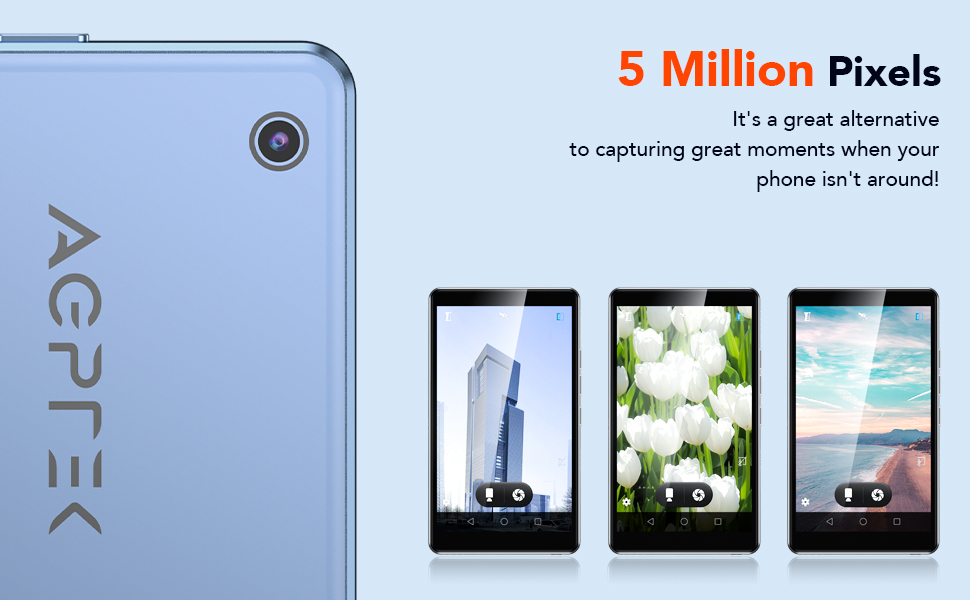
Image: The AGPTEK T06S MP3 Player displaying a video on its 4-inch full touch screen, highlighting its smooth operation and HD display.
2. Music Playback
The device supports various audio formats including MP3, OGG, AAC, FLAC, APE, and MAV, offering HiFi lossless sound quality. You can listen to stored music or stream online via Wi-Fi.
- To add music: Connect the device to a computer using the USB-C cable and transfer audio files.
- To play music: Open the Music app and select your desired tracks or playlists.
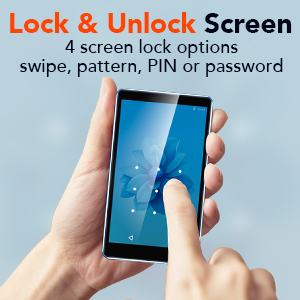
Image: A person using the AGPTEK T06S MP3 Player with wired earphones, demonstrating its music playback capabilities both online and offline.
3. Video Playback
The T06S supports 1080p HD video playback without conversion for formats like RM, AVI, RMVB, 3GP, FLV, MP4, DAT, MKV, MPG, and MOV. Videos can be watched on the 4-inch screen or through the built-in speaker.
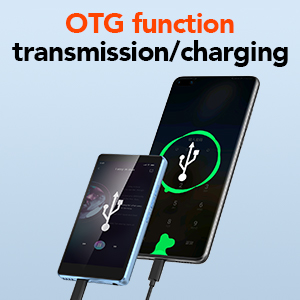
Image: The AGPTEK T06S MP3 Player playing a video, with sound waves emanating from the device, indicating the built-in speaker feature.
4. Camera Function
The device includes a 5MP camera for capturing photos and videos. Open the Camera app to access its functions.

Image: Hands holding the AGPTEK T06S MP3 Player, using its 5-megapixel camera to capture a moment.
5. App Installation
Running on a customized Android 8.1 OS, the T06S supports downloading various applications from the Android market, such as Spotify, TikTok, and Facebook.
6. Other Features
- FM Radio: Access the FM Radio app for auto-searching stations between 87.5-108MHz.
- Voice Recorder: Use the built-in voice recorder for audio notes.
- E-books: Read e-books on the 4-inch HD screen.
- OTG Function: Supports On-The-Go (OTG) for data transmission and charging with compatible devices.
- Screen Lock: Configure screen lock options including swipe, pattern, PIN, or password for security.
- Image Editing: Basic image editing and printing functions are supported.

Image: The AGPTEK T06S displaying its lock screen feature, offering swipe, pattern, PIN, or password options.

Image: The AGPTEK T06S connected via OTG for data transfer or charging.

Image: The AGPTEK T06S displaying the FM radio interface with auto-search functionality.
Maintenance
1. Battery Life
The device has a built-in 1200 mAh battery. Actual battery life varies based on usage conditions (e.g., screen brightness, volume, Wi-Fi/Bluetooth usage, file type). Refer to the table below for estimated usage times:
| Test Environment | APP | Usage Mode | Usage Time |
|---|---|---|---|
| Offline playback (WiFi and Bluetooth off) | Music (Screen off status) | Wired headset | 28 Hours |
| Music (Screen off status) | Speaker | 14 Hours | |
| Video | Wired headset | 4 Hours | |
| Online play (WiFi and Bluetooth on) | FM Radio (Screen off status) | Wired headset | 29 Hours |
| FM Radio (Screen off status) | Speaker | 10 Hours | |
| Music (Screen off status) | Speaker | 6 Hours | |
| Music (Screen off status) | Bluetooth headset | 15 Hours | |
| Video | Wired headset | 3 Hours | |
| Video | Speaker | 2.5 Hours |
For optimal battery performance, avoid extreme temperatures and use the provided USB-C cable for charging.
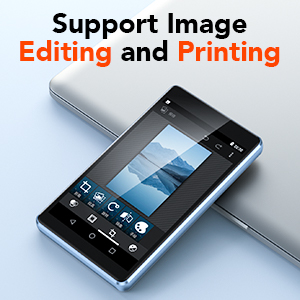
Image: The AGPTEK T06S MP3 Player connected for charging, with an 80% battery level displayed on the screen.
2. Software Updates
Periodically check for system updates in the device settings to ensure optimal performance and access to the latest features. Updates can improve compatibility with apps and overall system stability.
3. General Care
- Keep the device dry and away from extreme temperatures.
- Clean the screen with a soft, lint-free cloth.
- Avoid dropping the device or subjecting it to strong impacts.
Troubleshooting
1. Wi-Fi Connection Issues
If you experience difficulty connecting to Wi-Fi, ensure the device's date and time are set correctly. Incorrect date/time settings can prevent successful network authentication.
2. SD Card Not Detected After Update
If an SD card is not detected after a system update:
- Close any related notifications.
- Remove the SD card.
- Power off the device.
- Reinsert the SD card.
- Power on the device.
- Allow the firmware to update completely without the device going to sleep. You may need to disable sleep mode temporarily or keep the screen active.
3. Bluetooth Interference
If Bluetooth connectivity is unstable or experiences interference, avoid using the device near 2.4 GHz signal sources such as Wi-Fi routers or base stations.
Specifications
| Feature | Detail |
|---|---|
| Brand | AGPTEK |
| Model Name | T06S |
| Connectivity Technology | Bluetooth, USB, Wi-Fi |
| Memory Storage Capacity | 16 GB (expandable up to 128 GB via Micro SD) |
| Screen Size | 4 Inches |
| Display Technology | TFT |
| Supported Audio Formats | AAC, APE, FLAC, MP3, OGG, MAV |
| Supported Video Formats | RM, AVI, RMVB, 3GP, FLV, MP4, DAT, MKV, MPG, MOV, TS (1080p HD without conversion) |
| Camera | 5 MP |
| Processor | 8-core |
| RAM | 2 GB |
| ROM | 16 GB |
| Operating System | Customized Android 8.1 |
| Battery Capacity | 1200 mAh |
| Charging Port | USB-C |

Image: A visual representation of the MTK 8-core processor, highlighting the device's internal hardware capabilities.
Warranty and Support
AGPTEK provides comprehensive support for your T06S MP3 Player:
- 1-Year Warranty: Your device is covered by a one-year warranty from the date of purchase.
- Lifetime Technical Support: Access technical assistance for the lifespan of your product.
- 7x24 Online Service: Customer service is available 24 hours a day, 7 days a week.
For support, please refer to the contact information provided in your warranty card or visit the official AGPTEK website.

Image: Icons representing AGPTEK's service commitments: 1-Year Warranty, Lifetime Technical Support, and 7x24 Online Service.


