
Moog MIN-MOOG-D-04-01
Moog Minimoog Model D Analog Synthesizer User Manual
Model: MIN-MOOG-D-04-01
Introduction
Welcome to the Moog Minimoog Model D Analog Synthesizer user manual. This document provides essential information for setting up, operating, maintaining, and troubleshooting your instrument. The Minimoog Model D is a legendary monophonic analog synthesizer, renowned for its rich sound and intuitive interface.
This instrument features a 44-key velocity- and aftertouch-enabled keybed, three powerful oscillators, a classic Moog Ladder Filter, and extensive modulation capabilities.

Important Safety Instructions
- Read these instructions.
- Keep these instructions.
- Heed all warnings.
- Follow all instructions.
- Do not use this apparatus near water.
- Clean only with dry cloth.
- Do not block any ventilation openings. Install in accordance with the manufacturer’s instructions.
- Do not install near any heat sources such as radiators, heat registers, stoves, or other apparatus (including amplifiers) that produce heat.
- Do not defeat the safety purpose of the polarized or grounding-type plug. A polarized plug has two blades with one wider than the other. A grounding type plug has two blades and a third grounding prong. The wide blade or the third prong are provided for your safety. If the provided plug does not fit into your outlet, consult an electrician for replacement of the obsolete outlet.
- Protect the power cord from being walked on or pinched particularly at plugs, convenience receptacles, and the point where they exit from the apparatus.
- Only use attachments/accessories specified by the manufacturer.
- Use only with the cart, stand, tripod, bracket, or table specified by the manufacturer, or sold with the apparatus. When a cart is used, use caution when moving the cart/apparatus combination to avoid injury from tip-over.
- Unplug this apparatus during lightning storms or when unused for long periods of time.
- Refer all servicing to qualified service personnel. Servicing is required when the apparatus has been damaged in any way, such as power-supply cord or plug is damaged, liquid has been spilled or objects have fallen into the apparatus, the apparatus has been exposed to rain or moisture, does not operate normally, or has been dropped.
Setup
Unpacking
Carefully remove the Minimoog Model D from its packaging. Inspect the instrument for any signs of damage during transit. Retain all packaging materials for future transport or storage.
Placement
Place the synthesizer on a stable, flat surface. Ensure adequate ventilation around the unit. Avoid placing it near direct sunlight, heat sources, or areas with high humidity.
Power Connection
Connect the provided power cord to the "POWER INLET" on the rear panel of the Minimoog Model D. Plug the other end into a suitable AC power outlet. The unit operates on standard line voltage as indicated on the power inlet.
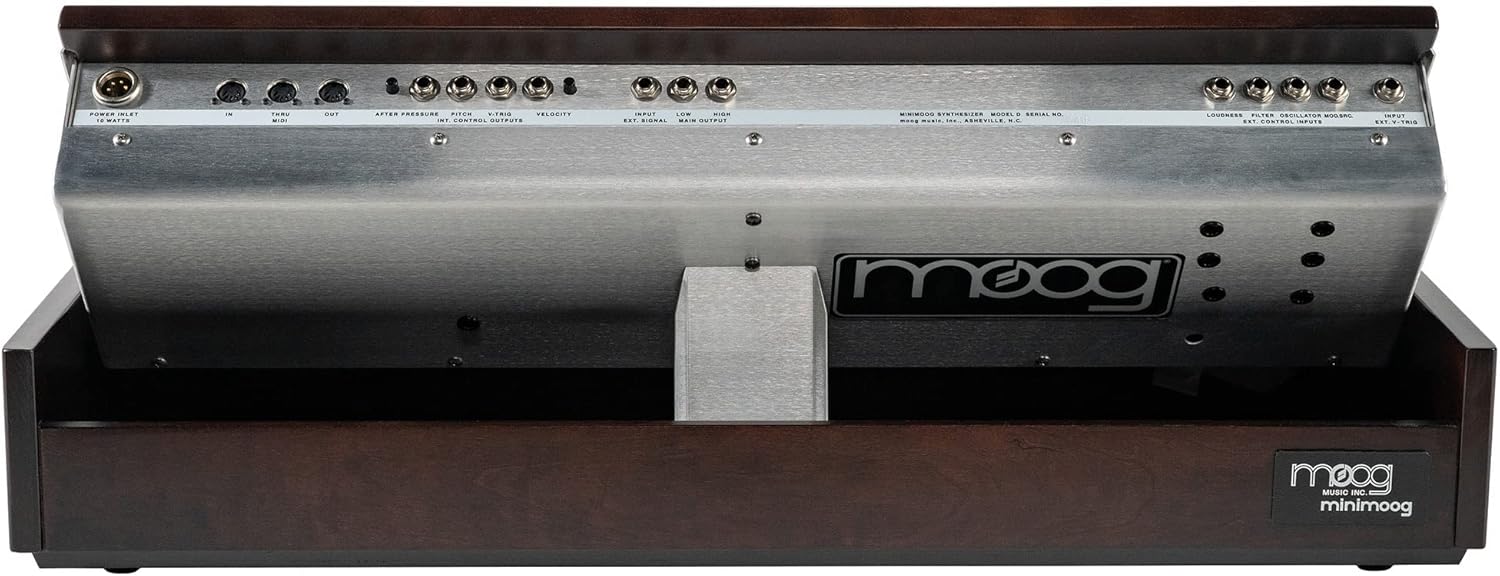
Audio Connections
The Minimoog Model D features both high and low-level audio outputs.
- Main Output (High): Connect this 1/4" jack to the input of your audio interface, mixer, or amplifier for line-level signals.
- Main Output (Low): Use this 1/4" jack for lower-level signals, suitable for certain vintage equipment or specific effects.
- Headphones: Connect standard 1/4" stereo headphones to the "PHONES" jack on the front panel for private monitoring.
MIDI Connections
The Minimoog Model D supports MIDI for external control.
- MIDI In: Connect a MIDI cable from your MIDI controller or computer interface to the MIDI In port to send note, velocity, and other MIDI data to the synthesizer.
- MIDI Out: Connect a MIDI cable from the MIDI Out port to another MIDI device to transmit MIDI data generated by the Minimoog Model D.
- MIDI Thru: The MIDI Thru port passes through the incoming MIDI data from the MIDI In port, allowing you to daisy-chain multiple MIDI devices.
Control Voltage (CV) Connections
The Minimoog Model D includes various CV inputs and outputs for integration with other analog synthesis equipment.
- After Pressure: CV output for aftertouch.
- Pitch: CV input for controlling oscillator pitch.
- V-TRIG: Gate input for triggering envelopes.
- Velocity: CV input for controlling velocity response.
- External Signal Input: 1/4" jack for processing external audio signals through the Minimoog's filter and VCA.
- Loudness, Filter, Oscillator Modulation, Key Control Inputs: Additional CV inputs for advanced modulation.
Operating Instructions
Powering On
Once all connections are made, flip the "POWER" switch on the front panel to the ON position. The power indicator light will illuminate.
Front Panel Overview
The front panel of the Minimoog Model D is divided into several sections:
- Controllers: Pitch Bend, Modulation Wheel, LFO Rate, Glide, Decay.
- Oscillator Bank: Three voltage-controlled oscillators (VCOs) with individual waveform selection and frequency controls.
- Mixer: Blends the signals from the oscillators, external input, and noise generator.
- Modifiers: Includes the Voltage Controlled Filter (VCF) and Voltage Controlled Amplifier (VCA) with their respective envelope generators (Filter Contour and Loudness Contour).
- Output: Master volume and headphone jack.

Basic Sound Generation
- Oscillators: Select a waveform (e.g., Sawtooth, Square) for Oscillator 1, 2, or 3. Adjust their "FREQUENCY" knobs to set their pitch.
- Mixer: Turn up the "VOLUME" knobs for the active oscillators in the Mixer section. You can also add "NOISE" (White or Pink) or an "EXTERNAL INPUT".
- Filter: Adjust the "CUTOFF FREQUENCY" to shape the timbre. Increase "EMPHASIS" (Resonance) for a more pronounced filter effect. The "AMOUNT OF CONTOUR" knob controls how much the Filter Contour affects the cutoff.
- Loudness Contour: This is the VCA envelope. Adjust "ATTACK TIME", "DECAY TIME", and "SUSTAIN LEVEL" to control the amplitude shape of the sound.
- Output: Adjust the "VOLUME" knob in the Output section to control the overall output level.
Controllers
- Pitch Bend Wheel: Allows for real-time pitch modulation.
- Modulation Wheel: Can be assigned to modulate various parameters, typically filter cutoff or oscillator pitch.
- LFO Rate: Controls the speed of the Low Frequency Oscillator, used for vibrato or tremolo effects.
- Glide: Controls the portamento (slide) time between notes.
- Decay: Controls the decay time of both the Filter and Loudness Contours.

Advanced Features
The Minimoog Model D offers deep sound design capabilities. Experiment with:
- Oscillator Sync: Synchronize oscillators for complex harmonic textures.
- Filter Modulation: Use Oscillator 3 or the LFO to modulate the filter cutoff.
- External Input: Process external audio signals through the Minimoog's legendary filter.
- Keyboard Control: Adjust how the keyboard tracks the filter cutoff.
Maintenance
Cleaning
Clean the exterior of the Minimoog Model D with a soft, dry, lint-free cloth. Do not use abrasive cleaners, solvents, or waxes. Avoid spraying liquids directly onto the instrument.
Storage
When not in use, store the synthesizer in a cool, dry place, away from direct sunlight and extreme temperatures. If storing for extended periods, it is recommended to use the original packaging or a dedicated flight case.
Calibration
The Minimoog Model D is an analog instrument and may occasionally require calibration to maintain optimal performance, especially after significant temperature changes or long periods of disuse. Refer to authorized service centers for professional calibration. Do not attempt internal adjustments unless you are a qualified technician.

Troubleshooting
| Problem | Possible Cause | Solution |
|---|---|---|
| No Sound | Power off; Volume low; Cables disconnected; Mixer levels down; Filter/Loudness contour settings. | Check power switch and indicator light. Increase master volume and amplifier/mixer volume. Ensure all audio cables are securely connected. Verify oscillator and mixer levels are up. Check Attack/Decay/Sustain settings on Loudness Contour. |
| Incorrect Pitch / Tuning Issues | Oscillators out of tune; Glide engaged; Temperature fluctuations. | Allow the unit to warm up for 15-20 minutes. Adjust individual oscillator "FREQUENCY" knobs. Ensure "GLIDE" is off if not desired. If persistent, professional calibration may be needed. |
| MIDI Not Responding | Incorrect MIDI connections; MIDI channel mismatch; External controller issue. | Verify MIDI In/Out/Thru connections. Ensure the external controller is sending data on the correct MIDI channel. Test with a different MIDI cable or controller if possible. |
| Distorted Sound | Output level too high; Overload engaged; External input level too high. | Reduce the master "VOLUME" knob. Check if "OVERLOAD" switch is engaged in the Mixer section (unless desired). Lower the input level of any external audio source. |
Specifications
| Feature | Detail |
|---|---|
| Model Name | Minimoog Model D |
| Model Number | MIN-MOOG-D-04-01 |
| Brand | Moog |
| Type | Monophonic Analog Synthesizer |
| Keybed | 44-key, Velocity- and Aftertouch-enabled |
| Oscillators | 3 x Voltage Controlled Oscillators (VCOs) |
| Filter | Moog Ladder Filter |
| Connectivity | MIDI In/Out/Thru, CV Inputs/Outputs (After Pressure, Pitch, V-TRIG, Velocity, External Signal), 3.5mm Jack, 6.35mm Jack |
| Power Source | Corded Electric |
| Dimensions (L x W x H) | 33.3 x 26.1 x 10.1 inches |
| Item Weight | 46.5 pounds |
| Body Material | Aluminum with Appalachian Cherry wood cabinet |
| UPC | 040232638893 |
Warranty Information
For detailed warranty information, please refer to the official Moog Music website or contact Moog customer support. Keep your proof of purchase for warranty claims.
Customer Support
For technical assistance, service, or further inquiries, please visit the official Moog Music support page or contact their customer service department.
Moog Music Official Website: www.moogmusic.com
Related documentsMIN-MOOG-D-04-01


Ask a question about this manual
Ask about setup, troubleshooting, compatibility, parts, safety, or missing instructions. Manuals+ will review the question and use this page’s manual context to help answer it.