
Introduction
This manual provides detailed instructions for the assembly, operation, and maintenance of your Bresser Junior 70/400 Children's Telescope. Please read this manual thoroughly before using the telescope to ensure proper function and longevity of the product. This telescope is designed for young astronomy enthusiasts aged 8 and over, offering an excellent introduction to observing celestial and terrestrial objects.
Package Contents
Before beginning assembly, please verify that all components listed below are present in your package:
- Children's telescope (main optical tube)
- Backpack
- 5x24 Finder Scope
- Zenith Prism
- Eyepieces: H20mm, H12mm, H6mm
- 1.5x Reversing Lens
- Height-adjustable Aluminum Tripod
- Smartphone Holder
- Instruction Manual (this document)

Figure 1: All components included with the Bresser Junior 70/400 Telescope.
Setup and Assembly
- Set up the Tripod:
Unfold the aluminum tripod legs and extend them to your desired height. Secure the legs using the locking clamps. Ensure the tripod is stable on a flat surface.
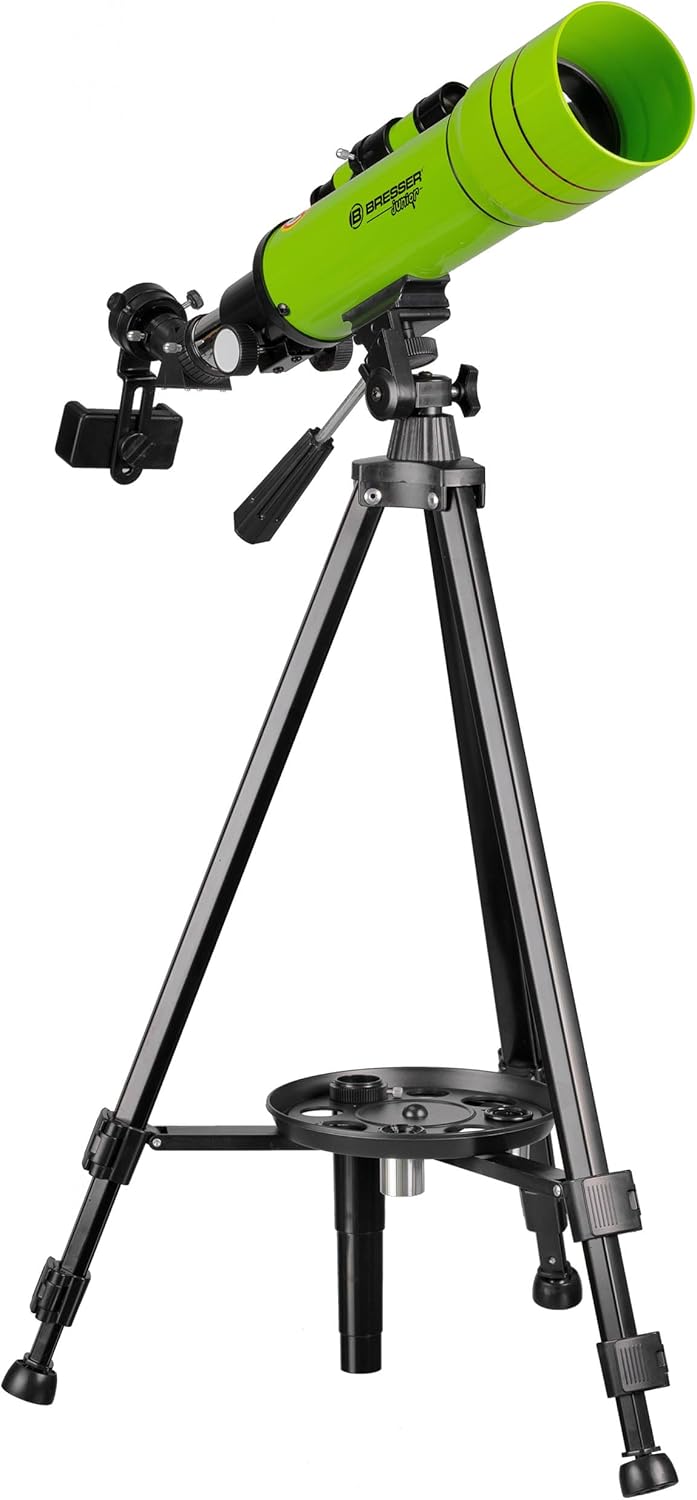
Figure 2: The tripod with the accessory tray in place.
- Attach the Accessory Tray:
Locate the accessory tray and attach it to the center brace of the tripod. This tray provides a convenient place to store eyepieces and other small accessories during observation.

Figure 3: Attaching the accessory tray to the tripod.
- Mount the Telescope Tube:
Carefully place the main telescope optical tube onto the tripod's altazimuth mount. Secure it firmly using the provided screws or clamps. Ensure the telescope is balanced.

Figure 4: The telescope optical tube mounted on the tripod.
- Install the Finder Scope:
Attach the 5x24 finder scope to its designated bracket on the main telescope tube. Align the finder scope with the main telescope by looking through both at a distant object during daylight hours. Adjust the finder scope's alignment screws until the object is centered in both the finder scope and the main telescope's lowest power eyepiece.
- Insert the Zenith Prism:
Insert the zenith prism into the focuser of the telescope. The zenith prism allows for more comfortable viewing angles, especially when observing objects high in the sky.
- Insert an Eyepiece:
Choose an eyepiece (start with the H20mm for the widest field of view and lowest magnification) and insert it into the zenith prism. Secure it with the small thumbscrew.
- Attach the Smartphone Holder (Optional):
If you wish to use the smartphone holder for astrophotography, attach it to an eyepiece as per its specific instructions. Ensure your smartphone is securely clamped.

Figure 5: Smartphone holder attached to the eyepiece for astrophotography.
Operating the Telescope
Basic Operation
- Pointing the Telescope: Use the altazimuth mount to move the telescope horizontally (azimuth) and vertically (altitude) to point at your desired object.
- Using the Finder Scope: Look through the finder scope to locate the object you wish to observe. Once the object is centered in the finder scope, it should be visible in the main telescope's eyepiece.
- Focusing: Turn the focus knob on the focuser until the image appears sharp and clear.
- Changing Magnification: To change magnification, swap eyepieces. The H20mm eyepiece provides the lowest magnification and widest field of view, ideal for locating objects. The H12mm and H6mm eyepieces provide higher magnifications for more detailed views.
- Using the 1.5x Reversing Lens: This lens corrects the image orientation, making the telescope suitable for terrestrial (land) observations where an upright image is desired. Insert it between the zenith prism and the eyepiece.
Observation Tips
- For astronomical observations, choose a dark location away from city lights.
- Allow your eyes to adapt to the darkness for at least 20 minutes before observing.
- Start with the lowest magnification eyepiece (H20mm) to locate objects, then switch to higher magnifications for more detail.
- Avoid touching the telescope lenses with your fingers.
Maintenance and Care
- Cleaning Lenses: Use a soft, lint-free cloth specifically designed for optical lenses. For stubborn smudges, use a small amount of optical cleaning fluid. Never use abrasive materials or household cleaners.
- Storage: When not in use, store the telescope and its accessories in the provided backpack in a dry, dust-free environment. Avoid extreme temperatures and humidity.
- Handling: Always handle the telescope carefully. Avoid dropping or subjecting it to strong impacts.
- Tripod Care: Keep the tripod legs clean and free of dirt or sand to ensure smooth operation of the locking mechanisms.

Figure 6: The included backpack for safe storage and transport.
Troubleshooting
| Problem | Possible Cause | Solution |
|---|---|---|
| Image is blurry or out of focus. | Incorrect focus setting. | Adjust the focus knob until the image is sharp. |
| Cannot find objects. | Finder scope not aligned; using too high magnification. | Align the finder scope with the main telescope. Start with the lowest power eyepiece (H20mm). |
| Image is upside down or reversed. | Normal for astronomical telescopes; 1.5x reversing lens not used for terrestrial viewing. | This is normal for astronomical observations. For terrestrial viewing, insert the 1.5x reversing lens. |
| Dark spots in the view. | Dust on eyepiece or objective lens. | Carefully clean the lenses as described in the Maintenance section. |
Specifications
| Feature | Detail |
|---|---|
| Model Name | Beginner 70/400 |
| Optical Tube Length | 400 Millimeters |
| Objective Lens Diameter | 70 mm |
| Magnification | 20-100x (with included eyepieces) |
| Eyepieces Included | H20mm, H12mm, H6mm |
| Reversing Lens | 1.5x |
| Finder Scope | 5x24 |
| Telescope Mount Type | Altazimuth Mount |
| Tripod Material | Aluminum |
| Product Dimensions | 5.91 x 5.91 x 30.31 inches (15 x 15 x 77 cm) |
| Item Weight | 5.65 pounds (2.56 kg) |
| Item Model Number | 8850610B4K000 |
Warranty and Support
BRESSER products are designed for quality and durability. For information regarding warranty coverage and terms, please refer to the warranty card included with your product or visit the official BRESSER website. For technical support, spare parts, or service inquiries, please contact BRESSER customer service.
BRESSER Customer Service:
- Website: www.bresser.de
- Contact Information: Please check the BRESSER website for the most current contact details for your region.


