
1. Introduction
The EPEVER UPower-Hi Hybrid Inverter Charge Controller Charger is a new generation device designed to optimize solar energy utilization. It integrates a solar charge controller, an inverter, and a charger into one compact unit, providing a highly stable and reliable electrical energy solution. This system is suitable for solar energy, utility grid, and oil generator hybrid systems, allowing flexible energy source selection to maximize efficiency and ensure a guaranteed power supply.
The UPower-Hi series features advanced protection functions, including overcurrent and reverse polarity protection, making it fully compatible with lithium battery systems. Its intelligent design and robust capabilities make it an ideal choice for various power management needs.
2. Key Features
- Supports both battery mode and non-battery mode operation.
- Incorporates advanced MPPT (Maximum Power Point Tracking) technology for solar charging, achieving a tracking efficiency of up to 99.5%.
- Utilizes advanced SPWM (Sinusoidal Pulse Width Modulation) technology for pure sine wave output, ensuring compatibility with sensitive electronics.
- Features PFC (Power Factor Correction) technology for high power factor in AC-DC charging, reducing grid capacity consumption.
- Offers three distinct charging modes: Solar Only, Solar Priority, and Grid & Solar.
- Provides two AC output modes: Grid Priority and Inverter Priority.
- Includes remote control temperature compensation for batteries, enhancing battery lifespan and performance.
- Optional BMS (Battery Management System) link connection for integrated charge and discharge control with the BMS.
- Configurable battery charging current, discharge current, and grid charging current.
- Supports cold start and soft start functions.
- Equipped with an AC OUT button for direct control of AC output.
- Multiple LED indicators dynamically display the system status.
- 4.2-inch LCD display for monitoring and changing system parameters.
- Optional WiFi or GPRS remote control via the insulated RS485 port.
3. Product Overview
Familiarize yourself with the physical components and interfaces of the UPower-Hi Hybrid Inverter.

Figure 3.1: Front view of the EPEVER UPower-Hi Hybrid Inverter, showing the control panel with LCD display and buttons.

Figure 3.2: Angled view of the EPEVER UPower-Hi Hybrid Inverter, highlighting the side ventilation for heat dissipation.

Figure 3.3: Rear view of the EPEVER UPower-Hi Hybrid Inverter, detailing connection ports for DC input, AC input, AC output, and WiFi/GPRS communication.
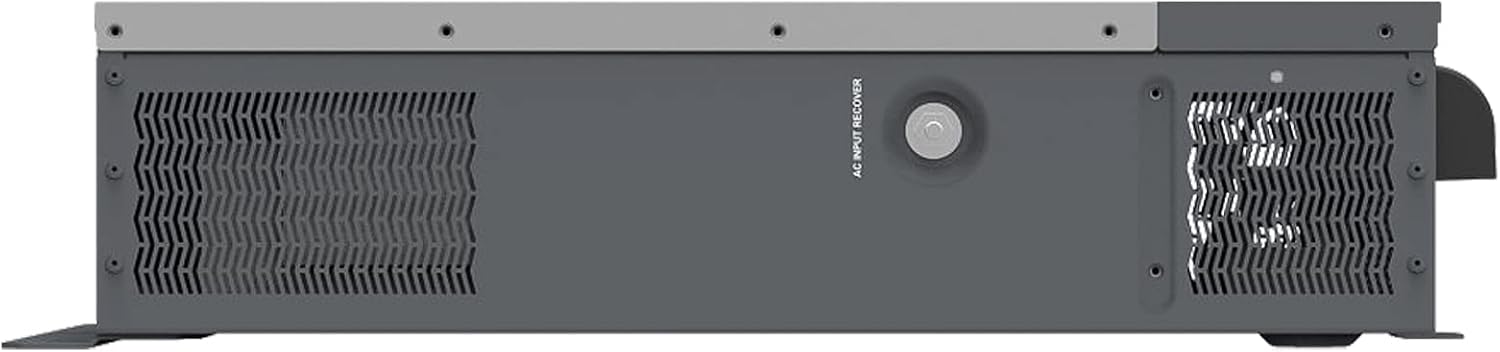
Figure 3.4: Side view of the EPEVER UPower-Hi Hybrid Inverter, showing the AC input recover button and additional ventilation.
4. Setup and Installation
4.1 Safety Precautions
- Ensure all power sources are disconnected before installation or maintenance.
- Only qualified personnel should perform installation and wiring.
- Wear appropriate personal protective equipment (PPE) during installation.
- Mount the inverter in a well-ventilated area, away from flammable materials and direct sunlight.
- Ensure proper grounding of the unit.
4.2 Unpacking
Carefully unpack the inverter and check for any shipping damage. The package should contain:
- Hybrid Inverter (UPower-Hi unit)
If any items are missing or damaged, contact your supplier immediately.
4.3 Mounting
Mount the inverter vertically on a sturdy, non-flammable surface. Ensure sufficient clearance around the unit for proper airflow and heat dissipation. Refer to the mounting holes on the back of the unit for secure installation.
4.4 Wiring Connections
Refer to Figure 3.3 for the location of connection ports. Ensure all connections are secure and correctly polarized.
- Battery Connection (DC INPUT): Connect the battery bank to the DC input terminals. Observe correct polarity (+ to + and - to -).
- PV Array Connection (DC INPUT): Connect the solar PV array to the designated PV input terminals. Ensure the PV open circuit voltage and power do not exceed the inverter's specifications.
- AC Input Connection (AC INPUT): Connect the utility grid or generator AC power to the AC input terminals.
- AC Output Connection (AC OUTPUT): Connect your AC loads to the AC output terminals.
- Communication Ports: Use the RS485 port for optional WiFi or GPRS remote monitoring modules.
5. Operating Instructions
5.1 Initial Power-Up
- After completing all wiring, double-check all connections for tightness and correctness.
- Switch on the battery breaker.
- Switch on the PV array breaker (if applicable).
- Switch on the AC input breaker (if applicable).
- The inverter will initiate its self-test sequence. Observe the LCD display and LED indicators for status.
5.2 Display and Controls
The 4.2-inch LCD display provides real-time system data, including battery voltage, PV input, AC input/output, and various operational parameters. Use the navigation buttons (ESC, UP, DOWN, ENTER, AC OUT) on the control panel to navigate menus and adjust settings.
5.3 Operating Modes
The UPower-Hi offers flexible operating modes to suit different energy management strategies:
- Charging Modes: Configure how the battery is charged (Solar Only, Solar Priority, Grid & Solar).
- AC Output Modes: Determine the primary source for AC loads (Grid Priority, Inverter Priority).
- Battery/Non-Battery Mode: Select operation with or without a connected battery bank.
5.4 Parameter Configuration
Access the settings menu via the LCD display to configure various parameters, including:
- Battery type (AGM, GEL, FLD, LFP8/LFP15/LFP16, LNCM7/LNCM14)
- Battery charging and discharge current limits.
- AC input voltage range.
- System time and date.
6. Maintenance
Regular maintenance ensures optimal performance and longevity of your EPEVER UPower-Hi inverter.
- Cleaning: Periodically clean the inverter's exterior and ventilation openings to prevent dust accumulation, which can impede cooling. Use a dry, soft cloth.
- Connection Check: Annually inspect all wiring connections for tightness and signs of corrosion. Re-tighten if necessary.
- Environmental Check: Ensure the installation environment remains within the specified operating temperature range and is free from excessive humidity or corrosive gases.
- Battery Inspection: If using lead-acid batteries, check electrolyte levels and terminal conditions as per battery manufacturer guidelines. For lithium batteries, monitor BMS data if connected.
- Firmware Updates: Check the EPEVER official website for any available firmware updates to ensure your unit has the latest features and bug fixes.
7. Troubleshooting
This section provides guidance on common issues you might encounter. For more complex problems, contact technical support.
| Problem | Possible Cause | Solution |
|---|---|---|
| Inverter not turning on | No battery connection or low battery voltage; DC input breaker off. | Check battery connections and voltage. Ensure DC input breaker is on. |
| No AC output | AC output breaker off; Overload; Inverter fault. | Check AC output breaker. Reduce load. Check error codes on LCD. |
| Battery not charging | PV input issue; AC input issue; Charging mode incorrect. | Verify PV array connection and sunlight. Check AC input. Ensure correct charging mode is selected. |
| System shuts down frequently | Overload; Over-temperature; Battery protection triggered (e.g., low voltage, overcurrent). | Reduce load. Ensure proper ventilation. Check battery status and parameters. The inverter has comprehensive electronic protection functions against surge and reverse polarity. |
8. Technical Specifications
Detailed specifications for the EPEVER UPower-Hi Hybrid Inverter (Model UP3000-HM5042).

Figure 8.1: Product label displaying detailed technical specifications.
| Feature | Specification |
|---|---|
| Model Number | UP3000-HM5042 |
| Product Dimensions | 60.7 x 38.2 x 14.9 cm |
| Weight | 18 kg |
| Nominal Battery Voltage | 48 VDC |
| Battery Input Voltage Range | 43.2 ~ 64 VDC |
| Max. Battery Charging Current | 50 A |
| Continuous Output Power | 3000 W |
| Max. Impact Power | 6000 W |
| AC Input Frequency | 40 ~ 65 Hz |
| AC Input Voltage Range | 170 ~ 280 Vac |
| Max. Utility Charge Current | 40 A |
| MPPT Voltage Range | 80 ~ 350 V |
| Max. PV Open Circuit Voltage | 450 V (at minimum operating environment), 395 V (at 25 °C) |
| Max. PV Input Power | 4000 W |
| Max. PV Charging Power | 2875 W |
| Output Voltage/Frequency | 220/230 Vac, 50/60 Hz |
| Output Waveform | Pure Sine Wave |
| Operating Temperature Range | -20 ~ +50 °C |
| Supported Battery Types | AGM, GEL, FLD, LFP8/LFP15/LFP16, LNCM7/LNCM14 |
| Power Source | Solar Powered |
| Manufacturer | SolarV |
9. Warranty and Support
9.1 Warranty Information
The EPEVER UPower-Hi Hybrid Inverter comes with a 2-year manufacturer's warranty. This warranty covers defects in materials and workmanship under normal use and service conditions. Please retain your proof of purchase for warranty claims.
9.2 Technical Support
For technical assistance, troubleshooting beyond this manual, or warranty inquiries, please contact EPEVER customer support through their official website or your local distributor. Provide your product model number (UP3000-HM5042) and a detailed description of the issue when seeking support.


