
LIGE 731354be-6899-45a5-a496-ad82cfea89a5
LIGE Smart Watch User Manual
Model: 731354be-6899-45a5-a496-ad82cfea89a5
1. Introduction
This user manual provides comprehensive instructions for the LIGE Smart Watch, designed to enhance your daily routine with advanced features such as Bluetooth calling, fitness tracking, and health monitoring. Please read this manual thoroughly before using the device to ensure proper operation and maintenance.

Image: The LIGE Smart Watch featuring a silver metal band and a black watch face, showcasing its elegant design.
2. Safety Information
To ensure safe and effective use of your LIGE Smart Watch, please observe the following precautions:
- Do not attempt to disassemble, repair, or modify the device.
- Keep the watch away from extreme temperatures, direct sunlight, and corrosive liquids.
- Avoid strong impacts or drops.
- The watch is IP67 waterproof, suitable for daily use like hand washing or rain, but not for hot water baths, saunas, or diving.
- Health monitoring features are for reference only and should not be used for medical diagnosis or treatment. Consult a medical professional for health concerns.
- Ensure the charging contacts are clean and dry before charging to prevent short circuits.
3. Setup Guide
3.1. Charging the Watch
Before first use, fully charge your LIGE Smart Watch. Connect the magnetic charging cable to the charging contacts on the back of the watch and plug the USB end into a power adapter (not included) or a computer's USB port.

Image: Close-up view of the LIGE Smart Watch's rear, showing the magnetic charging contacts and the charging cable connected.
3.2. App Download and Installation
To unlock the full functionality of your LIGE Smart Watch, download and install the "FitCloudPro" app on your smartphone.
- Turn on your phone's Bluetooth.
- Scan the QR code provided in the watch's packaging or on the watch screen (if available) to download the "FitCloudPro" app, or search for "FitCloudPro" directly in your phone's app store (Google Play Store for Android, Apple App Store for iOS).
- Install the app and grant necessary permissions.

Image: A visual guide demonstrating the steps to connect the LIGE Smart Watch to a smartphone using the FitCloudPro app, including QR code scanning and Bluetooth pairing.
QR Code Link: http://fitcloud.hetangsmart.com/qrcode/_cn/
3.3. Pairing the Watch with Your Phone
The pairing process involves two main Bluetooth connections for full functionality:
- First Bluetooth (App Connection):
- Open the "FitCloudPro" app.
- Navigate to the "Device" section (or similar, usually represented by a watch icon).
- Tap "Add Device" or "Bind Device".
- The app will scan for available devices. Select your LIGE Smart Watch (it might appear as "BW027" or similar).
- Confirm the pairing request on both your phone and watch.
- Second Bluetooth (Call Function Connection):
- On your LIGE Smart Watch, swipe down from the top of the screen to access the quick settings and ensure the "Audio" or "Call" function is turned on (usually indicated by a headphone icon).
- Go to your phone's Bluetooth settings (not within the app).
- Search for new devices. You should find a device named "Audio_ST2" or similar.
- Tap to connect to "Audio_ST2". This enables the Bluetooth call feature.
Once both connections are established, you can make and receive calls directly from your watch and receive all notifications.
4. Operating Instructions
4.1. Basic Navigation
- Touch Screen: Swipe left/right, up/down to navigate through menus and features. Tap to select.
- Side Buttons: The watch typically has one or more physical buttons. The top button usually acts as a power/back button, while the lower button or rotating crown can be used for menu navigation or quick access to features.
Image: A detailed view of the LIGE Smart Watch, highlighting its side buttons and the rotating crown for navigation and interaction.
4.2. Key Features
4.2.1. Bluetooth Call & Message Reminders
After successful Bluetooth pairing, you can make and receive calls directly from your watch. The watch also displays incoming SMS messages and notifications from various social media applications (e.g., Facebook, Twitter, WhatsApp, LinkedIn, Instagram).

Image: Illustration of the LIGE Smart Watch's Bluetooth call functionality, showing call receive/dial, built-in mic & speaker, and call records.

Image: A hand interacting with the LIGE Smart Watch, displaying various app icons for call and message reminders, including social media notifications.

Image: A visual representation of the LIGE Smart Watch's ability to receive and make calls, showing a phone's notification screen and the watch displaying an incoming call.
4.2.2. Health Monitoring
The watch provides 24/7 monitoring of key health metrics:
- Heart Rate: Advanced HR sensor for accurate heart rate monitoring.
- Blood Pressure: Measures blood pressure (for reference only).
- Blood Oxygen (SpO2): Monitors blood oxygen levels.
- Sleep Tracking: Analyzes sleep patterns and quality.

Image: The back of the LIGE Smart Watch showing the green light of the heart rate sensor during charging, with icons for Heart Rate, Blood Pressure, and Blood Oxygen.
Video: This video demonstrates the various health monitoring features of the LIGE Smart Watch, including heart rate, blood pressure, and blood oxygen tracking, along with sleep monitoring.
4.2.3. Sports Modes & Fitness Tracking
The watch supports 20 goal-based exercise modes, providing real-time stats during workouts. It accurately records steps, calories burned, distance, and time, synchronizing data with your phone for historical analysis.
- Supported modes include: Walking, Running, Cycling, Basketball, Football, Swimming, Mountaineering, Pingpong, Tennis, Rugby, Golf, Yoga, Badminton, Volleyball, Baseball, Elliptical Machine, Rowing Machine, Skipping Rope, Long Jump, Hula Hoop.

Image: A man cycling outdoors, with an overlay showing the LIGE Smart Watch's interface displaying various sports modes and fitness tracking metrics.
4.2.4. Other Smart Features
- Notifications: Receive alerts for calls, messages, and app notifications.
- Remote Camera: Control your phone's camera remotely from the watch.
- Music Controller: Play, pause, skip tracks on your phone's music player.
- Alarm Clock: Set multiple alarms.
- Sedentary Reminder: Get alerts to move after periods of inactivity.
- Stopwatch & Timer: Built-in timing functions.
- Find Phone/Watch: Locate your paired device.
- Intelligent Voice Assistant: Access your phone's voice assistant.
- Animated Clock Faces: Customize your watch face.
- Set Password: Protect your privacy with a password.
- Split Screen Display: Access frequently used functions quickly.

Image: A collage of images illustrating various smart features of the LIGE Smart Watch, including notifications, remote camera control, music control, alarm clock, sedentary reminder, and stopwatch/timer.
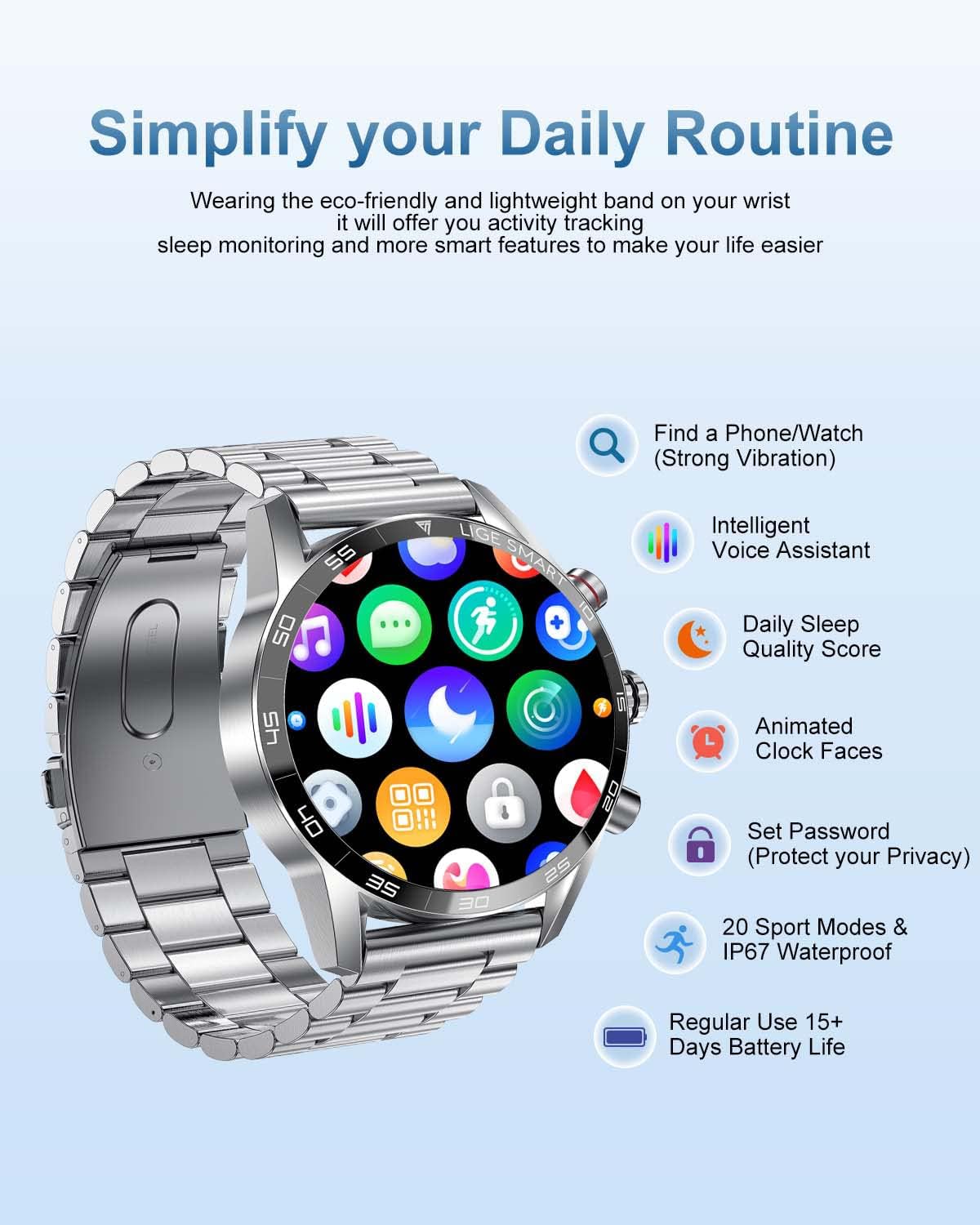
Image: The LIGE Smart Watch displaying its app menu, surrounded by icons representing features like Find a Phone/Watch, Intelligent Voice Assistant, Daily Sleep Quality Score, Animated Clock Faces, Set Password, 20 Sport Modes & IP67 Waterproof, and Regular Use 15+ Days Battery Life.

Image: A close-up of the LIGE Smart Watch screen, highlighting its 1.32-inch HD display with 360*360 resolution, split screen display, and TFT full touch screen capabilities.
5. Maintenance
- Cleaning: Regularly wipe the watch screen and strap with a soft, dry cloth. For stubborn stains, use a slightly damp cloth and then dry thoroughly. Avoid using harsh chemicals or abrasive materials.
- Water Resistance: The LIGE Smart Watch is IP67 waterproof. This means it is resistant to splashes, rain, and brief immersion in shallow water. It is not suitable for swimming, diving, hot showers, or saunas, as steam and hot water can damage the seals.
- Battery Care: To prolong battery life, avoid fully discharging the watch frequently. Charge it when the battery is low. If storing the watch for an extended period, charge it to about 50% and store in a cool, dry place.
- Strap Replacement: The watch comes with two watch bands. If you wish to change the strap, refer to the quick release pins on the underside of the strap for easy removal and attachment.

Image: The LIGE Smart Watch displayed with both its metal and silicone watch bands, emphasizing the option for strap replacement.
6. Troubleshooting
If you encounter issues with your LIGE Smart Watch, please refer to the following common solutions:
| Problem | Possible Solution |
|---|---|
| Watch not turning on/charging. | Ensure the charging cable is securely connected to both the watch and the power source. Check if the power adapter is working. Clean the charging contacts on the watch and cable. |
| Unable to pair with phone. | Ensure Bluetooth is enabled on your phone and the watch. Make sure the "FitCloudPro" app is installed and has necessary permissions. Forget previous Bluetooth connections for the watch on your phone and try pairing again. Ensure both the app connection and the "Audio_ST2" connection are made. |
| Inaccurate health data. | Ensure the watch is worn snugly on your wrist, not too loose or too tight. Clean the sensor on the back of the watch. Avoid excessive movement during measurements. Remember, these are for reference and not medical grade. |
| Notifications not received. | Check app notification settings within "FitCloudPro". Ensure your phone's notification permissions are granted to the app. Keep the app running in the background. |
| Short battery life. | Reduce screen brightness, disable unnecessary notifications, limit continuous heart rate monitoring, and turn off features like "raise to wake" if not needed. |
If the problem persists, please contact LIGE customer support for further assistance.
7. Specifications
| Feature | Detail |
|---|---|
| Model Name | LIGE Smart Watch |
| Item Model Number | 731354be-6899-45a5-a496-ad82cfea89a5 |
| Screen Size | 1.32 inches (HD Full Touch Screen) |
| Resolution | 360*360 HD |
| Operating System | Android, iOS compatible |
| Connectivity Technology | Bluetooth, USB (for charging) |
| Special Features | Heart Rate Monitor, Blood Pressure Monitor, Blood Oxygen Monitor, Bluetooth Call, Fitness Tracker, Sleep Tracker, Message Reminders, Music Control, Remote Camera, Alarm Clock, Sedentary Reminder, Stopwatch, Timer, Voice Assistant, Customizable Watch Faces, Password Protection, Split Screen Display |
| Water Resistance | IP67 |
| Battery Type | Lithium Polymer (1 required, included) |
| Item Weight | 8.1 ounces (0.23 Kilograms) |
| Package Dimensions | 8.11 x 3.78 x 0.87 inches |
| GPS | GPS Via Smartphone |
| Shape | Round |
8. Warranty and Support
LIGE is committed to providing high-quality products and excellent customer service. Your LIGE Smart Watch comes with a standard warranty. For specific warranty terms and conditions, please refer to the documentation included with your purchase or contact LIGE customer support.
If you have any questions, require technical assistance, or need to report an issue, please contact the LIGE customer service team. They are dedicated to ensuring a wonderful shopping experience and will resolve any queries quickly.
For more information or to contact support, please visit the official LIGE store on Amazon: LIGE Amazon Store.
Ask a question about this manual
Ask about setup, troubleshooting, compatibility, parts, safety, or missing instructions. Manuals+ will review the question and use this page’s manual context to help answer it.