
Dowinx LS-6678
Dowinx Gaming Chair User Manual
Model: LS-6678 | Brand: Dowinx
Introduction
Thank you for purchasing the Dowinx Gaming Chair. This manual provides detailed instructions for assembly, operation, maintenance, and troubleshooting to ensure you get the most out of your new chair. Designed for ultimate comfort and durability, this chair features a unique Japanese-style aesthetic, coil spring cushioning, 4D adjustable armrests, and a 165-degree reclining function, making it suitable for gaming, office work, or study.
Key Features
- Japanese-Style Design: A calm, harmonious color scheme that blends seamlessly into various room decors, suitable for both traditional and modern interiors.
- Coil Spring Cushioning: Utilizes high-end sofa technology with resilient coil springs for balanced weight distribution, reducing hip pressure and preventing fatigue during long sitting sessions.
- Ergonomic Support: Features an ergonomic S-shaped structure, adjustable headrest, and lumbar support for full-body fit and reduced strain on the lower back.
- Breathable Fabric: High-quality fabric material ensures excellent breathability, keeping you comfortable in all seasons and resisting stuffiness.
- 4D Adjustable Armrests: Multi-directional armrests with 8 stages of adjustment provide optimal elbow support for users of varying heights and arm lengths.
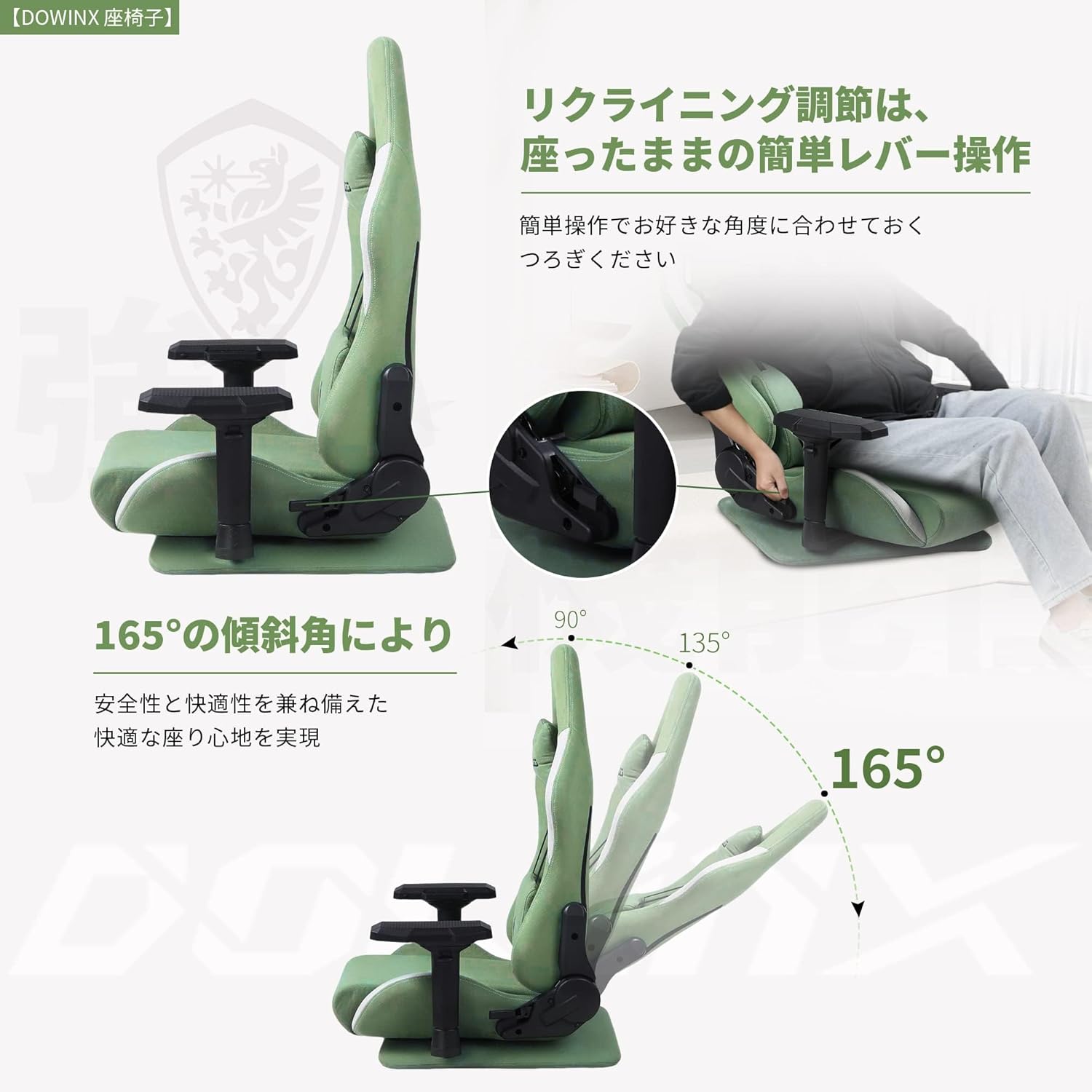
- 165° Stepless Recline: Smooth, infinite reclining up to 165 degrees allows for comfortable resting positions, similar to a bed.
- 360° Swivel: Enables smooth rotation for easy movement and access.
- Durable Construction: Woven fabric is resistant to scratches, ensuring long-lasting performance.
Setup and Assembly
Your Dowinx Gaming Chair comes with all necessary tools and a detailed assembly manual in both Japanese and English. Assembly can be easily completed by one person.
Package Contents:
- Chair components (backrest, seat, armrests, base, wheels, gas lift, etc.)
- Assembly hardware (screws, washers)
- Dedicated assembly tools
- Assembly instruction manual
Assembly Steps:
- Unpack all components and verify against the parts list in the manual.
- Attach the wheels to the chair base.
- Insert the gas lift into the center of the base.
- Assemble the seat and backrest according to the provided diagrams.
- Attach the armrests to the seat.
- Place the assembled seat onto the gas lift.
- Install the headrest and lumbar support cushions.
For detailed visual instructions, please refer to the included assembly manual.

Operating Instructions
Reclining Function:
The chair features a stepless reclining function that allows you to adjust the backrest angle from 90 degrees up to 165 degrees. To recline, locate the lever on the right side of the chair (when seated). Pull the lever up to unlock the recline mechanism, adjust the backrest to your desired angle, and then push the lever down to lock it in place. Ensure the backrest is securely locked before leaning back fully.

4D Armrest Adjustment:
The armrests are 4D adjustable, meaning they can be moved in four directions: up/down, forward/backward, left/right, and rotated inward/outward. Locate the buttons or levers on the side of each armrest. Use these controls to adjust the armrests to your preferred height and position for optimal elbow and forearm support.

Height Adjustment:
To adjust the chair's height, locate the lever beneath the seat on the right side. While seated, pull the lever up to lower the chair. To raise the chair, stand up slightly and pull the lever up. Release the lever at your desired height to lock it.
Swivel Function:
The chair is designed to swivel 360 degrees smoothly, allowing for easy rotation and movement without needing to reposition the entire chair.
Maintenance and Care
Proper care will extend the life and maintain the appearance of your Dowinx Gaming Chair.
Cleaning the Fabric:
- For general cleaning, use a soft brush attachment on a vacuum cleaner to remove dust and debris.
- For spills, blot immediately with a clean, dry cloth. Do not rub, as this can spread the stain.
- For stubborn stains, use a mild fabric cleaner diluted according to the product instructions. Test on an inconspicuous area first. Apply the cleaner to a clean cloth, then gently dab the stained area.
- Allow the fabric to air dry completely before using the chair.
General Care:
- Avoid exposing the chair to direct sunlight for prolonged periods, as this can cause fading.
- Keep the chair away from heat sources like radiators or fireplaces.
- Regularly check and tighten any loose screws or bolts to ensure stability and safety.
- The fabric is designed to be scratch-resistant, but avoid sharp objects that could damage the material.
Troubleshooting
If you encounter any issues with your Dowinx Gaming Chair, please refer to the following common problems and solutions:
| Problem | Possible Cause | Solution |
|---|---|---|
| Chair does not recline or lock. | Recline lever not fully engaged/disengaged. | Ensure the recline lever is pulled up to unlock and pushed down firmly to lock. Check for any obstructions. |
| Chair height adjustment not working. | Gas lift issue or lever not engaged. | Ensure the height adjustment lever is pulled correctly. If the issue persists, the gas lift may need replacement. |
| Armrests wobble or feel loose. | Mounting screws are loose. | Tighten the screws securing the armrests to the chair. Do not overtighten. |
| Squeaking noises during movement. | Loose connections or lack of lubrication. | Check and tighten all assembly bolts. Apply a small amount of silicone lubricant to moving parts if necessary. |
| Difficulty assembling screws. | Screws are too tight from factory or misaligned. | Ensure components are aligned correctly. If screws are pre-tightened, use the provided tool to loosen slightly before re-tightening during assembly. |
If the problem persists after attempting these solutions, please contact Dowinx customer support for further assistance.
Specifications
| Attribute | Value |
|---|---|
| Brand | Dowinx |
| Model Number | LS-6678 |
| Product Dimensions (D x W x H) | 50 x 50 x 80 cm |
| Package Dimensions | 80 x 57 x 32.5 cm |
| Material | Metal, Polyurethane, Alloy Steel |
| Color | Green |
| Size | Medium |
| Item Weight | 16 kg |
| Package Weight | 19.1 kg |
| Date First Available on Amazon.co.jp | 2024/6/7 |
Warranty and Support
Dowinx offers a reliable after-sales service to ensure our customers can use the product with peace of mind for a long time. Your Dowinx Gaming Chair comes with a one-year manufacturer's warranty.
If you encounter any defects, issues, or have any questions about your purchased product, please do not hesitate to contact us. We are committed to providing prompt assistance.
Contact Information:
Please refer to your purchase receipt or the Dowinx official website for the most up-to-date customer service contact details.
You can also visit the Dowinx Brand Store on Amazon for more information and support.
Related documentsLS-6678


Ask a question about this manual
Ask about setup, troubleshooting, compatibility, parts, safety, or missing instructions. Manuals+ will review the question and use this page’s manual context to help answer it.