
Andoer d8cfa559-d5d2-443f-9ed4-a8e814a7e410
Andoer 4K Digital Camera Video Camcorder User Manual
Model: d8cfa559-d5d2-443f-9ed4-a8e814a7e410
1. Introduction
This manual provides essential information for the safe and effective operation of your Andoer 4K Digital Camera Video Camcorder. Please read this manual thoroughly before using the device and retain it for future reference.
2. Safety Information
Warning:
- Do not expose the camera to water or moisture.
- Avoid dropping the camera or subjecting it to strong impacts.
- Keep out of reach of small children due to small parts.
- Use only the specified charging cable and power source.
- Dispose of packaging materials properly to avoid choking hazards.

Image: A warning graphic indicating proper disposal of packaging materials to prevent choking hazards. This emphasizes the importance of safety, especially for children.
3. Package Contents
Verify that all items listed below are included in your package:
- 1 x Andoer Digital Camera
- 1 x USB Charging Cable
- 1 x Wrist Strap
- 1 x Carry Bag
- 1 x 32GB Memory Card
- 1 x Users' Manual (English)
4. Product Overview
4.1 Camera Components
Familiarize yourself with the main components of your digital camera.

Image: Front and back views of the silver Andoer 4K Digital Camera. The front shows the lens and flash, while the back displays the screen and control buttons, including zoom (W/T), OK, menu, and mode buttons.

Image: A side view of the Andoer 4K Digital Camera, highlighting the USB port and memory card slot, which are typically covered by a flap.
4.2 Display and Controls
The camera features a 2.4-inch IPS screen for clear viewing and intuitive controls.
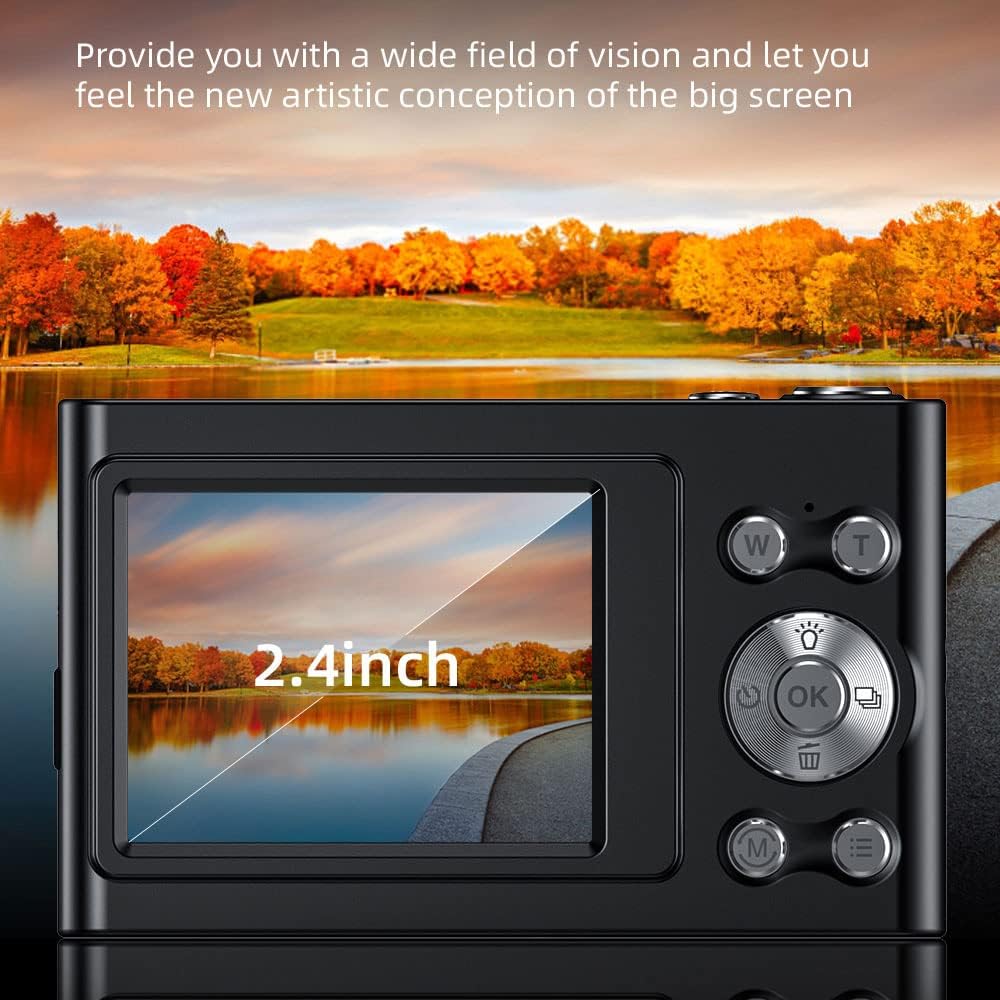
Image: A close-up of the camera's 2.4-inch IPS screen, displaying a landscape scene with a lake and autumn trees, demonstrating the screen's clarity and size.

Image: A hand holding the Andoer camera, with the screen displaying a family on a beach. The image highlights the camera's compact size and the accessibility of its rear controls, including the directional pad and function buttons.
4.3 Dimensions
The compact design of the camera makes it portable and easy to handle.

Image: A technical diagram illustrating the dimensions of the Andoer 4K Digital Camera. It shows the length (95mm), height (58mm), and thickness (25mm) of the device, along with top, front, and side views.
5. Setup
5.1 Charging the Battery
The camera has a built-in lithium battery. To charge:
- Connect the camera to a USB power adapter (not included) or a computer using the provided USB charging cable.
- The charging indicator light will illuminate.
- Once fully charged, the indicator light will turn off or change color.
Note: Ensure the camera is turned off during charging for optimal battery life.
5.2 Inserting the Memory Card
The camera supports Class-10 external TF memory cards up to 128GB. A 32GB memory card is included.
- Locate the memory card slot on the side of the camera (refer to Product Overview image).
- Open the protective cover.
- Insert the memory card with the metal contacts facing the correct direction until it clicks into place.
- Close the protective cover.
Note: Format the memory card in the camera's settings before first use.
6. Operating Instructions
6.1 Power On/Off
Press and hold the power button (usually located on the top or side) to turn the camera on or off.
6.2 Taking Photos
- Turn on the camera.
- Select Photo Mode using the Mode button (M).
- Frame your shot using the IPS screen.
- Use the W/T buttons for 16X digital zoom.
- Press the Shutter button (usually the large button on top) to capture the photo.

Image: A visual comparison demonstrating the camera's 16X digital zoom capability. The top image shows a wide shot (1x zoom) of a person on a beach with a hot air balloon, while the bottom image shows a zoomed-in view (16x zoom) of the same person, highlighting the magnification.
6.3 Recording Videos
- Turn on the camera.
- Select Video Mode using the Mode button (M).
- Press the Shutter button to start recording.
- Press the Shutter button again to stop recording.
The camera supports 4K (3840x2160) video resolution.
6.4 Playback
To view captured photos and videos:
- Enter Playback Mode (often indicated by an icon like a triangle or arrow).
- Use the directional buttons to navigate through your media.
- Press the OK button to play videos.
6.5 Menu Settings
Press the Menu button to access camera settings, including:
- Picture Resolution: 48M, 36M, 30M, 24M, 20M, 18M, 16M, etc.
- Video Resolution: 4K(3840x2160), 2.7K(2688x1520), 1080P(1920x1080), 720P(1280x720)
- Mode: Auto, Sport, Night, Portrait, Landscape, Backlight, Party, Beach, High Sensitivity
- White Balance: Auto, Daylight, Cloudy, Fluorescent, Tungsten
- Self-Timer: Off, 2 sec, 5 sec, 10 sec
- Auto Power Off: Off, 1 minute, 3 minutes, 5 minutes, 10 minutes
- Exposure: EV-3 to EV+3
- Anti-shake: Digital image stabilization.
- Face Detect & Smile Capture: Features for improved portrait photography.
- Continuous Photography: For capturing multiple shots in quick succession.

Image: Two views of the Andoer camera demonstrating its ability to support both vertical and horizontal screen shooting. One camera is positioned horizontally, and another is rotated vertically, each displaying a portrait of a woman.
7. Maintenance
7.1 Cleaning the Camera
- Use a soft, dry cloth to clean the camera body.
- For the lens and screen, use a specialized lens cleaning cloth and solution.
- Do not use abrasive cleaners or solvents.
7.2 Storage
- Store the camera in a cool, dry place away from direct sunlight and extreme temperatures.
- If storing for an extended period, remove the memory card and ensure the battery is partially charged (not fully charged or fully depleted).
- Use the provided carry bag for protection during transport.
8. Troubleshooting
| Problem | Possible Cause | Solution |
|---|---|---|
| Camera does not turn on. | Battery is depleted. | Charge the battery. |
| Cannot take photos/videos. | Memory card is full or not inserted correctly. | Insert/reinsert memory card, delete unnecessary files, or replace with a new card. |
| Images are blurry. | Lens is dirty; camera shake; subject too close/far. | Clean the lens; use anti-shake feature; ensure proper focus distance. |
| Flash not working. | Flash mode is off or battery is low. | Check flash settings; charge battery. |
9. Specifications
| Feature | Detail |
|---|---|
| Image Sensor | CMOS Sensor |
| Display | 2.4 Inch IPS Screen |
| Picture Resolution | 48M, 36M, 30M, 24M, 20M, 18M, 16M, etc. |
| Video Resolution | 4K(3840x2160), 2.7K(2688x1520), 1080P(1920x1080), 720P(1280x720) |
| Digital Zoom | 16X |
| Exposure | EV-3 to EV+3 |
| Power Supply | Built-in Lithium Battery |
| Item Size | 9.5 * 5.8 * 2.5cm (3.7 * 2.3 * 1in) |
| Item Weight | 115g (4.1oz) |
| Memory Card Support | Class-10 TF card, max. 128GB (32GB included) |
| Connectivity | USB |
| Special Features | Anti-shake, Face Detect, Smile Capture, Continuous Photography, Self-timer, Built-in Flash |
10. Warranty and Support
This product comes with a standard manufacturer's warranty. For specific warranty terms and conditions, please refer to the documentation provided with your purchase or contact Andoer customer support.
For technical support or service inquiries, please visit the official Andoer website or contact their customer service department. Contact information can typically be found on the product packaging or the brand's official online presence.
Based on product specifications, the warranty type is listed as "No Warranty". Please refer to your purchase documentation for any applicable seller or retailer warranties.
Ask a question about this manual
Ask about setup, troubleshooting, compatibility, parts, safety, or missing instructions. Manuals+ will review the question and use this page’s manual context to help answer it.