
Introduction
Thank you for choosing the LIGE FD0328B Smartwatch. This manual provides essential information for setting up, operating, and maintaining your device. Please read it carefully to ensure optimal performance and longevity of your smartwatch.
Safety Information
- Do not attempt to disassemble or modify the device.
- Keep the device away from extreme temperatures and direct sunlight.
- Avoid contact with strong chemicals or detergents.
- This device is not a medical instrument. Health data is for reference only and should not be used for medical diagnosis.
- Ensure the charging contacts are clean and dry before charging.
Package Contents
Please check the package for the following items:
- LIGE FD0328B Smartwatch
- Magnetic Charging Cable
- User Manual

Image: The LIGE FD0328B Smartwatch, magnetic charging cable, and user manual displayed next to the product packaging.
Product Overview
The LIGE FD0328B Smartwatch features a 1.32-inch HD color touchscreen display and a durable design. It includes physical buttons for navigation and interaction.

Image: Two LIGE smartwatches, one silver and one black, highlighting the 1.32-inch high-definition display and overall design.
Setup
1. Charging the Device
Before first use, fully charge your smartwatch. Connect the magnetic charging cable to the charging contacts on the back of the watch and plug the USB end into a power adapter (not included) or a computer's USB port.
- Charging time: Approximately 2.5 hours.
- Standby time: Up to 30 days.
- Typical usage time: 5-7 days.

Image: A LIGE smartwatch connected to its magnetic charging cable, illustrating the charging process and battery life.
2. Pairing with Smartphone
To unlock all features, download the companion app (refer to the app name in the watch's settings or quick start guide) from your smartphone's app store (compatible with Android 4.4+ and iOS 8.4+). Enable Bluetooth on your phone and follow the in-app instructions to pair your smartwatch.
3. Customizing Watch Faces
The smartwatch offers 6 pre-installed watch face styles. Connect to the app to access a wider selection of watch faces. You can also upload your favorite photos to create custom watch faces.

Image: The LIGE smartwatch showing different customizable watch faces, with a smartphone screen demonstrating the watch face selection process within the app.
Operating Instructions
1. Making and Receiving Calls
With its powerful Bluetooth chipset, the smartwatch allows you to make and receive calls directly from your wrist. Ensure your watch is connected to your phone via Bluetooth.

Image: A LIGE smartwatch on a wrist showing an incoming call, alongside a smartphone displaying the call interface, demonstrating the Bluetooth call function.
2. Receiving Notifications
Synchronize notifications from your phone to your smartwatch. You will receive vibration alerts for incoming calls, messages, and app notifications (e.g., Twitter, Instagram, Facebook, Line, Skype, WhatsApp).

Image: A LIGE smartwatch on a wrist showing a Facebook notification, with icons for various social media apps (Twitter, Instagram, Facebook, Line, Skype, WhatsApp) indicating notification support.
3. Health Monitoring
The smartwatch monitors various health metrics using its built-in sensors:
- Heart Rate: Continuously monitors your heart rate.
- Blood Oxygen: Measures your blood oxygen saturation (SpO2).
- Blood Pressure: Provides blood pressure readings.
- Sleep Monitoring: Automatically tracks your sleep patterns, including deep sleep, light sleep, and wake times, to help improve sleep quality.
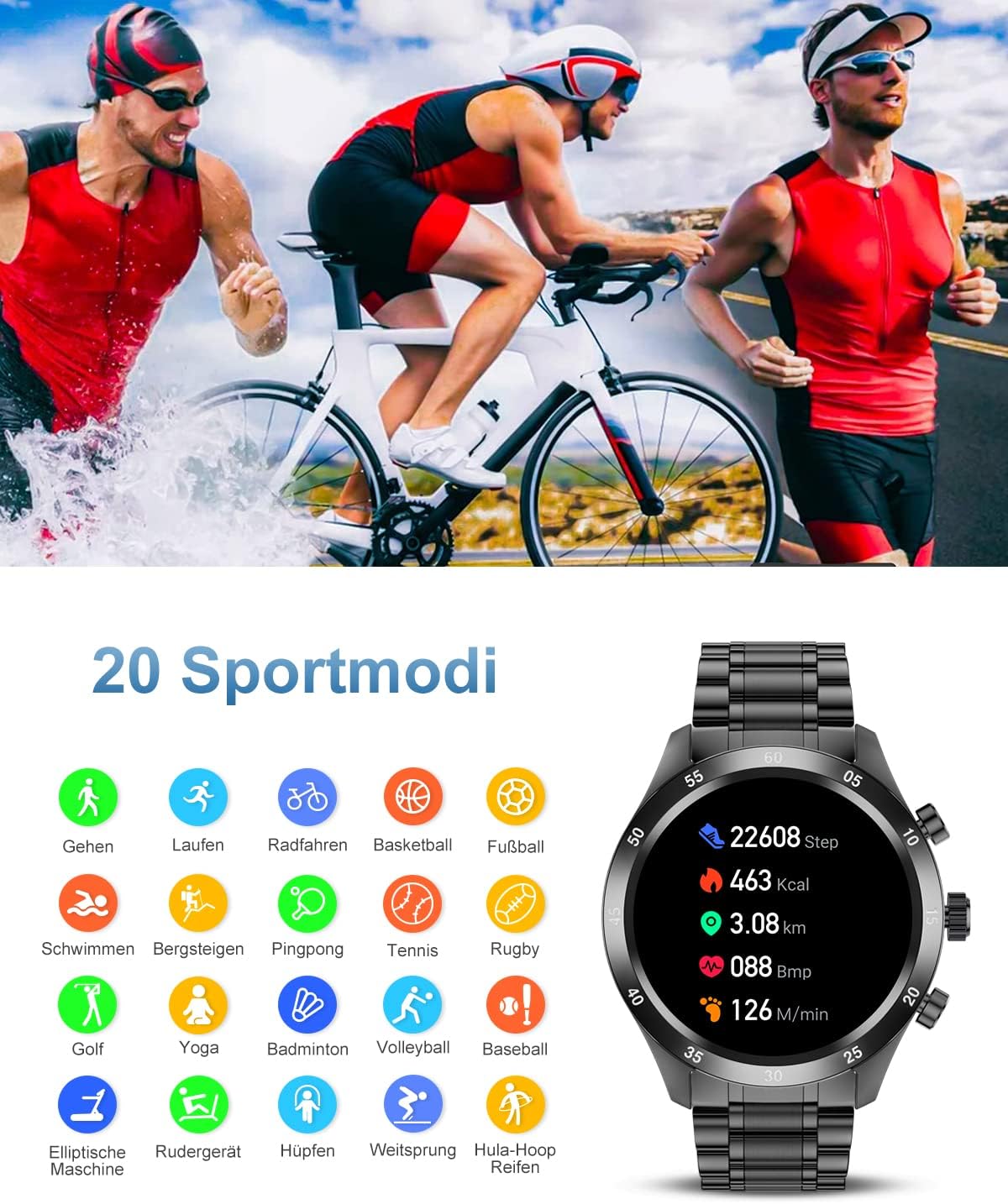
Image: The LIGE smartwatch displaying heart rate data, accompanied by images of a man performing push-ups (representing health monitoring) and a man sleeping (representing sleep monitoring).
4. Activity Tracking & Sports Modes
Track your daily activities and workouts:
- Pedometer: Records steps, distance, and calories burned.
- 20 Sports Modes: Includes walking, running, cycling, basketball, football, swimming, climbing, table tennis, tennis, rugby, golf, yoga, badminton, volleyball, baseball, elliptical, rowing, skipping, long jump, and hula hoop.

Image: The LIGE smartwatch screen showing activity data (steps, calories, distance, heart rate) and a list of 20 sports modes with corresponding icons, such as walking, running, cycling, and swimming.
5. Voice Assistant
Access your smartphone's voice assistant directly from the watch. Long-press the voice assistant function on the watch to issue commands without taking out your phone.

Image: A man using the LIGE smartwatch, demonstrating the voice assistant function. The watch screen also shows a Facebook notification.
6. Remote Camera Control
Control your phone's camera remotely through the smartwatch, making it convenient for taking photos.
7. Music Control
Control music playback on your smartphone directly from your watch (play, pause, skip tracks).

Image: The LIGE smartwatch displaying its music control interface, with a man wearing headphones and listening to music outdoors, illustrating the music control feature.
8. Reminders
Set up sedentary reminders and water intake reminders to help maintain healthy habits.
Maintenance
1. Water Resistance (IP67)
The smartwatch is IP67 water and dust resistant. This means it can withstand splashes, rain, and brief immersion in shallow water. It is suitable for washing hands or light activities in shallow water.
Caution:
- Do not wear the watch in hot water, saunas, or steam rooms.
- Avoid prolonged immersion in water or high-pressure water activities (e.g., diving, showering).
- Water resistance is not permanent and may decrease over time.
2. Cleaning
Wipe the watch and strap regularly with a soft, dry cloth. If necessary, use a slightly damp cloth and dry thoroughly. Avoid using abrasive cleaners.
3. Battery Care
To prolong battery life, avoid fully discharging the battery frequently. Charge the device when the battery level is low.
Troubleshooting
| Issue | Possible Solution |
|---|---|
| Watch does not turn on | Ensure the watch is fully charged. Connect to the charger for at least 30 minutes. |
| Cannot pair with phone | Ensure Bluetooth is enabled on your phone. Restart both the watch and phone. Make sure the app is installed and running. Check compatibility (Android 4.4+ / iOS 8.4+). |
| Notifications not received | Check app notification settings on your phone and within the smartwatch app. Ensure the watch is connected via Bluetooth. |
| Inaccurate health data | Ensure the watch is worn snugly on your wrist, not too tight or too loose. Keep the sensor clean. Note that data is for reference only. |
| Short battery life | Reduce screen brightness, disable unnecessary features, or limit frequent heart rate monitoring. |
Specifications
| Feature | Detail |
|---|---|
| Model Number | FD0328B |
| Display | 1.32-inch HD Color Touchscreen |
| Connectivity | Bluetooth 5.0 |
| Compatibility | Android 4.4 and above, iOS 8.4 and above |
| Battery Type | Lithium-polymer |
| Charging Time | Approx. 2.5 hours |
| Battery Life (Typical Use) | 5-7 days |
| Standby Time | Up to 30 days |
| Water Resistance | IP67 |
| Special Features | Bluetooth Call, Heart Rate Monitor, Sleep Monitor, Activity Tracker, Calorie Tracker, Voice Assistant, Remote Camera Control |
Warranty and Support
LIGE offers comprehensive after-sales service. If you encounter any issues with your smartwatch, please contact our customer support team. We are committed to providing satisfactory service and resolving any problems unconditionally.
For support, please refer to the contact information provided with your purchase or visit the official LIGE website.


