Introduction
This manual provides detailed instructions for the safe and effective use of your Inkbird ITC-308 Digital Temperature Controller and Inkbird ITH-12S Mini Digital Thermometer and Hygrometer bundle. Please read this manual thoroughly before operating the devices and retain it for future reference. This bundle is designed to provide precise temperature and humidity monitoring and control for various indoor applications.

Image: The Inkbird ITC-308 Temperature Controller and ITH-12S Thermometer/Hygrometer shown together, illustrating their combined functionality.
Product Overview
Inkbird ITC-308 Digital Temperature Controller
The ITC-308 is a plug-and-play digital temperature controller capable of controlling both heating and cooling devices. It features a dual display window for simultaneous viewing of measured and set temperatures.

Image: The ITC-308 controller unit, showing its display, control buttons, temperature probe, and the dual power outlets for heating and cooling devices.
Key Features:
- Dual Display Window: Displays measured temperature (PV) and set temperature (SV) simultaneously.
- Heating and Cooling Control: Two independent outlets for connecting heating and cooling equipment.
- Temperature Probe: External probe for accurate temperature sensing.
- Customizable Settings: Allows setting of temperature range and compressor delay for equipment protection.
- Temperature Unit: Supports both Celsius (°C) and Fahrenheit (°F) display.
Inkbird ITH-12S Mini Digital Thermometer and Hygrometer
The ITH-12S is a compact smart sensor that monitors both temperature and humidity. It features Bluetooth connectivity for remote monitoring via a smartphone application.

Image: Close-up of the ITH-12S device, showing its digital display with current temperature and humidity readings, along with MIN/MAX indicators and Bluetooth icon.

Image: Diagram of the ITH-12S, highlighting its sensor, current temperature, battery life, Bluetooth icon, °C/°F/Bluetooth button, current humidity, Min/Max Temp button, and space for mounting tapes, along with its compact dimensions.
Key Features:
- Bluetooth Connection: Connects to your smartphone for remote temperature and humidity monitoring up to 98ft/30m.
- Accurate Readings: Provides precise temperature (±0.50℉/±0.3℃) and humidity (±3%RH) measurements.
- Wide Measuring Range: Temperature range of 32℉-140℉ (0℃-60℃) and humidity range of 0%RH-99%RH.
- Data Storage: Capable of storing historical data for analysis.
- Easy to Use: Simple interface with °C/°F display options.
Setup
ITC-308 Temperature Controller Setup
- Unpack: Carefully remove the ITC-308 controller, temperature probe, and power outlets from the packaging.
- Connect Probe: Insert the temperature probe into the designated port on the bottom of the controller.
- Position Probe: Place the temperature probe in the area where you wish to monitor and control the temperature. Ensure it is not directly exposed to heating or cooling elements for accurate readings.
- Connect Devices: Plug your heating device into the "HEATING" outlet and your cooling device into the "COOLING" outlet on the provided power strip.
- Power On: Plug the main power cord of the ITC-308 into a standard electrical outlet. The display will illuminate.

Image: The ITC-308 controller, its temperature probe, the dual power outlet, and the included user guide, as they appear when unboxed.
ITH-12S Thermometer and Hygrometer Setup
- Unpack: Remove the ITH-12S device from its packaging.
- Install Battery: Open the battery compartment and insert the required batteries (usually AAA, check device for specifics).
- Power On: The device will automatically power on and display current temperature and humidity.
- Download App: Download the Inkbird app from your smartphone's app store (iOS or Android).
- Pair Device: Open the Inkbird app, enable Bluetooth on your phone, and follow the in-app instructions to pair with the ITH-12S.
- Placement: Place the ITH-12S in the desired monitoring location. It can be mounted using the provided adhesive tapes or placed on a flat surface.

Image: The ITH-12S device, its retail box, and two adhesive mounting pads, illustrating the items included in the package.
Operating Instructions
Operating the ITC-308 Temperature Controller
- Set Temperature: Press the 'SET' button once. The 'PV' (Process Value/Current Temperature) will flash. Use the Up/Down arrows to adjust the desired temperature. Press 'SET' again to confirm.
- Set Heating/Cooling Thresholds: Refer to the detailed instruction manual for advanced settings such as setting the heating differential (HD) and cooling differential (CD) to define the temperature range for activation.
- Compressor Delay: The ITC-308 includes a compressor delay function (PT) to protect refrigeration equipment from frequent cycling. Adjust this setting as needed according to your equipment's requirements.
- Temperature Unit: To switch between Celsius (°C) and Fahrenheit (°F), consult the full instruction manual for the specific button combination.
- Monitoring: The top display (PV) shows the current temperature detected by the probe, while the bottom display (SV) shows your set temperature. The 'HEATING' or 'COOLING' indicator light will illuminate when the respective outlet is active.
Operating the ITH-12S Thermometer and Hygrometer
- Read Display: The ITH-12S continuously displays the current temperature and humidity on its LCD screen.
- View MIN/MAX: Press the 'MIN/MAX' button to cycle through minimum and maximum recorded temperature and humidity values.
- Change Temperature Unit: Press the °C/°F button to switch between Celsius and Fahrenheit.
- Bluetooth Monitoring: Open the Inkbird app on your smartphone. The app will automatically connect to the ITH-12S (if within range) and display real-time temperature and humidity data.
- Data Logging: The app allows you to view historical data, trends, and export data for further analysis.
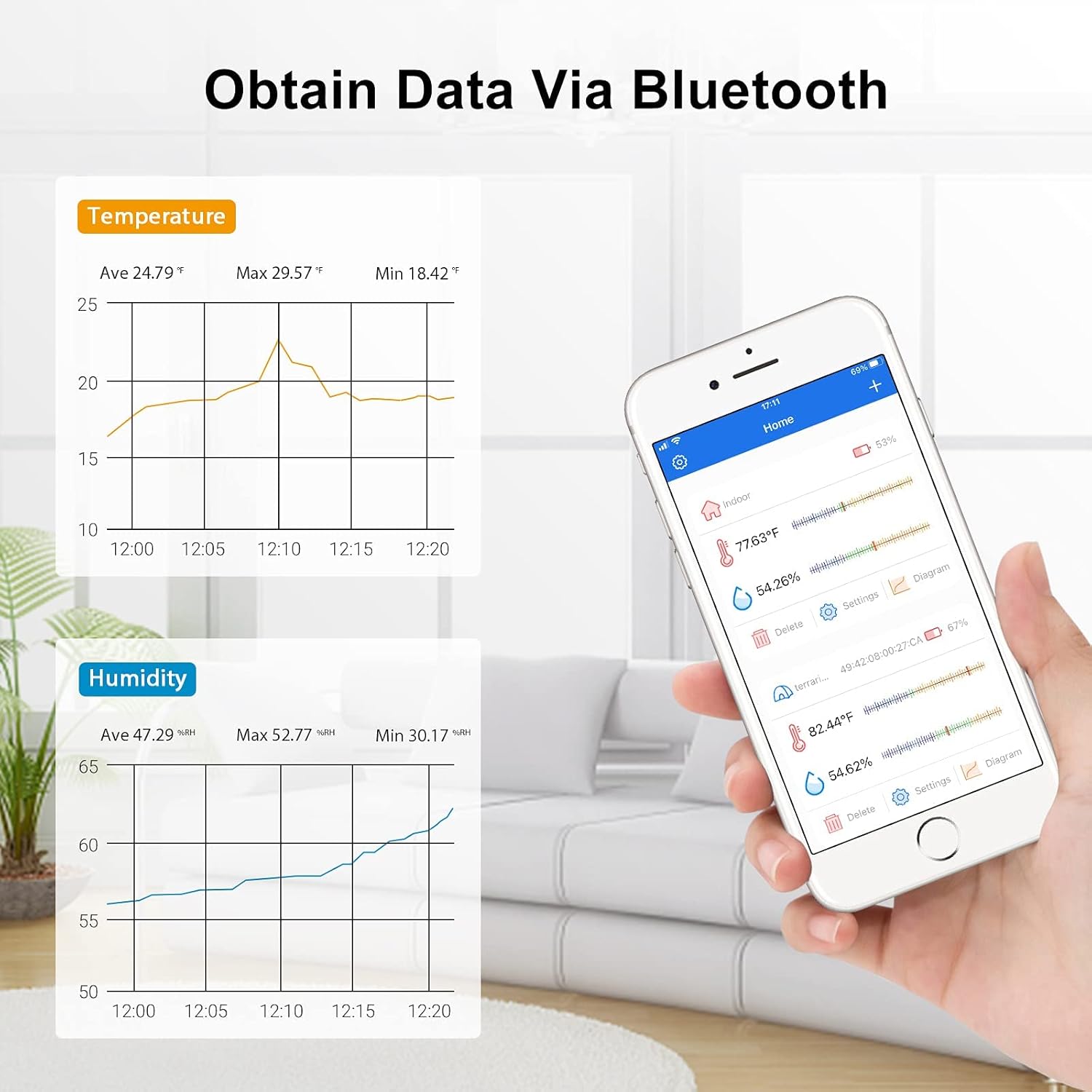
Image: A smartphone screen showing the Inkbird app interface, displaying real-time temperature and humidity data, along with historical graphs, as monitored by the ITH-12S device.
Maintenance
- Cleaning: Wipe both devices clean with a damp cloth. Do not use abrasive cleaners or immerse the devices in water.
- Probe Care: Ensure the temperature probe of the ITC-308 is kept clean and free from debris for accurate readings.
- Battery Replacement (ITH-12S): Replace batteries in the ITH-12S when the low battery indicator appears on the display.
- Storage: When not in use for extended periods, store the devices in a cool, dry place.
Troubleshooting
- No Power (ITC-308): Ensure the main power cord is securely plugged into a working electrical outlet. Check for tripped circuit breakers.
- Incorrect Temperature Readings: Verify the temperature probe is correctly inserted and positioned away from direct heat/cold sources. Ensure the probe is clean.
- Heating/Cooling Not Activating: Check that your heating/cooling devices are properly plugged into the correct outlets on the ITC-308. Verify that the set temperature and differential settings are appropriate for activation.
- ITH-12S Display Blank: Check and replace the batteries.
- Bluetooth Connection Issues (ITH-12S): Ensure Bluetooth is enabled on your smartphone and the ITH-12S is within the 98ft/30m range. Restart the app and the ITH-12S device.
- App Not Displaying Data: Confirm the ITH-12S is powered on and successfully paired via Bluetooth. Check for app updates.
For more detailed troubleshooting, please refer to the complete user manual or contact Inkbird customer support.
Specifications
| Feature | Specification |
|---|---|
| Brand | Inkbird |
| Model Names | ITC-308, ITH-12S |
| Outer Material | Plastic |
| Display Type | Digital |
| Connectivity Technology | Bluetooth (ITH-12S) |
| Power Source | ITC-308: AC Powered, ITH-12S: Battery Powered |
| ITC-308 Max Output Load | 1100W (110V) |
| ITH-12S Temperature Range | 32℉-140℉ (0℃-60℃) |
| ITH-12S Humidity Range | 0%RH-99%RH |
| ITH-12S Temperature Accuracy | ±0.50℉ (±0.3℃) |
| ITH-12S Humidity Accuracy | ±3%RH |
| Indoor/Outdoor Usage | Indoor |
| Product Care Instructions | Wipe Clean |
Warranty and Support
Inkbird products come with a manufacturer's warranty. Please refer to the warranty card included in your product packaging or visit the official Inkbird website for detailed warranty information and terms. For technical support, troubleshooting assistance, or any inquiries regarding your Inkbird ITC-308 or ITH-12S, please contact Inkbird customer service through their official channels.


