
1. Introduction
Thank you for choosing the ODK 59-inch L-Shaped Corner Computer Gaming Desk, Model 12. This manual provides essential information for the safe assembly, proper use, and maintenance of your new desk. Please read these instructions carefully before beginning assembly and retain them for future reference.
2. Safety Information
- Always follow the assembly instructions step-by-step.
- Ensure all screws and fasteners are securely tightened before use. Periodically check and re-tighten as necessary.
- Do not overload the desk. Distribute weight evenly across the surface.
- Keep small parts and packaging materials away from children to prevent choking hazards.
- Use the desk on a flat, stable surface to prevent tipping.
- Avoid placing hot items directly on the desk surface without protection.
3. Package Contents
The ODK L-Shaped Desk package includes all necessary components, hardware, and tools for assembly. Please verify that all parts are present and undamaged before starting assembly. Refer to the detailed parts list provided in the separate assembly guide included with your product.
4. Setup and Assembly Instructions
Assembly of the ODK L-Shaped Desk is designed to be straightforward. One person can complete the assembly by following the detailed, step-by-step instructions provided in the included assembly manual. All required tools are supplied in the package.
- Unpack Components: Carefully remove all parts from the packaging and lay them out on a clean, soft surface to prevent scratches.
- Identify Parts: Match each component with the corresponding labels in the assembly manual.
- Follow Step-by-Step Guide: Adhere strictly to the sequence of steps outlined in the assembly manual.
- Secure Connections: Ensure all screws and fasteners are tightened firmly but do not overtighten to avoid damaging the material.
- Final Check: Once assembled, gently test the desk for stability before placing any items on it.
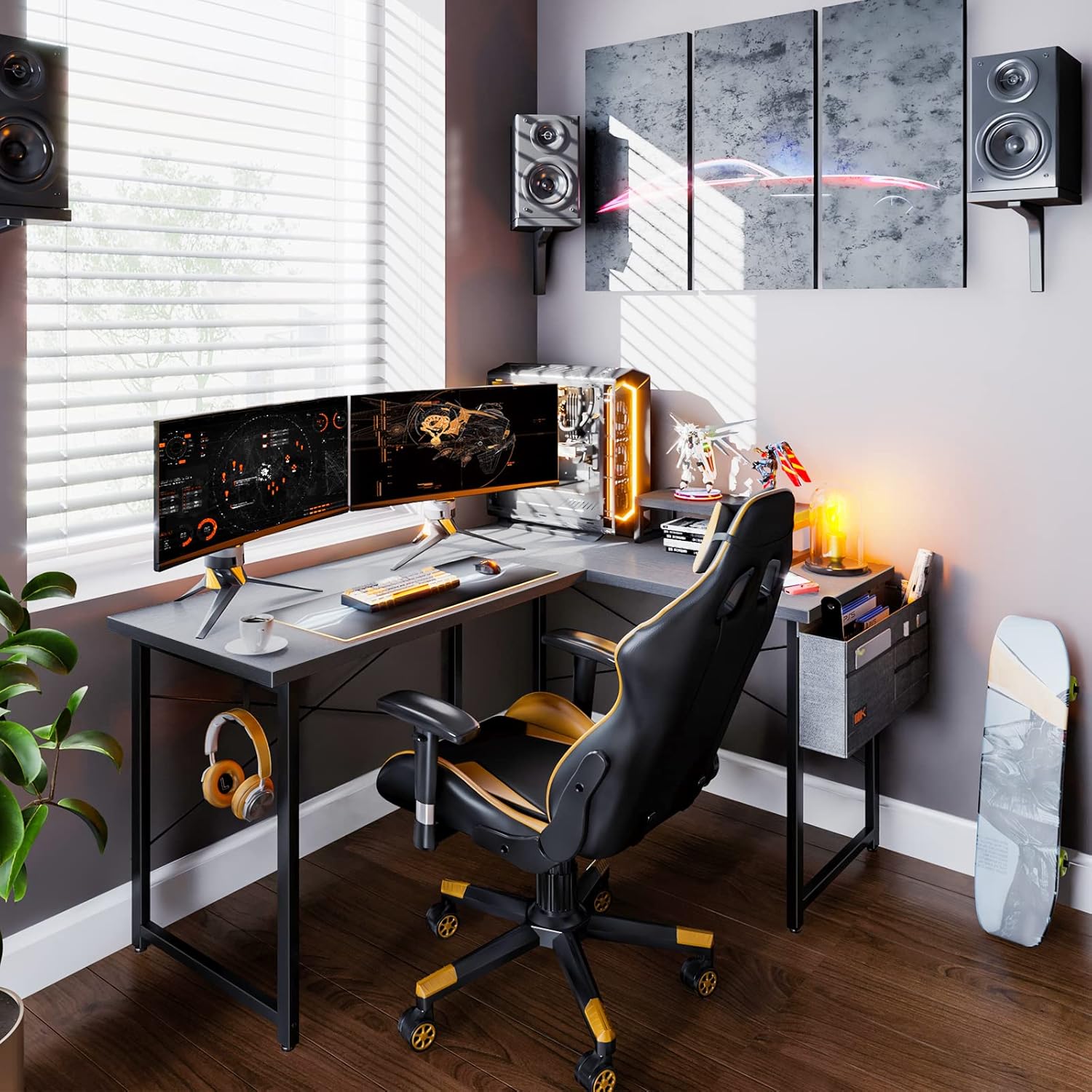
Figure 4.1: Desk dimensions and component overview. This image illustrates the overall measurements of the L-shaped desk, including the length of each side, height, and the dimensions of the integrated monitor stand and storage bag.

Figure 4.2: Fully assembled ODK L-shaped desk, showcasing its use in a gaming setup with multiple monitors and accessories.
5. Operating and Usage
The ODK L-Shaped Desk is designed for versatile use in various environments such as a study, home office, bedroom, living room, or workspace. Its L-shape provides ample surface area for multiple monitors, computers, and other accessories.
- Workstation Setup: Utilize the spacious desktop for computers, monitors, keyboards, and other office essentials.
- Gaming Configuration: The L-shape is ideal for multi-monitor gaming setups, providing dedicated space for gaming peripherals.
- Movable Shelf: The desk includes a movable shelf that can be positioned as needed for additional storage or to elevate a monitor.
- Iron Hook: An integrated iron hook provides a convenient location to hang headphones, bags, or other items, keeping your workspace tidy.

Figure 5.1: The ODK L-shaped desk arranged with a dual-monitor gaming setup, demonstrating its capacity for extensive equipment.

Figure 5.2: Detail of the movable shelf, illustrating its use for elevating items or providing additional storage space.

Figure 5.3: The integrated iron hook, shown holding headphones, offers a practical solution for organizing accessories.
6. Maintenance
Proper care and maintenance will extend the life and appearance of your ODK L-Shaped Desk.
- Cleaning: Wipe the desk surface with a soft, damp cloth. Avoid using abrasive cleaners, harsh chemicals, or solvents, as these can damage the engineered wood finish.
- Spills: Clean up spills immediately to prevent staining or damage to the surface.
- Heat and Moisture: Avoid placing hot items directly on the desk. Use coasters for drinks to protect against moisture rings.
- Sunlight: Prolonged exposure to direct sunlight may cause fading or discoloration.
- Fasteners: Periodically check all screws and bolts to ensure they remain tight. Re-tighten if necessary to maintain stability.
7. Troubleshooting
If you encounter any issues with your ODK L-Shaped Desk, please refer to the following common solutions:
- Desk is Wobbly: Ensure all screws and bolts are fully tightened. Check that the desk is on a level surface. If not, adjust the leveling feet (if applicable) or place shims under the legs.
- Missing Parts: If any parts are missing from the package, please contact ODK customer support immediately with your purchase details.
- Difficulty Assembling: Review the assembly manual carefully. Ensure you are using the correct hardware for each step. If issues persist, contact customer support for assistance.
- Surface Damage: For minor scratches, furniture repair pens or markers matching the desk color may be used. For significant damage, contact customer support for advice.
8. Specifications
| Feature | Specification |
|---|---|
| Brand | ODK |
| Model Number | 12 |
| Dimensions (Overall) | 128.02 cm (50.4 inches) x 104.9 cm (41.3 inches) x 73.91 cm (29.1 inches) |
| Material | Engineered Wood (Desktop), Alloy Steel (Base) |
| Color | Iron Gray |
| Weight | 16.6 kg (36.6 lbs) |
| Special Features | Adjustable, Movable Shelf, Iron Hook |
9. Warranty and Support
ODK is committed to customer satisfaction. If you have any questions, concerns, or require assistance with your product, please do not hesitate to contact our professional after-sales support team.
- Customer Service Response: Our team will respond to your inquiries within 24 hours.
- Contact Information: Please refer to the contact details provided on your purchase receipt or the ODK official website for the most current support channels.
Your satisfaction is our priority, and we are dedicated to resolving any issues to ensure you are completely satisfied with your ODK product.


