
1. Introduction
Thank you for choosing the Tribesigns Reversible L-Shaped Computer Desk, Model JW0334. This manual provides detailed instructions for assembly, operation, maintenance, and troubleshooting to ensure optimal use and longevity of your desk. Please read this manual thoroughly before beginning assembly and retain it for future reference.
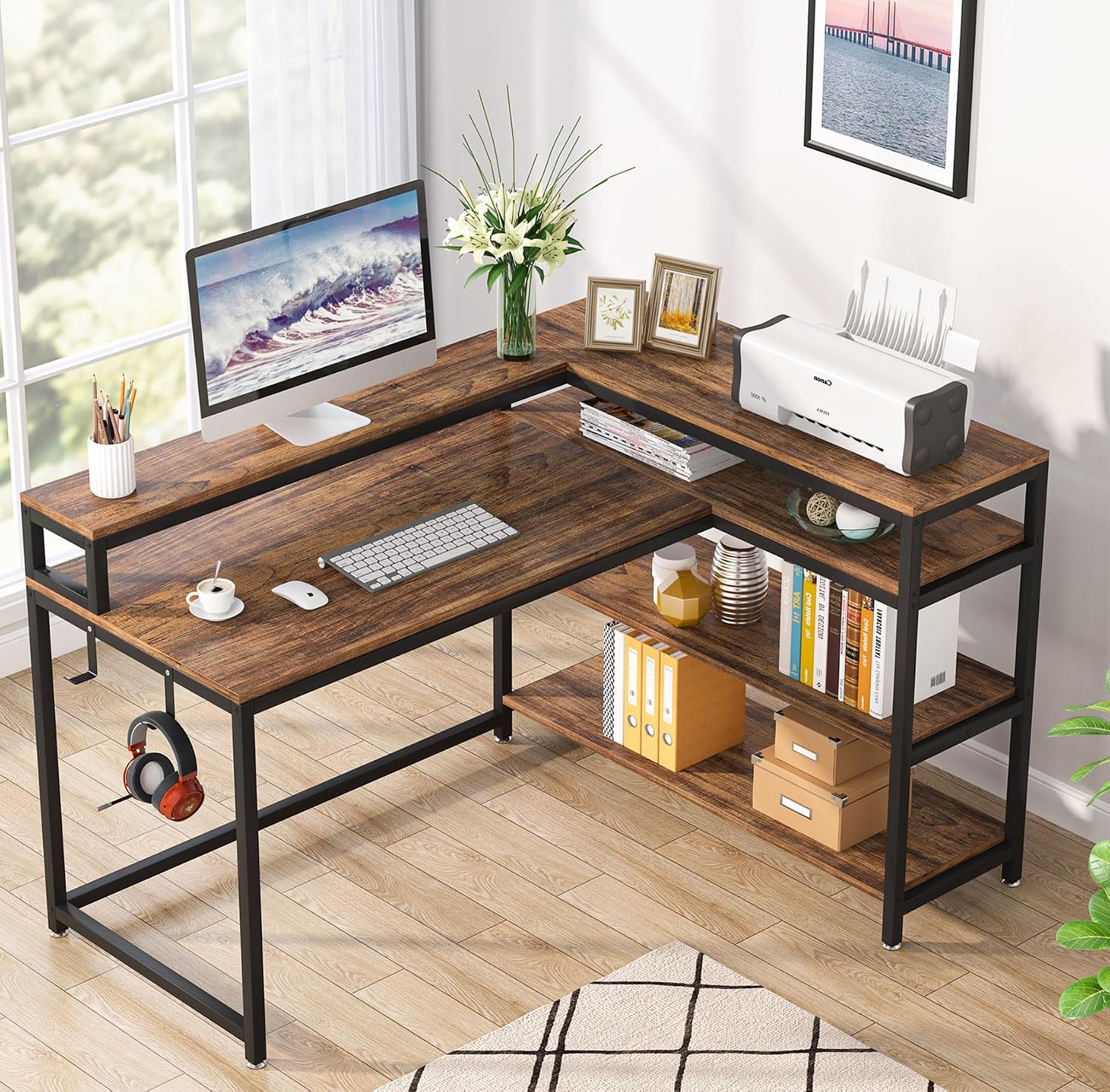
Image 1.1: The Tribesigns Reversible L-Shaped Computer Desk, Model JW0334, showcasing its spacious design and integrated storage shelves.
2. Safety Information
- Weight Capacity: The desk is designed to support a maximum weight of 350 pounds (158 kg). Do not exceed this limit to prevent damage or injury.
- Assembly: Assembly requires two people for safety and ease. Ensure all screws and fasteners are securely tightened before use.
- Placement: Place the desk on a level surface to ensure stability. Avoid placing in areas with excessive moisture or direct sunlight.
- Children: Keep small parts and packaging materials away from children during assembly.
3. Parts List
Before assembly, verify that all components listed below are present and undamaged. If any parts are missing or damaged, please contact customer support.
- Desktop Panels (L-shaped sections, monitor stand)
- Metal Frame Components (legs, support bars)
- Storage Shelf Panels
- Assembly Hardware (screws, Allen wrench, etc.)
- Headphone Hooks (optional attachment)
- Adjustable Feet
4. Setup and Assembly
Follow these steps carefully to assemble your Tribesigns L-Shaped Computer Desk. All necessary tools are included.
- Unpack Components: Carefully remove all parts from the packaging and lay them out on a clean, soft surface to prevent scratches.
- Identify Parts: Match each component to the corresponding labels in the instruction diagram.
- Assemble Frame: Begin by connecting the main metal frame components using the provided screws and Allen wrench. Ensure all connections are snug but do not overtighten initially.
- Attach Desktop Panels: Secure the main desktop panels to the assembled frame.
- Install Monitor Stand: Attach the monitor stand to the designated area on the desktop.
- Configure Reversible Storage: The storage shelf unit can be installed on either the left or right side of the desk to suit your preference. Refer to the diagram below for visual guidance.
- Attach Storage Shelves: Secure the storage shelf panels to the frame of the storage unit.
- Final Tightening: Once all components are in place, go back and fully tighten all screws.
- Attach Accessories: Install the headphone hooks and adjustable feet as desired.

Image 4.1: Illustration of the reversible L-shaped configuration, allowing the storage unit to be positioned on either side.

Image 4.2: Visual guide demonstrating the flexibility of the reversible L-shaped design for optimal space utilization.
5. Operating Instructions
The Tribesigns L-Shaped Computer Desk is designed for versatile use in various environments.
- Monitor Stand: Utilize the integrated monitor stand to raise your screen to eye level. This promotes an ergonomic posture, which can help reduce neck and back strain during extended use.
- Storage Shelves: The open 4-tier shelves provide ample space for books, files, printers, and other office supplies, keeping your workspace organized and efficient.
- Headphone Hooks: Use the convenient headphone hooks to keep your headphones within reach and off the desktop.
- Adjustable Feet: Adjust the desk's feet to ensure stability on uneven floors and prevent wobbling.

Image 5.1: Ergonomic design benefits, showing how the monitor stand helps maintain correct sitting posture.

Image 5.2: Detailed view of the monitor stand and its ergonomic advantages.

Image 5.3: The open 4-tier shelves providing ample storage for various items.
6. Maintenance
Proper care will extend the life and appearance of your desk.
- Cleaning: Wipe the desk surfaces with a dry cloth. Avoid abrasive cleaners or harsh chemicals that may damage the finish.
- Spills: Immediately wipe up any spills to prevent staining or damage to the engineered wood.
- Fasteners: Periodically check and retighten all screws and connections to ensure the desk remains stable.
7. Troubleshooting
- Wobbling Desk: Ensure the desk is on a level surface. Adjust the leveling feet at the bottom of the legs until the desk is stable. Check that all assembly screws are securely tightened.
- Difficulty During Assembly: Review the assembly instructions carefully, paying close attention to the orientation of parts, especially for the reversible sections. Ensure you are using the correct screws for each step. If a part seems forced, re-check the instructions.
- Damaged or Missing Parts: If you receive damaged or missing components, do not proceed with assembly. Contact Tribesigns customer service immediately for assistance.
8. Specifications
| Feature | Detail |
|---|---|
| Brand | Tribesigns |
| Model Number | JW0334 |
| Product Dimensions | 53"D x 41"W x 35"H |
| Material | Engineered Wood (Top), Metal (Base) |
| Color | Retro Brown |
| Style | Industrial |
| Weight Capacity | 350 Pounds (158 kg) |
| Number of Shelves | 3 |
| Assembly Required | Yes (Recommended 2 people) |
| Care Instructions | Wipe with Dry Cloth |

Image 8.1: Detailed dimensions of the Tribesigns L-Shaped Computer Desk.
9. Warranty and Support
Tribesigns products come with a commitment to quality.
- Warranty: This product includes a 90-day manufacturer's warranty for parts and 18 months of quality assurance.
- Customer Service: For any questions, concerns, or assistance with assembly or parts, please contact Tribesigns customer service. Refer to your purchase documentation for specific contact details.


