
Introduction
This manual provides comprehensive instructions for the Realforce Topre R3S TKL Keyboard (Topre 45g), Model R3SD31. It covers setup, operation, maintenance, troubleshooting, and detailed specifications to ensure optimal use of your keyboard. The Realforce R3S TKL keyboard features a space-saving tenkeyless form factor, laser-printed PBT keycaps, and full N-key rollover (NKRO) support, utilizing high-quality Topre switches for a unique typing experience.
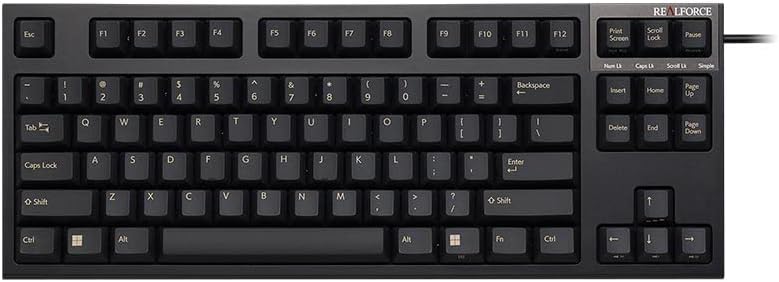
Image: Front view of the Realforce Topre R3S TKL Keyboard.
Setup
Follow these steps to set up your Realforce Topre R3S TKL Keyboard:
- Unpack the Keyboard: Carefully remove the keyboard and the included USB cable from its packaging.
- Connect to Computer: The keyboard features a non-detachable USB-A cable. Connect the USB-A end of the cable to an available USB-A port on your computer (Laptop or PC).
- Operating System Compatibility: The keyboard is compatible with Windows operating systems. No special drivers are typically required for basic functionality; it should be recognized automatically.
- Placement: Place the keyboard on a stable, flat surface. Adjust the keyboard feet on the underside for your preferred typing angle, if available.

Image: Rear view of the Realforce R3S TKL Keyboard, illustrating the USB cable connection and the product label with model information.
Operating Instructions
The Realforce Topre R3S TKL Keyboard is designed for intuitive use. Here are key aspects of its operation:
Basic Typing
The keyboard features a standard QWERTY layout with 87 keys. Its tenkeyless (TKL) form factor provides a compact design while retaining essential keys for efficient typing. The Topre 45g switches offer a tactile typing experience.

Image: Top-down view of the Realforce R3S TKL Keyboard, showing the QWERTY layout and 87 keys.
Topre Switches
This keyboard utilizes Topre electrostatic capacitive non-contact switches, known for their smooth, tactile feel and durability. The 45g weighting provides a consistent and satisfying keypress.

Image: An exploded view of a Topre switch, illustrating its internal components and non-contact design.
Feather-Key Touch
The Topre switches are designed to provide a 'feather-key touch' sensation, characterized by a smooth press and a distinct tactile bump without a harsh bottom-out. This design aims to reduce finger fatigue during extended typing sessions.

Image: A force curve graph demonstrating the 'feather-key touch' characteristic of Topre switches, showing the force required over key travel.
Actuation Point Changer (APC) Function
The keyboard supports an Actuation Point Changer (APC) function, allowing you to customize the key actuation point. This feature enables you to adjust how deep a key needs to be pressed before it registers, offering flexibility for different typing styles or applications like gaming.

Image: A diagram illustrating the adjustable actuation points (0.8mm, 1.5mm, 2.2mm, 3mm) for the keyboard switches.
Customizable Software
The Realforce R3S TKL Keyboard is supported by dedicated software that allows for advanced customization. This software enables users to adjust the actuation point per key, remap keys, and configure other settings to personalize their typing experience.

Image: Screenshot of the Realforce R3S customization software interface, showing options for actuation point adjustment and key remapping.
Maintenance
Proper maintenance ensures the longevity and performance of your Realforce keyboard:
- Regular Cleaning: Use a soft, lint-free cloth to wipe down the keycaps and keyboard surface regularly. For deeper cleaning, a can of compressed air can be used to remove dust and debris from between the keys.
- Keycap Cleaning: The PBT keycaps are durable. If necessary, keycaps can be carefully removed using a keycap puller (not included) for thorough cleaning. Clean them with mild soap and water, then ensure they are completely dry before reattaching.
- Avoid Liquids: Do not spill liquids on the keyboard. In case of accidental spills, immediately disconnect the keyboard from your computer and allow it to dry completely before reconnecting.
- Storage: When not in use for extended periods, store the keyboard in a clean, dry environment away from direct sunlight and extreme temperatures.
Troubleshooting
If you encounter issues with your Realforce Topre R3S TKL Keyboard, try the following steps:
- Keyboard Not Responding:
- Ensure the USB cable is securely connected to both the keyboard and your computer.
- Try connecting the keyboard to a different USB port on your computer.
- Test the keyboard on another computer to determine if the issue is with the keyboard or the original computer.
- Restart your computer.
- Specific Keys Not Working:
- Check for any physical obstructions or debris under the non-functioning keycap.
- If using the customization software, ensure no key remapping or actuation point settings are causing the issue. Reset to default settings if necessary.
- Unexpected Behavior:
- If the keyboard is behaving erratically, disconnect it and reconnect it.
- Ensure your operating system is up to date.
If these steps do not resolve the issue, please refer to the Support section for further assistance.
Specifications
| Brand | Realforce |
| Model Number | R3SD31 |
| Connectivity Technology | USB-A (Wired) |
| Switch Type | Topre Electrostatic Capacitive (Tactile, 45g) |
| Keycaps | Laser Printed PBT |
| Keyboard Layout | QWERTY, 87 Keys (Tenkeyless) |
| Compatible Devices | Laptop, PC |
| Compatible Operating System | Windows |
| Product Dimensions (L x W x H) | 14.53" x 5.59" x 1.5" (36.9 cm x 14.2 cm x 3.8 cm) |
| Item Weight | 1.1 Kilograms (2.43 lbs) |
| Material | Acrylonitrile Butadiene Styrene (ABS) |
| Special Features | Full N-Key Rollover (NKRO), Topre Switches, Customizable Actuation Point (via software) |
| What's in the Box | USB Cable |
Warranty
The Realforce Topre R3S TKL Keyboard comes with a 1-year limited repair warranty from the manufacturer, Topre Corporation. This warranty covers defects in materials and workmanship under normal use. Please retain your proof of purchase for warranty claims.
Support
For further assistance, technical support, or warranty inquiries, please contact Realforce customer service or visit the official Realforce store.
Realforce Store: Visit the Realforce Store on Amazon
When contacting support, please have your keyboard's model number (R3SD31) and proof of purchase readily available.
