
1. Introduction and Overview
This manual provides comprehensive instructions for the assembly, operation, and maintenance of your Aheaplus L Shaped Desk. Designed for versatility, this desk can be configured as an L-shaped corner desk or a long two-person desk, featuring integrated power outlets, USB ports, LED strip lighting, and ample storage solutions.

Figure 1.1: The Aheaplus L Shaped Desk, showcasing its L-shape configuration, integrated hutch, LED lighting, and power outlets. This desk is designed for home office, gaming, or general workspace use, offering a spacious and organized environment.
2. Safety Information
Important Safety Precautions:
- Always follow the assembly instructions provided in this manual carefully.
- Exercise caution when handling heavy components to prevent injury.
- Ensure the desk is stable and properly leveled before placing items on it.
- Do not overload the desk. The maximum recommended weight limit is 500 pounds (226.8 kg). Exceeding this limit may compromise the desk's stability and structural integrity.
- Use the desk only for its intended purposes, such as working, writing, or gaming.
- Keep all electrical components (power outlets, USB ports, LED strip) dry and away from liquids.
- Do not attempt to modify the electrical components or wiring.
3. Package Contents
Before beginning assembly, verify that all components listed below are present and undamaged. If any parts are missing or damaged, please contact customer support.
- Desk panels (main desktops, hutch shelves, side storage shelves)
- Metal frame components (legs, support bars)
- Integrated power strip with 3 AC outlets and 2 USB ports
- LED light strip with remote control
- Moveable monitor stand
- Extra storage bag (fabric)
- Headphone hooks
- Assembly hardware (screws, bolts, nuts, Allen wrench)
- Instruction manual

Figure 3.1: Detailed dimensions of the Aheaplus L Shaped Desk in both its L-shaped and straight configurations, providing measurements for planning your space and ensuring all components fit.
4. Setup and Assembly
The Aheaplus L Shaped Desk is designed for straightforward assembly. All necessary hardware and tools are included, and parts are clearly labeled. For optimal results, it is recommended to assemble the desk with two people.
4.1 Assembly Steps
- Unpack and Organize: Carefully unpack all components and lay them out on a clean, soft surface to prevent scratches. Identify each part using the provided labels and the parts list in the instruction manual.
- Assemble the Frame: Begin by connecting the metal frame components according to the diagrams in the included assembly guide. Ensure all screws are finger-tight before fully tightening them.
- Attach Desktop Panels: Secure the main desktop panels to the assembled frame. Pay attention to the orientation if you are choosing between an L-shape or a long desk configuration. The desk is reversible, allowing the L-shape to be set up with the longer side on the left or right.
- Install Hutch and Shelves: Attach the 2-tier top hutch and the side storage shelves. These provide additional space for books, monitors, and office essentials.
- Integrate Power Outlet: Install the built-in power strip into the designated slot on the desktop. Ensure it is securely fastened.
- Apply LED Strip: Adhere the LED light strip to the underside of the hutch or desired location. Ensure the strip is clean and dry before application for best adhesion.
- Add Accessories: Attach the extra storage bag and headphone hooks as desired. The storage bag is ideal for documents and small items, while the hooks keep headphones or other accessories organized.
- Final Tightening: Once all components are in place and aligned, systematically tighten all screws and bolts. Do not overtighten.

Figure 4.1: The Aheaplus desk configured as a long two-person desk, demonstrating its versatility and ample workspace for collaborative or dual setups.
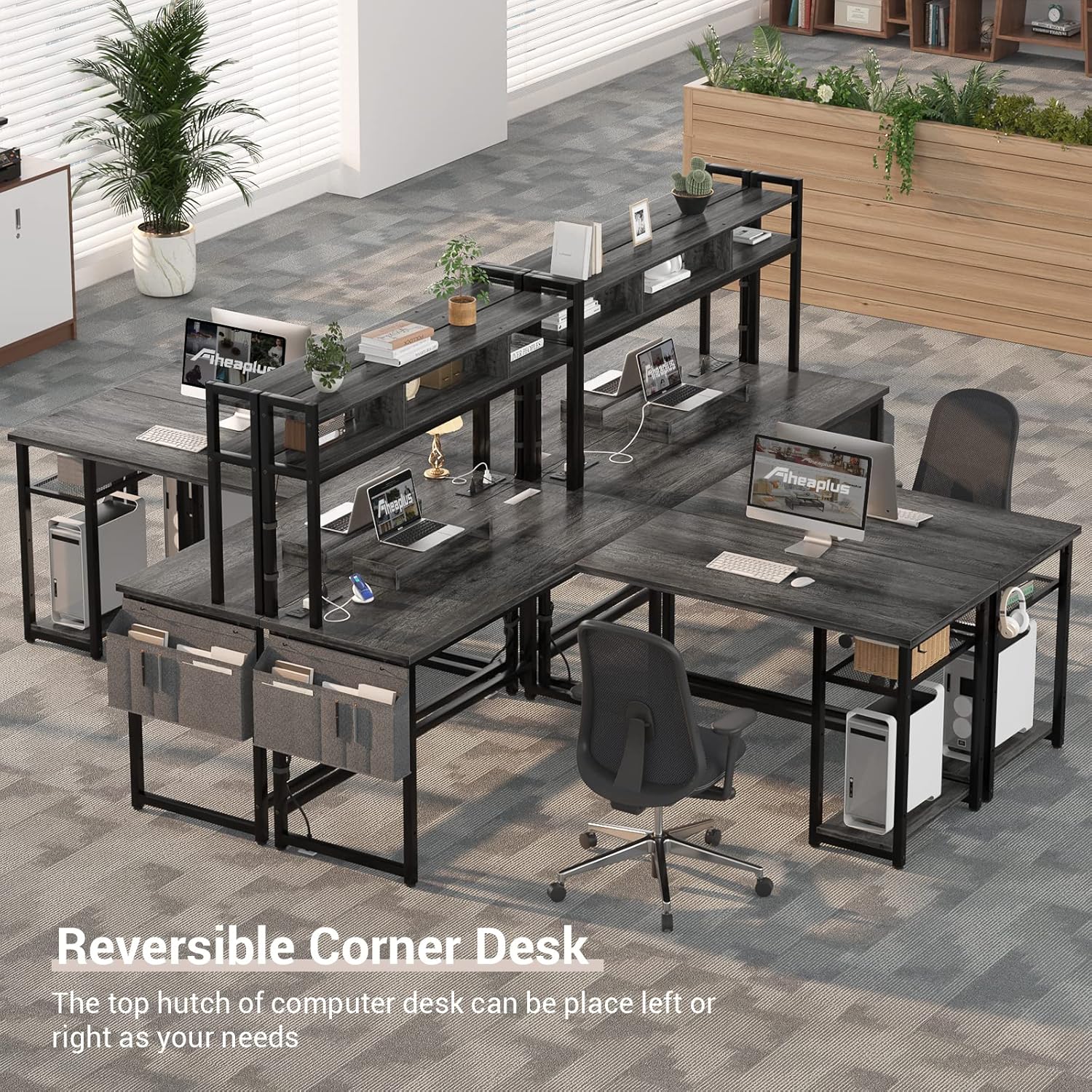
Figure 4.2: An example of multiple Aheaplus L Shaped Desks used in a larger office environment, highlighting their modularity and ability to create various workspace layouts.
5. Operating Instructions
5.1 Power Outlet and USB Ports
The integrated power strip provides convenient access to power for your electronic devices.
- AC Outlets: The desk features 3 standard 120V/12A AC outlets. Plug in your computer, monitor, lamps, or other AC-powered devices.
- USB Ports: Two 5V/2A USB ports are available for charging mobile phones, tablets, headphones, and other USB-powered devices.
- Power Cord: The power strip is connected via a 6.5-foot (1.98 meter) power cord. Plug this cord into a grounded wall outlet.

Figure 5.1: A detailed view of the integrated power strip, showing the 3 AC outlets and 2 USB ports, designed for convenient charging and powering of various devices directly from your desk.
5.2 LED Light Strip
The LED light strip enhances your workspace ambiance and can be controlled via the included remote.
- Static Colors: Choose from 20 static colors to match your mood or decor.
- Dynamic Modes: Explore 21 dynamic modes for various lighting effects.
- Flashing Modes: Select from 5 light flashing modes.
- Memory Function: The LED lights feature a memory function, retaining the last selected mode when turned off and on again.
- Remote Control: Use the provided remote to power on/off, change colors, adjust brightness, and select modes.

Figure 5.2: The Aheaplus L Shaped Desk illuminated by its LED strip, creating an immersive environment, particularly suitable for gaming setups. The image also shows the remote control for the LED lights.
5.3 Moveable Monitor Stand
The included moveable monitor stand helps maintain proper sitting posture by elevating your monitor to an ergonomic height, reducing strain on your neck and spine.
- Place the monitor stand on the desktop in a position that aligns your monitor with your eye level.
- Adjust its position as needed to ensure comfortable viewing.

Figure 5.3: A visual guide demonstrating how the moveable monitor stand helps achieve and maintain a correct sitting posture, promoting cervical and spinal health during extended use.
6. Maintenance
Regular maintenance will help preserve the appearance and functionality of your Aheaplus L Shaped Desk.
- Cleaning: Wipe surfaces with a soft, damp cloth. Avoid harsh chemicals or abrasive cleaners, which can damage the finish. For the black oak finish, fingerprints may be visible; a soft cloth can easily remove them.
- Hardware: Periodically check all screws and bolts to ensure they remain tight. Retighten if necessary, but do not overtighten.
- Electrical Components: Keep the power outlets, USB ports, and LED strip free from dust and debris. Do not attempt to clean them with liquids.
- Weight Distribution: Distribute weight evenly across the desktop and shelves to prevent stress on any single point.
7. Troubleshooting
This section addresses common issues you might encounter with your desk.
| Problem | Possible Cause | Solution |
|---|---|---|
| Desk wobbles or is unstable. | Uneven floor; loose assembly hardware. | Adjust the leveling feet on the bottom of the desk legs. Ensure all assembly screws and bolts are securely tightened. |
| Power outlets/USB ports not working. | Power cord not plugged in; circuit breaker tripped; device malfunction. | Ensure the desk's power cord is fully plugged into a working wall outlet. Check your home's circuit breaker. Test the device in another outlet. If the issue persists, contact customer support. |
| LED strip not lighting up or responding to remote. | LED strip not properly connected; remote battery low; remote signal obstructed. | Check the connection of the LED strip to its power source. Replace the remote control battery. Ensure there is no obstruction between the remote and the LED receiver. |
| Difficulty during assembly. | Incorrect part orientation; missing hardware. | Refer to the detailed assembly instructions and diagrams. Ensure parts are oriented correctly. Verify all hardware is present. Contact customer support if parts are missing or instructions are unclear. |
8. Specifications
| Feature | Detail |
|---|---|
| Brand | Aheaplus |
| Model Number | 9092c0ce-ca4d-4efb-85f2-0d17c158ff62 |
| Dimensions (L-Shape) | 59"W x 19.7"D x 59.8"H (approximate, refer to diagram for full L-shape dimensions) |
| Dimensions (Long Desk) | 86.6"L x 19.7"D x 59.8"H (approximate, refer to diagram for full long desk dimensions) |
| Color | Black Oak |
| Material | Engineered Wood (Desktop), Metal (Frame) |
| Power Outlets | 3 x 120V/12A AC Outlets |
| USB Ports | 2 x 5V/2A USB Ports |
| Power Cord Length | 6.5 feet (1.98 meters) |
| LED Light Features | 20 Static Colors, 21 Dynamic Modes, 5 Flashing Modes, Memory Function |
| Maximum Weight Recommendation | 500 Pounds (226.8 kg) |
| Included Components | Power Outlets, USB Ports, Moveable Monitor Stand, Extra Storage Bag, Headphone Hooks |
| Assembly Required | Yes (All tools included) |
9. Warranty and Customer Support
Aheaplus is committed to providing high-quality products and excellent customer service.
- Customer Support: We provide lifetime customer support for your Aheaplus L Shaped Desk.
- Contact: If you encounter any issues, have questions about assembly, or require assistance, please do not hesitate to contact our experienced customer service team. We aim to respond within 24 hours.
- Returns: The product is eligible for 30-day easy returns. Please refer to your purchase platform's return policy for detailed instructions.
For further assistance, please visit the official Aheaplus store or contact us through the platform where you purchased the product.
