
1. Introduction
This manual provides detailed instructions for the safe and efficient use of your Müller-Licht Mobina Push 30 LED Orientation Light. Please read this manual thoroughly before operating the device and retain it for future reference.
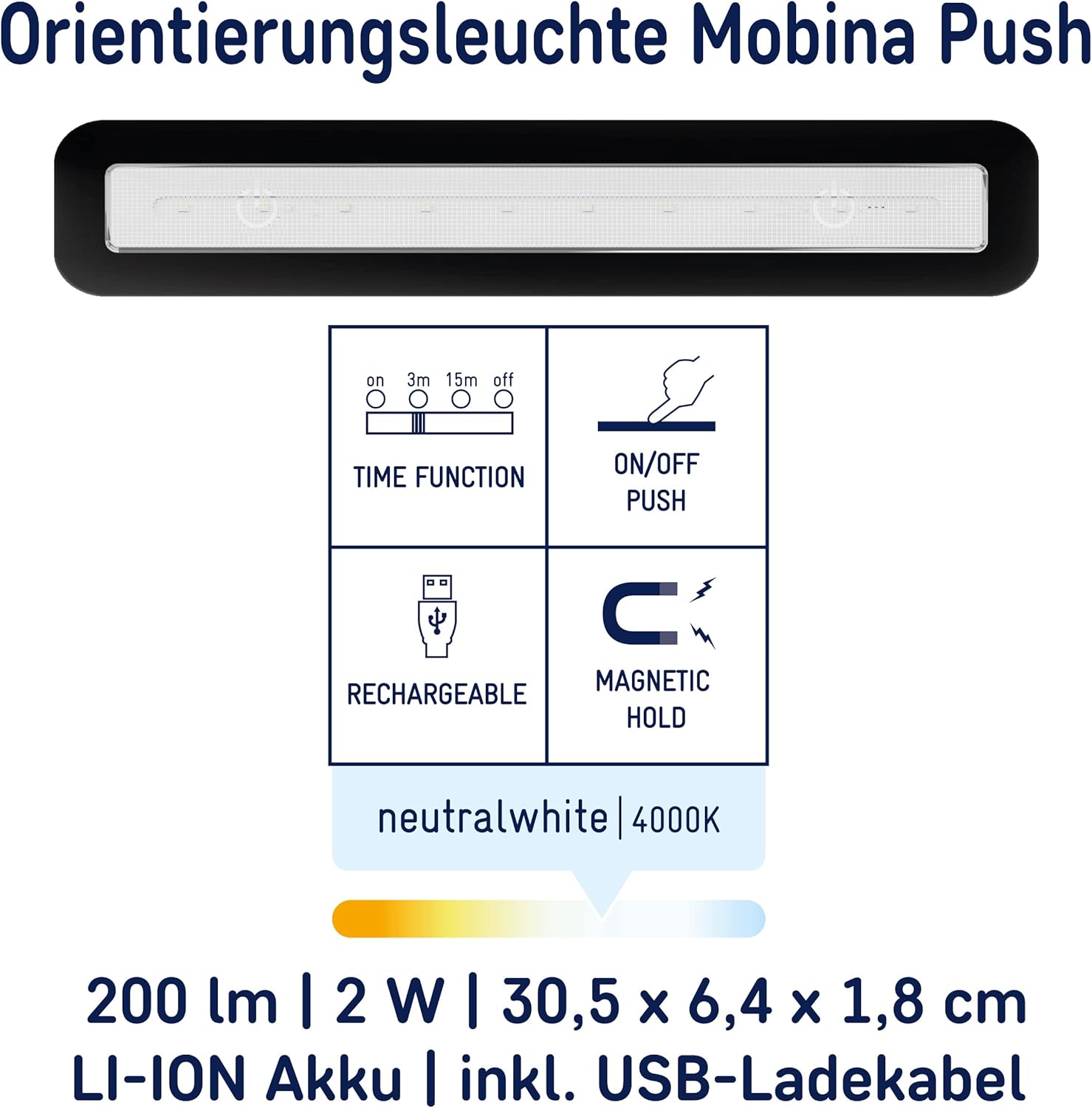
The Mobina Push 30 is a versatile, wireless LED light designed to provide illumination where needed. It features a push-activated light, USB recharging, and a timer function for energy efficiency. Its compact and self-adhesive design allows for flexible installation in various indoor environments.
2. Product Features
- Wireless and Mobile: Offers flexible placement without the need for permanent wiring.
- Push Activation: Easily turn the light ON/OFF by pressing its surface.
- USB Rechargeable: Conveniently recharges via a standard USB cable.
- Timer Function: Adjustable automatic shut-off after 3 or 15 minutes to conserve energy.
- Magnetic and Self-Adhesive Mounting: Simple and quick installation on various surfaces.
- Neutral White Light (4000K): Provides clear and comfortable illumination.
- Compact Design: Flat profile integrates seamlessly into any space.
3. Package Contents
Please check that all items are present in the package:
- Mobina Push 30 LED Orientation Light (Black)
- Mounting material (self-adhesive pads, magnetic strips)
- Micro USB charging cable (15 cm)
- User manual
4. Safety Instructions
To ensure safe operation, please observe the following safety guidelines:
- This product is intended for indoor use only. Do not expose to moisture or extreme temperatures.
- Do not attempt to open, disassemble, or modify the device. This will void the warranty and may cause damage or injury.
- Keep the device away from children and pets.
- Use only the provided USB cable or a certified equivalent for charging.
- Do not cover the light during operation, as this may lead to overheating.
- If the device is damaged, discontinue use immediately and contact customer support.
5. Setup and Installation
The Mobina Push 30 LED light offers flexible installation options:
- Charging: Before first use, fully charge the device using the provided micro USB cable. Connect the cable to the charging port on the side of the light and to a standard USB power source (e.g., computer, USB wall adapter). The charging indicator will show the charging status.
- Surface Preparation: Ensure the desired mounting surface is clean, dry, and smooth.
- Mounting Options:
- Self-Adhesive: Peel off the protective film from the self-adhesive pads on the back of the light. Press the light firmly onto the desired surface for at least 30 seconds.
- Magnetic: The light features integrated magnets, allowing it to be attached to metallic surfaces directly.

6. Operation
Operating the Mobina Push 30 is straightforward:
- Power Switch: Locate the small switch on the side of the light. Set it to the "ON" position.
- Turning On/Off: Gently press the surface of the light to turn it on. Press it again to turn it off.
- Timer Function: The light includes a timer switch. You can select between:
- 3m (3 minutes): The light will automatically turn off after 3 minutes of activation.
- 15m (15 minutes): The light will automatically turn off after 15 minutes of activation.
- OFF: The timer function is disabled, and the light remains on until manually turned off by pressing the surface.

7. Maintenance and Care
To maintain the performance and appearance of your LED light:
- Clean the surface with a soft, dry cloth. Do not use abrasive cleaners or solvents.
- Ensure the charging port is free of dust and debris.
- Store the device in a cool, dry place when not in use for extended periods.
8. Troubleshooting
If you encounter issues with your Mobina Push 30, refer to the following common problems and solutions:
| Problem | Possible Cause | Solution |
|---|---|---|
| Light does not turn on. | Battery is depleted. | Charge the device using the USB cable. |
| Light does not turn on. | Power switch is in the OFF position. | Ensure the power switch is set to "ON". |
| Light turns off too quickly. | Timer function is active. | Adjust the timer switch to the "OFF" position if continuous light is desired. |
| Device is not charging. | USB cable or power source issue. | Try a different USB cable or power adapter. Ensure the cable is securely connected. |
9. Technical Specifications
| Specification | Value |
|---|---|
| Brand | MÜLLER LICHT |
| Model Number | 27700058 |
| Dimensions (L x W x H) | 30.5 x 6.4 x 1.8 cm |
| Weight | 148 g |
| Material | Plastic |
| Color | Black |
| Light Type | LED Orientation Light / Night Light |
| Light Color Temperature | 4000K (Neutral White) |
| Luminous Flux | 200 lm |
| Power Consumption | 2 Watts |
| Voltage | 3.7 Volts |
| Battery Type | 1 Lithium-ion (included) |
| Charging | USB Rechargeable |
| IP Rating | IP20 |
| Special Features | Push activation, Wireless, Touch control, Timer function, Self-adhesive, Magnetic |

10. Disposal Information
Do not dispose of the device with household waste. This product contains a rechargeable battery and electronic components that must be recycled separately. Please use designated collection points for electrical and electronic waste in your community.
11. Warranty and Support
For warranty information and customer support, please refer to the documentation included with your purchase or visit the official Müller-Licht website. Keep your proof of purchase for warranty claims.


