
1. Introduction
Thank you for purchasing the iDance GO PARTY 4 Portable Bluetooth Speaker. This device is designed to provide high-quality audio streaming via Bluetooth, USB MP3 playback, and includes a wired microphone with voice changer effects and integrated disco LED lights. This manual provides essential information for safe and effective use of your speaker.
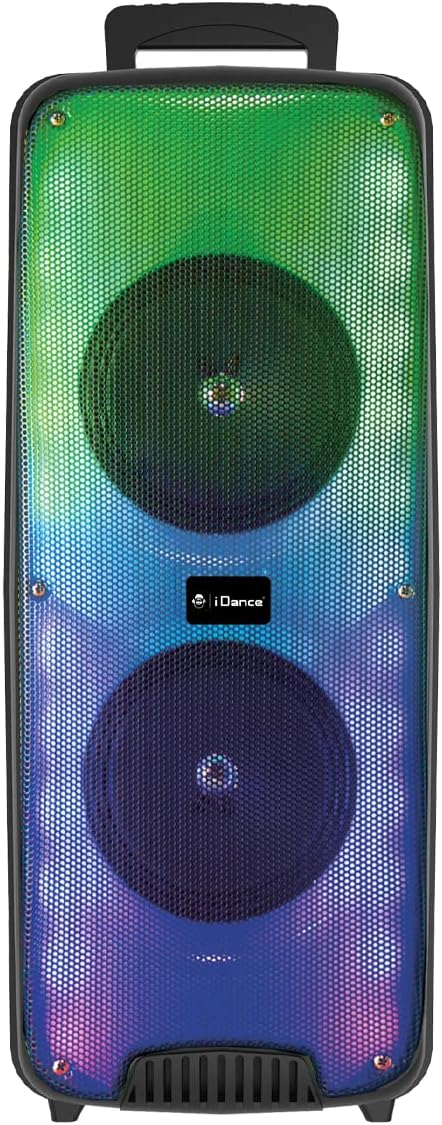
Image 1.1: Front view of the iDance GO PARTY 4 Portable Bluetooth Speaker, showcasing its dual speakers and vibrant LED lighting.
2. Safety Information
- Read all instructions before operating the device.
- Keep the speaker away from water, moisture, and extreme temperatures. This product is not waterproof.
- Do not block ventilation openings.
- Use only attachments/accessories specified by the manufacturer.
- Unplug the device during lightning storms or when unused for long periods.
- Do not attempt to repair the unit yourself. Refer all servicing to qualified personnel.
- Dispose of batteries and electronic components responsibly according to local regulations.
3. Package Contents
Ensure all items are present in the package:
- iDance GO PARTY 4 Portable Bluetooth Speaker
- Wired Microphone
- Remote Control
- Charging Cable (Micro USB)

Image 3.1: Included wired microphone and remote control.
4. Product Overview
Familiarize yourself with the control panel and ports of your iDance GO PARTY 4 speaker.

Image 4.1: Rear control panel of the iDance GO PARTY 4 speaker.
Control Panel Features:
- ON/OFF Switch: Powers the speaker on or off.
- VOLUME Knob: Adjusts the main speaker volume.
- AUDIO INPUT: 3.5mm auxiliary input for external audio devices.
- CHARGING DC 5V Port: Micro USB port for charging the speaker.
- USB Port: For USB MP3 playback.
- TF Card Slot: For TF (MicroSD) card MP3 playback.
- PREV / NEXT Buttons: Navigate tracks during MP3 playback.
- SOUND EFFECT Button: Activates various sound effects.
- VOICE CHANGER Button: Cycles through voice changer modes.
- MODE / LED ON/OFF Button: Switches between input modes (Bluetooth, USB, AUX) and controls LED lights.
- ECHO Knob: Adjusts the echo effect for the microphone.
- MIC VOL Knob: Adjusts the microphone volume.
- INPUT (MIC) Port: 6.35mm jack for connecting the wired microphone.
- Charging Indicator: LED light indicating charging status.
5. Setup
5.1. Charging the Speaker
- Connect the provided Micro USB charging cable to the CHARGING DC 5V Port on the speaker.
- Connect the other end of the cable to a standard USB power adapter (not included) or a computer's USB port.
- The charging indicator light will illuminate. Once fully charged, the light may change color or turn off, depending on the model.
- A full charge provides approximately 4 to 8 hours of playback time.
5.2. Power On/Off
- To turn on the speaker, slide the ON/OFF Switch to the 'ON' position.
- To turn off the speaker, slide the ON/OFF Switch to the 'OFF' position.
6. Operating Instructions
6.1. Bluetooth Pairing
- Ensure the speaker is powered on.
- Press the MODE button on the control panel or remote control until the speaker is in Bluetooth mode. A voice prompt or indicator light will confirm.
- On your mobile device (smartphone, tablet, etc.), enable Bluetooth and search for available devices.
- Select "iDance GO PARTY 4" or a similar name from the list of devices.
- Once paired, the speaker will indicate a successful connection, and you can begin streaming audio.
6.2. USB MP3 Playback
- Insert a USB flash drive containing MP3 audio files into the USB Port.
- The speaker should automatically switch to USB mode and begin playing the MP3 files. If not, press the MODE button to select USB mode.
- Use the PREV / NEXT buttons to skip tracks.
6.3. Microphone Usage and Voice Changer
- Connect the wired microphone to the INPUT (MIC) Port.
- Adjust the microphone volume using the MIC VOL Knob.
- Rotate the ECHO Knob to add or reduce the echo effect to your voice.
- Press the VOICE CHANGER Button to cycle through the four available voice effects: Child, Woman, Man, and Robot.
6.4. LED Lights
The iDance GO PARTY 4 features integrated disco LED lights. Press the MODE / LED ON/OFF Button (or the dedicated LED button on the remote) to turn the lights on or off.
6.5. Remote Control Functions
The included remote control allows for convenient operation of the speaker from a distance. Functions include:
- Power On/Off
- Mode Selection (Bluetooth, USB, AUX)
- Volume Up/Down
- Track Skip (Previous/Next)
- Play/Pause
- LED Light Control
- Voice Changer Activation
- Sound Effects (EFX1-EFX8)
7. Maintenance
- Cleaning: Use a soft, dry cloth to clean the speaker's exterior. Do not use liquid cleaners or abrasive materials.
- Storage: Store the speaker in a cool, dry place away from direct sunlight and extreme temperatures.
- Battery Care: To prolong battery life, avoid fully discharging the battery frequently. Charge the speaker regularly, even if not in use, to maintain battery health.
8. Troubleshooting
| Problem | Possible Cause | Solution |
|---|---|---|
| Speaker does not turn on. | Battery is depleted. | Charge the speaker using the provided Micro USB cable. |
| No sound from speaker. | Volume is too low; incorrect input mode; device not paired (Bluetooth). | Increase volume; press MODE button to select correct input; re-pair Bluetooth device. |
| Bluetooth device cannot connect. | Speaker not in pairing mode; device too far; interference. | Ensure speaker is in Bluetooth mode; move device closer; turn off other Bluetooth devices. |
| Microphone not working. | Microphone not properly connected; MIC VOL too low. | Ensure microphone is fully plugged into the INPUT port; increase MIC VOL. |
| Remote control not responding. | Battery depleted; obstruction between remote and speaker. | Replace remote control battery; ensure clear line of sight to the speaker's IR receiver. |
9. Specifications
| Model Number | GOPTY4 |
| Brand | iDance |
| Connectivity Technology | Bluetooth |
| Power Output | 200 Watts (Peak) |
| Speaker Output (Max) | 10 Watts |
| Power Source | Battery Powered (Lithium-ion) |
| Battery Life | 4-8 hours (approx.) |
| Dimensions (L x W x H) | 25.5 x 20 x 58 cm |
| Weight | 3.99 Kilograms |
| Material | Plastic |
| Control Method | Remote Control, On-device buttons |
| Special Features | Portable, Disco LED Lights, USB MP3 Player, Wired Microphone, Voice Changer (Child, Woman, Man, Robot), Echo Effect |
| Compatible Devices | Smartphones, Tablets, MP3 Players, Home Cinema Systems, Televisions |
| Waterproof | No |
10. Warranty and Support
The iDance GO PARTY 4 Portable Bluetooth Speaker comes with a limited warranty. Please refer to the warranty card included in your package for specific terms and conditions. For technical support, service inquiries, or further assistance, please contact your retailer or visit the official iDance website.


