
1. Introduction and Overview
The MICRO-AIR EasyTouch Digital RV Thermostat, Model 356 Black, offers a modern and reliable solution for managing your recreational vehicle's climate. This programmable thermostat features a large color touch screen, WiFi and Bluetooth connectivity, and automatic detection of various system sources including furnace, heat strip, and cooling. It is designed to provide effortless temperature adjustments and remote control capabilities for enhanced comfort on the road.
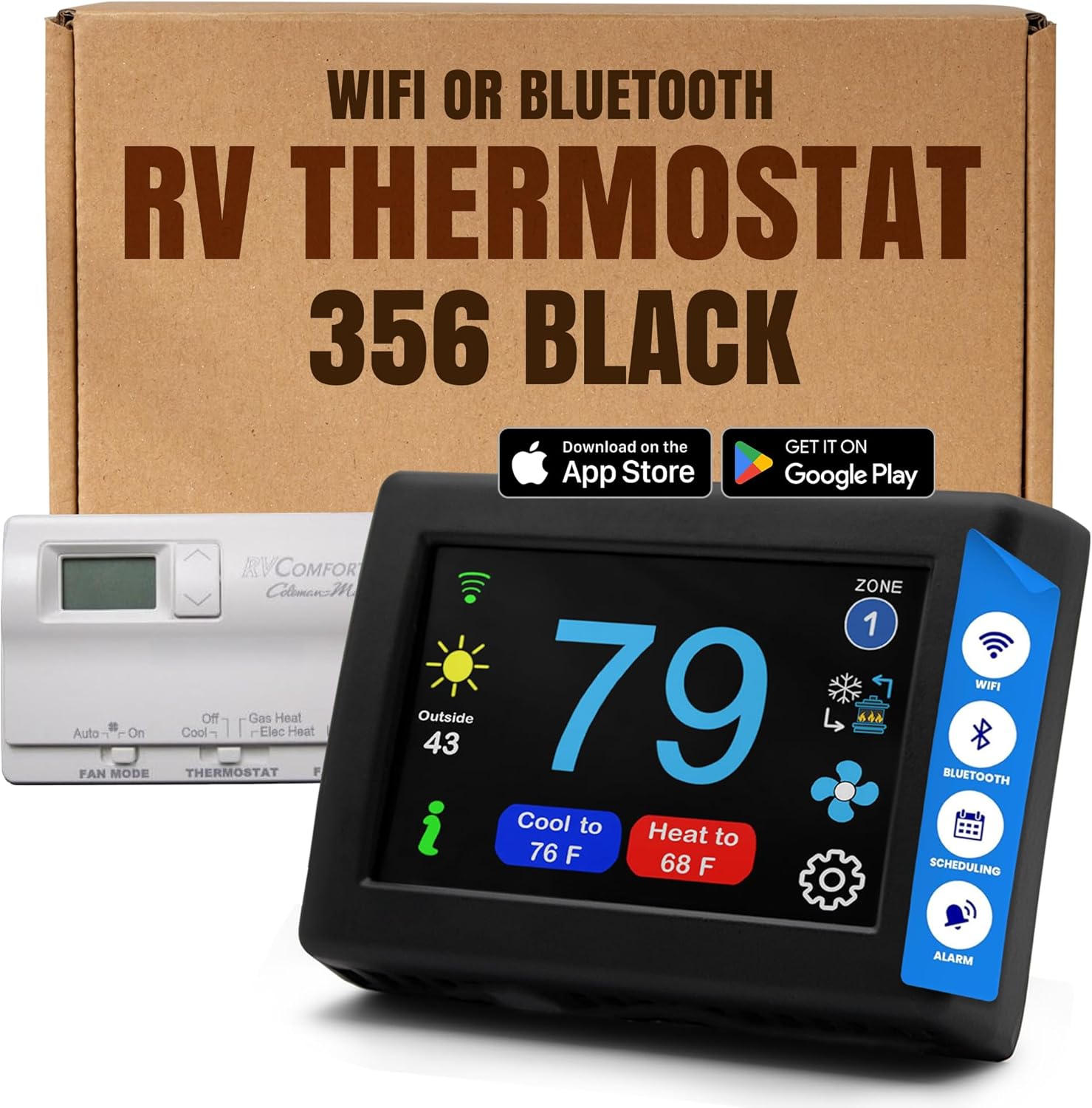
Image 1.1: The MICRO-AIR EasyTouch Digital RV Thermostat, Model 356 Black, shown alongside a traditional RV thermostat for comparison.
2. Key Features
- Touch Screen Interface: A large, colored touch screen (approximately 4" x 3.05") provides an intuitive and modern control experience.
- Programmable Functionality: Set custom schedules for heating and cooling to optimize comfort and energy usage.
- Wireless Connectivity: Integrated WiFi and Bluetooth allow for remote monitoring and control via a dedicated smartphone application.
- Automatic System Detection: The thermostat automatically identifies connected systems such as furnace, heat strip, and cooling units.
- Wide Temperature Range: Capable of controlling temperatures from 40°F to 90°F (4°C to 32°C).
- Low Profile Design: Its sleek, compact design minimizes protrusion from the wall.
- Easy to Clean: The sealed surface allows for simple cleaning with a damp cloth.

Image 2.1: The thermostat's compact dimensions and large colored touch screen are designed for user convenience.
3. Compatibility
The MICRO-AIR EasyTouch RV Thermostat Model 356 Black is specifically designed as a replacement for certain Coleman RV COMFORT P.H.P. Multi Zone thermostats. Verify your existing thermostat's model number against the list below to ensure compatibility.
Compatible Coleman RV COMFORT P.H.P. Model Numbers:
- 6330-355
- 6535-335
- 6535-344
- 6535-345
- 6536-335
- 6536-345
- 6536-347
- 6537-335
- 6537-344
- 6636-344
- 6636-345
- 6636-347
- 6759-345
- 6795-365
- 9330-336
- 9530-335

Image 3.1: Refer to this guide to ensure your existing thermostat is compatible with the Micro-Air 356 model.
Video 3.1: This video provides a quick guide on how to choose the correct EasyTouch model based on your existing RV thermostat. It highlights various compatible models and their corresponding EasyTouch replacements.
4. Installation
Installation of the EasyTouch thermostat is designed to be straightforward. Always ensure power is disconnected before beginning any electrical work.
4.1. Removing the Old Thermostat
- Locate the rectangular locking tab on the bottom of your existing thermostat.
- Depress this tab using a small screwdriver.
- Gently pull the thermostat away from the wall from the bottom.
- Unplug the connector by depressing its locking tab.
- Remove the back plate mounting screws and detach the back plate.
4.2. Wiring the New Thermostat
The EasyTouch thermostat uses a standard telephone-style modular jack (6-pin Ethernet connector). Simply press the tab on the connector from your old thermostat and insert it into the new EasyTouch thermostat.
4.3. Mounting the EasyTouch Thermostat
- Locate the mounting buttons horizontally across the hole with the smaller diameter against the wall.
- Screw in one screw and level the buttons so the display will be straight when installed.
- Screw in the second screw, ensuring both buttons remain level.
- Remove the mounting tab before mounting the display on the wall.
- Align and press the display against the wall, then gently slide it down to lock it in place.

Image 4.1: Visual guide for the installation process, from removing the old thermostat to securely mounting the new EasyTouch unit.
5. Setup: App, WiFi, and Bluetooth
The EasyTouch thermostat offers advanced connectivity for convenient control from your smartphone or other devices.
5.1. Downloading the EasyTouch RV App
Download the official EasyTouch RV App from your device's app store (available on Apple App Store and Google Play Store). This app enables remote monitoring and control of your RV's air conditioner, furnace, and heat pump.
5.2. Connecting via WiFi and Bluetooth
Once the app is installed, follow the in-app instructions to connect your thermostat using either WiFi or Bluetooth. This allows you to adjust settings, view temperatures, and manage schedules from anywhere.
- Remote Control: Control your RV's climate remotely, allowing you to cool or heat your RV before arrival.
- Free Feature Updates: The thermostat receives free feature updates via WiFi, ensuring access to the latest functionalities without monthly service fees.

Image 5.1: The EasyTouch RV App provides comprehensive remote control and scheduling options for your thermostat.
6. Operating Instructions
The EasyTouch thermostat offers both on-device touch control and remote app control for managing your RV's climate.
6.1. On-Device Control
- Temperature Adjustment: Use the up and down arrows on the touch screen to set your desired temperature.
- Mode Selection: Cycle through available modes (Cool, Heat, Fan, Auto) by pressing the 'Mode' button.
- Fan Speed: Adjust fan speed settings as needed.
- Zone Control: If your RV supports multiple zones, use the 'Zone' button to select and control individual zones.
6.2. App Control
The EasyTouch RV App mirrors the on-device controls and adds advanced scheduling and monitoring features:
- Remote Temperature Adjustment: Change the temperature from anywhere with an internet connection.
- Scheduling: Create and manage detailed climate schedules for different times of day and days of the week.
- Monitoring: View current indoor and outdoor temperatures, system status, and energy usage.
- Alerts: Receive notifications for high/low temperature warnings or system issues.

Image 6.1: Wireless app access allows for convenient control of your RV's climate from your smartphone.
7. Maintenance
To ensure optimal performance and longevity of your EasyTouch thermostat, follow these simple maintenance guidelines:
- Cleaning: The thermostat's sealed surface can be easily cleaned. Use a soft, damp cloth to wipe the screen and buttons. Avoid abrasive cleaners or harsh chemicals.
- Software Updates: Regularly check for and install available software updates via WiFi to ensure your thermostat has the latest features and performance enhancements.
- Battery Check: While the thermostat is primarily powered by your RV's system, it may have internal components that rely on backup power. Refer to the full user manual for specific battery maintenance details if applicable.
8. Troubleshooting
If you encounter any issues with your MICRO-AIR EasyTouch Digital RV Thermostat, consider the following general troubleshooting steps:
- No Power/Display: Ensure that the RV's main power supply is active and that the thermostat is correctly connected to its base plate. Check the circuit breaker for your RV's HVAC system.
- Incorrect Temperature Readings: Verify that the thermostat's internal temperature sensor is not obstructed or exposed to direct sunlight or drafts, which can affect accuracy.
- Connectivity Issues (WiFi/Bluetooth): Confirm your RV's WiFi network is active and within range. For Bluetooth, ensure your smartphone is close to the thermostat. Try restarting both the thermostat and your mobile device.
- System Not Responding: Check all wiring connections to ensure they are secure. Confirm that the correct system type (furnace, AC, heat pump) is selected in the thermostat settings or app.
For persistent issues or specific error codes, please refer to the comprehensive digital manual available through the EasyTouch RV App or contact MICRO-AIR customer support.
9. Specifications
| Feature | Specification |
|---|---|
| Brand | MICRO-AIR |
| Model Name | EasyTouch® RV Touch Screen Thermostat with WiFi and Bluetooth |
| Product Dimensions | 1"D x 4"W x 3"H |
| Controller Type | iOS / Android App, Touchpad Control |
| Special Feature | Programmable, Temperature Display |
| Color | Black |
| Temperature Control Type | Programmable |
| Connectivity Technology | Bluetooth, Wi-Fi |
| Included Components | Temperature Sensor |
| Power Source | RV System (24 Volts) |
| Display Type | LED |
| Screen Size | 3 Inches |
| Mounting Type | Wall Mount |
| Item Model Number | ASY-356-X01 |
10. Warranty and Support
MICRO-AIR is committed to reliability and customer satisfaction. The EasyTouch Digital RV Thermostat is designed to offer seamless control of your RV's climate.
If you have any questions, require assistance with installation, setup, or troubleshooting, please do not hesitate to contact MICRO-AIR customer support. Refer to the product packaging or the official MICRO-AIR website for the most current contact information.


