
1. Introduction
This manual provides detailed instructions for the proper setup, operation, and maintenance of your new Automatic Pet Feeder. Designed for convenience and reliability, this feeder ensures your cat or small to medium-sized dog receives meals on a consistent schedule. Please read this manual thoroughly before first use and retain it for future reference.
2. Safety Information
- Always place the feeder on a stable, level surface to prevent tipping.
- This device is intended for indoor use only. Do not expose to rain or moisture.
- Use only dry pet food with a kibble size appropriate for the feeder's dispenser mechanism.
- Keep the power cord away from pets to prevent chewing, which could lead to electrical hazards.
- Unplug the feeder before cleaning or if it will not be used for an extended period.
- Do not immerse the main unit in water.
- Keep out of reach of children.
3. Package Contents
Please check the package to ensure all items are present and in good condition:
- Automatic Pet Feeder Main Unit
- Stainless Steel Food Bowl
- USB Power Cable and AC Adapter
- User Manual

Figure 3.1: Included with the feeder are a user manual and a USB power cable with an AC adapter.
4. Product Components
Familiarize yourself with the different parts of your automatic pet feeder:

Figure 4.1: The automatic pet feeder features a white body with a black top dome and a stainless steel food bowl.
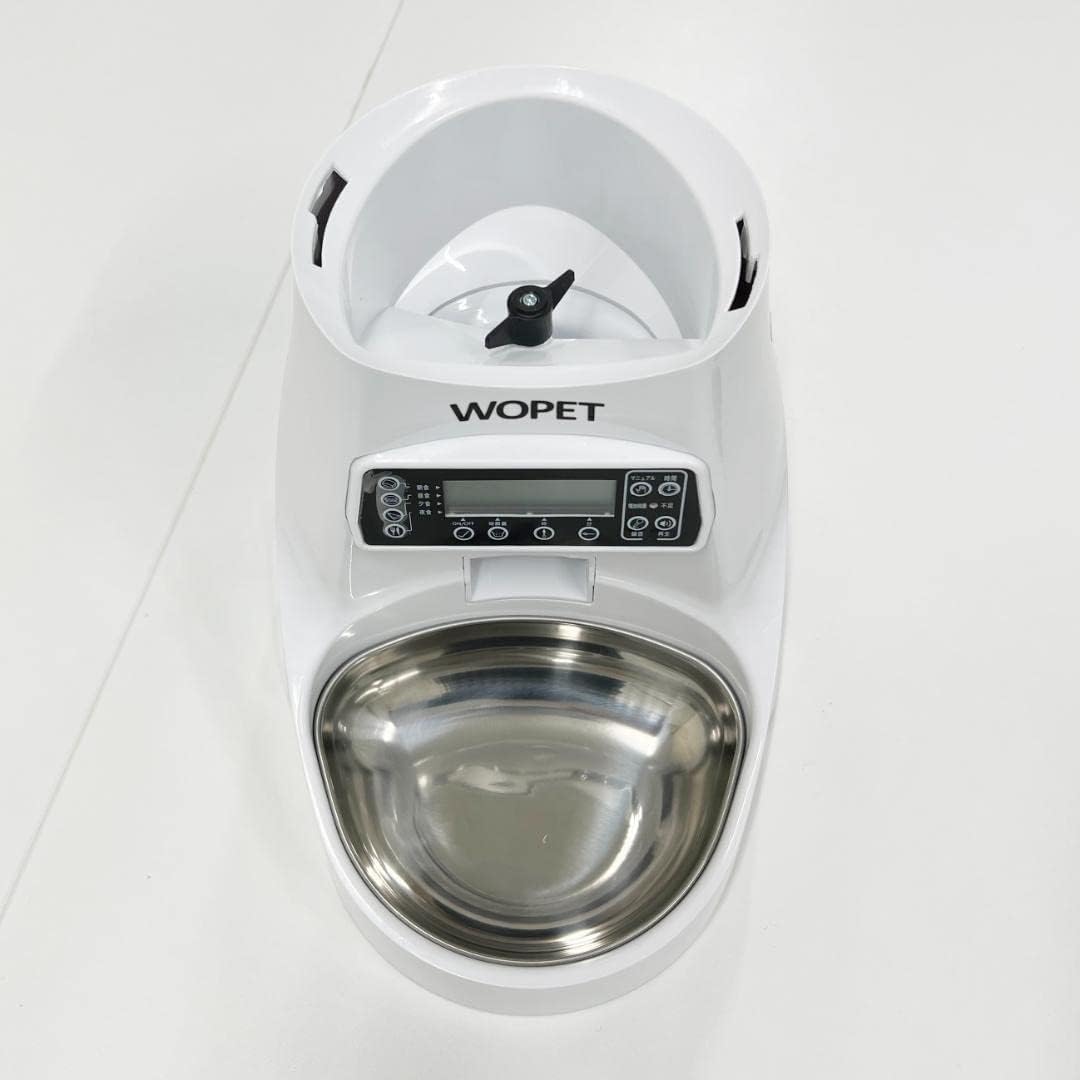
Figure 4.2: An overhead view showcasing the overall design and the food dispensing mechanism.
- Food Reservoir: Located under the top dome, this is where dry pet food is stored.
- Control Panel: Features an LCD screen and buttons for programming.
- Dispenser Outlet: Where food exits the reservoir into the bowl.
- Stainless Steel Food Bowl: Removable bowl for pet food.
- Power Port: For connecting the USB power cable.

Figure 4.3: The control panel includes an LCD screen, buttons for setting meal times, portion sizes, and a manual feed option.

Figure 4.4: A removable stainless steel bowl is provided for easy cleaning and hygienic feeding.
5. Setup
- Unpack: Carefully remove all components from the packaging.
- Assemble: Place the stainless steel food bowl into its designated slot at the base of the feeder.
- Power Connection: Connect the USB power cable to the feeder's power port and plug the AC adapter into a standard wall outlet. The feeder will power on.
- Load Food: Open the top dome of the feeder. Pour dry pet food into the food reservoir. Ensure the dome is securely closed after filling.

Figure 5.1: The top dome opens to reveal the food reservoir, where dry pet food is stored.
- Initial Settings: The LCD screen will display the current time. If it's incorrect, proceed to the 'Operating Instructions' section to set the correct time.
6. Operating Instructions
The control panel allows you to customize feeding schedules and portion sizes.
6.1 Setting the Current Time
- Press the 'SET' button to enter time setting mode.
- Use the 'UP' and 'DOWN' arrows to adjust the hour. Press 'SET' to confirm.
- Use the 'UP' and 'DOWN' arrows to adjust the minute. Press 'SET' to confirm and exit time setting.
6.2 Programming Meal Times and Portions
The feeder supports multiple meal times per day.
- Press the 'MEAL' button to cycle through available meal slots (e.g., Meal 1, Meal 2).
- Once a meal slot is selected, press 'SET'.
- Use 'UP' and 'DOWN' arrows to set the desired feeding time (hour and minute), pressing 'SET' after each.
- After setting the time, use 'UP' and 'DOWN' arrows to adjust the portion size (number of units dispensed). Press 'SET' to confirm.
- Repeat for additional meal slots as needed. To disable a meal slot, set its portion size to zero.
6.3 Manual Feeding
To dispense food immediately, press the 'MANUAL' button. One portion will be dispensed. Press multiple times for additional portions.
6.4 Voice Recording (If Applicable)
Some models allow for a short voice recording to call your pet at meal times. Refer to the control panel for a 'REC' or 'MIC' button. Press and hold to record, then release. Press 'PLAY' to test.
7. Maintenance
Regular cleaning ensures hygiene and proper functioning of the feeder.
- Unplug: Always unplug the feeder from the power source before cleaning.
- Remove Food: Empty any remaining food from the reservoir.
- Clean Food Bowl: The stainless steel food bowl can be removed and washed with mild soap and water. Rinse thoroughly and dry completely before reinserting.
- Clean Food Reservoir: Wipe the inside of the food reservoir with a damp cloth. For stubborn residue, use a small amount of pet-safe cleaner, then wipe clean with a damp cloth and dry thoroughly.
- Clean Dispenser Outlet: Use a small brush or cloth to clear any food crumbs or blockages from the dispenser outlet.
- Main Unit: Wipe the exterior of the main unit with a soft, dry cloth. Do not use abrasive cleaners or immerse the unit in water.
- Reassemble: Ensure all parts are dry before reassembling and plugging the feeder back in.
8. Troubleshooting
| Problem | Possible Cause | Solution |
|---|---|---|
| Feeder does not power on. | No power supply. | Check if the power adapter is securely plugged into the feeder and the wall outlet. Try a different outlet. |
| Food is not dispensing. | Food jam; empty reservoir; incorrect settings. | Check for blockages in the dispenser. Refill food reservoir. Verify meal times and portion settings. |
| Dispensing too much/too little food. | Incorrect portion size setting. | Adjust the portion size in the meal programming settings. |
| Time/settings reset. | Power interruption. | Reprogram the time and meal settings. Ensure a stable power supply. |
| Pet cannot access food. | Feeder placed incorrectly. | Ensure the feeder is placed in an accessible location for your pet. |
9. Specifications
- Model Number: NON
- Brand: Generic Brand
- Operation Mode: Electronic
- Target Species: Cat, Dog (Small to Medium)
- ASIN: B0BBXY89LP
- First Available Date: August 25, 2022
10. Warranty and Support
This product comes with a standard manufacturer's warranty against defects in materials and workmanship. For specific warranty details, please refer to the product packaging or contact your retailer. For technical support or further assistance, please reach out to the customer service department of your purchase point.


