
FIFINE H6 Gaming Headset User Manual
Model: H6
1. Introduction
Thank you for choosing the FIFINE H6 Gaming Headset. This headset is designed to provide an immersive audio experience for gaming on PC, PS4, and PS5. It features virtual 7.1 surround sound, a detachable microphone for clear communication, three EQ modes, and comfortable ear cushions for extended use.
Please read this manual carefully before using the product to ensure proper operation and to maximize your gaming experience.
2. Package Contents
- FIFINE H6 Gaming Headset
- Detachable Microphone
- User Manual
3. Product Overview
3.1 Headset Components
The FIFINE H6 headset is designed for comfort and durability, featuring soft ear cushions and an adjustable headband.

Image 3.1: The headset features breathable ear cushions, a soft headband, and an adjustable metal frame for a comfortable fit. It weighs approximately 330g.
3.2 Inline Controls
The headset includes an inline control unit for easy access to audio settings.
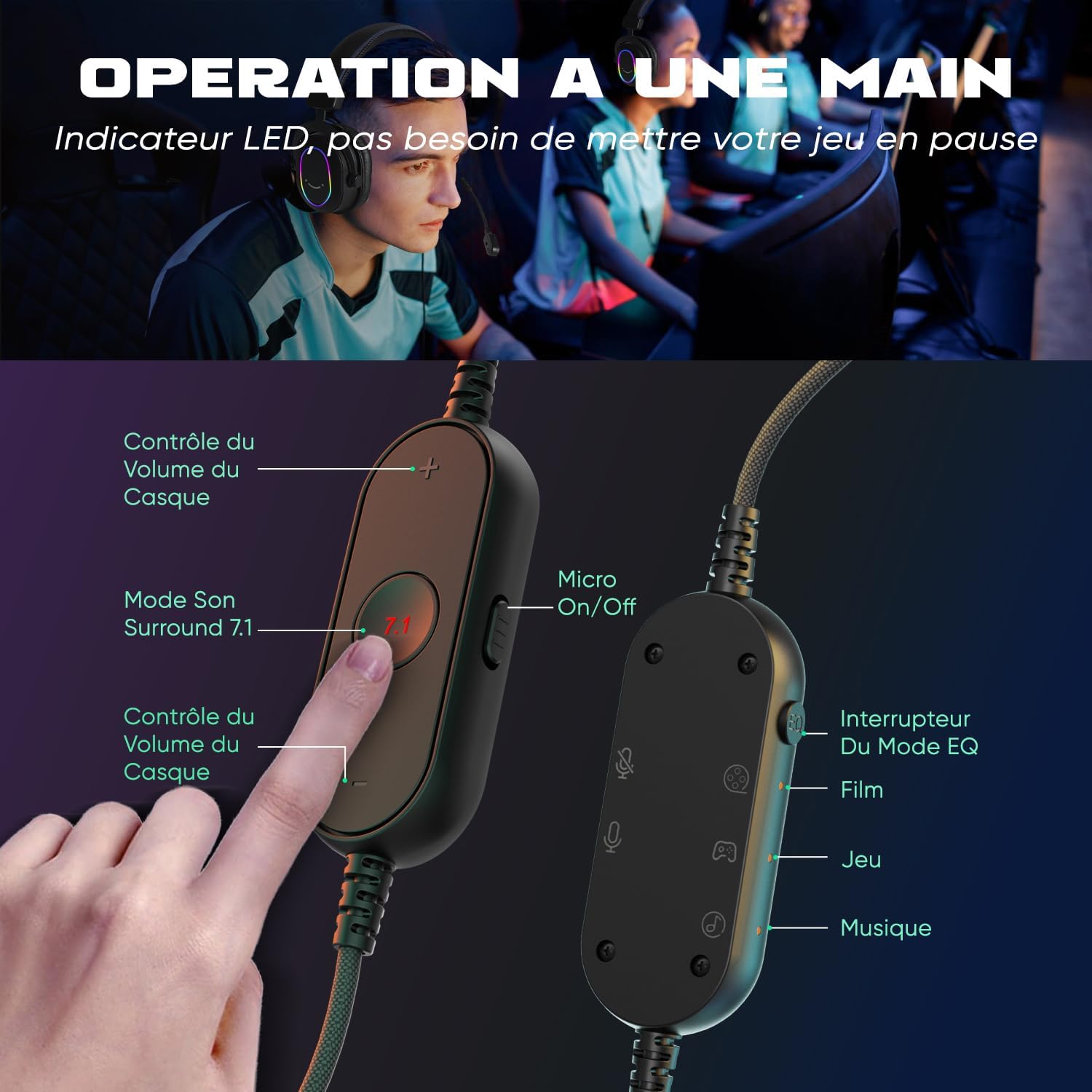
Image 3.2: The inline controller allows for quick adjustments. It includes headset volume control, a 7.1 surround sound activation button, a microphone on/off switch, and an EQ mode selector for Film, Game, and Music modes.
3.3 Audio Technology
Equipped with 50mm drivers, the H6 headset delivers enhanced sound quality for an immersive experience.

Image 3.3: The headset features 50mm drivers designed to improve overall sound quality and enhance your audio experience.
4. Setup
The FIFINE H6 headset offers plug-and-play functionality, making setup quick and easy.
4.1 Connecting the Headset
- Connect the USB-A cable of the headset to an available USB port on your PC, PS4, or PS5.
- The headset is automatically recognized by your device. No additional drivers are typically required.
- Ensure the headset is selected as the default audio input and output device in your system's sound settings.

Image 4.1: The headset connects via USB and is compatible with Windows, PS4/PS5, and Mac OS devices, offering simple plug-and-play installation.
4.2 Attaching the Microphone
- Insert the detachable microphone into the designated port on the left earcup until it clicks into place.
- Adjust the flexible microphone boom to position it optimally for your voice.
- To remove, gently pull the microphone out of its port.

Image 4.2: The headset features a detachable and 360-degree flexible microphone. A red light on the inline control indicates when the microphone is muted.
5. Operating Instructions
5.1 Virtual 7.1 Surround Sound
Activate the virtual 7.1 surround sound for an immersive gaming experience, allowing you to pinpoint audio cues like footsteps and gunfire.
- Press the 7.1 button on the inline control unit to toggle virtual 7.1 surround sound on or off.
- An LED indicator on the control unit will confirm the status.

Image 5.1: Virtual 7.1 surround sound provides an immersive gaming experience, allowing precise localization of in-game sounds such as explosions, gunshots, footsteps, aircraft, and vehicles.
5.2 EQ Modes
The headset offers three equalization (EQ) modes optimized for different audio scenarios.
- Press the EQ Mode Switch button on the inline control unit to cycle through the modes:
- Film Mode: Optimized for movie watching.
- Game Mode: Enhanced audio for gaming, highlighting in-game sounds.
- Music Mode: Balanced audio for listening to music.
- An LED indicator will show the currently active EQ mode.
5.3 Volume Control
- Use the Volume Up (+) and Volume Down (-) buttons on the inline control unit to adjust the headset's audio output level.
5.4 Microphone Mute
- Slide the Micro On/Off switch on the inline control unit to mute or unmute the microphone.
- A red LED light on the control unit indicates when the microphone is muted.
6. Maintenance
- Cleaning: Use a soft, dry cloth to clean the headset. Do not use harsh chemicals or abrasive materials.
- Storage: Store the headset in a cool, dry place away from direct sunlight and extreme temperatures.
- Cable Care: Avoid bending or twisting the cable excessively to prevent damage. The braided cable material is designed for durability.
- Microphone: When not in use, you can detach the microphone to prevent accidental damage.
7. Troubleshooting
| Problem | Solution |
|---|---|
| No sound from headset |
|
| Microphone not working |
|
| Sound quality issues (e.g., static, distortion) |
|
8. Specifications
| Feature | Detail |
|---|---|
| Brand | FIFINE |
| Model Name | H6 (also referred to as MI4 in some documentation) |
| Color | Black |
| Connectivity Technology | Wired (USB-A) |
| Ear Placement | Over-Ear (Circum-Aural) |
| Driver Type | Dynamic |
| Driver Size | 50 mm |
| Frequency Range | 20 Hz - 20,000 Hz |
| Special Features | Virtual 7.1 Surround Sound, Detachable Microphone, 3 EQ Modes (Film, Game, Music), RGB Lighting, Inline Controls |
| Compatible Devices | Desktop Computers, Gaming Consoles (PS4, PS5) |
| Cable Features | Braided, Durable, Sufficient Length |
| Material | Metal, Plastic |
| Water Resistance Level | Not Waterproof |
9. Warranty & Support
9.1 Warranty Information
FIFINE products typically come with a standard manufacturer's warranty. Please refer to your purchase documentation or the official FIFINE website for specific warranty terms and conditions applicable to your region.
9.2 Customer Support
For technical assistance, troubleshooting, or any questions regarding your FIFINE H6 Gaming Headset, please contact FIFINE customer support through their official website or the retailer where you purchased the product.
You can often find support contact information on the FIFINE brand store page or by visiting www.fifinemic.com.


