
1. Product Overview
The ERAY Smart Door Lock offers a versatile 4-in-1 keyless entry solution, combining Bluetooth APP control, fingerprint recognition, keypad code entry, and traditional mechanical keys. Designed for interior doors, it provides enhanced security and convenience for homes, hotels, and apartments.
Key Features:
- 4 Ways To Unlock: Bluetooth APP, Fingerprint, Passcode, Mechanical Key.
- Smart APP Control: Manage access, set temporary passwords, and view unlocking records.
- Reversible Door Handle: Suitable for both left and right-hand doors (thickness 1-3/8'' to 2-1/8'').
- High Quality Construction: Made of heavy-duty zinc alloy.
- Emergency Power: Micro-USB port for emergency unlock if batteries deplete.

Figure 1: ERAY Smart Door Lock components.
2. Setup and Installation
The ERAY Smart Door Lock is designed for easy installation, typically requiring only a screwdriver. Ensure your door thickness is between 1-3/8'' and 2-1/8'' (35-50mm).
Installation Steps:
- Remove existing door hardware.
- Install the latch and strike plate. The latch is adjustable for 2-3/8" (60mm) or 2-1/8" (70mm) backsets.
- Attach the exterior handle, ensuring the standoffs and wire pass through the door.
- Connect the interior handle, carefully routing the wire and securing with screws.
- Install 4 AAA batteries (not included) into the interior handle's battery compartment.
- Test the lock's basic functionality before programming.

Figure 2: Door dimensions and latch adjustment.
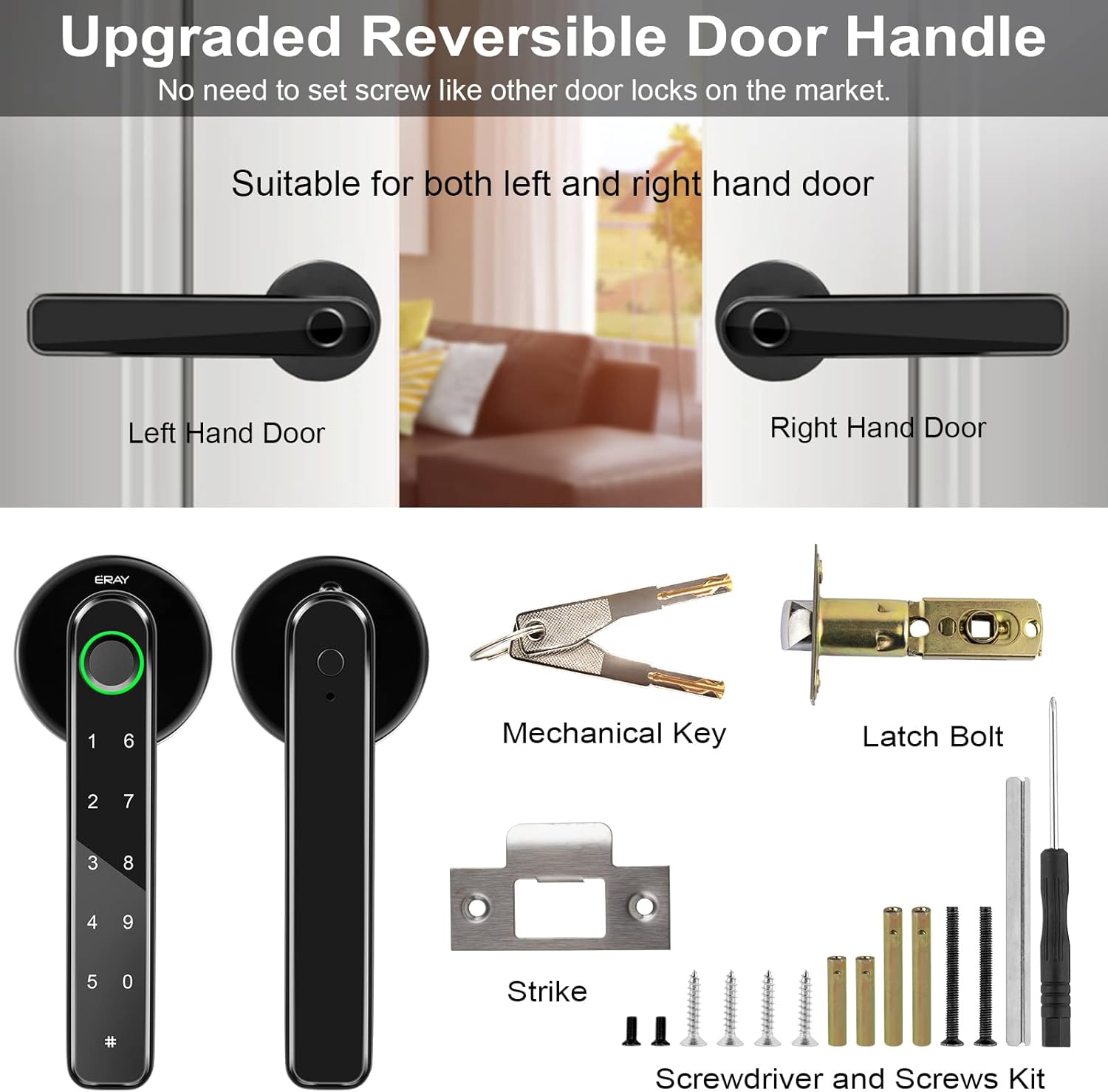
Figure 3: All components included for installation.
Video 1: Detailed guide on how to install the fingerprint door knob lock.
Video 2: Instructions on how to install the keyless entry door knob lock with handle.
3. Operating Instructions
The ERAY Smart Door Lock offers multiple convenient ways to unlock your door.
Unlock Methods:
- Fingerprint Unlock: The enlarged fingerprint sensor allows for quick recognition (under 0.3 seconds). You can store up to 100 fingerprints.
- Keypad Code Unlock: Set up to 100 passcodes. The anti-peeping function allows you to enter random numbers before or after your actual code to prevent others from guessing it.
- Bluetooth APP Unlock: Use the Tuya APP to unlock the door remotely (within Bluetooth range). You can also generate temporary passwords for guests or share e-keys.
- Mechanical Key Unlock: Two mechanical keys are included for emergency access, such as when batteries are depleted.

Figure 4: Smart APP Unlock and Control.
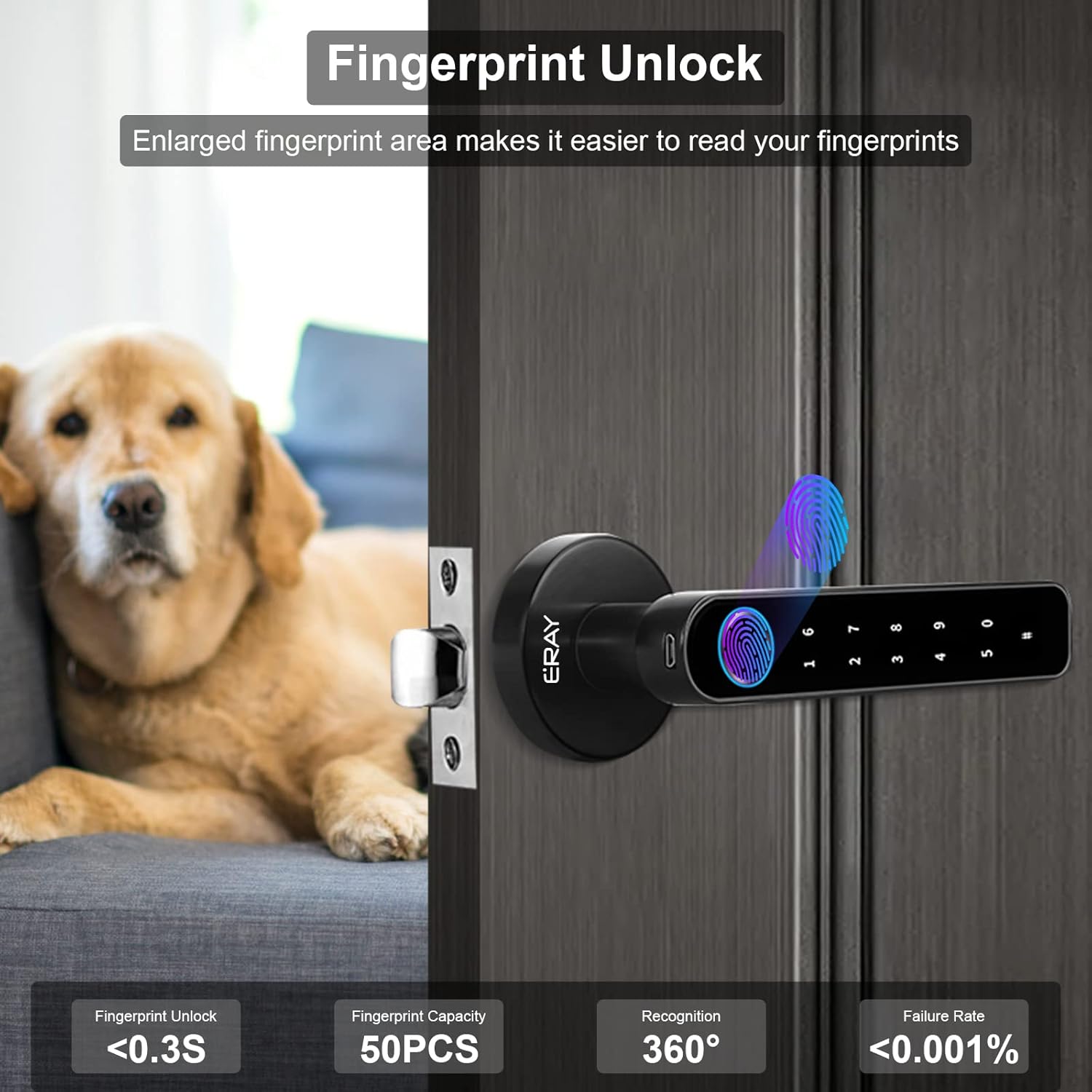
Figure 5: Fingerprint Unlock.
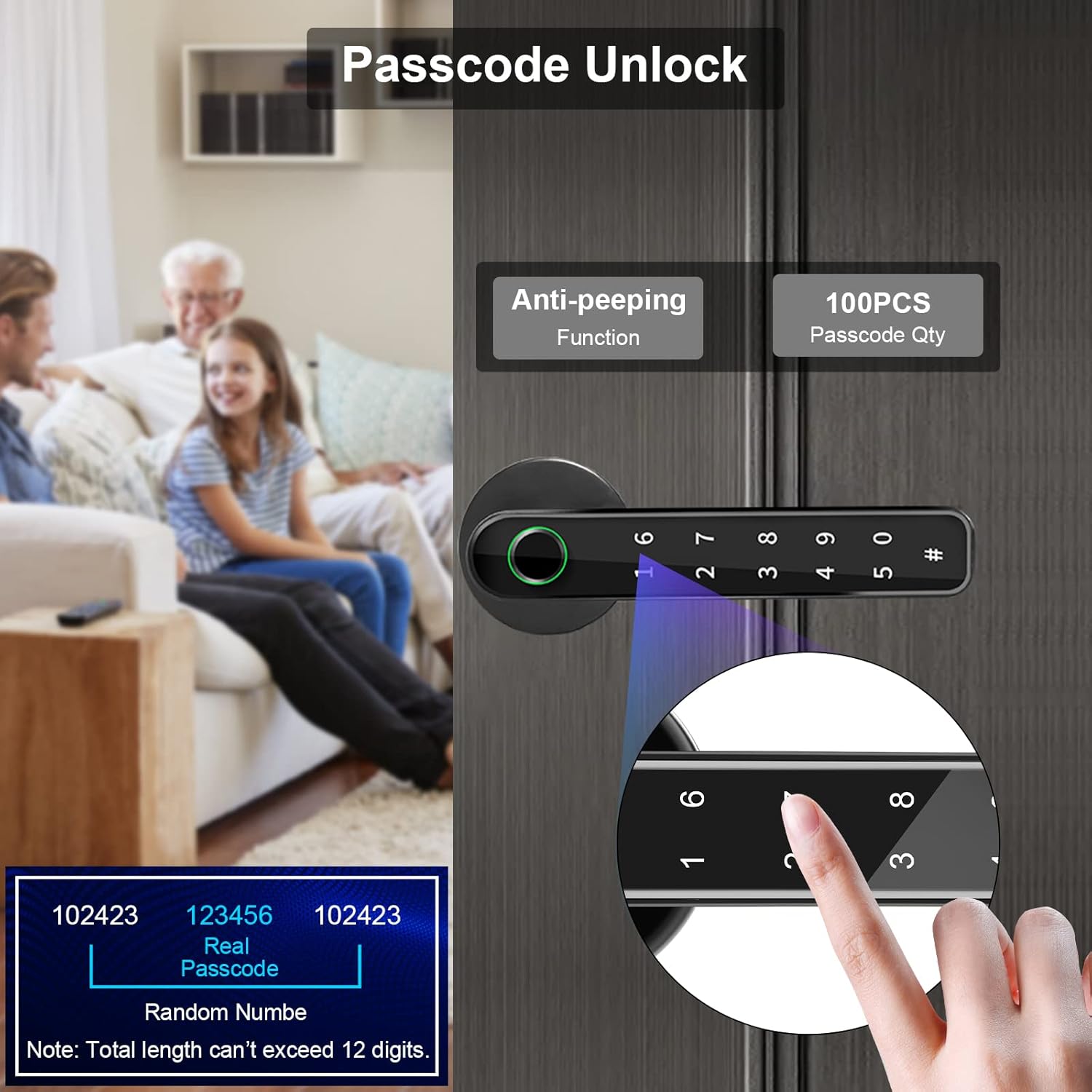
Figure 6: Passcode Unlock.
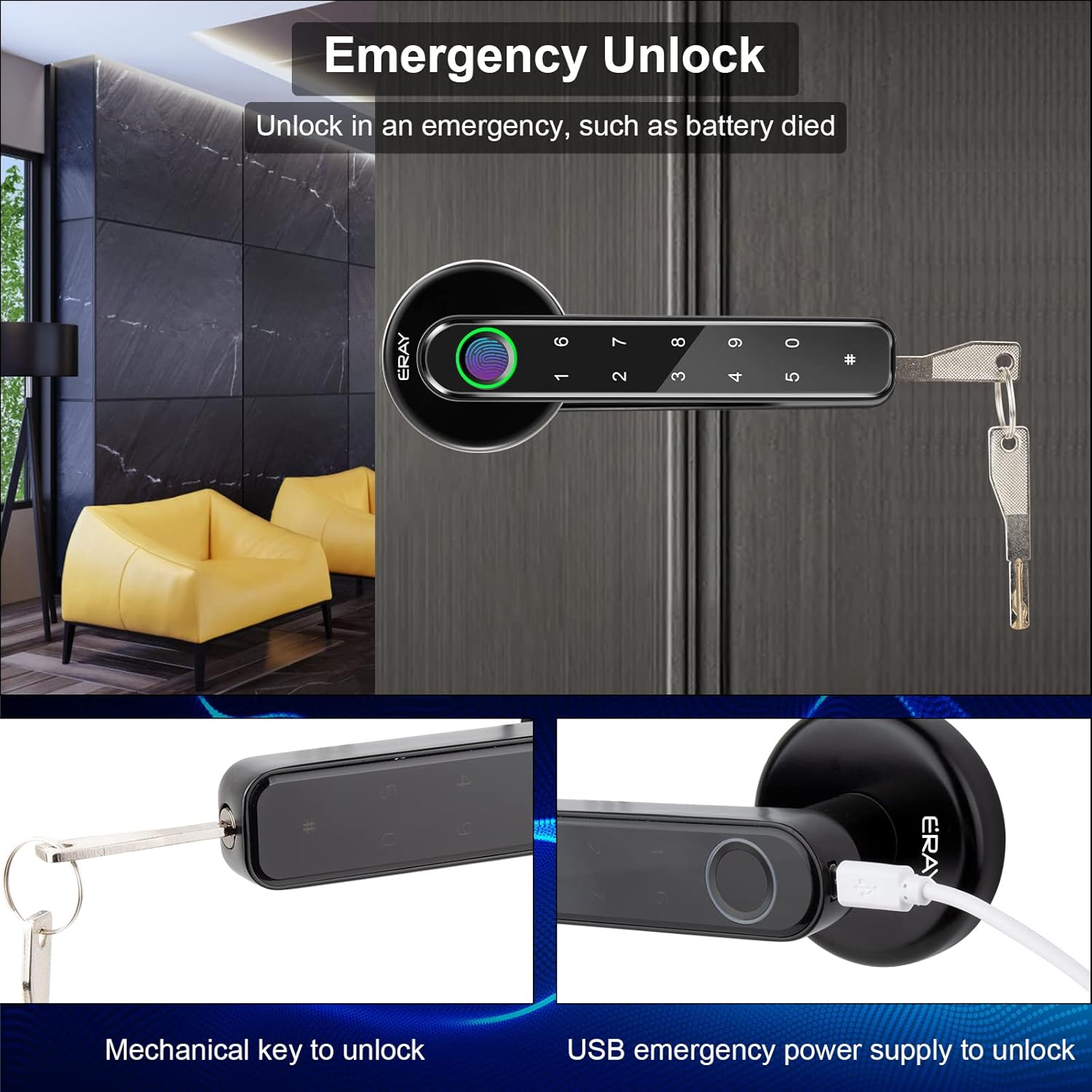
Figure 7: Emergency Unlock options.
Video 3: Demonstration of how to use the APP, fingerprint, code, and keys to unlock the door.
Video 4: Overview of ERAY Fingerprint Door Handle Lock with Smart APP features.
4. Maintenance
To ensure optimal performance and longevity of your ERAY Smart Door Lock, follow these maintenance guidelines:
- Battery Replacement: The lock is powered by 4 AAA batteries. Replace them when the low battery reminder function activates. It is recommended to use LR03 AAA batteries.
- Emergency Power: In case of complete battery depletion, use the micro-USB port for temporary power to unlock the door, or use the mechanical key. The micro-USB port is not for recharging.
- Cleaning: Wipe the lock surface with a soft, dry cloth. Avoid using abrasive cleaners or solvents that could damage the finish or electronic components.
- Environment: This lock is suitable for interior doors only. Avoid exposure to rain or excessive moisture, as this can affect unlocking functionality.
5. Troubleshooting
If you encounter issues with your ERAY Smart Door Lock, refer to the following common troubleshooting tips:
- Lock not responding: Check battery levels. Replace batteries if low. Ensure the battery connector is securely plugged in.
- Fingerprint not recognized: Ensure your finger is clean and dry. Try re-registering your fingerprint in the APP. Ensure proper placement on the sensor.
- Passcode not working: Double-check the entered code. Ensure the anti-peeping function is used correctly. Verify the passcode is still active in the APP.
- Door does not lock/unlock properly: Check for any obstructions in the door frame or latch mechanism. Ensure the lock is installed correctly and aligned with the strike plate.
- Battery drains quickly: Ensure you are using high-quality alkaline batteries. Excessive usage or frequent unlocking may lead to faster battery depletion.
- APP connectivity issues: Ensure Bluetooth is enabled on your smartphone and the lock is within range. Try restarting the APP or re-pairing the device.
6. Specifications
| Feature | Detail |
|---|---|
| Brand | ERAY |
| Model Name | E196 |
| Lock Type | Biometric, Keypad, Door knob with keys |
| Material | Durable Zinc alloy and ABS plastic casing |
| Color | Black with APP |
| Item Dimensions L x W x H | 8.54 x 3.03 x 7.05 inches |
| Item Weight | 2 Pounds |
| Connectivity Protocol | Bluetooth |
| Power Source | 4 AAA batteries (Not Included) |
| Special Features | Low Battery Reminder Function, 4-in-1 Unlock, Reversible Door Handle, Fingerprint Door Lock for Front Door, Room, Office, Apartment, Hotel |
7. Warranty and Support
Warranty: The ERAY Smart Door Lock comes with a 12-month warranty for product quality.
Customer Service: If you have any questions or require assistance with your smart door lock, please contact ERAY customer service. They aim to reply within 24 hours and provide a suitable solution.
For further support, you may refer to the official user manual PDF available online or contact the seller directly.


