
1. Product Overview
The NOLYTH External USB 3.0 Type-C Slot-in CD/DVD Drive (Model CT820) is a versatile optical drive designed for modern computers lacking an internal CD/DVD player. It offers both reading and writing capabilities for various disc formats, features a 3.5mm audio output, two additional USB ports, and an eject button for user convenience. Its compact design makes it highly portable.

Image: NOLYTH External CD/DVD Drive in use, demonstrating its slot-in design and connectivity.
2. Package Contents
Please verify that all items are present in your package:
- 1 x NOLYTH External CD/DVD Drive (Model CT820)
- 1 x USB 3.0 and Type-C Data Cable
- 1 x USB Power Cable

Image: Included USB-A and USB-C data cable.
3. Setup Instructions
The NOLYTH External CD/DVD Drive is designed for plug-and-play functionality, requiring no additional driver installation for most operating systems.
3.1 Connecting the Drive
- Connect the USB 3.0 or Type-C end of the data cable to an available USB port on your computer (laptop or desktop).
- Connect the other end of the data cable to the corresponding port on the NOLYTH CD/DVD drive.
- The drive should be automatically recognized by your computer. A small LED indicator on the drive will illuminate, signaling power.
3.2 Power Supply (Optional but Recommended for Stability)
For optimal performance and stability, especially with ultra-thin laptops or when using the drive for burning operations, it is recommended to use the additional USB power cable.
- Connect the small round end of the USB power cable to the DC port on the NOLYTH CD/DVD drive.
- Plug the USB-A end of the power cable into a USB power source, such as a USB wall adapter (not included) or a powered USB hub.

Image: Overview of the drive's features and plug-and-play functionality.
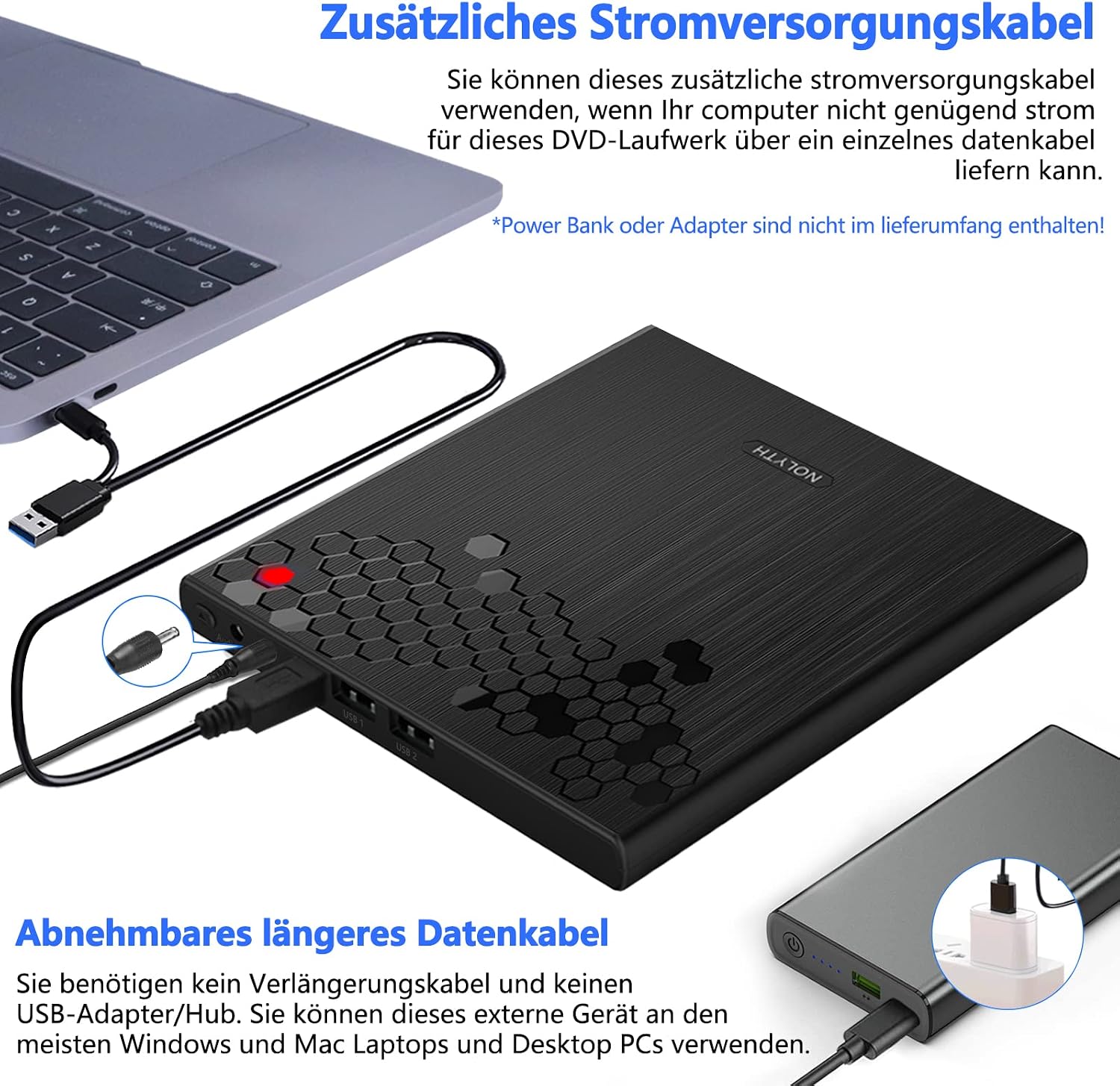
Image: Connecting the optional USB power cable to the drive.
4. Operating Instructions
4.1 Inserting and Ejecting Discs
- Inserting a Disc: Gently slide a CD or DVD into the slot on the front of the drive until it is pulled in automatically.
- Ejecting a Disc: Press the dedicated eject button located on the front of the drive. The disc will partially eject, allowing you to remove it.

Image: Location and operation of the eject button.
4.2 Reading and Writing Discs
Once a disc is inserted and recognized by your computer, you can perform various tasks:
- Playing Media: Use your computer's media player software (e.g., VLC, Windows Media Player) to play DVDs, VCDs, or audio CDs.
- Burning/Ripping: Utilize compatible third-party software to burn data to blank CD-R/RW or DVD-R/RW discs, or to rip audio from CDs.
- Software/System Installation: Install software or operating systems from discs.
- Data Backup: Back up important data to optical media.
The drive supports a wide range of disc formats including CD±R, DVD-RW, DVD±R, CD-ROM, DVD-ROM, DVD-R DL, VCD-ROM, and DVD±RW.
4.3 Using the 3.5mm Audio Output
The drive includes a 3.5mm audio output jack for private listening.
- Plug your headphones, earphones, or headset directly into the 3.5mm audio jack on the front of the drive.
- This allows you to enjoy audio from movies or music discs without disturbing others.

Image: Connecting headphones to the 3.5mm audio output.
4.4 Utilizing the USB Hub Functionality
The NOLYTH drive features two additional USB Type-A ports, allowing it to function as a mini USB hub.
- Connect USB peripherals such as a mouse, keyboard, or USB flash drive to these ports.
- This feature is particularly useful for laptops with a limited number of USB ports.

Image: Using the integrated 2-port USB hub.
5. Compatibility
The NOLYTH External CD/DVD Drive offers broad compatibility with various operating systems and computer types:
- Supported Operating Systems: Windows 11, Windows 10, Windows 8.1, Windows 7, Windows XP, Linux, and all versions of Mac OS.
- Compatible Devices: MacBook Pro/Air, iMac, Mac mini, Windows laptops, and desktop PCs.
Important Note: This USB DVD drive does not support Chromebooks, TVs, tablets, iPads, mobile phones, projectors, trucks, or cars.
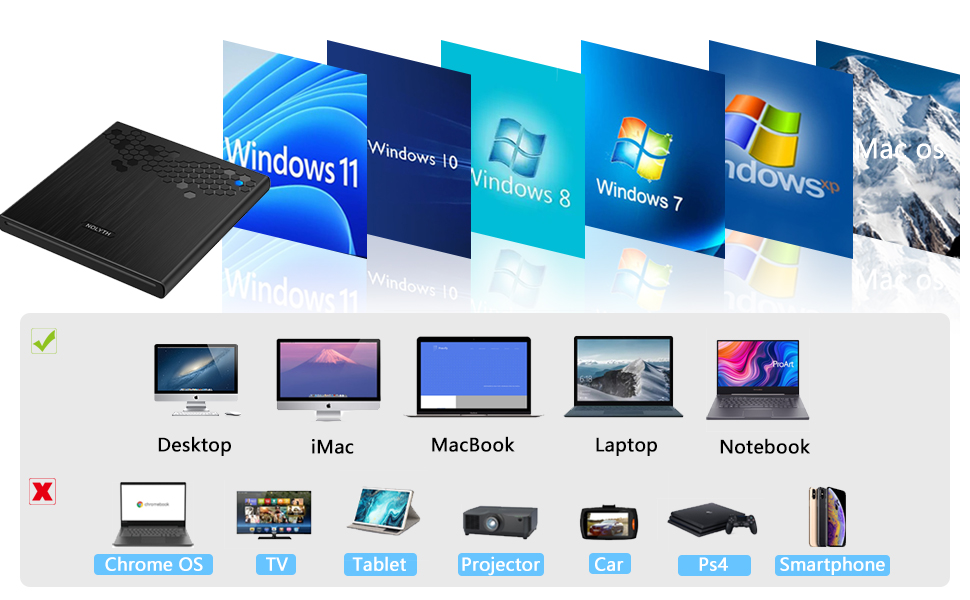
Image: Visual representation of supported and unsupported devices/operating systems.
6. Maintenance
To ensure the longevity and optimal performance of your NOLYTH External CD/DVD Drive, follow these maintenance guidelines:
- Keep Clean: Regularly wipe the exterior of the drive with a soft, dry cloth. Avoid using harsh chemicals or abrasive materials.
- Handle Discs Carefully: Always handle CDs and DVDs by their edges to prevent fingerprints and scratches, which can affect playback and burning quality.
- Storage: Store the drive in a dry, dust-free environment when not in use. Avoid extreme temperatures and direct sunlight.
- Avoid Obstructions: Ensure the disc slot is free from dust or debris. Never force a disc into the drive.
7. Troubleshooting
If you encounter issues with your NOLYTH External CD/DVD Drive, please refer to the following common solutions:
- Drive Not Recognized:
- Ensure the data cable is securely connected to both the drive and your computer's USB port.
- Try connecting to a different USB port on your computer.
- If using an ultra-thin laptop or experiencing power issues, connect the additional USB power cable to a reliable power source.
- Restart your computer.
- Disc Ejection Issues:
- Press the eject button firmly.
- If the disc does not eject, try ejecting it through your operating system's file explorer (e.g., right-click on the drive icon and select 'Eject').
- Disc Read/Write Errors:
- Ensure the disc is clean and free from scratches or damage.
- Try a different disc to rule out a faulty disc.
- Ensure you are using compatible software for burning or playing media.
- Excessive Noise During Operation:
- Some noise is normal, especially during high-speed DVD playback or burning operations.
- If the noise is unusually loud or accompanied by vibrations, ensure the drive is placed on a stable, flat surface.
If these steps do not resolve your issue, please contact NOLYTH customer support for further assistance.
8. Specifications
| Feature | Specification |
|---|---|
| Model Number | CT820 |
| Dimensions (L x W x H) | 14.5 x 13.6 x 1.4 cm |
| Weight | 360 grams |
| Hardware Interface | USB 3.0, USB 3.0 Type-C |
| Optical Storage Write Speed | 8x (DVD), 24x (CD) |
| Optical Storage Read Speed | 8x (DVD), 24x (CD) |
| Cache Size | 2 MB |
| Data Transfer Rate | 48 megabytes per second |
| Special Features | 2 USB ports, Eject button, Compact design, LED indicator, 3.5mm Audio output port |
| Supported Operating Systems | Windows 11/10/8.1/7/XP, Linux, Mac OS |
| UPC/GTIN | 726133312178 |
9. Warranty and Support
NOLYTH stands behind the quality of its products. Your NOLYTH External CD/DVD Drive comes with the following:
- 60-Day Full Refund: If you are not satisfied with your purchase, you are eligible for a full refund within 60 days.
- 2-Year Technical Support: Enjoy comprehensive technical assistance for two years from the date of purchase.
With 12 years of experience in external optical drive manufacturing, NOLYTH ensures reliable quality and professional customer service. Should you encounter any issues or require assistance, please do not hesitate to contact NOLYTH customer support. We are committed to providing help or a free replacement if problems arise after purchase, ensuring you are not limited by a short return window.