
BRESSER 7000027
Bresser Quadro Individio Weather Station User Manual
Model: 7000027
1. Introduction
The Bresser Quadro Individio Weather Station provides comprehensive weather and climate monitoring for your indoor and outdoor environments. This elegant station features a main display unit and three external sensors, allowing you to monitor temperature and humidity in up to four different locations simultaneously. It also offers reliable weather forecasts, an integrated alarm clock with snooze function, and automatic time synchronization via DCF signal.
1.1 Package Contents
- 1x Bresser Quadro Individio Base Station
- 3x Thermo-Hygro Radio Sensors
- 1x Power Adapter
- User Manual (this document)

Figure 1.1: The Bresser Quadro Individio Weather Station main unit and three external sensors.
2. Safety Information
Please read this instruction manual carefully before using the device. Keep these instructions for future reference. Failure to follow these instructions may result in injury or damage to the device.
- Do not expose the device to extreme temperatures, direct sunlight, or high humidity.
- Avoid strong impacts or vibrations.
- Do not disassemble the device. Repairs should only be performed by qualified personnel.
- Keep batteries out of reach of children. Dispose of used batteries properly.
- Use only the specified power adapter.
- The external sensors are splash-proof (IP44) but should not be submerged in water.

Figure 2.1: External sensor highlighting its IP44 water resistance, indicating protection against splashing water.
3. Setup
3.1 Battery Installation
The base station requires 3x AAA batteries (not included) for backup power, and the external sensors each require 2x AAA batteries (6x AAA total, not included).
- External Sensors: Open the battery compartment on the back of each sensor. Insert 2x AAA batteries, observing the correct polarity (+/-). Close the compartment securely.
- Base Station: Open the battery compartment on the back of the base station. Insert 3x AAA batteries, observing the correct polarity (+/-). Close the compartment.

Figure 3.1: Rear view of the base station, indicating the battery compartment and DC 5.0V power input.
3.2 Powering On and Initial Synchronization
Connect the provided power adapter to the DC 5.0V input on the back of the base station and plug it into a power outlet. The display will light up, and the base station will begin searching for the external sensors and the DCF time signal.
- Place the external sensors within range of the base station (up to 30 meters in open air).
- The base station will automatically detect the sensors and display their temperature and humidity readings. This may take a few minutes.
- The DCF time signal reception will also begin automatically. Once received, the time and date will be set.

Figure 3.2: The three external thermo-hygro radio sensors, each with its own display for local readings.
4. Operation
4.1 Display Overview
The color display of the base station provides a clear overview of all relevant data. It shows indoor temperature and humidity, outdoor temperature and humidity from the three sensors, weather forecast, time, date, and air pressure trend.
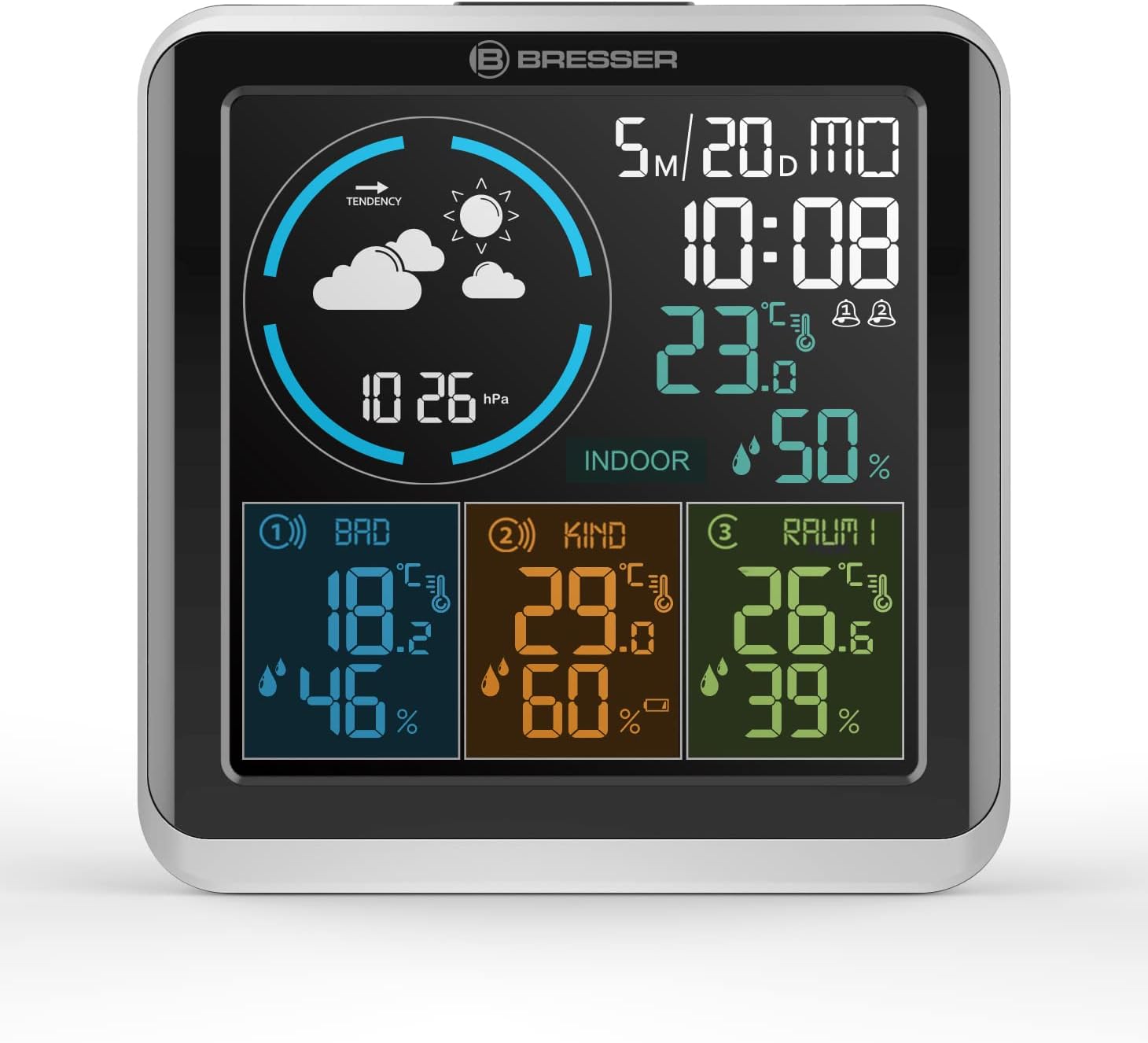
Figure 4.1: Detailed view of the main display, illustrating various data points including time, indoor/outdoor conditions, and weather icons.
4.2 Setting Time and Date
The station automatically synchronizes time via the DCF signal. If manual adjustment is needed or the signal is not available:
- Press and hold the "MODE" button (located on the back of the unit, see Figure 3.1) to enter time setting mode.
- Use the "UP" and "DOWN" buttons to adjust values.
- Press "MODE" again to confirm and move to the next setting (e.g., 12/24 hour format, hour, minute, year, month, day).
4.3 Alarm Function
The weather station features an integrated alarm clock with two settable alarms.
- Press the "MODE" button repeatedly to cycle through display modes until the alarm time is shown.
- Press and hold "MODE" to enter alarm setting mode.
- Use "UP" and "DOWN" to set the desired alarm time.
- Press "MODE" to confirm.
- To activate/deactivate an alarm, briefly press the "UP" button when the alarm time is displayed.
- When the alarm sounds, press the "SNOOZE" button (usually the large button on top or front) to activate snooze.
4.4 Max/Min Readings
The station records maximum and minimum temperature and humidity values for all sensors.
- Briefly press the "MAX/MIN" button (if available, or cycle through MODE/UP/DOWN buttons as per specific model) to view maximum values.
- Press again to view minimum values.
- Press a third time to return to current readings.
- To clear recorded values, press and hold the "MAX/MIN" button while viewing them.
4.5 Sensor Naming
For better organization, you can assign custom names to the three external sensors on the main display.
- Refer to the specific instructions in your product's detailed manual for the exact procedure to name sensors, as this feature varies by model. Typically, it involves selecting a sensor channel and then using UP/DOWN buttons to cycle through predefined names or characters.
5. Maintenance
5.1 Cleaning
Clean the device and sensors with a soft, damp cloth. Do not use abrasive cleaners or solvents.
5.2 Battery Replacement
Replace batteries in the base station and external sensors when the low battery indicator appears on the display. Always replace all batteries in a set at the same time to ensure optimal performance.
6. Troubleshooting
| Problem | Possible Cause | Solution |
|---|---|---|
| No display on base station. | No power or dead batteries. | Ensure power adapter is connected and working. Check/replace AAA backup batteries. |
| External sensor readings not displayed. | Sensor out of range, dead batteries, or interference. | Move sensor closer to base station. Replace sensor batteries. Avoid placing near large metal objects or electronics. |
| Incorrect time/date. | DCF signal not received or manual setting error. | Ensure base station is in an area with good signal reception. Manually set time if DCF signal is consistently poor. |
| Inaccurate temperature/humidity. | Sensor placement or environmental factors. | Ensure sensors are not in direct sunlight, near heat sources, or in drafts. Allow time for readings to stabilize. |
7. Specifications
| Feature | Detail |
|---|---|
| Model Number | 7000027 |
| Dimensions (Base Station) | 14.4 x 14.2 x 2.5 cm (L x W x H) |
| Weight (Base Station) | 350 g (approx. 740 g with packaging) |
| Power Source (Base Station) | Power Adapter (included), 3x AAA batteries (not included) for backup |
| Power Source (External Sensors) | 2x AAA batteries per sensor (6x AAA total, not included) |
| Special Features | Backlight, DCF Time Signal, Alarm Function, Max/Min Memory, Graphical Weather Forecast, Air Pressure Trend |
| External Sensor Protection | IP44 (Splash-proof) |

Figure 7.1: Dimensions of the Bresser Quadro Individio base station.
8. Warranty and Support
BRESSER provides a manufacturer's warranty for this product. For detailed warranty terms and conditions, please refer to the warranty card included with your product or visit the official BRESSER website. For technical support or service inquiries, please contact BRESSER customer service.
Official BRESSER Website: www.bresser.de
Related documents7000027


Ask a question about this manual
Ask about setup, troubleshooting, compatibility, parts, safety, or missing instructions. Manuals+ will review the question and use this page’s manual context to help answer it.