
1. Introduction
Thank you for choosing the Nokia GO EARBUDS 2+ TWS-122 ENC Black. These true wireless earbuds are designed to provide a high-quality audio experience with features like Environmental Noise Cancelling (ENC) for clear calls, balanced 10mm drivers for crisp sound, and a long-lasting battery. This manual will guide you through the setup, operation, and maintenance of your new earbuds.

Image 1.1: The Nokia GO EARBUDS 2+ TWS-122 ENC Black earbuds and their charging case. The earbuds are black, sleek, and designed for in-ear placement, while the charging case is compact and oval-shaped, also in black, with a subtle Nokia logo.
2. What's in the Box
Ensure all items are present in the package:
- Nokia GO EARBUDS 2+ TWS-122 (Left and Right Earbuds)
- Charging Case
- USB Type-C Charging Cable
- User Manual (this document)
3. Product Overview
Familiarize yourself with the components of your Nokia GO EARBUDS 2+.
Earbuds
- Touch Control Area: For managing playback, calls, and voice assistant.
- Microphone: For calls and Environmental Noise Cancelling (ENC).
- Charging Contacts: For charging inside the case.
- LED Indicator: Shows connection and battery status.
Charging Case
- Earbud Slots: Securely holds and charges the earbuds.
- Charging Port: USB Type-C port for charging the case.
- LED Indicator: Shows charging status of the case.
4. Setup
4.1. Charging the Earbuds and Case
- Place the earbuds into the charging case. Ensure the charging contacts align.
- Connect the USB Type-C cable to the charging port on the case and the other end to a power source (e.g., USB wall adapter, computer USB port).
- The LED indicator on the case will show the charging status. A full charge typically takes approximately 1.5-2 hours.
- Once fully charged, disconnect the charging cable. The case provides up to 24 hours of additional playtime for the earbuds.
4.2. Pairing with a Device (Bluetooth 5.2)
The Nokia GO EARBUDS 2+ utilize Bluetooth 5.2 for a stable and efficient connection.
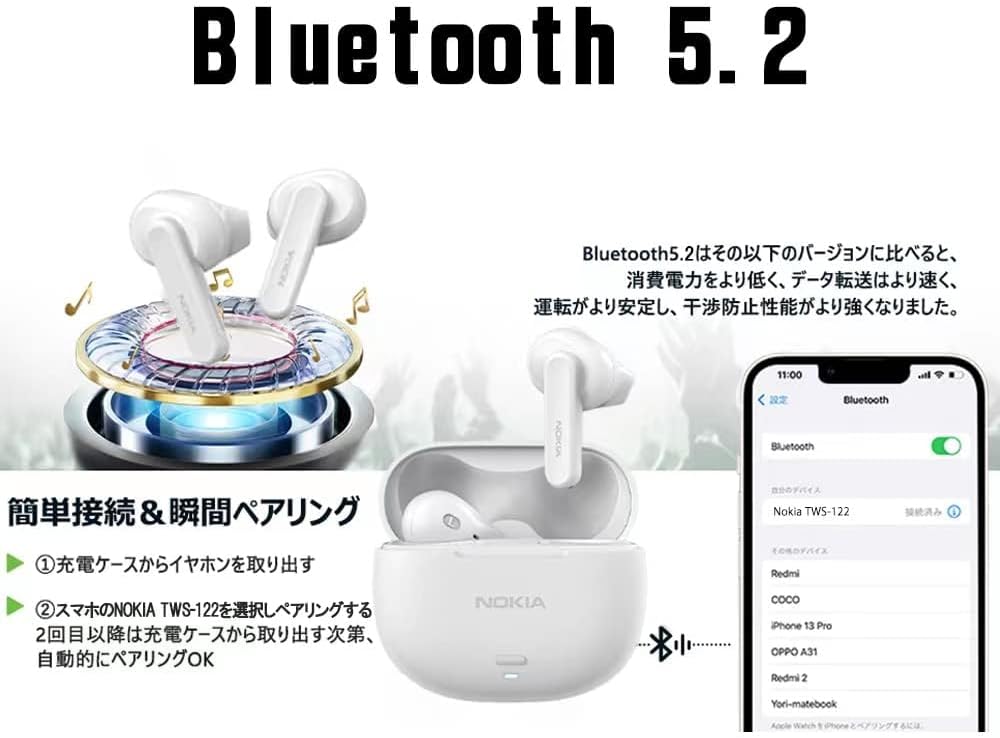
Image 4.1: This image illustrates the simple and instant pairing process using Bluetooth 5.2. It shows the earbuds in their charging case, a smartphone displaying Bluetooth settings with 'Nokia TWS-122' selected, and the earbuds connecting wirelessly to the phone.
- Initial Pairing:
- Open the charging case. The earbuds will automatically enter pairing mode.
- On your device (smartphone, tablet, etc.), enable Bluetooth and search for available devices.
- Select "Nokia TWS-122" from the list of found devices.
- Once connected, the earbuds will indicate successful pairing (e.g., an audio prompt or LED change).
- Automatic Reconnection: After the initial pairing, the earbuds will automatically connect to the last paired device when taken out of the charging case, provided Bluetooth is enabled on the device.

Image 4.2: This graphic highlights the benefits of Bluetooth 5.2 technology, including low latency for synchronized audio, strong anti-interference capabilities for stable connections, improved battery life for extended use, and high-speed data transmission.
5. Operating
5.1. Wearing the Earbuds
The earbuds feature an ergonomic hybrid design for a secure and comfortable fit. Gently insert each earbud into your ear canal and rotate slightly until it feels snug and stable. Ensure the microphone is facing downwards for optimal call clarity.
5.2. Touch Controls
The Nokia GO EARBUDS 2+ feature multi-function touch controls on each earbud.

Image 5.1: This diagram illustrates the multi-function touch control area on the earbuds. It shows various touch gestures can be used to control power on/off, play/pause music, adjust volume, skip tracks, answer/reject calls, and activate voice assistants like Siri.
| Action | Function |
|---|---|
| Single Tap (Left/Right) | Play/Pause music, Answer/End call |
| Double Tap (Right) | Next Track |
| Double Tap (Left) | Previous Track |
| Triple Tap (Right) | Volume Up |
| Triple Tap (Left) | Volume Down |
| Long Press (2 seconds) | Reject Call, Activate Voice Assistant (Siri, Google Assistant) |
| Long Press (5 seconds) | Power On/Off (when not in case) |
5.3. Environmental Noise Cancelling (ENC)
The earbuds feature ENC technology to reduce environmental noise during calls, ensuring your voice is heard more clearly by the person on the other end. This feature is automatically active during phone calls.

Image 5.2: A man wearing the Nokia earbuds in a cafe setting, smiling and holding a cup. This image visually represents the effectiveness of the Environmental Noise Cancelling (ENC) feature, allowing for clear communication even in noisy environments.
6. Maintenance
6.1. Cleaning
- Regularly clean the earbuds and charging case with a soft, dry, lint-free cloth.
- Do not use abrasive cleaners, alcohol, or chemical solvents.
- Gently clean the charging contacts on both the earbuds and the case to ensure proper charging.
6.2. Storage
- When not in use, always store the earbuds in their charging case to protect them and keep them charged.
- Store the device in a cool, dry place, away from extreme temperatures and direct sunlight.
6.3. Water Resistance (IPX4)
The Nokia GO EARBUDS 2+ are IPX4 water resistant, meaning they are protected against splashing water from any direction. This makes them suitable for workouts and light rain. However, they are not designed for swimming or submersion in water.

Image 6.1: This image shows the Nokia earbuds being splashed with water, illustrating their IPX4 water resistance rating. This feature ensures the earbuds are tough enough to withstand sweat and splashes from rain or active workouts.
7. Troubleshooting
If you encounter issues with your earbuds, refer to the following common solutions:
| Problem | Possible Solution |
|---|---|
| Earbuds not pairing | Ensure earbuds are charged. Turn off and on Bluetooth on your device. Forget "Nokia TWS-122" from your device's Bluetooth list and re-pair. |
| No sound from one earbud | Place both earbuds back in the case, close it, then open it again. Ensure both earbuds are charged. |
| Low volume | Adjust volume on both your device and using the earbud touch controls. Clean any debris from the earbud speaker mesh. |
| Charging issues | Ensure the charging cable is securely connected. Clean the charging contacts on earbuds and case. Try a different USB port or power adapter. |
| Poor call quality | Ensure the microphone is not obstructed. Move closer to your connected device. Reduce background noise if possible. |
8. Specifications
Detailed technical specifications for the Nokia GO EARBUDS 2+ TWS-122:
- Model Name: GO EARBUDS
- Item Model Number: TWS-122
- Brand: Nokia
- Headphone Type: In-ear
- Connectivity Technology: Wireless, Bluetooth
- Wireless Communication Technology: Bluetooth 5.2
- Earbud Drivers: Balanced 10 mm
- Noise Control: Active Noise Cancellation (ENC for calls)
- Water Resistance: IPX4 (Sweat and splash resistant)
- Play Time: Up to 24 hours (with charging case)
- Battery: 1 Nonstandard Battery (included)
- Color: Black
- Package Dimensions: 12.4 x 10 x 4.2 cm
- Item Weight: 150 g
- Included Components: Cable (USB Type-C)
9. Warranty and Support
For warranty information and customer support, please refer to the warranty card included in your product packaging or visit the official Nokia support website. Keep your proof of purchase for warranty claims.
Online Support: For further assistance, FAQs, and software updates, please visit the official Nokia support page: www.nokia.com/support


