
Introduction
Thank you for purchasing the RCA 32V-type FHD Tunerless Smart TV, model RCA-32D1. This television is designed for seamless access to online streaming content without the need for traditional terrestrial broadcast tuners. It features a Full HD display, built-in Wi-Fi, Chromecast functionality, and voice control for an enhanced viewing experience. This manual provides essential information for setting up, operating, maintaining, and troubleshooting your new TV.

Figure 1: Front view of the RCA 32V-type FHD Tunerless Smart TV.
Safety Information
Please read all safety instructions carefully before using the product. Keep this manual for future reference.
- Do not expose the TV to rain or moisture to prevent fire or electric shock.
- Ensure proper ventilation. Do not block ventilation openings.
- Use only the power cord supplied with the TV.
- Do not open the TV casing. Refer all servicing to qualified personnel.
- Keep batteries out of reach of children. Dispose of used batteries responsibly.
- Avoid placing the TV on unstable surfaces.
Package Contents
Verify that all items are present in the package:
- RCA 32V-type FHD Tunerless Smart TV Unit
- Remote Control
- AAA Batteries (x2)
- TV Stand (Base and Screws)
- Power Cable
- User Manual (This document)
Setup
1. Physical Setup
Attach the TV stand or mount the TV to a wall. For wall mounting, ensure you use a VESA-compatible bracket (40 x 40mm) and appropriate screws (M6 10mm x 2 for upper two points, screws for lower two points are included with the TV). Always ensure the TV is securely mounted to prevent accidents.

Figure 2: TV dimensions and connection terminal layout.
2. Connections
Connect the power cable to the TV and then to a power outlet. This TV requires only a power connection and Wi-Fi for internet streaming.

Figure 3: Power and Wi-Fi connectivity for the tunerless TV.
For external devices, use the available ports:
- HDMI Ports (x3): Connect game consoles, Blu-ray players, or other HDMI-compatible devices.
- USB 2.0 Ports (x2): Connect USB storage devices for media playback.
- LAN Port: For wired internet connection (optional, Wi-Fi is also available).
- Audio Output: For connecting external audio systems.

Figure 4: Connecting external devices via HDMI ports.
3. Initial Power On
After connecting the power, press the power button on the remote control. Follow the on-screen instructions to complete the initial setup, including connecting to your Wi-Fi network and logging into your Google account to access smart TV features.
Operating
1. Remote Control
The included remote control allows for easy navigation and features voice control capabilities. Dedicated buttons provide quick access to popular streaming services.
- Voice Control: Press the voice assistant button and speak commands like "Play cat videos on YouTube" or "Increase volume."
- Dedicated App Buttons: Quickly launch NETFLIX, YouTube, and Prime Video with a single press.
- Navigation: Use the directional pad and OK button to navigate menus and select options.
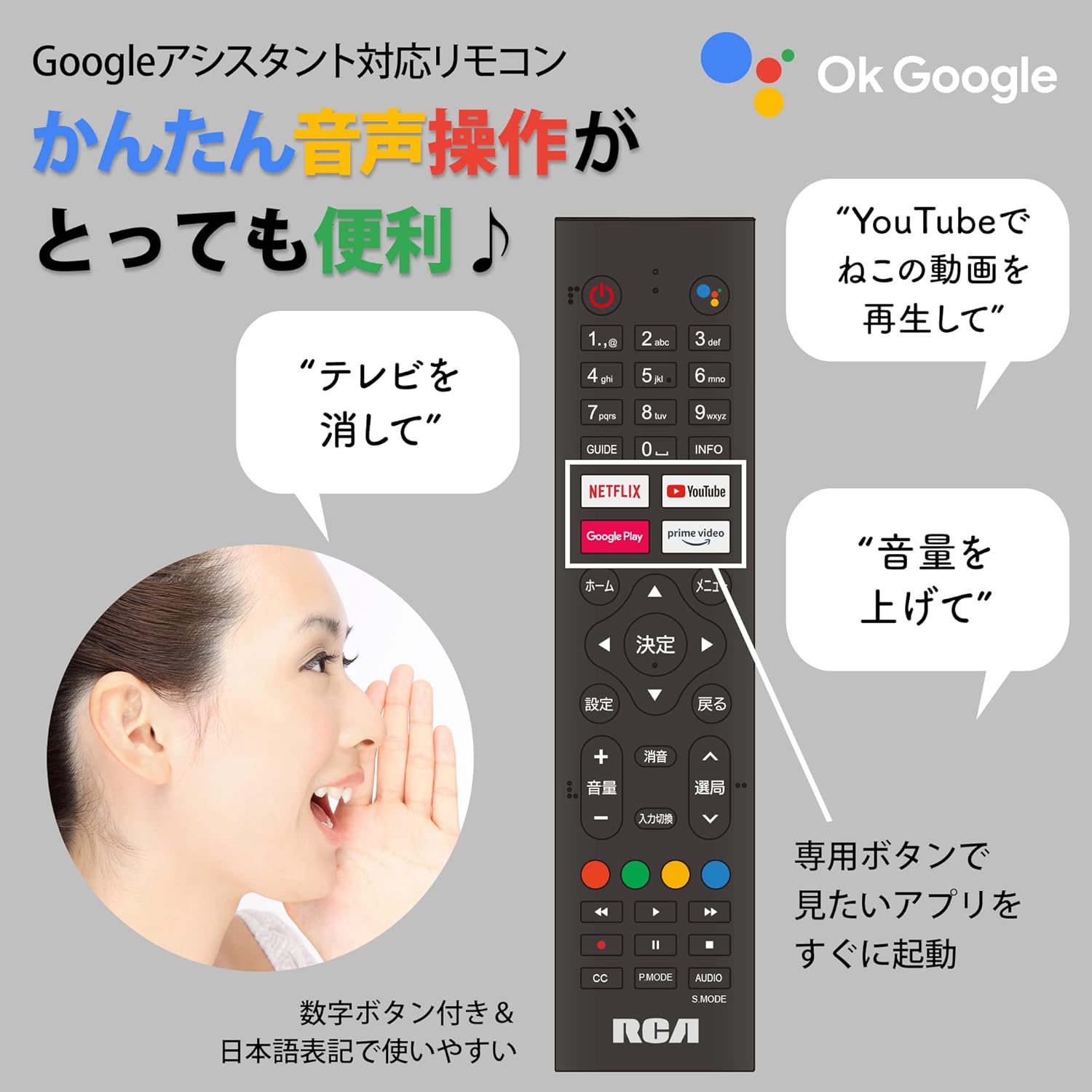
Figure 5: Remote control with voice command functionality and dedicated app buttons.
2. Smart TV Features
This tunerless TV provides access to a wide range of online video distribution services and features:
- Streaming Services: Enjoy content from NETFLIX, YouTube, Prime Video, Tver, U-NEXT, AbemaTV, and more.
- Chromecast Built-in: Cast content directly from your smartphone or tablet to the TV screen.
- Android OS: Access a variety of apps from the Google Play Store.

Figure 6: Using Chromecast to cast content from a smartphone to the TV.
Video 1: Demonstration of the Google TV interface and voice control for content discovery.
3. Basic Operations
- Power On/Off: Press the power button on the remote control.
- Volume Control: Use the Volume Up/Down buttons on the remote.
- Input Selection: Press the Input button to switch between HDMI and other connected sources.
Maintenance
1. Cleaning
To clean the TV screen, gently wipe it with a soft, lint-free cloth. For stubborn marks, slightly dampen the cloth with water or a screen-cleaning solution. Do not spray liquid directly onto the screen. Clean the TV casing with a soft, dry cloth.
2. Storage
If storing the TV for an extended period, disconnect it from the power outlet and store it in a cool, dry place away from direct sunlight and extreme temperatures.
Troubleshooting
If you encounter issues with your TV, refer to the following common problems and solutions:
| Problem | Solution |
|---|---|
| No power | Ensure the power cable is securely connected to both the TV and the power outlet. Try a different outlet. |
| No picture/Sound but no picture | Check the input source. Ensure external devices are powered on and connected correctly. |
| Remote control not working | Replace the batteries. Ensure there are no obstructions between the remote and the TV's IR sensor. |
| Cannot connect to Wi-Fi | Check your router and internet connection. Re-enter the Wi-Fi password. Move the TV closer to the router. |
| App is slow or freezes | Restart the TV. Clear the app's cache in the TV settings. Ensure your internet connection is stable. |
If the problem persists, please contact customer support.
Specifications
The following are the technical specifications for the RCA-32D1 Tunerless Smart TV:
| Feature | Detail |
|---|---|
| Model Number | RCA-32D1 |
| Screen Size | 31.5 inches (32V-type) |
| Display Technology | LCD, VA Panel, LED Backlight |
| Resolution | Full HD (1920 x 1080) |
| Refresh Rate | 60 Hz |
| Contrast Ratio | 3000:1 |
| Operating System | Android |
| Connectivity | Wi-Fi, HDMI (x3), USB 2.0 (x2), LAN, Audio Output |
| Special Features | Chromecast Built-in, Voice Control |
| Supported Streaming Services | Netflix, YouTube, Prime Video, Tver, U-NEXT, AbemaTV |
| Product Dimensions (D x W x H) | 16.1 x 73.1 x 47 cm |
| Item Weight | 4.9 kg |
| VESA Mount Standard | 40 x 40mm |
| Included Batteries | 2 AAA batteries |

Figure 7: High-definition VA panel for vivid image quality.
Warranty and Support
This product is covered by the manufacturer's warranty. Please refer to the warranty card included in your package for specific terms and conditions.
Customer Support
For technical assistance or inquiries, please contact the KEIYO Support Center:
- Phone: 050-8880-2812
- Reception Hours: Weekdays 10:00-12:00, 13:00-17:00 (Excluding summer holidays, year-end/New Year holidays, Golden Week, and public holidays).
