
OMMO OM0893
OMMO 16 Lines Green Laser Level Instruction Manual
Model: OM0893
1. Introduction
This manual provides detailed instructions for the safe and effective use of your OMMO 16 Lines Green Laser Level. This tool is designed for precise leveling and alignment tasks, featuring two 360° horizontal lines and two 360° vertical lines, providing comprehensive coverage for various applications. Please read this manual thoroughly before operating the device and retain it for future reference.
2. Safety Information
WARNING: This is a Class II laser product. Avoid direct eye exposure to the laser beam. Staring directly into the laser beam can cause eye injury.
- Do not stare into the laser beam.
- Do not aim the laser beam at people or animals.
- Do not operate the device in explosive atmospheres, such as in the presence of flammable liquids, gases, or dust.
- Keep the device out of reach of children.
- Use only specified batteries and chargers.
- Do not attempt to modify or disassemble the laser level.
3. Package Contents
Verify that all items listed below are included in your package:
- 1 x OMMO 16 Lines Green Laser Level
- 2 x Rechargeable Li-ion Batteries
- 1 x Remote Control
- 1 x Magnetic Wall Bracket
- 1 x Lifting Base
- 1 x 1/4" Mounting Screw
- 1 x Power Adapter/Charger
- 1 x Bracket Patch (Metal Plate)
- 1 x Carrying Case
- 1 x User Manual (this document)
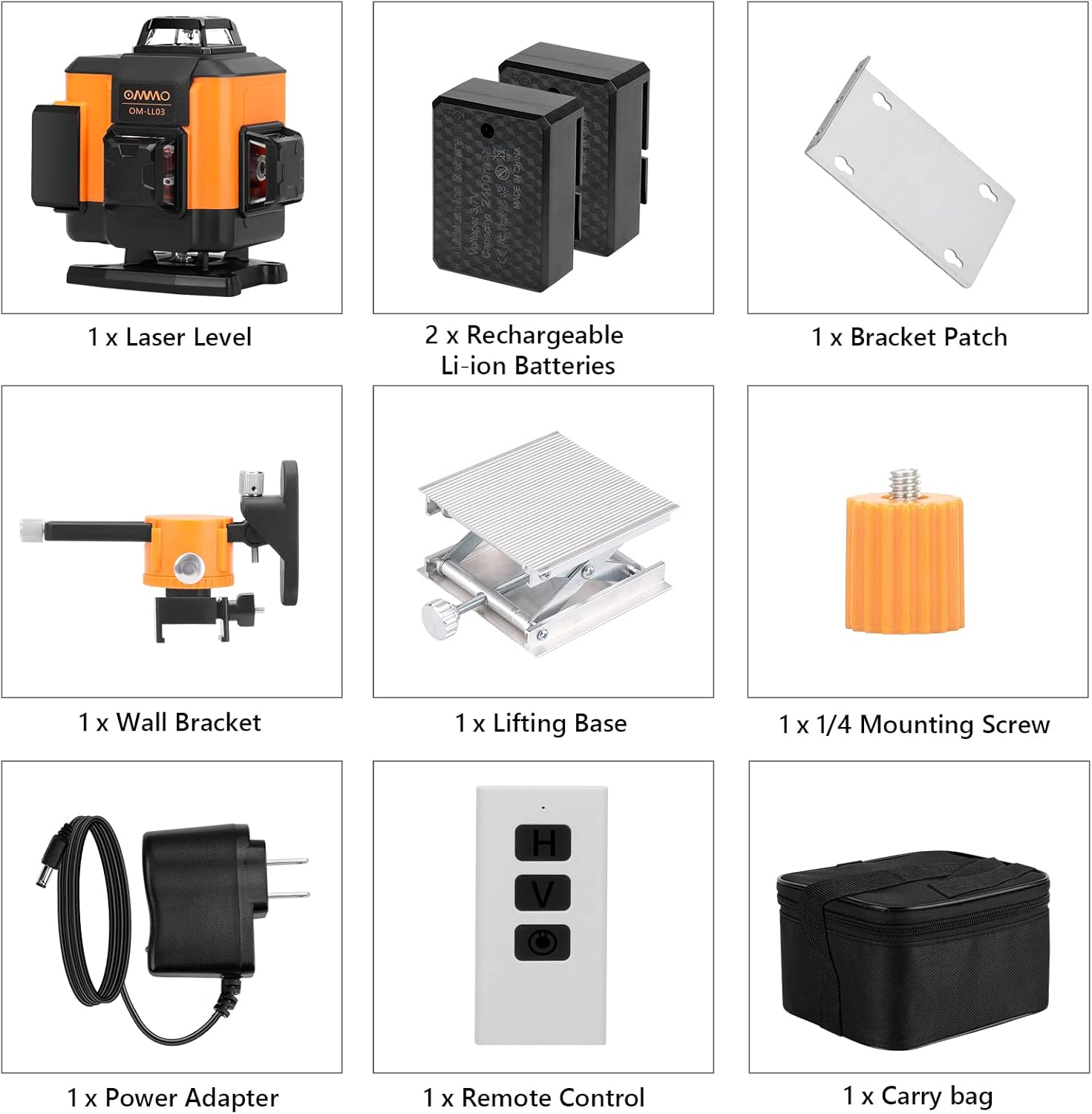
Figure 1: Contents of the OMMO 16 Lines Green Laser Level package, including the laser level, batteries, remote, various mounts, charger, and carrying case.
4. Product Overview
Familiarize yourself with the components of your laser level:

Figure 2: Key components of the OMMO 16 Lines Green Laser Level.
- Power ON/OFF Button: Located on the top panel.
- Horizontal Line Button (H): Activates/deactivates horizontal laser lines.
- Vertical Line Button (V): Activates/deactivates vertical laser lines.
- Battery Compartment: Houses the rechargeable Li-ion battery.
- 1/4" Mounting Thread: For attaching to tripods or other mounting accessories.
- Pendulum Lock Switch: Located on the side, controls self-leveling and manual modes.
5. Setup
5.1 Battery Installation and Charging
- Open the battery compartment cover on the side of the laser level.
- Insert the rechargeable Li-ion battery, ensuring correct polarity.
- Close the battery compartment cover securely.
- To charge, connect the power adapter to the charging port on the device and plug it into a power outlet. The indicator light will show charging status.

Figure 3: Battery installation and charging port location.
5.2 Mounting the Laser Level
The laser level can be mounted using various accessories:
- Tripod Mounting: Attach the laser level to a standard tripod using the 1/4" mounting thread at the bottom.
- Magnetic Wall Bracket: Use the magnetic wall bracket to attach the device to metal surfaces. The bracket also allows for height and angle adjustments.
- Lifting Base: The included lifting base provides fine height adjustment for precise positioning on flat surfaces.

Figure 4: Different installation methods for the laser level.
6. Operating Instructions
6.1 Self-Leveling Mode
- Slide the pendulum lock switch to the "ON" (unlocked) position.
- Press the Power ON/OFF button to turn on the device.
- The laser level will automatically self-level within a range of ±3°. If the device is outside this range, the laser lines will flash and an audible alarm will sound, indicating it is not level. Adjust the device's position until it is within the self-leveling range.
- Use the "H" button to activate/deactivate horizontal lines and the "V" button to activate/deactivate vertical lines.

Figure 5: Self-leveling mode operation.
6.2 Manual Mode (Locked Mode)
- Slide the pendulum lock switch to the "OFF" (locked) position.
- Press and hold the Power ON/OFF button for 3 seconds to turn on the device.
- In manual mode, the self-leveling function is disabled, allowing you to project laser lines at any desired angle. The laser lines will not flash or beep in this mode.
- Use the "H" and "V" buttons to control the laser lines.

Figure 6: Manual mode operation for angled projections.
6.3 Using the Remote Control
The remote control allows for convenient operation from a distance.
- The remote has buttons corresponding to the laser level's functions (Power ON/OFF, Horizontal Line, Vertical Line).
- Ensure the remote is pointed towards the laser level for optimal signal reception.

Figure 7: Remote control in use for different applications.
7. Maintenance
- Cleaning: Wipe the device with a soft, damp cloth. Do not use abrasive cleaners or solvents.
- Storage: When not in use, store the laser level in its carrying case in a dry, cool place, away from direct sunlight. Ensure the pendulum lock switch is in the "OFF" (locked) position to protect the pendulum mechanism.
- Battery Care: Remove batteries if the device will not be used for an extended period.

Figure 8: The laser level is designed to be dustproof and shockproof (IP54 rated).
8. Troubleshooting
| Problem | Possible Cause | Solution |
|---|---|---|
| Laser lines are flashing and beeping in self-leveling mode. | Device is outside its ±3° self-leveling range. | Place the device on a more level surface or adjust its position until it is within the self-leveling range. |
| Laser lines are dim or not visible. | Low battery; Bright ambient light. | Charge the battery; Use the device in lower light conditions or closer to the working surface. |
| Device does not turn on. | Battery is dead or incorrectly installed; Pendulum lock switch is in "OFF" position and power button not held for 3s for manual mode. | Charge or reinstall the battery; Ensure pendulum lock is "ON" for self-leveling or hold power button for 3s for manual mode. |
| Remote control not working. | Remote battery is dead; Obstruction between remote and device. | Replace remote battery; Ensure clear line of sight to the laser level. |
9. Specifications
| Brand | OMMO |
| Model Number | OM0893 |
| Laser Lines | 16 Lines (2x360° Horizontal, 2x360° Vertical) |
| Laser Color | Green |
| Visibility Range | Up to 150 feet |
| Self-Leveling Range | ±3° |
| Material | Acrylonitrile Butadiene Styrene (ABS) |
| Power Source | Battery Powered (2 Lithium Ion batteries included) |
| Item Weight | 3.56 pounds |
| Protection Rating | IP54 (Dustproof and Splashproof) |
10. Warranty and Support
For warranty information or technical support, please refer to the contact details provided with your purchase or visit the official OMMO website. Keep your purchase receipt as proof of purchase for warranty claims.
OMMO Official Store: Visit OMMO Store on Amazon
Related documentsOM0893

Ask a question about this manual
Ask about setup, troubleshooting, compatibility, parts, safety, or missing instructions. Manuals+ will review the question and use this page’s manual context to help answer it.