
Introduction
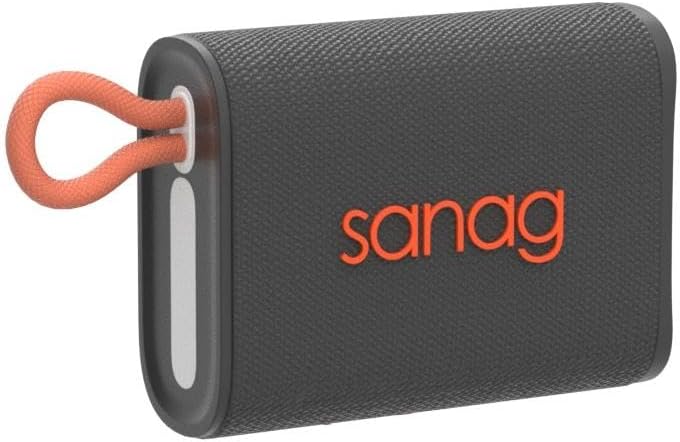
The Sanag M13S Pro is an ultra-portable Bluetooth speaker designed for high-quality audio on the go. It features dynamic RGB lighting, powerful 360° stereo sound with enhanced bass, and IPX7 waterproofing for durability in various environments. With Bluetooth 5.3 connectivity and an 18-hour playtime, it offers a seamless and extended listening experience. This manual provides essential information for setting up, operating, and maintaining your speaker.
What's in the Box
- RGB Portable Bluetooth Speaker
- Type-C Charging Cable
- Aux Cable
- User Manual
Product Features
- Beat-Driven RGB Light Show: Dynamic lighting effects pulsate and sparkle to the beat of your music.
- Hi-Fi Stereo Sound: Full-range drivers and passive radiators deliver powerful 360° stereo sound with enhanced bass, tight mids, and crystal-clear highs. Advanced digital signal processor ensures distortion-free sound.
- IPX7 Waterproof: Designed to withstand water splashes, spray, and rain, making it suitable for outdoor use.
- Ultra Portable Design: Compact size with an integrated loop for easy carrying.
- Clear Call & 18H Playtime: Built-in noise-cancelling microphone for crystal clear calls and up to 18 hours of continuous music playback.
Setup
Charging the Speaker
Before first use, fully charge the speaker. Connect the provided Type-C charging cable to the speaker's charging port and a suitable USB power source. The charging indicator light will show the charging status.
Bluetooth Pairing
- Power on the speaker by pressing and holding the power button. The RGB light will begin to flash, indicating it is in pairing mode.
- On your device (smartphone, tablet, etc.), enable Bluetooth and search for available devices.
- Select "Sanag M13S Pro" from the list of devices.
- Once connected, the speaker will emit a confirmation tone, and the RGB light will stop flashing and display a steady pattern.

Video: This video demonstrates the unboxing and initial setup of the Sanag Bluetooth Speaker, including how to power it on and connect it via Bluetooth to a mobile device. It highlights the speaker's compact size and features.
Operating Instructions
Power On/Off
Press and hold the power button (usually marked with 'O') for a few seconds to turn the speaker on or off.
Volume and Track Control
- Volume Up: Short press the '+' button.
- Volume Down: Short press the '-' button.
- Next Track: Long press the '+' button.
- Previous Track: Long press the '-' button.
- Play/Pause: Short press the power button ('O').
RGB Light Modes
The speaker features multiple RGB light modes. To switch between modes, press the power button ('O') three times quickly. Available modes include:
- Gradient mode (music-synced light changes between various colors).
- Flowing mode (light changes brightness according to music volume).
- No indicator mode (lights off to conserve battery).

Video: This video from the seller demonstrates the RGB pulsing light feature of the Sanag M13S Pro speaker, showcasing how the lights react to music.
TF Card Playback
Insert a TF (Micro SD) card with pre-loaded music into the designated slot. The speaker will automatically switch to TF card mode and begin playback. To switch back to Bluetooth mode, double-click the power button ('O').
Hands-Free Calling
The built-in noise-cancelling microphone allows for clear hands-free calls. When a call comes in, short press the power button ('O') to answer or end the call. Long press to reject a call.

Maintenance
Waterproof Care (IPX7)
The Sanag M13S Pro is IPX7 waterproof, meaning it can be submerged in up to 1 meter of water for 30 minutes. Ensure the rubber flap covering the charging port and TF card slot is securely closed before exposing the speaker to water. After exposure to water, wipe the speaker dry with a soft cloth.


General Care
Clean the speaker with a soft, dry cloth. Avoid using harsh chemicals or abrasive materials. Store the speaker in a cool, dry place when not in use.
Troubleshooting
- Speaker will not power on: Ensure the speaker is fully charged.
- Cannot pair via Bluetooth: Make sure the speaker is in pairing mode (flashing RGB light) and your device's Bluetooth is enabled. Try restarting both the speaker and your device.
- No sound: Check the volume levels on both the speaker and your connected device. Ensure the speaker is correctly paired.
- RGB lights not working: Cycle through the RGB light modes by pressing the power button three times quickly. Ensure the speaker is not in "No indicator mode."
Specifications
| Feature | Specification |
|---|---|
| Model Name | M13 |
| Speaker Type | Subwoofer |
| Special Feature | Portable |
| Wireless Communication Technology | Bluetooth 5.3 |
| Water Resistance Level | Waterproof (IPX7) |
| Speaker Maximum Output Power | 10 Watts |
| Item Weight | 7.7 ounces |
| Product Dimensions | 3.03"D x 3.8"W x 1.6"H |
| Power Source | Battery Powered (1 Lithium Polymer battery included) |
| Audio Output Mode | Stereo |
| Compatible Devices | iPhone, Samsung, Xiaomi, OnePlus |
Warranty and Support
Sanag is committed to your satisfaction. We provide a 30-day no-reason return policy and a 180-day warranty. If you encounter any problems, please contact us promptly through one of the following options:
- Go to your Amazon account: [Account Service] > [Order History] > [Seller Contact].
- Click on our business name "NIEWEILI-US" on the product page, then click the yellow "Questions" button to send us an email.


