
1. Introduction
The TP-Link TL-SG3452XP is a JetStream 48-Port Gigabit L2+ Managed PoE Switch, designed for robust and scalable network deployments. It features 48 PoE+ (802.3at/af) 10/100/1000 Mbps RJ45 ports, providing up to 30W per port with a total PoE budget of 500W. Additionally, it includes 4x 10GE SFP+ slots for high-bandwidth connectivity and non-blocking switching capacity. This switch supports advanced features such as Omada SDN integration, IPv6, and Static Routing, making it suitable for various business and enterprise environments.
2. Safety Information
Please read and follow all safety instructions carefully before operating the device to prevent damage and ensure proper functionality.
- Ensure the power supply voltage matches the device's requirements.
- Do not expose the device to water or excessive humidity.
- Avoid placing the device near heat sources or in direct sunlight.
- Use only the power cord provided with the device.
- Do not open or attempt to repair the device yourself. Refer all servicing to qualified personnel.
- Ensure proper ventilation around the device to prevent overheating.
3. Package Contents
Verify that all items are present in the package:
- TP-Link TL-SG3452XP Switch
- Power Cord
- Quick Installation Guide
- Rackmount Kit
- Rubber Feet
4. Physical Overview
4.1 Front Panel
The front panel of the TL-SG3452XP switch features 48 Gigabit Ethernet ports with PoE+ capabilities and 4 SFP+ ports for high-speed uplinks. Status LEDs indicate power, system status, link/activity, and PoE status for each port.
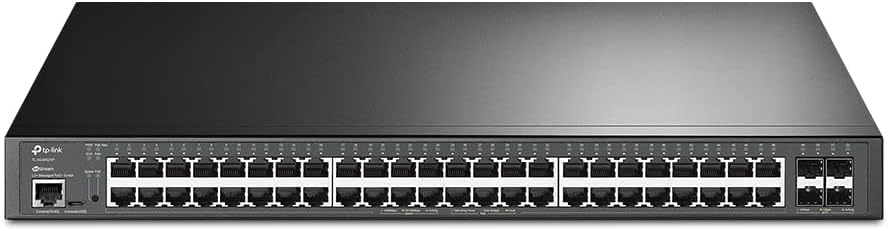
Figure 4.1: Front view of the TP-Link TL-SG3452XP switch, showing 48 RJ45 ports and 4 SFP+ ports, along with status indicators.
4.2 Rear Panel
The rear panel includes the power input connector and grounding screw. It is designed for efficient cable management and secure power connection.

Figure 4.2: Rear view of the TP-Link TL-SG3452XP switch, displaying the power input and grounding point.
4.3 Power over Ethernet (PoE) Capabilities
The TL-SG3452XP switch provides Power over Ethernet Plus (PoE+) on all 48 RJ45 ports, simplifying deployment of devices like IP cameras, IP phones, and wireless access points by delivering both power and data over a single Ethernet cable. It offers a maximum of 30W per port and a total power budget of 500W.

Figure 4.3: Illustration of the switch's PoE+ capabilities, showing connections to IP cameras, IP phones, and access points.
5. Setup
5.1 Rackmount Installation
The TL-SG3452XP is designed for standard 19-inch rack mounting. Use the provided rackmount kit to secure the switch within a server rack. Ensure adequate space for airflow around the device.
5.2 Power Connection
- Connect one end of the provided power cord to the power input on the rear panel of the switch.
- Connect the other end of the power cord to a grounded electrical outlet.
- Verify that the power LED on the front panel illuminates, indicating the device is receiving power.
5.3 Network Connection
- Connect network devices (e.g., computers, servers, access points) to the RJ45 ports on the front panel using Ethernet cables.
- For high-speed uplinks, insert compatible SFP+ modules into the SFP+ slots and connect fiber optic cables to other network devices or backbone infrastructure.
5.4 Initial Configuration
The switch can be managed in standalone mode via its web-based GUI or integrated into the Omada Software Defined Networking (SDN) platform for centralized management.
- Standalone Mode: Access the switch's web management interface by connecting a computer to one of its Ethernet ports and configuring your computer's IP address to be in the same subnet as the switch's default IP. Refer to the Quick Installation Guide for default IP address and login credentials.
- Omada SDN Integration: For centralized management, integrate the switch into your Omada SDN network. This requires an Omada Hardware Controller, Omada Software Controller, or Omada Cloud-based Controller. The Omada platform allows for unified management of switches, access points, and gateways.

Figure 5.4: Overview of Omada SDN integration, illustrating various control options and cloud access.
6. Operating
6.1 Basic Network Configuration
The TL-SG3452XP supports various L2+ features to optimize network performance and security.
- VLAN (Virtual Local Area Network): Use 802.1Q VLAN to segment your network into smaller broadcast domains, enhancing security and performance.
- QoS (Quality of Service): Prioritize network traffic to ensure critical applications receive sufficient bandwidth, providing a fluent online experience.
- Flow Control: Manage data flow to prevent packet loss during network congestion.
- IGMP Snooping: Optimize multicast traffic delivery, particularly useful for IPTV applications.

Figure 6.1: Illustration of advanced network features, demonstrating how VLANs segment the network and other features optimize traffic.
6.2 PoE Management
The switch allows for management of Power over Ethernet settings, including enabling/disabling PoE on specific ports, setting power priorities, and monitoring power consumption. PoE Recovery ensures connected PoE devices automatically restart if they become unresponsive.
6.3 Network Security Features
The TL-SG3452XP incorporates robust security features to protect your network:
- IP-MAC-Port Binding: Binds specific IP addresses, MAC addresses, and port numbers to prevent unauthorized access.
- ACL (Access Control List): Filters network traffic based on defined rules.
- Port Security: Limits the number of MAC addresses allowed on a port to prevent MAC flooding attacks.
- DoS Defend: Protects against Denial of Service attacks.
- Storm Control: Prevents network performance degradation caused by broadcast, multicast, or unknown unicast storms.
- DHCP Snooping: Prevents unauthorized DHCP servers from providing IP addresses.
- 802.1X Radius Authentication: Provides port-based network access control.
7. Maintenance
7.1 Firmware Updates
Regularly check the TP-Link official website for the latest firmware updates. Updating the firmware can improve performance, add new features, and fix known issues. Follow the instructions provided with the firmware download for the update process.
7.2 Cleaning
To maintain optimal performance and extend the lifespan of your switch:
- Disconnect the power before cleaning.
- Use a soft, dry cloth to wipe the exterior of the device.
- Do not use liquid or aerosol cleaners.
- Ensure ventilation openings are free from dust and obstructions.
7.3 Environmental Considerations
Operate the switch within the recommended temperature and humidity ranges to ensure stable operation. Avoid environments with extreme temperatures, high humidity, or significant dust accumulation.
8. Troubleshooting
This section addresses common issues you might encounter with the TL-SG3452XP switch.
- No Power:
- Ensure the power cord is securely connected to both the switch and a working power outlet.
- Verify the power outlet is functional by plugging in another device.
- No Link/Activity LED:
- Check the Ethernet cable connection between the switch and the connected device. Try a different cable.
- Ensure the connected device is powered on and functioning correctly.
- Verify the port on the switch is enabled in the configuration.
- PoE Device Not Powering On:
- Ensure the connected device is PoE-compatible (802.3af/at).
- Check the PoE status LED for the specific port.
- Verify that the total PoE budget (500W) is not exceeded by all connected devices.
- Ensure PoE is enabled for the specific port in the switch's configuration.
- Cannot Access Web Management Interface:
- Ensure your computer's IP address is in the same subnet as the switch's IP address.
- Verify the physical connection between your computer and the switch.
- Try clearing your browser's cache or using a different browser.
- If the switch is managed by Omada SDN, access its settings through the Omada Controller.
9. Specifications
| Feature | Detail |
|---|---|
| Model | TL-SG3452XP |
| Ports | 48x 10/100/1000 Mbps RJ45 (PoE+), 4x 10GE SFP+ Slots |
| PoE Standard | 802.3at/af compliant |
| PoE Power Budget | 500W |
| Switching Capacity | 176 Gbps |
| Packet Forwarding Rate | 130.9 Mpps |
| Dimensions (W x D x H) | 17.32 x 17.32 x 1.73 inches (440 x 440 x 44 mm) |
| Weight | 12.1 pounds (5.5 kg) |
| Power Supply | 100-240V AC, 50/60Hz |
| Operating Temperature | 0–45 °C (32–113 °F) |
| Management | Web-based GUI, CLI, SNMP, RMON, Omada SDN |
| UPC | 840030702518 |
10. Warranty & Support
TP-Link provides a limited warranty for this product. The specific terms and conditions of the warranty may vary by region. Please refer to the official TP-Link website or the warranty card included with your product for detailed warranty information.
Technical Support
For technical assistance, firmware updates, and product support, please visit the official TP-Link support website:
You can also find FAQs, user guides, and contact information for customer service on the support page.


