
Introduction
The KRATKI MSK Glass fi 100 Microprocessor Controller is designed to optimize the combustion process in fireplaces, enhancing heating efficiency. This modern controller features a glass touchscreen and an integrated damper system to regulate external air intake for combustion.
It is compatible with various fireplace inserts that utilize external air intake and can also integrate with water heater exchangers. The system intelligently manages air supply to ensure efficient burning and prevents rapid cooling of the living space once the fire subsides.
Package Contents
Verify that all components are present in your package:
- Microprocessor Controller with Glass Touchscreen
- Temperature Sensor with 2.5 m Silicone Cable
- Damper with Servo Mechanism (fi 100)
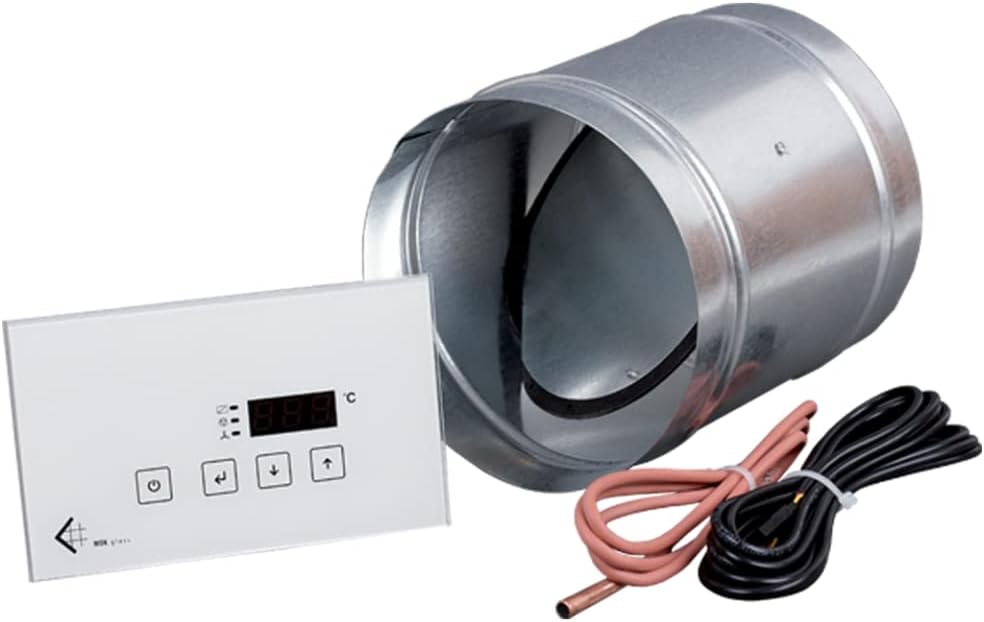
Figure 1: Complete set of the KRATKI MSK Glass fi 100 Microprocessor Controller.
Setup and Installation
- Damper Installation: Install the fi 100 damper in the external air intake duct leading to the fireplace combustion chamber. Ensure the damper's special seal provides a complete shut-off when closed.
- Temperature Sensor Placement: Connect the temperature sensor. Important Note: If using a cast iron fireplace, do not place the sensor directly on the insert, as high temperatures may cause it to melt. Position it in a location that accurately reflects the fireplace's heat output without direct contact with extreme heat.
- Controller Mounting: Mount the microprocessor controller in a convenient location, ensuring the glass touchscreen is easily accessible for operation.
- Wiring: Connect the damper servo mechanism and the temperature sensor to the microprocessor controller according to the wiring diagram provided in the full installation manual (not included here).
- Power Connection: Connect the controller to a suitable power supply.
For detailed wiring diagrams and specific installation instructions, please refer to the comprehensive installation guide provided with your product.
Operating Instructions
The MSK Glass fi 100 controller automates air supply for optimal combustion. Here are its key operational aspects:
- Automatic Air Dosing: The controller precisely doses external cold air into the combustion chamber based on temperature readings, ensuring efficient burning and wood saving.
- Post-Combustion Shut-off: Once the embers in the fireplace insert are extinguished and the temperature drops, the regulator automatically closes the external air intake. This prevents cold air from entering and cooling the fireplace and the room.
- Integration with Heating Systems: The controller can manage two central heating pumps and an additional independently adjustable device (e.g., a fireplace turbine or lighting).
- Oil/Gas Stove Interaction: The system monitors room temperature. If you start a fire in the fireplace, the controller will detect the temperature increase, preventing an oil or gas stove from activating unnecessarily. Conversely, if the fireplace fire dies down and the temperature drops, the oil or gas stove will automatically activate to maintain warmth. Direct connection between the fireplace controller and the oil/gas stove controller is not required for this function.
- Safety Features: Includes overheating protection and automatic air supply cut-off in case of a power failure. Acoustic warnings are also integrated.
Use the glass touchscreen to monitor temperature and adjust settings as needed. Refer to the full user manual for detailed menu navigation and parameter adjustments.
Maintenance
Regular maintenance ensures the longevity and optimal performance of your KRATKI MSK Glass fi 100 controller:
- Cleaning the Touchscreen: Gently wipe the glass touchscreen with a soft, dry cloth. Avoid abrasive cleaners or harsh chemicals that could damage the surface.
- Damper Inspection: Periodically inspect the damper and its servo mechanism for any obstructions or signs of wear. Ensure it opens and closes smoothly.
- Cable Check: Verify that all cables (temperature sensor, power, damper) are securely connected and free from damage.
- Sensor Cleanliness: Ensure the temperature sensor is clean and free from dust or debris that could affect its accuracy.
No user-serviceable parts are inside the microprocessor controller. For any internal issues, contact qualified service personnel.
Troubleshooting
| Problem | Possible Cause | Solution |
|---|---|---|
| Controller not powering on | No power supply; loose connection | Check power source and ensure all cables are securely connected. |
| Damper not opening/closing | Obstruction; servo mechanism fault; wiring issue | Inspect damper for obstructions. Check wiring to the servo. If problem persists, contact support. |
| Inaccurate temperature readings | Sensor dirty or improperly placed; sensor fault | Clean the sensor. Verify correct placement (not on cast iron insert). If still inaccurate, sensor may need replacement. |
| Oil/gas stove activating when fireplace is active | Room temperature sensor not detecting fireplace heat adequately | Ensure the fireplace is generating sufficient heat to raise room temperature, or check sensor placement. |
| Acoustic warning sounds | System error; overheating; power failure | Check the controller display for error codes. Address the specific issue (e.g., reduce fire intensity if overheating). |
If you encounter issues not listed here or if the suggested solutions do not resolve the problem, please contact KRATKI customer support.
Specifications
- Model: MSK Glass fi 100 Control
- Manufacturer: KRATKI
- Product Dimensions (L x W x H): 25 x 25 x 20 cm
- Weight: 403.7 grams
- Material: Glass (touchscreen)
- Damper Diameter: fi 100
- Temperature Sensor Cable Length: 2.5 meters
- Country of Origin: Poland
Warranty and Support
Information regarding specific warranty terms and conditions for the KRATKI MSK Glass fi 100 Microprocessor Controller is not available in this document. Please refer to the product packaging, official KRATKI website, or your point of purchase for detailed warranty information.
For technical support, service, or replacement parts, please contact KRATKI customer service through their official channels. Keep your purchase receipt and product model information handy when contacting support.