
intpw YH6S
intpw Powered USB Hub 10Gbps (Model YH6S) - Instruction Manual
Introduction
The intpw Powered USB Hub (Model YH6S) is designed to expand your device's connectivity, offering high-speed data transfer and efficient charging capabilities. This hub features 7 SuperSpeed USB 3.1 Gen 2 data ports and 3 fast charging ports, making it suitable for a wide range of computers and peripherals. This manual provides essential information for setting up, operating, and maintaining your USB hub.
Package Contents
- intpw Powered USB Hub (Model YH6S)
- 36W Power Adapter (12V/2.5A)
- USB-A to USB-A Cable
- USB-A to USB-C Cable

Image: The intpw Powered USB Hub, accompanied by its power adapter and two connection cables (USB-A to USB-A and USB-A to USB-C).
Product Overview
The intpw USB Hub features a durable aluminum unibody design with an ergonomic 32-degree angle for easy access to ports. Key components include:
- 7 x USB 3.1 Gen 2 Data Ports: These ports (typically blue) support data transfer speeds up to 10Gbps.
- 1 x Quick Charge 3.0 Port: An orange port for compatible devices, offering up to 18W fast charging.
- 2 x INT-POWER Fast Charging Ports: Green ports providing up to 2.4 amps per port for other devices.
- DC Power Input Port: For connecting the included 36W power adapter.
- Host Connection Port: Located on the side, for connecting to your computer via USB-A or USB-C cable.

Image: A detailed view of the intpw USB Hub's ports, highlighting the 7 USB 3.1 Gen 2 data ports, 2 INT-POWER fast charging ports, and 1 Quick Charge 3.0 port.
Setup Instructions
- Connect Power Adapter: Connect the provided 36W (12V/2.5A) power adapter to the DC power input port on the back of the hub. Then, plug the power adapter into a standard electrical outlet.
- Connect to Computer: Use either the included USB-A to USB-A cable or the USB-A to USB-C cable to connect the hub's host connection port (on the side) to an available USB-A or USB-C port on your computer.
- Automatic Recognition: The hub is designed for plug-and-play operation. Your computer should automatically recognize the device without requiring additional driver installation.

Image: The intpw USB Hub connected to a computer, illustrating the use of extended cables for flexible placement.
Operating Instructions
Data Transfer
Connect your USB devices, such as external hard drives, flash drives, keyboards, or mice, to any of the 7 blue USB 3.1 Gen 2 data ports. These ports support data transfer speeds up to 10 Gigabits Per Second (10Gbps), enabling rapid file transfers.

Image: The intpw USB Hub connected to a laptop, illustrating SuperSpeed data transfer at 10Gbps, significantly faster than USB 3.0.
Device Charging
The hub provides three dedicated charging ports:
- Quick Charge 3.0 Port (Orange): Use this port for devices compatible with Qualcomm Quick Charge 3.0 technology, delivering up to 18W of power.
- INT-POWER Fast Charging Ports (Green): Two ports designed for other devices, providing up to 2.4 amps per port for efficient charging.
Important Note: The three fast charging ports are for power delivery only and do not support data transfer. Ensure data devices are connected to the blue USB 3.1 data ports.

Image: The intpw USB Hub simultaneously charging an iPhone, iPad Pro, and Samsung S9, demonstrating its fast charging capabilities for multiple devices.
Compatibility
The intpw USB Hub offers broad compatibility with various operating systems and devices:
- Operating Systems: Supports Windows XP/2000/7/8/10/11, Android, Linux, and Mac OS 10.3 or above.
- Compatible Devices: Works with all USB-A/USB-C laptops and PCs, including M1 Mac mini, MacBook Air/Pro, iMac, XPS, and Surface Pro. It also supports a wide array of peripherals such as scanners, external hard drives, projectors, modems, USB flash drives, MP3 players, televisions, keyboards, gaming consoles, DVD routers, desktops, monitors, speakers, printers, tablets, headphones, digital cameras, dashcams, smartphones, and card readers.

Image: A visual chart detailing the intpw USB Hub's compatibility with different USB devices and host operating systems like Windows, macOS, and Linux.
Specifications
| Model Number | YH6S |
| Product Dimensions | 6.85 x 2.59 x 1.1 inches |
| Item Weight | 1.1 pounds |
| Hardware Interface | Thunderbolt, USB, USB 3.0, USB Type C |
| Total USB Ports | 10 (7 data, 3 charging) |
| Data Transfer Rate | 10 Gigabits Per Second (for data ports) |
| Power Adapter | 36W (12V/2.5A) |
| Charging Port Types | 1x Quick Charge 3.0 (18W), 2x INT-POWER (2.4A) |
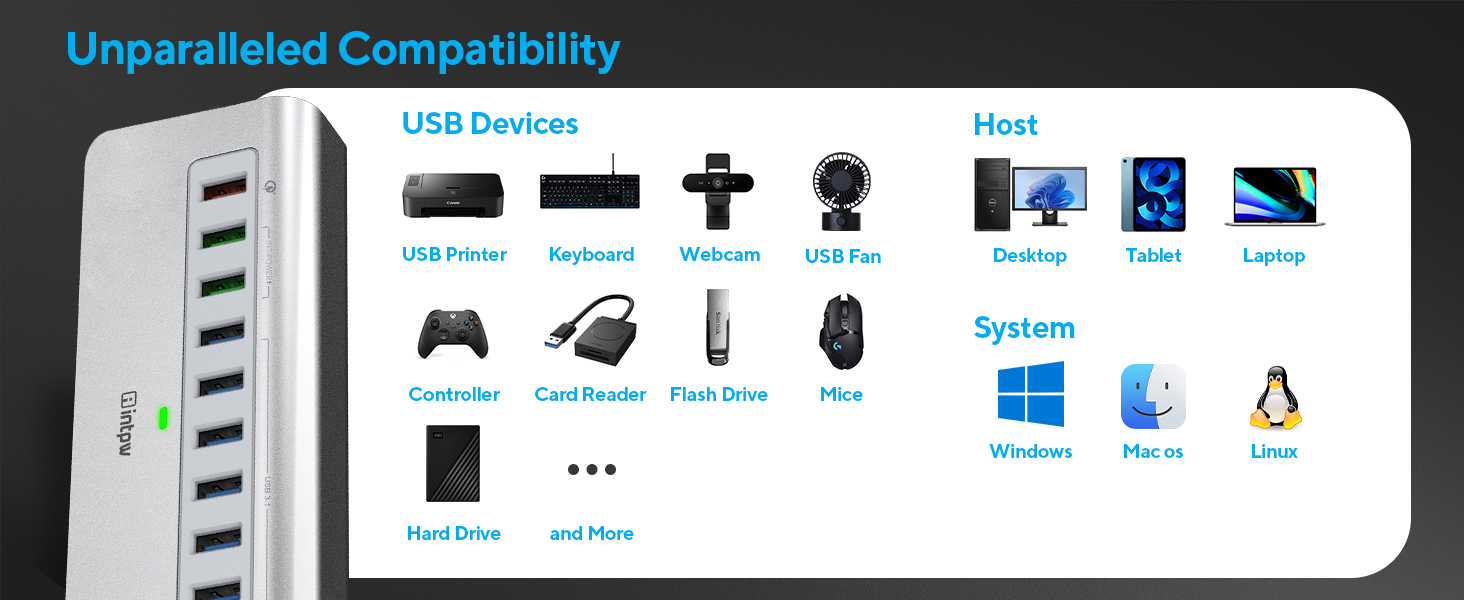
Image: Illustration of the intpw USB Hub's stable 36W power supply and built-in protection against over-voltage, over-temperature, and over-current.
Maintenance
- Cleaning: Keep the hub clean and free from dust. Use a soft, dry cloth for cleaning. Avoid liquid cleaners.
- Environment: Avoid exposing the hub to extreme temperatures, direct sunlight, or high humidity.
- Handling: Do not drop or subject the hub to strong impacts. Do not attempt to disassemble or repair the device yourself, as this will void the warranty.
Troubleshooting
Device Not Recognized or Slow Speeds
- Power Connection: Ensure the 36W power adapter is securely connected to both the hub and a functional electrical outlet. A stable power supply is crucial for optimal performance.
- Host Connection: Verify that the hub is correctly connected to your computer's USB-A or USB-C port using one of the provided cables. Try connecting to a different USB port on your computer.
- Restart Computer: Sometimes, a simple computer restart can resolve connectivity issues.
- Driver Updates: Ensure your computer's USB drivers are up to date.
- Port Type: Remember that the three dedicated charging ports (orange and green) do not support data transfer. Connect data devices to the blue USB 3.1 data ports.
Charging Issues
- Device Compatibility: Confirm that the device you are charging is compatible with Quick Charge 3.0 (for the orange port) or standard 2.4A charging (for the green ports).
- Charging Cable: Ensure your charging cable is not damaged and is functioning correctly. Try a different cable if necessary.
Warranty and Support
intpw products come with a manufacturer's warranty. For specific warranty details, technical assistance, or customer support, please refer to the contact information provided in your product packaging or visit the official intpw website. Please retain your proof of purchase for warranty claims.
Related documentsYH6S


Ask a question about this manual
Ask about setup, troubleshooting, compatibility, parts, safety, or missing instructions. Manuals+ will review the question and use this page’s manual context to help answer it.