
1. Introduction
The EF ECOFLOW 110W Portable Solar Panel is designed for efficient and reliable power generation in various outdoor settings. Featuring a foldable design with a convenient carry case, it offers high 23% efficiency and an IP68 waterproof and dustproof rating, making it suitable for camping, RVs, and backyard use. This manual provides essential information for the safe and effective operation of your solar panel.
2. What's in the Box
- EF ECOFLOW 110W Solar Panel ×1
- Kickstand Case ×1
- User Manual ×1
- Service Card ×1
- Solar to XT60i Cable ×1
- Snap Hooks ×4

3. Setup
- Unfold the Solar Panel: Carefully unfold the EF ECOFLOW 110W Portable Solar Panel.
- Position the Kickstand Case: The included carry case doubles as a kickstand. Position the case behind the solar panel and use the integrated clips to secure the panel at an optimal angle for maximum sunlight exposure. Adjust the angle throughout the day to follow the sun's path.
- Connect to a Power Station: Use the provided Solar to XT60i cable to connect the solar panel to a compatible EF ECOFLOW portable power station. Ensure the connections are secure.
- Optimize Sunlight Exposure: For best performance, ensure the solar panel is placed in direct sunlight and free from any shadows.
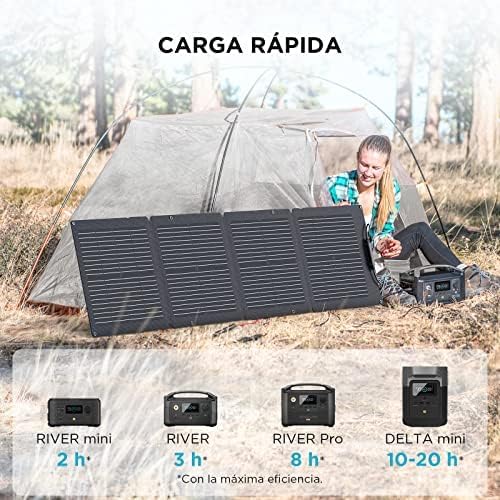

Video: This video demonstrates the setup and connection of the EF ECOFLOW Solar Panel to a power station, highlighting its portability and ease of use.
4. Operating Instructions
The EF ECOFLOW 110W Portable Solar Panel is designed for high efficiency, converting up to 23% of solar energy into usable power. To ensure optimal performance:
- Direct Sunlight: Always position the panel to face direct sunlight. Avoid shaded areas, as even partial shading can significantly reduce power output.
- Angle Adjustment: Utilize the adjustable kickstand to angle the panel towards the sun. Adjust the angle periodically throughout the day to maximize energy capture as the sun moves.
- Compatibility: The MC4 connector ensures broad compatibility with most solar generators. For EF ECOFLOW power stations, the XT60i cable provides a direct and efficient connection.
- Weather Conditions: While the panel is IP68 water and dustproof, extreme weather conditions (e.g., heavy rain, hail) may affect efficiency.

Video: This video demonstrates the EF ECOFLOW 110W Solar Panel charging a River 2 Pro power station, showcasing its real-world application and efficiency.
5. Maintenance
- Cleaning: Regularly clean the surface of the solar panel with a soft, damp cloth to remove dust, dirt, and debris. A clean surface ensures maximum sunlight absorption and efficiency. Avoid abrasive cleaners or harsh chemicals.
- Inspection: Periodically inspect the panel for any physical damage, such as cracks, scratches, or frayed cables. Ensure all connections are secure and free from corrosion.
- Storage: When not in use, fold the solar panel and store it in its kickstand case. Store in a cool, dry place away from direct sunlight and extreme temperatures.
- Water and Dust Protection: The IP68 rating provides protection against water and dust. However, for prolonged lifespan, avoid unnecessary exposure to harsh elements.

6. Troubleshooting
- Low Power Output:
- Ensure the panel is in direct, unobstructed sunlight.
- Check for any shading from trees, buildings, or other objects.
- Clean the panel surface from dirt or dust.
- Verify the angle of the panel is optimized for the sun's position.
- No Charging:
- Confirm all cables (Solar to XT60i) are securely connected to both the solar panel and the power station.
- Check if the power station is turned on and configured for solar input.
- Ensure there is sufficient sunlight for charging.
- Inspect cables for any visible damage.
- Overheating:
- While designed for outdoor use, avoid placing the power station in direct, intense sunlight for extended periods, especially in hot climates. Ensure adequate ventilation around the power station.
7. Specifications
| Feature | Detail |
|---|---|
| Brand | EF ECOFLOW |
| Model Number | EF-Flex-110C |
| Maximum Power | 110 Watts |
| Efficiency | High Efficiency (up to 23%) |
| Material | Monocrystalline Silicon |
| Product Dimensions (Unfolded) | 16.5"L x 0.8"W x 20.2"H (Folded dimensions are implied to be smaller, but not explicitly stated for unfolded) |
| Item Weight | 3.99 Kilograms (approx. 8.8 lbs) |
| Waterproof Rating | IP68 |
| Connector Type | MC4 |
| Special Features | High Efficiency, Portable, Weather Resistant, Adjustable Case, High-Quality Components |
8. Safety Information
- Do not attempt to modify or disassemble the solar panel.
- Keep the solar panel away from open flames or heat sources.
- Avoid dropping or subjecting the panel to severe impacts.
- Ensure children and pets are kept away from the solar panel during operation.
- Do not immerse the panel in water for extended periods despite its IP68 rating.
- Handle with care to prevent damage to the solar cells.
9. Warranty & Support
For detailed warranty information and customer support, please refer to the Service Card included in your product packaging or visit the official EF ECOFLOW website. You can also find additional resources and FAQs there.
Contact Information: Please refer to the official EF ECOFLOW website for the most up-to-date contact details for customer service and technical support.


