
PTHTECHUS 1328
PTHTECHUS Replacement Remote Control for Samsung 4K QLED UHD TVs
Model: 1328
Introduction
This manual provides essential instructions for the PTHTECHUS Replacement Remote Control, designed for various Samsung Smart TVs. This remote offers full functionality comparable to original Samsung remotes, ensuring a seamless user experience. It operates using infrared technology and requires no complex setup.
Setup
1. Battery Installation
The remote control requires two AAA batteries (not included). Follow these steps to install them:
- Locate the battery compartment cover on the back of the remote control.
- Slide the cover downwards to open the compartment.
- Insert two AAA batteries, ensuring the positive (+) and negative (-) terminals align correctly with the markings inside the compartment.
- Slide the battery compartment cover back into place until it clicks securely.

Figure 1: Battery compartment with AAA batteries. Ensure correct polarity when inserting batteries.
2. Initial Use
No configuration or pairing is necessary. Once batteries are installed, the remote control is ready for immediate use with compatible Samsung TVs. Simply point the remote towards your television and begin operation.
Operating Instructions
This remote control provides access to all standard functions of your Samsung TV. Familiarize yourself with the button layout for optimal use.
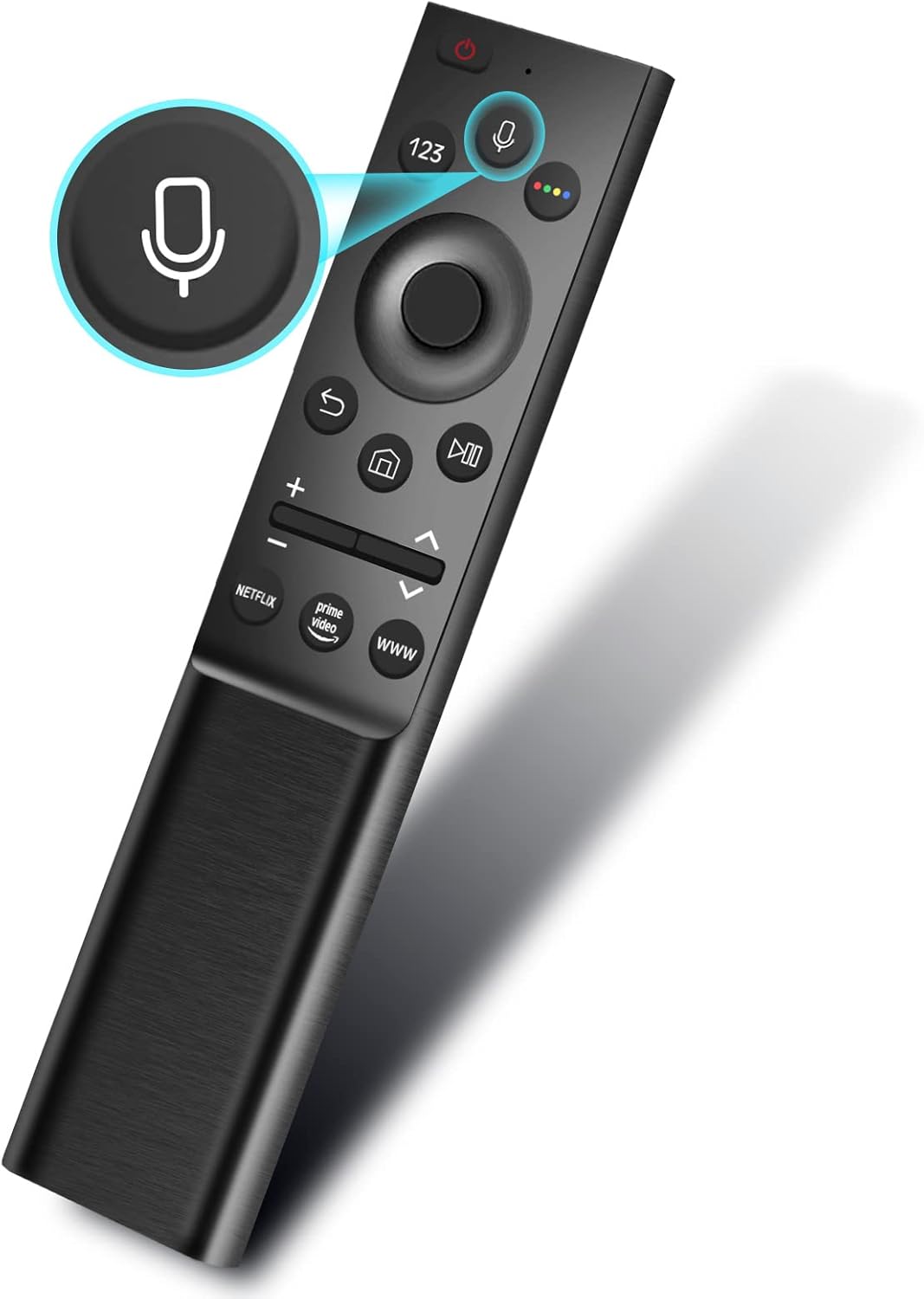
Figure 2: Remote control layout with microphone button highlighted. This button activates voice control features on compatible TVs.
Basic Functions
- Power Button: Located at the top, turns the TV on or off.
- Volume Control (+/-): Adjusts the TV volume.
- Channel Control (Up/Down arrows): Changes TV channels.
- Navigation Pad (Directional buttons and Enter): Used to navigate menus and select options.
- Return Button: Returns to the previous screen or menu.
- Home Button: Accesses the TV's Smart Hub or main menu.
- Play/Pause, Fast Forward, Rewind: Controls media playback.
Special Features
- Voice Control Button: Press the microphone button (Figure 2) to activate voice commands on compatible Samsung Smart TVs. Speak clearly into the remote.
- Quick Access Buttons: Dedicated buttons for popular streaming services like Netflix, Prime Video, and a general WWW button for web browsing (Figure 3).

Figure 3: Dedicated app buttons for quick access to streaming services and web browsing.
Infrared Operation
This remote control operates using infrared (IR) technology. Ensure there are no obstructions between the remote's IR emitter (located at the top front) and the TV's IR receiver for proper signal transmission. The effective range is approximately 10 meters (33 feet).

Figure 4: Visual representation of voice command functionality and signal transmission.
Maintenance
Battery Replacement
Replace the AAA batteries when the remote control's responsiveness decreases or it stops functioning. Always replace both batteries at the same time with new ones. Do not mix old and new batteries, or different types of batteries.
Cleaning
To clean the remote control, use a soft, dry cloth. Do not use liquid cleaners, aerosols, or abrasive materials, as these can damage the remote's surface or internal components.
Troubleshooting
- Remote not responding:
- Ensure batteries are correctly installed with the correct polarity.
- Replace old batteries with new AAA batteries.
- Check for any obstructions between the remote control and the TV's IR receiver.
- Ensure you are within the operating range (approximately 10 meters) and pointing the remote directly at the TV.
- Voice control not working:
- Verify that your Samsung TV model supports voice control functionality with a replacement remote.
- Ensure there are no loud background noises interfering with the microphone.
- Speak clearly and directly into the remote's microphone.
- Specific buttons not working:
- Some advanced features or specific app buttons may require your TV to be connected to the internet or have the corresponding app installed and updated.
Specifications
| Brand | PTHTECHUS |
| Model Number | 1328 |
| Compatible Samsung Remote Models | BN59-01274A, BN59-01300J, BN59-01298H, and others listed in product description. |
| Compatible Devices | Samsung 4K QLED UHD TVs (e.g., QA55Q8CNAK, QA75Q9FNAK, QE65Q7FNAU, etc.) |
| Connectivity Technology | Infrared (IR) |
| Frequency | 433 MHz |
| Remote Control Range | Approximately 10 meters (33 feet) |
| Battery Type | 2 x AAA batteries (not included) |
| Material | ABS |
| Dimensions (L x W x H) | 23 x 4.7 x 2.4 cm (approx. 9.06 x 1.85 x 0.94 inches) |
| Weight (with packaging) | Approximately 107.2 g (3.78 oz) |

Figure 5: Design and form factor of the PTHTECHUS remote control.
Support and Warranty
For any issues or questions not covered in this manual, please contact the manufacturer or your retailer for assistance. Information regarding warranty coverage is typically provided at the point of purchase or on the product packaging.
Ask a question about this manual
Ask about setup, troubleshooting, compatibility, parts, safety, or missing instructions. Manuals+ will review the question and use this page’s manual context to help answer it.