
KitchenAid 5KFP0921BOB
KitchenAid 2.1 L Food Processor User Manual
Model: 5KFP0921BOB
Introduction
Thank you for choosing the KitchenAid 2.1 L Food Processor. This appliance is designed to simplify your food preparation tasks with its efficient performance and versatile accessories. Please read this manual carefully before using the appliance to ensure safe and optimal operation.
Important Safety Instructions
When using electrical appliances, basic safety precautions should always be followed, including the following:
- Read all instructions.
- To protect against risk of electrical shock, do not put the appliance base in water or other liquid.
- Close supervision is necessary when any appliance is used by or near children.
- Unplug from outlet when not in use, before putting on or taking off parts, and before cleaning.
- Avoid contact with moving parts.
- Do not operate any appliance with a damaged cord or plug or after the appliance malfunctions, or is dropped or damaged in any manner.
- The use of attachments not recommended or sold by the manufacturer may cause fire, electric shock, or injury.
- Do not use outdoors.
- Do not let cord hang over edge of table or counter.
- Do not let cord contact hot surface, including the stove.
- Always ensure the lid is securely locked in place before operating the appliance.
- Blades are sharp. Handle with care.
Parts and Features
Familiarize yourself with the components of your KitchenAid Food Processor.
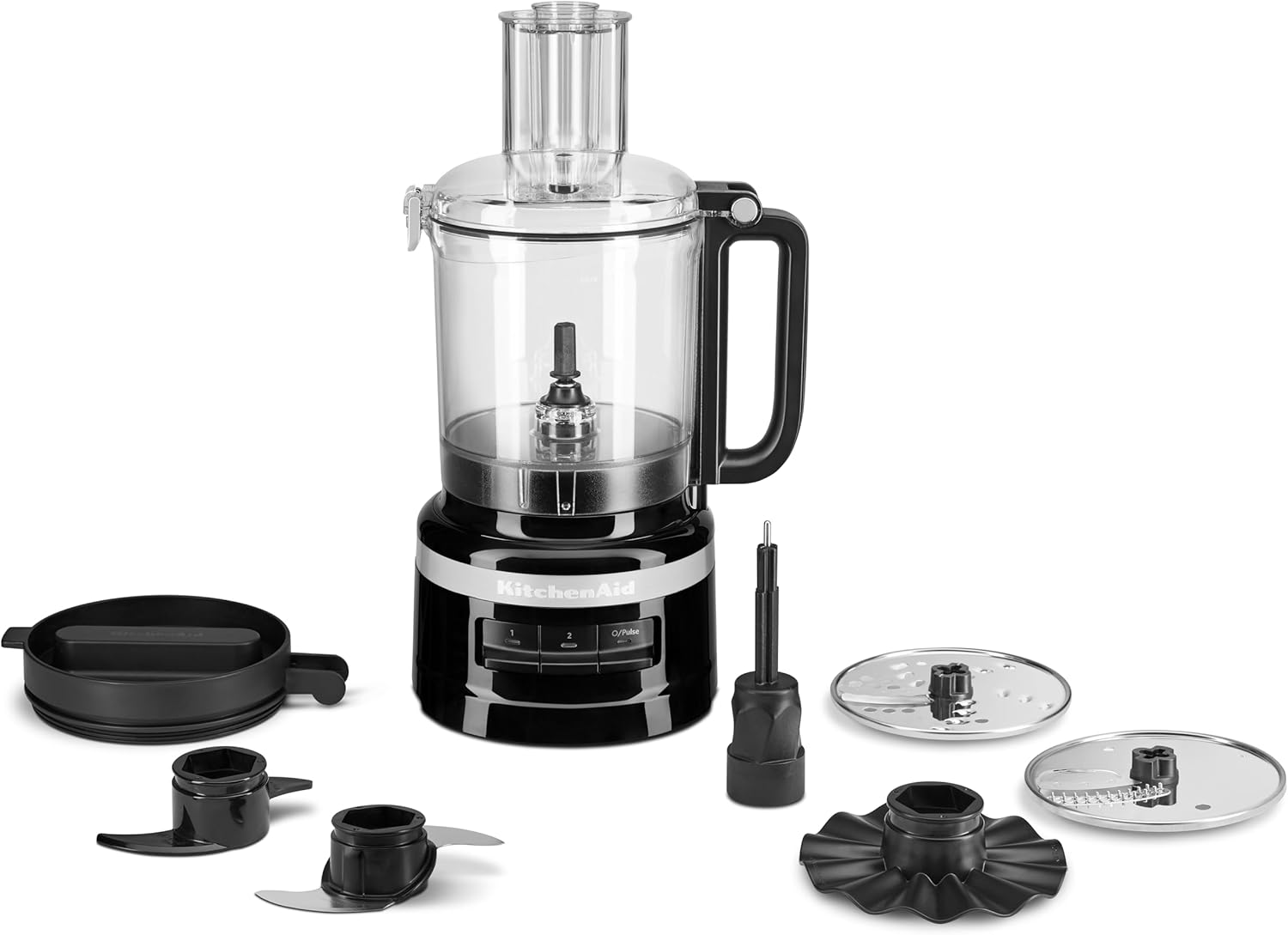
Figure 1: The KitchenAid 2.1L Food Processor base unit, work bowl, lid, and various accessories including the multi-purpose blade, dough blade, reversible shredding/slicing disc, Julienne disc, and whisk accessory.

Figure 2: Front view of the KitchenAid 2.1L Food Processor, highlighting the control panel with '1', '2', and 'Pulse' buttons.

Figure 3: Side view of the KitchenAid 2.1L Food Processor, showing the clear work bowl and the feed tube on the lid.

Figure 4: Back view of the KitchenAid 2.1L Food Processor, illustrating the compact design.
Included Accessories:
- Multi-purpose Blade: For chopping, mincing, mixing, and pureeing.
- Dough Blade: For kneading dough.
- Reversible Medium Shredding/Slicing Disc (4 mm): For shredding and slicing various ingredients.
- Julienne Disc: For creating thin strips of vegetables.
- Whisk Accessory: For whipping cream or eggs.
- 2-in-1 Feed Tube with Pushers: Allows for processing both large and small ingredients.
Setup and Assembly
Before first use, wash all parts except the motor base in warm, soapy water. Rinse thoroughly and dry.
- Place the motor base on a clean, dry, flat surface.
- Align the work bowl with the motor base and twist clockwise until it locks into place. The handle should be positioned slightly to the right of the center.
- Insert the desired blade or disc onto the drive adapter in the work bowl. Ensure it is fully seated.
- Place the lid onto the work bowl, aligning the tab on the lid with the slot on the work bowl handle. Twist the lid clockwise until it clicks into place. The feed tube should be aligned with the work bowl handle.
- Insert the appropriate food pusher into the feed tube.

Figure 5: The KitchenAid Food Processor fully assembled on a kitchen counter, ready for use, with various ingredients prepared for processing.
Operating Instructions
Follow these steps for safe and effective operation of your food processor.
- Ensure the appliance is properly assembled and the work bowl and lid are securely locked.
- Add ingredients to the work bowl. For slicing or shredding, place ingredients into the feed tube.
- Plug the power cord into a grounded electrical outlet.
- Select the desired speed:
- Speed 1 (Low): Ideal for softer ingredients or lighter tasks.
- Speed 2 (High): Suitable for harder ingredients or more intensive processing.
- Pulse: Provides short bursts of power for coarse chopping or quick blending. Hold the button for continuous pulsing.
- For slicing or shredding, use the food pusher to guide ingredients through the feed tube. Do not force ingredients.
- When finished, press the 'Off' button or unplug the appliance.
- Wait for the blade or disc to stop completely before removing the lid.

Figure 6: A hand pressing the pulse button on the control panel of the KitchenAid Food Processor, demonstrating the ease of use for quick processing.

Figure 7: A person spreading butter on bread, with the KitchenAid Food Processor in the background, illustrating its use in preparing ingredients for various dishes.

Figure 8: The food processor work bowl filled with layers of shredded vegetables, demonstrating the shredding capability.

Figure 9: The food processor work bowl containing chopped tomatoes and other ingredients, indicating its use for preparing items like salsa.
Using the Dough Blade:
The dough blade is designed for kneading various types of dough.
- Assemble the food processor with the dough blade.
- Add dry ingredients to the work bowl first, then gradually add liquids through the feed tube while the processor is running on Speed 1.
- Process until the dough forms a ball and cleans the sides of the bowl.

Figure 10: A person removing kneaded dough from the food processor work bowl, demonstrating the dough blade's effectiveness.
Care and Cleaning
Proper cleaning ensures the longevity and hygiene of your food processor.
- Always unplug the food processor before cleaning.
- Remove the lid, blades/discs, and work bowl from the motor base.
- All parts, except the motor base, are dishwasher-safe (top rack recommended) or can be washed by hand in warm, soapy water.
- Wipe the motor base with a damp cloth. Do not immerse the motor base in water or other liquids.
- Handle blades and discs with extreme care as they are sharp.
- For convenient storage, the accessories can be stored inside the work bowl.

Figure 11: The food processor work bowl with its refrigerator lid, demonstrating its design for convenient storage of processed ingredients.
Cord Storage:
The power cord can be neatly stored under the motor base.

Figure 12: The underside of the food processor base, showing the integrated cord storage feature for tidy organization.
Troubleshooting
If you encounter any issues with your food processor, refer to the following table for common problems and solutions.
| Problem | Possible Cause | Solution |
|---|---|---|
| Appliance does not turn on. |
|
|
| Motor stops during operation. |
|
|
| Ingredients are not processed evenly. |
|
|
Specifications
| Feature | Detail |
|---|---|
| Brand | KitchenAid |
| Model Number | 5KFP0921BOB (also 700046779) |
| Colour | Onyx Black |
| Product Dimensions | 20 x 24.5 x 39 cm |
| Item Weight | 3 kg |
| Number of Speeds | 3 (Low, High, Pulse) |
| Bowl Capacity | 2.1 litres |
| Special Features | Adjustable Speed Control, All-in-one storage, Refrigerator lid |
Warranty and Support
KitchenAid products are manufactured to the highest quality standards. For detailed warranty information and customer support, please refer to the warranty card included with your product or visit the official KitchenAid website.
Online Support: www.kitchenaid.co.uk/support
Contact Information: Please refer to your regional KitchenAid website for local contact numbers.
Related documents5KFP0921BOB


Ask a question about this manual
Ask about setup, troubleshooting, compatibility, parts, safety, or missing instructions. Manuals+ will review the question and use this page’s manual context to help answer it.