1. Introduction
Thank you for choosing the Hoco GA08 Smart Sports Bracelet. This device is designed to help you monitor your fitness activities and health metrics, providing convenient notifications and smart features directly on your wrist. Please read this manual carefully before using the product to ensure proper operation and to maximize its potential.
2. Package Contents
Please check the box for the following items:
- Hoco GA08 Smart Sports Bracelet (main unit and strap)
- USB Charging Cable
- User Manual
3. Product Overview
Familiarize yourself with the components of your Hoco GA08 Smart Sports Bracelet.

Figure 3.1: Hoco GA08 Smart Sports Bracelet and its retail packaging.
3.1 Main Unit and Strap
The main unit houses the display, sensors, and internal electronics. It is designed to be detachable from the strap for charging and maintenance.
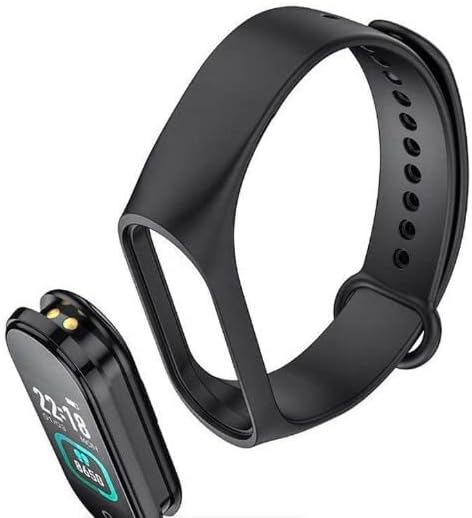
Figure 3.2: The main unit of the Hoco GA08 Smart Sports Bracelet detached from its silicone strap.
3.2 Sensors and Charging Contacts
On the underside of the main unit, you will find the optical sensors for heart rate and blood pressure monitoring, along with the charging contacts.

Figure 3.3: Rear view of the Hoco GA08 Smart Sports Bracelet, highlighting the health sensors and charging pins.
4. Setup
4.1 Charging the Device
- Gently detach the main unit from the strap.
- Connect the main unit to the USB charging cable, ensuring the charging contacts align correctly.
- Plug the USB end of the cable into a standard USB power adapter (5V/1A recommended) or a computer's USB port.
- The bracelet display will show a charging indicator. A full charge typically takes 1-2 hours.
4.2 Downloading the Companion App
To unlock all features and synchronize data, download the dedicated companion app on your smartphone. Search for the app name (usually mentioned in the quick start guide or on the product packaging) in your device's app store (Google Play Store for Android or Apple App Store for iOS).
4.3 Pairing with Your Smartphone
- Ensure your smartphone's Bluetooth is enabled.
- Open the companion app on your smartphone.
- Follow the in-app instructions to search for and connect to your Hoco GA08 bracelet. The bracelet's name will typically appear as 'GA08' or 'Hoco GA08'.
- Confirm the pairing request on both your smartphone and the bracelet if prompted.
5. Operating Instructions
The Hoco GA08 Smart Sports Bracelet features a touch-sensitive button or area for navigation. Tap to cycle through functions, or long-press to select/activate.
5.1 Basic Navigation
- Tap: Short press the touch area to switch between different display screens (time, steps, heart rate, etc.) or to navigate within a menu.
- Long Press: Press and hold the touch area for a few seconds to enter a function, confirm a selection, or start/stop an activity.
5.2 Health Monitoring
- Heart Rate Monitoring: Navigate to the heart rate screen. The bracelet will automatically begin measuring your heart rate. Ensure the bracelet is snug on your wrist for accurate readings.
- Blood Pressure Measurement: Navigate to the blood pressure screen. Remain still and relaxed during the measurement.
- Temperature Display: Navigate to the temperature screen to view your current body temperature.
5.3 Sports Modes
The bracelet supports 6 sports modes. Navigate to the sports mode section and long-press to select your desired activity. The bracelet will track relevant metrics such as duration, steps, and calories burned during your workout.
5.4 Smart Features
- Clock, Stopwatch, Alarm, Timer, Calendar: Access these time-keeping functions directly from the bracelet. Alarms and timers can often be set via the companion app.
- Incoming Message and Call Notifications: Once paired with your smartphone, the bracelet will vibrate and display notifications for incoming calls and messages.
- Phone Search: Use this feature to make your paired smartphone ring, helping you locate it.
- Reminder Function: Set custom reminders through the app for hydration, movement, or other tasks.
- Weather Display: View current weather conditions after synchronizing with the companion app and your phone's location services.
- Remote Photo Capture: Use the bracelet as a remote shutter button for your smartphone camera. Open the camera in the app, then shake the bracelet or tap its touch area to take a photo.
6. Maintenance
- Cleaning: Regularly clean the bracelet, especially the sensors and charging contacts, with a soft, dry cloth. If necessary, use a slightly damp cloth and mild soap, then dry thoroughly.
- Avoid Chemicals: Do not use harsh chemicals, cleaning solvents, or strong detergents, as these can damage the device.
- Water Resistance: The bracelet typically has a certain level of water resistance (e.g., IP67). Avoid prolonged submersion or use in hot water/steam. Refer to product specifications for exact water resistance ratings.
- Storage: Store the bracelet in a cool, dry place when not in use.
- Battery Care: Avoid completely draining the battery frequently. Charge the device regularly to maintain battery health.
7. Troubleshooting
If you encounter issues with your Hoco GA08 Smart Sports Bracelet, try the following solutions:
- Device not turning on: Ensure the device is fully charged. Connect it to the charger for at least 30 minutes.
- Cannot pair with smartphone:
- Ensure Bluetooth is enabled on your phone.
- Make sure the bracelet is charged and within Bluetooth range of your phone.
- Restart both your phone and the bracelet.
- Try unpairing and re-pairing the device through the app.
- Inaccurate health readings:
- Ensure the bracelet is worn snugly on your wrist, about one finger's width above the wrist bone.
- Keep still during measurements.
- Clean the sensor area on the back of the bracelet.
- Notifications not appearing:
- Check app permissions on your smartphone to ensure the companion app has access to notifications.
- Verify that notification settings are enabled within the companion app.
- Ensure the bracelet is connected via Bluetooth.
8. Specifications
| Feature | Description |
|---|---|
| Brand Name | Hoco |
| Model | GA08 |
| Operating System (App Compatibility) | Android |
| Special Features | Heart Rate Monitor, Blood Pressure Measurement, 6 Sports Modes, Notifications, Remote Camera Control, Weather Display, Temperature Display |
| Item Shape | Oval |
| Style | Suitable for all seasons |
| Color | Black |
| Target Audience | Adults (Unisex) |
| Compatible Devices | Smartphone |
| Band Color | Black |
| Case Material Type | Resin |
9. Safety Information
- This device is not a medical device and should not be used to diagnose or treat any medical condition. Consult a healthcare professional for medical advice.
- Keep the device away from extreme temperatures, direct sunlight, and open flames.
- Do not attempt to disassemble or modify the device. This will void the warranty and may cause damage or injury.
- Keep out of reach of children.
- If you experience skin irritation or discomfort, discontinue use and consult a doctor.
10. Warranty and Support
For warranty information and customer support, please refer to the warranty card included in your product packaging or visit the official Hoco website. Typically, warranty covers manufacturing defects for a specified period from the date of purchase.
If you require technical assistance or have questions not covered in this manual, please contact Hoco customer service through their official channels.


