
1. Introduction
The SatLink ST-6986 is a versatile handheld combo meter designed for the installation, verification, and troubleshooting of digital satellite, terrestrial, and cable TV systems. It supports DVB-S/S2/S2X, DVB-T/T2, and DVB-C standards, along with MPEG-2, H.264/AVC, and H.265/HEVC (10-bit) hardware decoding. Its compact size, intuitive user interface, and long battery life make it an ideal tool for professionals.
Key features include a 7-inch high-definition TFT LCD screen (1024*600), constellation and spectrum analyzers, auto blind scan, manual and NIT scan support, and light alarm for signal locking. It also calculates AZ and EL angles automatically and supports DISEQC 1.0/1.1/1.2, Unicable, and 0/22kHz Tone. Connectivity options include Wi-Fi, Ethernet, AV in/out, and HDMI in/out.
2. Product Overview

Figure 2.1: Front view of the ST-6986 with main menu.

Figure 2.2: Top and side views illustrating connectivity ports.
2.1 Controls and Indicators
- 7-Inch TFT LCD Screen: High-definition display for menu navigation, signal analysis, and video playback.
- Keypad: Numeric buttons (0-9), directional pad (Up, Down, Left, Right, OK), MENU, EXIT, MUTE, INFO buttons for device control.
- Function Buttons (F1, F2, F3, AVS, AUDIO, REC, SYS): Dedicated buttons for quick access to specific features and settings.
- Power Button: To turn the device on/off.
- LED Indicators: PWR (Power), H/V (Horizontal/Vertical polarization), LOCK (Signal Lock), CHG (Charging status).
2.2 Connectivity Ports
- LNB IN: F-type connector for satellite LNB input.
- ANT IN: F-type connector for terrestrial/cable antenna input.
- USB Port: For software upgrades and media playback.
- HDMI OUT: Connect to an external display for video output.
- Ethernet Port: For network connection.
- AV OUT: Audio/Video output via 3.5mm jack.
- DC OUT: 12V DC power output.
- Optical Power Measurement: For fiber optic signal measurement.
- Power Input: For connecting the 12V power adapter.
- AV IN: Audio/Video input via 3.5mm jack.
- HDMI IN: Connect external HDMI sources for display on the meter.
3. What's in the Box
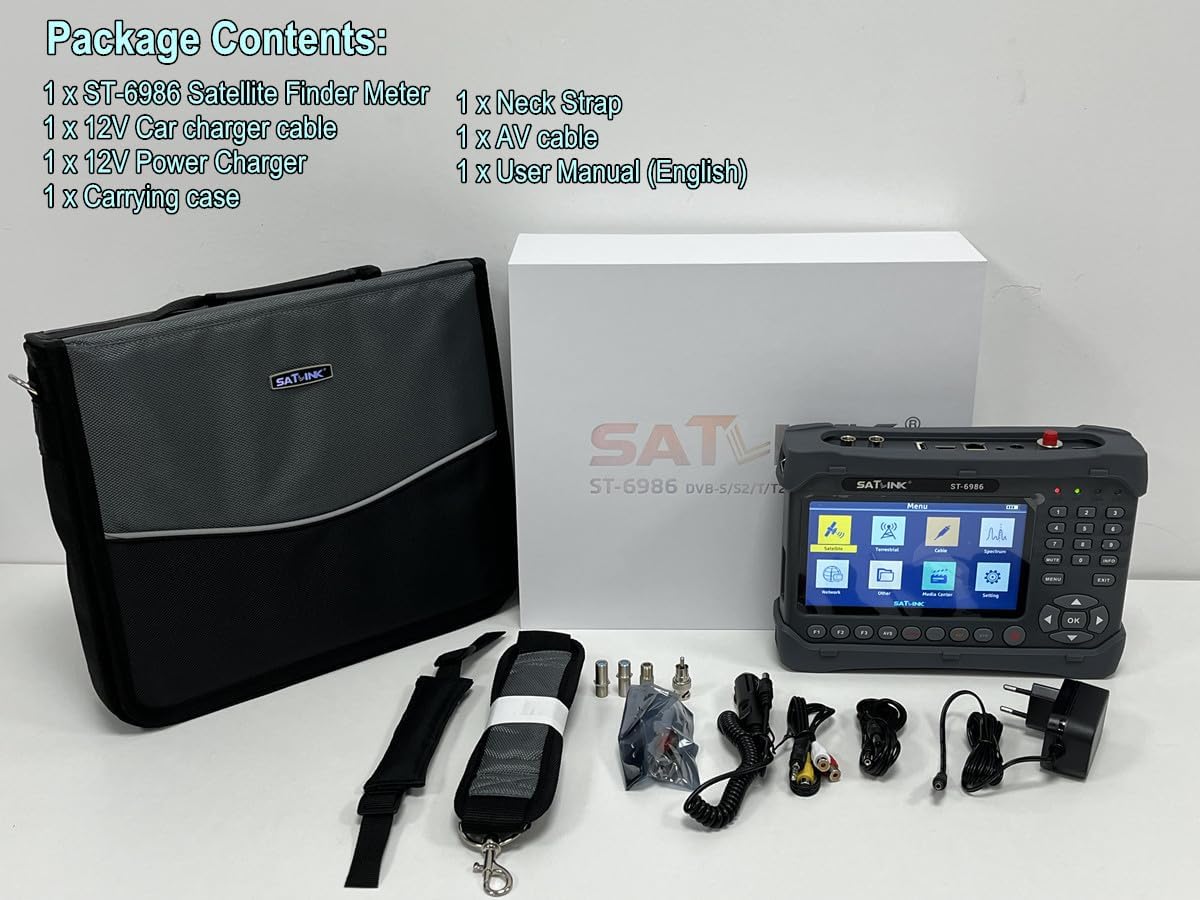
Figure 3.1: Package Contents.
The SatLink ST-6986 package includes:
- 1 x SatLink ST-6986 Satellite Finder Meter
- 1 x 12V Car charger cable
- 1 x 12V Power Charger
- 1 x Carrying case
- 1 x Neck Strap
- 1 x AV cable
- 1 x User Manual (English)
4. Setup
- Charging the Battery: Connect the provided 12V power charger to the meter's power input port and a suitable AC outlet. The CHG LED indicator will illuminate during charging. The internal 7.4V/5000mAh Li-ion battery provides extended operational hours.
- Power On/Off: Press and hold the Power button to turn the device on or off.
- Initial Settings: Upon first use, navigate to the 'System Setting' menu to configure language, local time, video resolution, and other preferences.
- Connecting Cables: Depending on the signal type you wish to analyze, connect the satellite LNB cable to the 'LNB IN' port or the terrestrial/cable antenna cable to the 'ANT IN' port.
5. Operating Instructions
The ST-6986 offers a user-friendly menu system for various functions. Use the directional pad and 'OK' button to navigate and select options.
Video 5.1: Official product video demonstrating the features and user interface of the SatLink ST-6986 DVB-S/S2/T/T2/C Combo Meter.
5.1 Satellite Signal Analysis (DVB-S/S2/S2X)
- From the main menu, select 'Satellite'.
- Choose your desired satellite from the list or add a new one.
- Configure LNB frequency, transponder frequency, symbol rate, and polarization (H/V).
- The meter will display signal strength and quality. Use the 'Light Alarm' feature for audible signal lock indication.
- Utilize the 'Spectrum analyzer' and 'Constellation analyzer' for detailed signal diagnostics.
- The device can automatically calculate the Azimuth (AZ) and Elevation (EL) angles for dish alignment.
- Perform 'Auto Blind Scan' or 'NIT Scan' to find available channels.
5.2 Terrestrial Signal Analysis (DVB-T/T2)
- Select 'Terrestrial' from the main menu.
- Choose your country and frequency channel.
- The meter will display signal strength and quality for terrestrial broadcasts.
5.3 Cable Signal Analysis (DVB-C)
- Select 'Cable' from the main menu.
- Enter the frequency, symbol rate, and modulation type.
- Monitor signal strength and quality for cable TV signals.
5.4 Media Playback and USB Upgrade
- Media Player: Access the 'Media Center' to play compatible audio and video files from a connected USB drive.
- USB Upgrade: Software updates can be performed via the USB port. Refer to the official SatLink website for the latest firmware and instructions.
6. Maintenance
- Cleaning: Use a soft, dry cloth to clean the device. Avoid abrasive cleaners or solvents.
- Battery Care: To prolong battery life, avoid fully discharging the battery frequently. Store the device in a cool, dry place when not in use for extended periods.
- Storage: Keep the device in its carrying case to protect it from dust and physical damage.
7. Troubleshooting
- No Power: Ensure the battery is charged or the AC adapter is properly connected. Check the power button.
- No Signal Lock: Verify all cable connections. Ensure correct satellite/terrestrial/cable parameters are entered. Adjust antenna/dish alignment. Check LNB or amplifier if applicable.
- Poor Signal Quality: Check for obstructions, cable damage, or interference. Fine-tune antenna/dish alignment.
- Screen Issues: If the screen is unresponsive or displays errors, try restarting the device. If issues persist, contact support.
- Software Glitches: Ensure the device has the latest firmware. A USB software upgrade may resolve some issues.
8. Specifications
| Feature | Specification |
|---|---|
| Transmission Standards | DVB-S/S2/S2X, DVB-T/T2/C, MPEG-2/H.264/AVC, H.265/HEVC (10 Bit) |
| Screen | 7 Inch High Definition TFT LCD (1024*600) |
| Satellite Input Frequency | 950 to 2150 MHz |
| DVB-T/T2/C Input Frequency | 48 to 862 MHz |
| Signal Input Level | -65 to -25 dBm |
| LNB Supply | 13V/18V, Imax 400mA |
| Demodulation Type | QPSK, 8PSK, 16APSK |
| Input Impedance | 75Ω |
| Li-ion Battery | 7.4V/5000mAh |
| Input Power | 12V/1.5A |
| Connectivity | Ethernet, HDMI, USB, Wi-Fi |
| Audio Output Mode | Stereo |
| Video Output Resolution | 720 pixels_per_inch |
| Aspect Ratio | 16:9 |
9. Warranty and Support
This product is provided with no explicit warranty as per the product information. For technical support, firmware updates, or further inquiries, please refer to the official SatLink website or contact your retailer.